1. Introducció
This manual provides essential information for the safe and efficient use of your AT&T Cingular Flex 2 Smart Flip Phone (Model 6723D). Please read these instructions carefully before operating your device to ensure optimal performance and longevity.
The Cingular Flex 2 is a compact flip phone designed for reliable communication. It features a vibrant display, a built-in camera for capturing moments, and 4GB of internal storage for essential files and applications. The device operates on KaiOS, offering a streamlined user experience.
2. Què hi ha a la caixa
Verifiqueu que tots els elements siguin presents al paquet del producte:
- AT&T Cingular Flex 2 Smart Flip Phone
- Adaptador d'alimentació
- Bateria de ions de liti (preinstal·lada o separada)
3. Dispositiu acabatview
Familiarize yourself with the physical components of your AT&T Cingular Flex 2 phone.
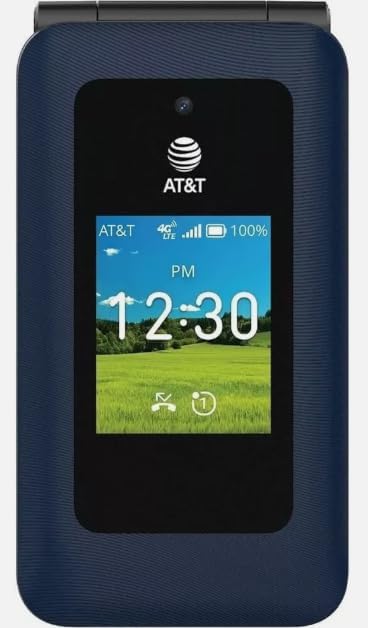
Figura 3.1: Davant view of the AT&T Cingular Flex 2 Smart Flip Phone, showing the main display with time, network signal, and battery indicator.

Figura 3.2: posterior view of the AT&T Cingular Flex 2 Smart Flip Phone, highlighting the textured back cover and the speaker grille at the top.
Components clau:
- Pantalla externa: Shows notifications, time, and caller ID when closed.
- Pantalla principal: Internal screen for navigation and content.
- Teclat: Numeric and navigation buttons for input.
- Càmera: Located on the device for capturing photos and videos.
- Botons de volum: Ajusta els nivells d'àudio.
- Power/End Call Button: Turns the device on/off and ends calls.
- Port de càrrega: Per connectar l'adaptador de corrent.
4. Configuració
4.1. Inserció de la targeta SIM i la bateria
- Assegureu-vos que el telèfon estigui apagat.
- Traieu amb cura la tapa posterior del telèfon.
- If the battery is installed, remove it by gently lifting it from the notch.
- Locate the SIM card slot, typically beneath the battery compartment. Insert your SIM card with the gold contacts facing down and the notched corner aligned correctly.
- Insert the battery, ensuring the contacts align with those in the phone.
- Torneu a col·locar la coberta posterior fins que sentiu un clic i que quedi ben fixada al seu lloc.
4.2. Càrrega del dispositiu
- Connect the power adapter to the charging port on your phone.
- Connecteu l'adaptador d'alimentació a una presa de corrent estàndard.
- Allow the phone to charge completely before initial use. The battery indicator on the screen will show charging status.
4.3. Encès / apagat
- Per encendre: Premeu i manteniu premut el botó d'engegada/finalització de trucada fins que la pantalla s'il·lumini.
- Per apagar: Mantingueu premut el botó d'engegada/finalització de trucada i, a continuació, seleccioneu "Apagar" de les opcions que apareixen a la pantalla.
5. Com utilitzar el telèfon
5.1. Navegació bàsica
The Cingular Flex 2 uses a physical keypad for navigation. Use the directional pad (D-pad) to move between menu items and the center button to select. The left and right soft keys perform actions indicated on the screen above them.
5.2. Fer i rebre trucades
- Per fer una trucada: Enter the phone number using the keypad and press the Call button (usually the green button).
- Per respondre una trucada: When the phone rings, press the Call button.
- Per finalitzar una trucada: Press the Power/End Call button (usually the red button).
5.3. Enviament i recepció de missatges
Navegueu fins a l'aplicació "Missatges" des del menú principal.
- To Send a New Message: Select 'New Message', enter the recipient's number or select from contacts, then type your message using the keypad.
- Note on Multimedia Messaging: Sending photos via text message may not be consistently supported. Receiving multimedia messages can also be intermittent.
- Voice to Text: This device does not support voice-to-text input for messaging.
5.4. Ús de la càmera
The phone includes a built-in camera. You can access it via the main menu or by pressing the dedicated camera shortcut button on the side of the device.
- Fent fotos: Open the camera app, frame your shot, and press the center button or camera button to capture.
- Gravació de vídeos: Switch to video mode within the camera app and press the record button.
5.5. Internet and Applications
The Cingular Flex 2 runs on KaiOS. Access the KaiOS store for additional applications. Pre-installed apps include YouTube and a feature-reduced version of Google Maps. Be aware that some utility apps downloaded from the store may display advertisements.
6. Manteniment
6.1. Cura de la bateria
- Eviteu exposar la bateria a temperatures extremes.
- Charge the battery using only the provided power adapter.
- Unplug the charger once the battery is fully charged to conserve energy.
6.2. Neteja del dispositiu
Use a soft, dry, lint-free cloth to clean the phone's screen and body. Avoid using harsh chemicals or abrasive materials.
6.3. Actualitzacions de programari
Periodically check for software updates in the phone's settings menu to ensure your device has the latest features and security enhancements.
7. Solució De Problemes
If you encounter issues with your Cingular Flex 2, refer to the following common problems and solutions:
| Problema | Possible solució |
|---|---|
| Slow interface or app loading | Close unused applications. Restart the phone. Consider uninstalling less frequently used apps to free up resources. |
| Operating System crashes | Restart the device. Ensure the software is up to date. If persistent, a factory reset may be necessary (back up data first). |
| Wi-Fi or network connectivity issues | Toggle Wi-Fi/Mobile Data off and on. Restart the phone. Check router or network settings. Ensure notifications for network disconnections are managed in settings to avoid excessive alerts. |
| Keyboard input errors (e.g., double key strokes) | Ensure you are pressing keys firmly and deliberately. If the issue persists, contact customer support. |
| Cannot send photos via text message | This is a known limitation for some devices. Try alternative methods for sharing images if available, or reduce image size if an option. |
| Poca durada de la bateria | Reduce screen brightness. Close background apps. Limit use of power-intensive features like GPS. Ensure the battery is fully charged. |
7.1. Restabliment de fàbrica
Un restabliment de fàbrica esborrarà totes les dades del telèfon i el restaurarà a la configuració original de fàbrica. Això pot resoldre problemes de programari persistents. Back up all important data before performing a factory reset. Consult your phone's settings menu for the 'Reset' or 'Erase all data' option.
8. Especificacions
Detailed technical specifications for the AT&T Cingular Flex 2 Smart Flip Phone (Model 6723D):
| Característica | Especificació |
|---|---|
| Nom del model | Cingular Flex 2 |
| Número de model de l'article | 6723D |
| Marca | AT&T |
| Sistema operatiu | KaiOS |
| Capacitat d'emmagatzematge de memòria | 4 GB |
| Mida instal·lada de la memòria RAM | 512 MB |
| Model de CPU | Mediatek Dimensity 1100 |
| Resolució | 720 x 1520 |
| Tecnologia de connectivitat | 4G LTE |
| Tecnologia cel·lular | 4G |
| Operador sense fil | Desbloquejat |
| GPS | És cert |
| Factor de forma | Flip |
| Color | Classic Navy |
| Capacitat de la bateria | 1400 milionsamp Hores |
| Potència nominal de la bateria | 2800 Amp Hores |
| Pes de l'article | 7.4 unces (0.21 quilograms) |
| Dimensions del paquet | 4.69 x 2.91 x 2.13 polzades |
| Fabricant | AT&T |
| Data de primera disponibilitat | 11 de febrer de 2025 |
9. Garantia i Suport
For warranty information, please refer to the documentation provided with your purchase or visit the official AT&T support website. If you require technical assistance or have questions not covered in this manual, please contact AT&T customer support.
Podeu trobar recursos de suport addicionals i informació de contacte a AT&T Store on Amazon.


