Introducció
The Memorex MX-BCD20 is a versatile portable stereo system designed to provide high-quality audio playback from multiple sources. It features a top-loading CD player, AM/FM radio, and an auxiliary input for connecting external devices. Its compact design and flexible power options make it suitable for use at home or on the go.
Informació important de seguretat
Please read all instructions carefully before operating this unit. Keep this manual for future reference.
- No exposeu aquesta unitat a la pluja o la humitat.
- No obstruïu cap obertura de ventilació.
- Ensure proper power supply (AC adapter or 6 'C' batteries).
- No obriu la tapa de la unitat.asing; demaneu totes les tasques de manteniment a personal qualificat.
- Eviteu col·locar la unitat a prop de fonts de calor o sota la llum solar directa.
- Netegeu només amb un drap sec.
Contingut del paquet
- Memorex MX-BCD20 Portable CD Player
- Adaptador de corrent alterna
- Manual d'instruccions (aquest document)
Producte acabatview
Familiarize yourself with the various parts and controls of your Memorex Portable CD Player.
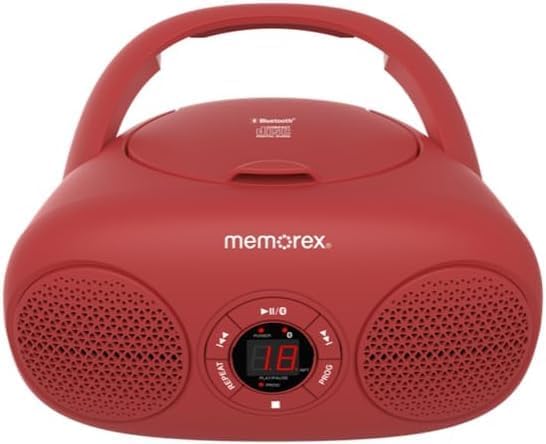
Figura 1: Frontal view of the Memorex MX-BCD20 Portable CD Player, showing the main controls and speakers.

Figura 2: posterior view illustrating the battery compartment and a side view highlighting the tuning dial and function switch.
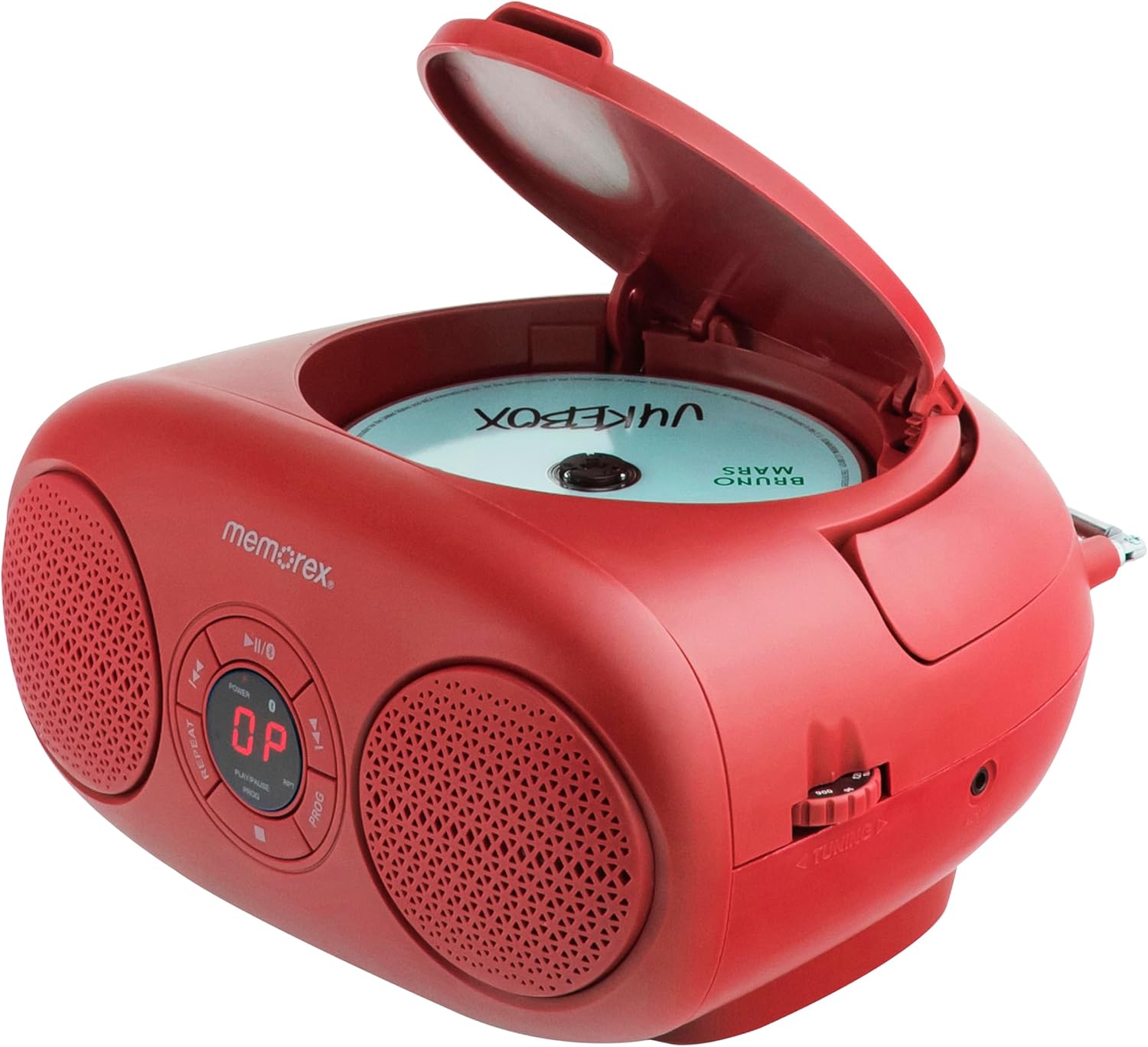
Figura 3: superior view with the CD compartment lid open, ready for disc insertion.
Controls i indicadors:
- Botó d'encendre: Encén/apaga la unitat.
- Botó REPRODUIR/PAUSA (►/▮▮): Inicia o posa en pausa la reproducció de CD.
- Botó STOP (■): Atura la reproducció de CD.
- SKIP/SEARCH Buttons (◀◀ / ►►): Skips tracks or searches within a track on CD.
- REPEAT Button (RPT): Repeteix la pista actual o totes les pistes del CD.
- PROGRAM Button (PROG): Programs CD tracks for custom playback.
- VOLUM Selector: Ajusta el nivell de sortida d'àudio.
- FUNCTION Switch: Selects between CD, AM, FM, or AUX modes.
- Dial d'AFINAMENT: Tunes AM/FM radio frequencies.
- Pantalla LED: Shows CD track number or radio frequency.
- Antena telescòpica: Per a la recepció de ràdio FM.
- Presa d'entrada AUX: Per connectar dispositius d'àudio externs.
- AC Input Jack: Per connectar l'adaptador de corrent altern.
- Compartiment de la bateria: Holds 6 'C' batteries for portable use.
Configuració
Alimentació de la unitat:
The Memorex MX-BCD20 can be powered by either the included AC adapter or 6 'C' batteries (not included).
Alimentació CA:
- Insert the small end of the AC power adapter into the AC input jack on the back of the unit.
- Plug the other end of the AC power adapter into a standard AC wall outlet (120V ~ 60Hz).
Potència de la bateria:
- Obriu la tapa del compartiment de la bateria situada a la part inferior de la unitat.
- Insert 6 'C' size batteries (not included), ensuring correct polarity (+/-) as indicated inside the compartment.
- Tanqueu bé la tapa del compartiment de la bateria.
Note: When the unit is connected to AC power, battery power is automatically disconnected. Remove batteries if the unit will not be used for an extended period.
Configuració de l'antena:
For optimal FM radio reception, fully extend the telescopic antenna. For AM reception, the unit has a built-in antenna, so no adjustment is needed, but you may need to rotate the unit for better signal.

Figure 4: The unit with its telescopic antenna extended for improved FM radio reception.
Instruccions de funcionament
Funcionament general:
- Premeu el botó PODER botó per encendre la unitat.
- Ajusteu el VOLUM marqueu el dial fins al nivell d'escolta desitjat.
- Utilitza el FUNCIÓ switch to select your desired mode: CD, AM, FM, or AUX.
Reproducció de CD:
- Estableix el FUNCIÓ switch to "CD".
- Obriu la tapa del compartiment del CD aixecant-la suaument.
- Place a CD (or CD-R/RW) onto the center spindle with the label side facing up.
- Close the CD compartment lid firmly until it clicks. The LED display will show the total number of tracks.
- Premeu el botó REPRODUCCIÓ/PAUSA (►/▮▮) button to begin playback. The current track number will be displayed.
- Per aturar la reproducció, premeu REPRODUCCIÓ/PAUSA (►/▮▮) again. Press it once more to resume.
- Per aturar la reproducció, premeu el botó STOP (■) button.
Saltant pistes:
- Durant la reproducció, premeu SALTAR/CERCAR (►►) to skip to the next track.
- Premeu SALTAR/CERCAR (◀◀) to skip to the beginning of the current track. Press it twice to skip to the previous track.
Searching Within a Track:
- Durant la reproducció, manteniu premut SALTAR/CERCAR (►►) to fast-forward through the current track.
- Mantén premut SALTAR/CERCAR (◀◀) to fast-reverse through the current track.
- Deixeu anar el botó per reprendre la reproducció normal.
Repetició de reproducció:
- Premeu el botó REPETIR (RPT) button once during playback to repeat the current track. "REPEAT 1" will appear on the display.
- Premeu el botó REPETIR (RPT) button a second time to repeat all tracks on the CD. "REPEAT ALL" will appear.
- Premeu el botó REPETIR (RPT) button a third time to cancel repeat playback.
Reproducció del programa:
You can program up to 20 tracks to play in a specific order.
- En el mode STOP, premeu la tecla PROGRAMA (PROG) button. "PROG" will flash on the display.
- Utilitza el SALTAR/CERCAR (◀◀ / ►►) buttons to select the first track you wish to program.
- Premeu PROGRAMA (PROG) again to confirm the selection. The display will show the program number (e.g., "01" for the first programmed track).
- Repetiu els passos 2 i 3 per afegir més pistes al programa.
- After programming all desired tracks, press the REPRODUCCIÓ/PAUSA (►/▮▮) button to start programmed playback.
- Per esborrar el programa, obriu la tapa del compartiment del CD o premeu el botó STOP (■) button twice.
Operació de ràdio:
- Estableix el FUNCIÓ switch to "AM" or "FM".
- For FM reception, extend the telescopic antenna fully.
- Gira el TUNING dial to select your desired radio station. The frequency will be shown on the LED display.
- Ajusteu el VOLUM dial as needed.
Tip: For better AM reception, try rotating the entire unit. For FM, adjust the position and extension of the telescopic antenna.
Entrada auxiliar (AUX):
You can connect an external audio device (e.g., smartphone, MP3 player) to the unit using a 3.5mm audio cable (not included).
- Estableix el FUNCIÓ switch to "AUX".
- Connect one end of a 3.5mm audio cable to the AUX input jack on the unit.
- Connecteu l'altre extrem del cable a la presa d'auriculars o a la sortida d'àudio del dispositiu extern.
- Start playback on your external device. The audio will be routed through the Memorex unit's speakers.
- Adjust the volume using both the unit's VOLUM dial and your external device's volume control.
Manteniment
- Neteja: Netegeu la unitat amb un drap suau i sec. No utilitzeu productes de neteja abrasius ni dissolvents.
- Cura de CD: Manipuleu els CD per les vores. Mantingueu-los nets i sense ratllades. Guardeu-los a les seves fundes quan no els feu servir.
- Emmagatzematge: If storing the unit for a long period, remove the batteries to prevent leakage.
Resolució de problemes
| Problema | Causa possible | Solució |
|---|---|---|
| Sense poder | L'adaptador de CA no està connectat correctament; les piles estan esgotades o inserides incorrectament. | Check AC connection; Replace batteries or ensure correct polarity. |
| El CD no es reprodueix | CD inserted incorrectly; CD is dirty or scratched; CD compartment lid not closed. | Re-insert CD label side up; Clean CD with a soft cloth; Close lid firmly. |
| Mala recepció de ràdio | Antenna not extended (FM); Unit position (AM). | Fully extend FM antenna; Rotate unit for better AM signal. |
| No hi ha so des de l'AUX | AUX cable not connected; External device volume too low. | Ensure AUX cable is securely connected; Increase volume on external device. |
Especificacions
- Model: MX-BCD20
- Font d'alimentació: AC 120V ~ 60Hz or 6 x 'C' Batteries (DC 9V)
- Compatibilitat amb CD: CD, CD-R / RW
- Freqüències de ràdio: AM/FM
- Entrada auxiliar: Jack estèreo de 3.5 mm
- Dimensions (L x A x A): 10 x 10 x 6 polzades (aprox.)
- Pes: 2.14 lliures (aprox.)
Garantia i Suport
Memorex products are designed for reliability and performance. For warranty information or technical support, please refer to the contact details provided on the product packaging or visit the official Memorex weblloc web. Conserveu el rebut de compra com a comprovant de compra per a reclamacions de garantia.


