1. Introducció
The BeLink MK9000 Portable 3D Video Projector is a compact, high-performance DLP LED projector designed for ultimate entertainment and convenience. This manual provides essential information for setting up, operating, and maintaining your projector, ensuring you get the most out of its advanced features.

Figure 1: The BeLink MK9000 Portable 3D Video Projector shown with its packaging, highlighting its compact design and 4K UHD capabilities.
2. Contingut del paquet
Marqueu la casella per als elements següents:
- BeLink MK9000 Portable 3D Video Projector
- Control remot
- Adaptador d'alimentació
- Manual d'usuari (Aquest document)
3. Característiques del producte
The BeLink MK9000 boasts a range of features designed for an exceptional viewExperiència:
- Ultra-bright 7500 Lumens: Enjoy vibrant, clear images in almost any lighting condition.
- Tecnologia DLP: Delivers superior image quality with enhanced brightness and contrast, making it perfect for movies, presentations, and gaming.
- HD & 3D Support: Full HD resolution and 3D capabilities for immersive viewfent experiències.
- Disseny portàtil: Lightweight and compact, perfect for on-the-go entertainment or business use.
- Smart Home Theater Experience: Ideal for streaming, gaming, or projecting large-screen content at home or in any environment.
- Múltiples opcions de connectivitat: HDMI, USB, and wireless capabilities to easily connect to a range of devices.
- Altaveus integrats: Convenient audio output for a fully integrated experience.
- Funcionament silenciós: Minimal noise during use, making it perfect for both entertainment and presentations.
- LED d'eficiència energètica Lamp: Long-lasting and eco-friendly, providing years of reliable performance.
4. Guia de configuració
4.1 Desembalatge i col·locació
Carefully remove all components from the packaging. Place the projector on a stable, flat surface. Ensure adequate ventilation around the device to prevent overheating.
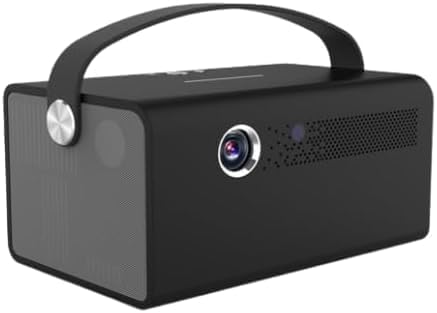
Figura 2: Frontal view of the BeLink MK9000 projector, showing the lens and ventilation grilles.
4.2 Connexió d'alimentació
Connect the power adapter to the projector's DC IN port and then plug the adapter into a standard wall outlet.
4.3 Encès inicial
Press the power button on the projector or the remote control to turn on the device. The indicator light will illuminate.
4.4 Ajust del focus
Adjust the focus ring located near the projector lens until the projected image appears clear and sharp on your screen or wall.
5. Instruccions de funcionament
5.1 Selecció de la font
Use the "Source" button on the remote or the projector's control panel to cycle through available input sources (e.g., HDMI, USB, Wi-Fi).
5.2 Connexió de dispositius
5.2.1 Connexió HDMI
Connect your HDMI-enabled device (laptop, gaming console, Blu-ray player) to the HDMI port on the projector using an HDMI cable. Select the corresponding HDMI input source.
5.2.2 Connexió USB
Insert a USB flash drive into the USB port to access compatible media files (photos, videos, documents) directly from the projector's media player.
5.2.3 Connexió sense fil (Wi-Fi)
Navigate to the projector's network settings menu. Select your Wi-Fi network from the list and enter the password to establish a wireless connection. This enables streaming and screen mirroring features.
5.3 Reproducció en 3D
For 3D content, ensure your source material is 3D compatible (e.g., 3D Blu-ray). The projector supports active 3D technology; active 3D glasses are required and sold separately. The projector will automatically detect 3D signals.
5.4 Sortida d'àudio
The projector features built-in speakers for convenient audio output. For enhanced sound, you can connect external speakers or headphones to the audio output port, or utilize Bluetooth connectivity if your external audio device supports it.

Figura 3: lateral view of the BeLink MK9000 projector, highlighting the integrated speaker grille for audio output.
6. Manteniment
6.1 Neteja de la lent
Gently wipe the projector lens with a soft, lint-free cloth specifically designed for optical surfaces. Do not use abrasive cleaners, solvents, or excessive pressure, as this can damage the lens coating.
6.2 Neteja del cos del projector
Use a soft, dry cloth to clean the exterior of the projector. Avoid using liquid cleaners directly on the device. For stubborn marks, slightly dampen the cloth with water and wipe gently, then dry immediately.
6.3 Emmagatzematge
When not in use for extended periods, store the projector in a cool, dry place, away from direct sunlight, dust, and extreme temperatures. It is recommended to use the original packaging or a protective case.
7. Solució De Problemes
Si teniu problemes amb el projector, consulteu els problemes i solucions més comuns següents:
7.1 No es mostra cap imatge
- Assegureu-vos que el projector estigui encès i que l'indicador lluminós d'engegada estigui actiu.
- Check all cable connections (HDMI, power) to ensure they are securely plugged in.
- Verifiqueu que s'ha seleccionat la font d'entrada correcta al projector.
- Test with a different source device or cable if possible.
7.2 Image is Blurry or Distorted
- Ajusteu l'anell d'enfocament de la lent del projector fins que la imatge sigui nítida.
- Ensure the projection distance is within the recommended range for the projector.
- Check for any obstructions in front of the lens.
7.3 Sense so
- Comproveu el nivell de volum del projector i del dispositiu font connectat.
- Ensure external audio devices are properly connected if used, and that the projector's audio output is correctly configured.
- If using HDMI, ensure the audio output is enabled on the source device.
7.4 El comandament a distància no funciona
- Reviseu i substituïu les piles del comandament a distància si cal.
- Assegureu-vos que no hi hagi obstacles entre el comandament a distància i el receptor d'infrarojos del projector.
- Apunteu el comandament a distància directament al sensor d'infrarojos del projector.
8. Especificacions tècniques
| Característica | Detall |
|---|---|
| Nom de marca | BeLink |
| Característiques especials | Preparat per a 3D |
| ASIN | B0DX88277D |
| Data de primera disponibilitat | 14 de febrer de 2025 |
| Usos recomanats per al producte | Home Cinema |
| Tecnologia de connectivitat | Wi-Fi |
| Resolució de visualització | 4096 x 2160 |
9. Garantia i Suport
The BeLink MK9000 Portable 3D Video Projector comes with a standard manufacturer's warranty. For detailed warranty information, technical support, or service inquiries, please refer to the warranty card included in your package or visit the official BeLink weblloc web per obtenir els recursos de suport més actualitzats.
Nota: Els termes i condicions de la garantia poden variar segons la regió. Conserveu el comprovant de compra per a les reclamacions de garantia.