1. Introducció
This manual provides instructions for the NPET S21 Wireless Gaming Keyboard and Mouse Combo. This combo features 2.4G high-speed wireless transmission, ensuring stable performance for various tasks. The keyboard and mouse are designed for ergonomic comfort and durability, with customizable RGB backlighting and programmable functions.
2. Contingut del paquet
- NPET S21 Wireless Gaming Keyboard
- NPET S21 Wireless Gaming Mouse
- Purple Mouse Pad
- USB Receiver (located at the bottom of the mouse)
- Cable de càrrega USB
- Eina d'extracció de tecles
- Extra Key Switches
- Manual d'instruccions
3. Configuració
3.1 Connexió del dispositiu
- Locate the USB receiver at the bottom of the mouse.
- Inseriu el receptor USB en un port USB disponible de l'ordinador.
- Turn on both the keyboard and the mouse. They are pre-paired and should connect automatically.
 Image: NPET S21 Wireless Gaming Keyboard and Mouse Combo set up on a desk.
3.2 Càrrega del teclat i del ratolí
The keyboard is equipped with a 3000 mAh battery, and the mouse with an 800 mAh battery. For optimal performance, charge both devices for 8 hours before initial use.
- Connect the provided USB charging cable to the keyboard/mouse and a power source.
- The devices feature smart energy-saving functions, automatically entering sleep mode after 2 minutes of inactivity. Press any key to wake them up.
 Image: Keyboard and mouse connected for charging.
3.3 Ajust de l'alçada del teclat
The keyboard features adjustable feet on the underside to customize the typing angle for ergonomic comfort.
Video: Demonstration of adjusting the keyboard's height using the flip-out feet on the underside.
4. Instruccions de funcionament
4.1 Control de retroiluminació del teclat
The keyboard features built-in rainbow backlight effects with breathing modes, 3 static modes, and 4 brightness levels. The mouse has a 7-color cyclic gradual lighting effect.
- Premeu el botó Fn tecla + LED key (usually located near the arrow keys or F-row) to cycle through backlight modes.
- Premeu Fn + Amunt pàgina per augmentar la brillantor.
- Premeu Fn + Pàgina avall per disminuir la brillantor.
- Premeu el botó LED key alone to turn the backlight on/off.
 Image: Keyboard displaying various RGB backlight colors.
4.2 Mouse DPI Adjustment
The gaming mouse features adjustable DPI settings for precision control.
- Press the DPI button on the mouse to cycle through 800, 1600, 2400, and 3200 DPI settings.
 Image: Gaming mouse with DPI adjustment options.
4.3 Tecles multimèdia
Access multimedia functions using the Fn key in combination with the F-row keys.
- Fn + F1: Reproductor multimèdia
- Fn + F2: Baixar el volum
- Fn + F3: Pujar el volum
- Fn + F4: Mut
- Fn + F5: Atura
- Fn + F6: Pista anterior
- Fn + F7: Reproduir/Pausa
- Fn + F8: Pista següent
- Fn + F9: Correu electrònic
- Fn + F10: Web Navegador
- Fn + F11: Lock Windows Key
- Fn + F12: Calculadora
4.4 Tecles anti-ghosting
The keyboard features 19 anti-ghosting keys, ensuring accurate registration of multiple simultaneous key presses during intense gaming sessions.
4.5 WASD and Arrow Key Swap
For user preference, the WASD keys can be swapped with the arrow keys.
- Premeu Fn + W per intercanviar la funcionalitat de les tecles WASD amb les tecles de fletxa. Repetiu per tornar a l'estat original.
5. Manteniment
5.1 Cleaning and Spill Resistance
The keyboard is designed with spill-resistant features and drainage holes on the bottom to protect against accidental liquid spills. The ABS keycaps use a two-color injection molding process, ensuring the characters do not fade over time.
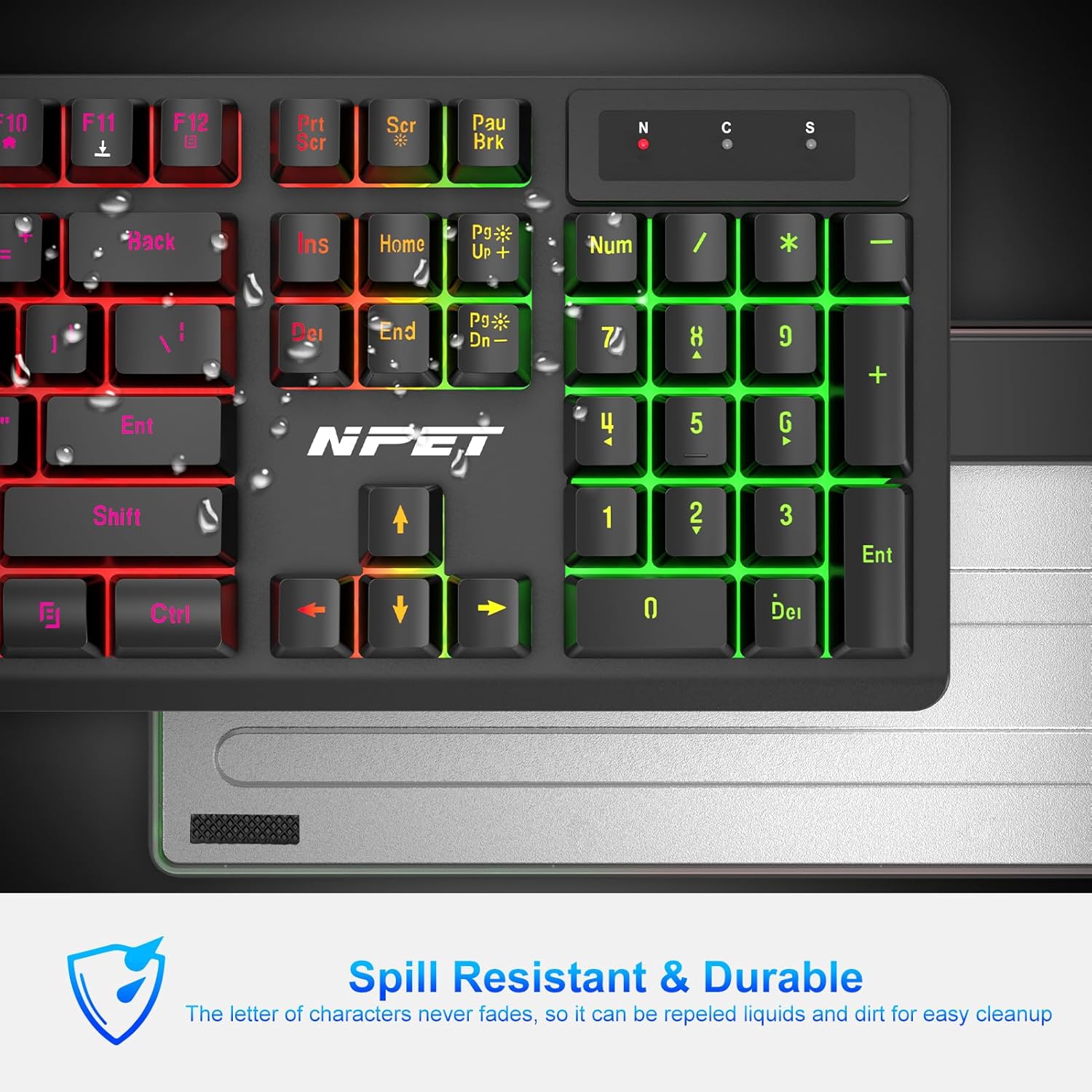 Image: Keyboard demonstrating spill resistance.
5.2 Substitució de la tapa de les tecles i l'interruptor
The keyboard features hot-swappable switches, allowing for easy replacement of individual keycaps and switches.
- Use the provided keycap puller tool to carefully remove keycaps.
- Use the switch puller (often integrated with the keycap puller) to remove the underlying switch.
- Align and press new switches and keycaps into place.
 Image: Keycap removal process.
Video: Demonstration of removing and replacing keycaps and switches on the keyboard.
6. Solució De Problemes
- Problemes de connexió: If the wireless connection is lost, reset the code pairing by following the instructions in the full manual (if available) or by contacting customer support.
- Avaries generals: If the device cannot be used for any reason, please contact NPET customer support for assistance.
7. Especificacions
- Marca: NPET
- Model: S21
- Connectivitat: Sense fil 2.4G (receptor USB)
- Bateria del teclat: 3000 mAh
- Bateria del ratolí: 800 mAh
- Il·luminació de fons: RGB (Rainbow effects, breathing modes, static modes, 4 brightness levels for keyboard; 7-color cyclic gradual for mouse)
- Interruptors de clau: Mechanical-feeling (Hot-swappable Red switches mentioned in video)
- Anti-fantasma: 19 claus
- Característiques especials: Ergonomic design, Spill-resistant, Fade-proof keycaps, Multimedia keys, WASD/Arrow key swap, Windows key lock.
8. Garantia i Suport
For warranty information, technical support, or any product-related inquiries, please refer to the official NPET weblloc web o contacteu directament amb el servei d'atenció al client. Conserveu el rebut de compra per a reclamacions de garantia.


