Povanje safe fireproof waterproof 60EE

Povanje 5.0 Cuft Fireproof Safe User Manual

Model: safe fireproof waterproof 60EE

Introducció

This user manual provides essential information for the safe and effective operation of your Povanje 5.0 Cuft Fireproof Safe. Please read this manual thoroughly before setup and use, and retain it for future reference.

Informació de seguretat

Contingut del paquet

Verifiqueu que tots els elements siguin presents al vostre paquet:

Image showing the safe's accessories including keys, manual, mounting screws, fireproof bag, lock cover, and mat.

Figure 1: Included Accessories. This image displays the various components that come with your safe, such as the backup keys, user manual, mounting screws, a fireproof and waterproof document bag, a protective cover for the lock, and a mat for the interior.

Configuració

1. Instal·lació de la bateria

The digital keypad requires 4 AA batteries (not included). The external battery installation design allows for easy replacement.

  1. Locate the battery compartment on the keypad unit.
  2. Obriu la coberta del compartiment.
  3. Inseriu 4 piles AA, assegurant la polaritat correcta (+/-).
  4. Tanqueu la coberta del compartiment de manera segura.
Image showing the external battery compartment of the safe's keypad.

Figure 2: External Battery Compartment. This image illustrates the external battery compartment on the safe's keypad, designed for convenient battery replacement without needing to open the safe.

2. Setting Your Passcode

Your safe comes with a default factory code of "1234#". It is highly recommended to change this immediately.

  1. Open the safe using the default code or emergency key.
  2. Locate the red reset button inside the door, near the hinge.
  3. Press the red reset button. The keypad display will show "SET".
  4. Enter your desired 1-8 digit personal password on the keypad.
  5. Press the "#" key to confirm. The display will show "DONE".
  6. To set a master password (optional): Enter "100" then press the setting button inside the door. Enter the 1-8 digit master password and press "#" to confirm.
Diagram showing steps to set personal and master passcodes for the safe.

Figure 3: Setting Passcode. This diagram illustrates the process of setting both a personal and an optional master password for your safe's electronic keypad.

3. Muntatge de la caixa forta

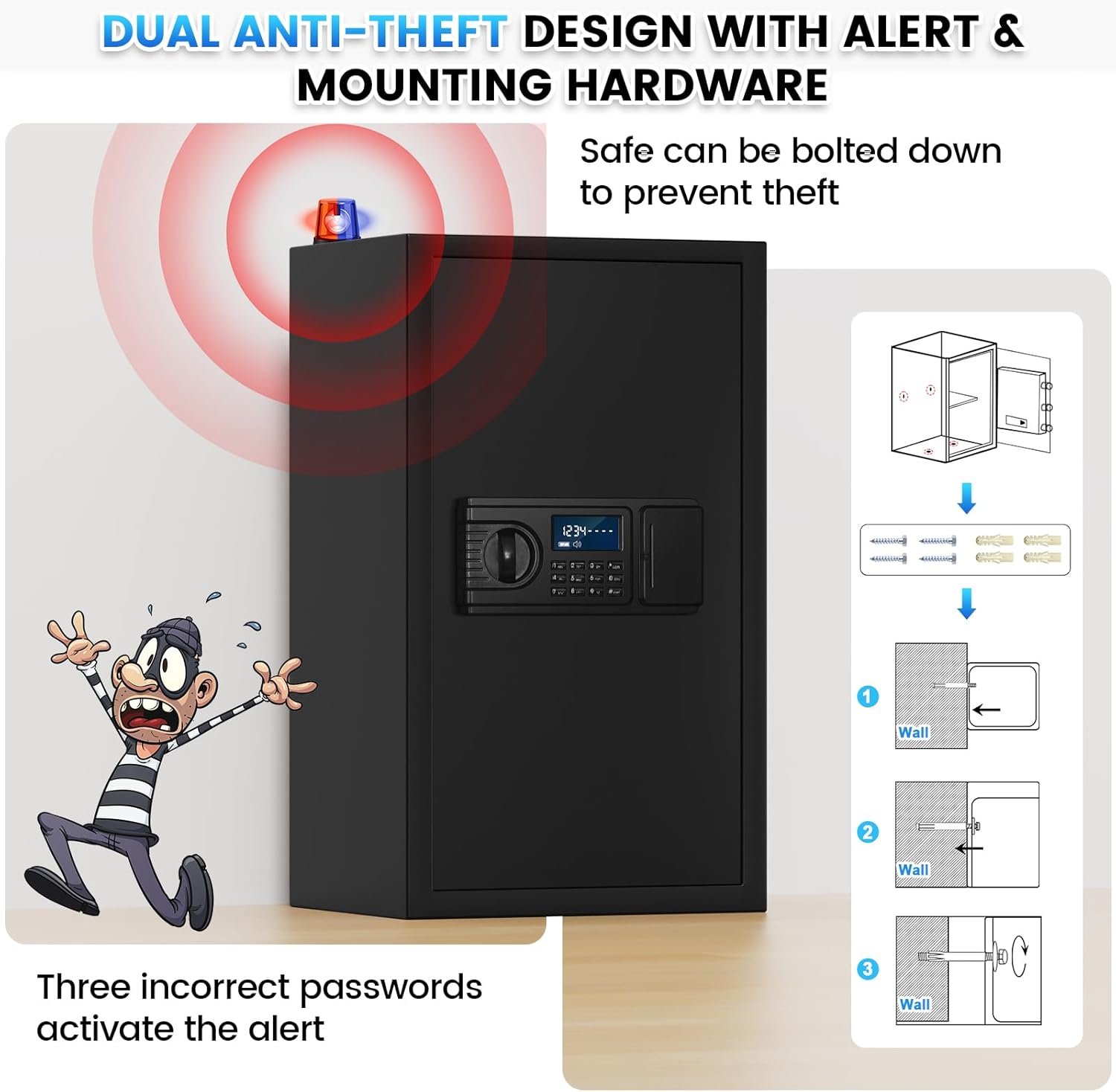
The safe features pre-drilled holes in the back and bottom for secure mounting to a wall or floor, preventing theft.

  1. Choose a suitable location for your safe.
  2. Mark the drilling points through the pre-drilled holes on the safe's back or bottom.
  3. Drill holes into the wall or floor using an appropriate drill bit.
  4. Align the safe with the drilled holes.
  5. Insert the provided mounting screws and anchors, and tighten them securely.
Image showing the safe with an anti-theft alert and a diagram for wall mounting.

Figure 4: Mounting Instructions. This image demonstrates the anti-theft alert system and provides a visual guide for securely mounting the safe to a wall using the pre-drilled holes and included hardware.

Funcionament de la caixa forta

1. Opening with Personal Code (Daily Use)

  1. Enter your 1-8 digit personal password on the keypad.
  2. Press the "#" key to confirm. The display will show "OPEN".
  3. Turn the knob clockwise to open the safe door.
Image showing two ways to unlock the safe: with emergency keys and with a personal code.

Figure 5: Two Unlock Ways. This image illustrates both the emergency key and personal code methods for opening the safe, highlighting the convenience of the digital keypad for daily use.

2. Opening with Emergency Keys

Use emergency keys if batteries are depleted or you forget your passcode.

  1. Locate the emergency keyhole, usually hidden behind a cover on the keypad unit.
  2. Insert the emergency key and turn it counter-clockwise.
  3. Simultaneously turn the knob clockwise to open the safe door.

3. Hidden Code Mode

To prevent others from seeing your entered password, you can activate hidden code mode.

Image detailing the features of the safe's LCD keypad, including hidden password mode.

Figure 6: Keypad Features. This image highlights the large LCD screen, low battery reminder, hidden password function, and keyhole serial number for backup key replacement.

4. Anti-Theft Alert System

The safe is equipped with an anti-theft alarm system for enhanced security.

Video 1: LCD Digital Keypad Fireproof Safe Box Features. This video demonstrates various features of the safe, including the large interior, reinforced lock latches, thickened steel door, one-piece all-steel structure, anti-prying design, wall/floor mounting, large LCD screen, hidden password mode, smart anti-theft alert, and dual opening methods (backup keys and personal code).

Manteniment

1. Substitució de la bateria

When the LCD screen displays a low battery reminder, replace the batteries promptly to ensure continuous operation.

2. Neteja

Resolució de problemes

ProblemaCausa possibleSolució
La caixa forta no s'obre amb el codi d'accés.Incorrect passcode entered; low batteries.Re-enter passcode carefully. Replace batteries. Use emergency key.
L'alarma sona després de diversos intents.Three incorrect passcode entries.The alarm will sound for 1 minute. Remove batteries to stop it immediately. Re-enter correct passcode or use emergency key.
LCD screen is blank or dim.Bateries baixes o esgotades.Substituïu les 4 piles AA.
Cannot set new passcode.Incorrect procedure followed.Review "Setting Your Passcode" section carefully and repeat steps. Ensure the reset button is pressed correctly.

Especificacions

Image showing the large spacious safe box with its dimensions and key features.

Figure 7: Safe Dimensions and Features. This image provides a visual representation of the safe's external dimensions and highlights key features such as the included fireproof bag, weight, video guide availability, and upgraded packaging.

Image comparing the safe's interior with and without removable shelves, showing various items stored.

Figure 8: Removable Shelf Configuration. This image demonstrates the versatility of the safe's interior, showing how items like cash, documents, jewelry, firearms, and passports can be organized with or without the removable shelves.

Garantia i Suport

Povanje offers comprehensive support for your safe:

Image showing customer support icons and service guarantees.

Figure 9: Customer Support and Guarantees. This image highlights Povanje's commitment to customer satisfaction, including quick response times, money-back guarantees, warranty coverage, and lifetime after-sales support.

Documents relacionats - safe fireproof waterproof 60EE

Preview Manual d'instruccions de la caixa forta amb pantalla tàctil
Manual d'instruccions complet per a la caixa forta amb pantalla tàctil, que inclou descripcions dels components, llista de peces, ús inicial, inserció de la bateria, obertura i tancament de la porta, sistema d'alarma dual, configuració dels codis d'usuari i d'administrador, mode de silenci, restabliment de fàbrica i instruccions de muntatge.
Preview Safe Box Instruction Manual: Setup, Operation, and Mounting Guide
Comprehensive instruction manual for operating and mounting your safe box. Covers first opening, setting user codes, alarm settings, and installation procedures. Includes troubleshooting tips and contact information.
Preview Manual d'instruccions de la caixa forta: guia d'ús i muntatge
Guia completa per a la caixa forta, que inclou la primera obertura, la configuració del codi d'usuari, les funcions de bloqueig automàtic, les especificacions tècniques i les instruccions de muntatge. Apreneu a protegir els vostres objectes de valor amb aquesta caixa forta domèstica.
Preview Manual d'usuari de la caixa forta amb pany de seguretat Diosmio
Manual d'usuari complet per a la caixa forta Diosmio Security Lock, que cobreix les especificacions elèctriques, diversos models i dimensions, accessoris, instruccions d'ús detallades per a l'accés amb clau i contrasenya, consells per a la resolució de problemes i preguntes freqüents.
Preview Security Lock Box (EE Series) Instructions and User Guide
Comprehensive instructions for operating and securing the Security Lock Box (EE Series). This guide details first-time opening, setting master and personal codes, emergency access, troubleshooting notices, wall and floor fixation methods, and a list of packing accessories.
Preview WASJOYE Safe: Manual d'usuari i guia d'instal·lació
Guia completa per a les caixes fortes WASJOYE, que cobreix les característiques del producte, el funcionament, la configuració de seguretat, la resolució de problemes i els mètodes d'instal·lació. Inclou instruccions en diversos idiomes.