Machenike G3V2 Bluetooth Gaming Controller User Manual
Model: G3V2PE
1. Introducció
Welcome to the Machenike G3V2 Bluetooth Gaming Controller user manual. This guide provides detailed instructions on how to set up, operate, and maintain your new gaming controller. The G3V2 controller is designed for a superior gaming experience across multiple platforms, including PC, Nintendo Switch, iOS, and Android devices, featuring advanced Hall Effect technology, customizable RGB lighting, and programmable buttons.
2. Contingut del paquet
- Machenike G3V2 Bluetooth Controller
- Charging Dock (for ST White model)
- Cable de càrrega USB-C
- Receptor sense fil 2.4G
- Manual d'usuari
3. Producte acabatview

Davant view of the Machenike G3V2 Bluetooth Controller, showcasing its translucent design and button layout.

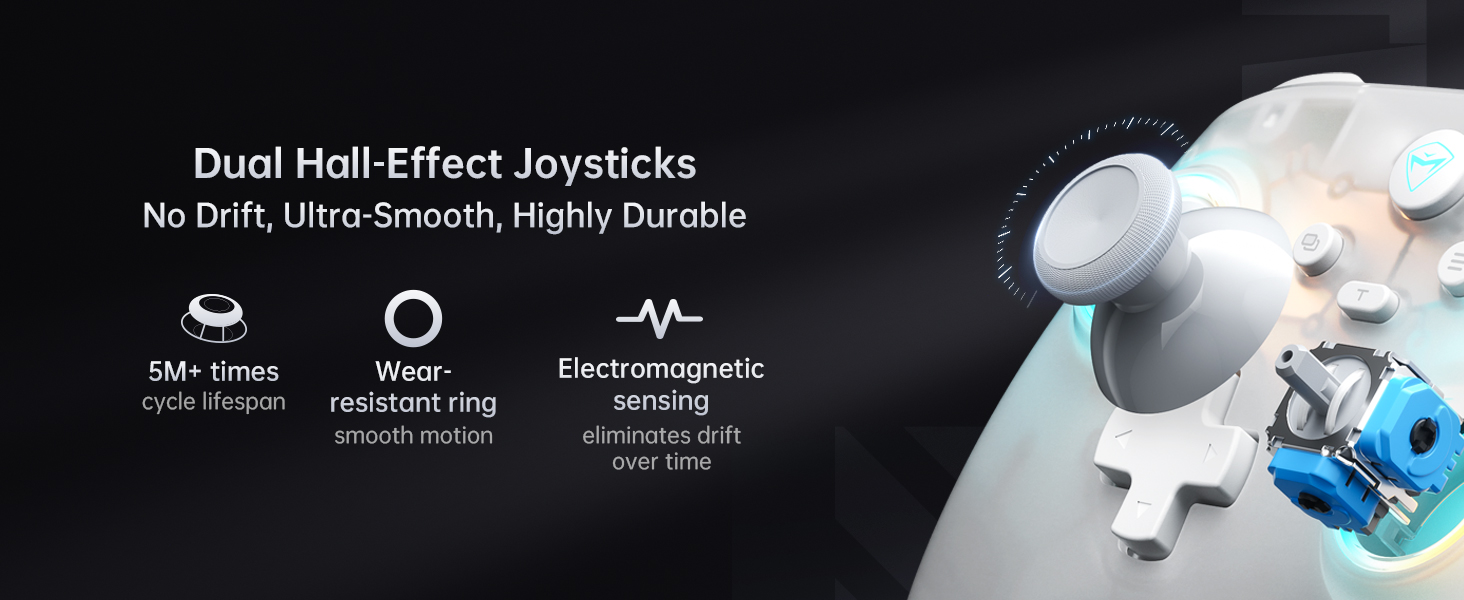
Key features of the Machenike G3V2 controller, highlighting its technical specifications and design elements.
Identificació de components
- Manets analògics esquerre/dret: Dual Hall-effect joysticks for precise movement.
- D-Pad: Directional pad for navigation and input.
- Botons d'acció (A, B, X, Y): Standard gaming input buttons.
- Botons d'espatlla (L1, R1): Botons muntats a la part superior.
- Triggers (L2, R2): Hall-effect triggers for accurate pressure sensitivity.
- Botó FN: Function button for various shortcuts.
- Menu/Options Buttons: For system and game menu navigation.
- M1/M2 Back Buttons: Two customizable programmable buttons on the rear.
- Port USB-C: Per a connexió amb cable i càrrega.
- Il·luminació RGB: Integrated lighting around joysticks and within the controller.
4. Configuració
4.1. Càrrega del controlador
The Machenike G3V2 controller is equipped with a 1000mAh lithium battery. Before first use, or when the battery is low, charge the controller using the provided USB-C cable or the magnetic charging dock (if included with your model).
- Connect the USB-C cable to the controller's USB-C port and to a power source (e.g., PC, USB wall adapter).
- If using the charging dock, simply place the controller onto the dock.
- Charging takes approximately 1.8 to 2 hours for a full charge.
- The RGB lighting on the controller or the dock's RGB indicator will show the charging status (e.g., red for charging, green for fully charged).

The controller features a 1000mAh high-capacity battery for extended playtime.
4.2. Connexió a dispositius
The G3V2 controller supports three connection modes: Wired, 2.4GHz Wireless, and Bluetooth.
The Machenike G3V2 supports multiple connection modes for broad compatibility.
Wired Connection (PC/Android TV/Android TV Box)
- Connect the USB-C cable from the controller to a USB port on your PC or compatible device.
- El controlador es reconeixerà automàticament i es podrà utilitzar.
2.4GHz Wireless Connection (PC/Android TV/Android TV Box/Steam Deck/Raspberry Pi 3B)
- Insert the 2.4G wireless receiver into a USB port on your device.
- Press and hold the connection button on the controller (refer to product diagram for location) until the indicator light flashes rapidly.
- The controller will automatically pair with the receiver. Once connected, the indicator light will become solid.
- This mode offers a 1000Hz polling rate for ultra-low latency.
Bluetooth Connection (PC/MacOS/iOS/Android/Nintendo Switch/Tesla)
- For PC/MacOS/Android/iOS:
- Activa el Bluetooth al teu dispositiu.
- Press and hold the Bluetooth pairing button on the controller (refer to product diagram) until the indicator light flashes rapidly.
- On your device, search for
Documents relacionats - G3V2PE

Manual d'instruccions del controlador de jocs sense fil MACHENIKE G5PRO
Instruccions d'ús completes i especificacions tècniques per al comandament de jocs sense fil MACHENIKE G5PRO. Cobreix la configuració, els modes de connexió per a PC, Switch, Android i iOS, les funcions clau, les funcions ampliades com la il·luminació i la vibració, el calibratge i els paràmetres del producte.
Manual d'usuari i informació de garantia del gamepad MACHENIKE G1
Manual d'usuari complet i detalls de la garantia per al gamepad MACHENIKE G1, que cobreix la configuració, la connexió, les característiques, les especificacions i el suport. Inclou la disposició dels botons, els modes de connexió, el calibratge, la informació d'alimentació, la personalització mitjançant l'aplicació Keylinker i el compliment de les normes mediambientals.
Manual d'usuari del controlador de jocs sense fil MACHENIKE G5 PRO
Manual d'usuari complet per al comandament de jocs sense fil MACHENIKE G5 PRO. Cobreix la seguretat, l'embalatge, la disposició dels botons, la connexió multiplataforma (PC, Switch, iOS, Android), el calibratge, les característiques (Turbo, Macro, RGB), les especificacions, la resolució de problemes, la garantia i el compliment de la FCC.
MACHENIKE G3V2 Gamepad User Manual - Connectivity, Features, and Specifications
Comprehensive user manual for the MACHENIKE G3V2 gamepad. Learn about packing contents, button layout, wireless and wired connection modes (2.4G, Bluetooth), battery information, turbo function, app customization, calibration, specifications, warranty, and compliance.
Manual d'usuari i especificacions del portàtil Qingdao Machenike L7AIR
Manual d'usuari oficial i especificacions tècniques per al portàtil Qingdao Machenike L7AIR (model 2BBT5-L7AIR), incloent-hi les directrius de seguretat i la informació de compliment normatiu.
Manual d'usuari dels auriculars MACHENIKE TH70 Pro ANC
Manual d'usuari dels auriculars MACHENIKE TH70 Pro ANC, que detalla les característiques, les especificacions, els mètodes de connexió, el contingut del paquet i la resolució de problemes. Inclou assistència multilingüe.