1. Introducció
Thank you for choosing the Machenike G3V2 Bluetooth Controller. This manual provides essential information for setting up, operating, and maintaining your new gaming controller. Please read it thoroughly to ensure optimal performance and longevity of your device.

Image 1.1: Machenike G3V2 Bluetooth Controller in black, showcasing its transparent design and RGB lighting.
2. Característiques clau
- Lightning-Fast 1000Hz Response: Experience ultra-low latency in wired and 2.4G wireless modes for competitive gaming.
- Convenient Charging Dock: Keeps your controller charged and ready, with an integrated USB extension port for enhanced stability.
- Precision Hall Joysticks and Triggers: Quad-Hall system ensures precise tracking, pressure sensitivity, and eliminates drift.
- Temps de joc ampliat: Equipped with a robust 1000mAh battery for long gaming sessions.
- Botons posteriors dobles personalitzables: Program up to 32 actions for a personalized experience.
- Comentaris immersius: 4-level vibration feature with asymmetrical motors for realistic in-game sensations.
- Compatibilitat multiplataforma: Supports PC, Nintendo Switch, iOS, and Android devices.

Imatge 2.1: Visual overview of the controller's key features, including 1000Hz polling rate, customizable back buttons, 1000mAh battery, dual-core receiver, Quad-Hall system, native vibration, Keylinker 2.0 app support, and tri-mode connectivity.
3. Contingut del paquet
- Machenike G3V2 Bluetooth Controller
- Base de càrrega (si s'inclou amb el vostre model)
- Cable USB-C a USB-A
- Receptor sense fil 2.4G
- Manual d'usuari (aquest document)
4. Configuració
4.1 Càrrega del controlador
Before first use, fully charge the controller. Place the controller on the charging dock or connect it directly via the USB-C cable to a power source (e.g., PC USB port, USB wall adapter). The RGB lighting will indicate charging status and turn off or change color when fully charged.

Image 4.1: Illustration of the controller's 1000mAh high-capacity battery, indicating extended playtime.
4.2 Connexió a dispositius
The G3V2 controller supports three connection modes: Wired, 2.4G Wireless, and Bluetooth.
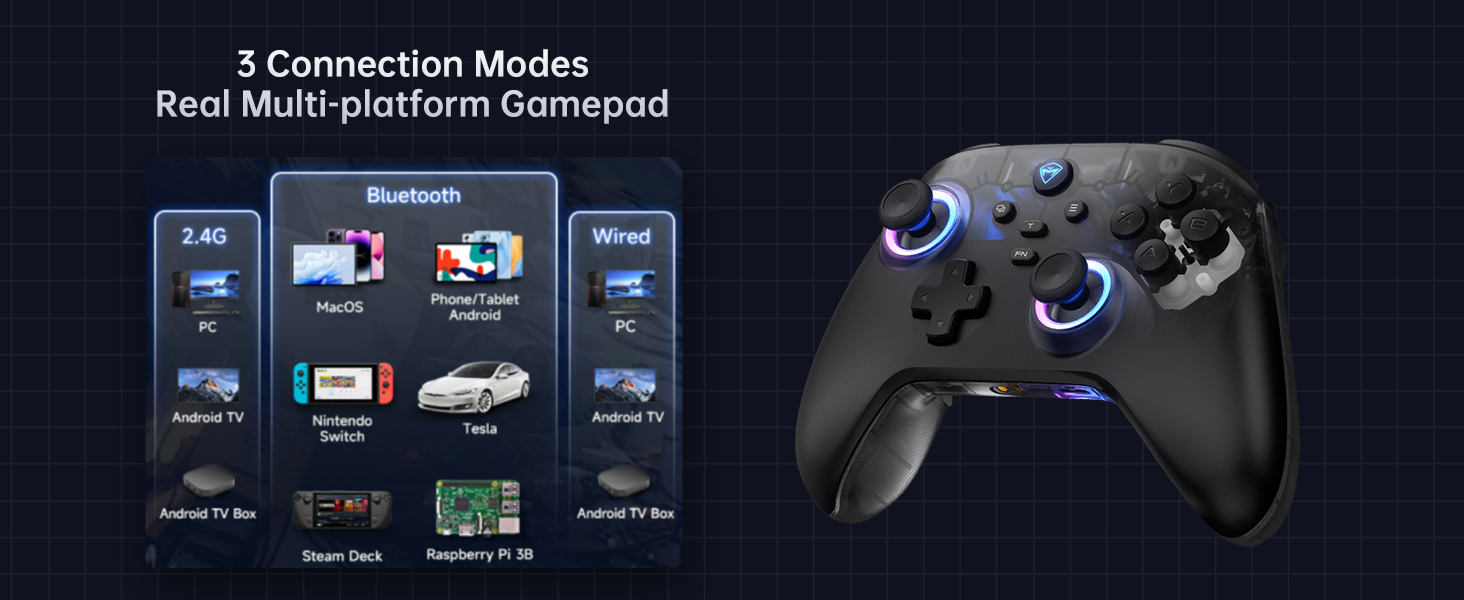
Image 4.2: Diagram illustrating the three connection modes: 2.4G (PC, Android TV Box, Steam Deck, Raspberry Pi 3B), Bluetooth (PC, MacOS, Phone/Tablet Android, iOS, Nintendo Switch, Tesla), and Wired (PC, Android TV).
4.2.1 Wired Connection (PC)
- Connect the USB-C end of the cable to the controller and the USB-A end to your PC.
- El vostre ordinador reconeixerà automàticament el controlador.
4.2.2 2.4G Wireless Connection (PC, Android TV Box, Steam Deck, Raspberry Pi 3B)
- Insert the 2.4G wireless receiver into an available USB port on your device.
- Manteniu premut el botó Casa button on the controller until the indicator light flashes rapidly, then turns solid, indicating a successful connection.
4.2.3 Bluetooth Connection (PC, MacOS, Phone/Tablet Android, iOS, Nintendo Switch, Tesla)
- Assegureu-vos que el Bluetooth estigui habilitat al vostre dispositiu.
- Al controlador, premeu i manteniu premut Emparellament Bluetooth button (refer to controller diagram for location) until the indicator light flashes rapidly.
- On your device, search for new Bluetooth devices and select "Machenike G3V2" from the list.
- The indicator light on the controller will turn solid when successfully paired.
5. Instruccions de funcionament
5.1 Encès/Apagat
- Encès: Premeu el botó Casa botó.
- Apagar: Manteniu premut el botó Casa button for 3 seconds. The controller will also automatically power off after a period of inactivity.
5.2 Control d'il·luminació RGB
The controller features customizable RGB lighting. Use the dedicated lighting control button (often labeled with a light icon or integrated with the FN button) to cycle through various lighting modes, colors, and brightness levels.
5.3 Botons Enrere Programables (M1/M2)
The G3V2 controller includes two customizable back buttons (M1 and M2) that can be programmed for macros or remapping. Refer to the Keylinker 2.0 app section for detailed programming instructions.
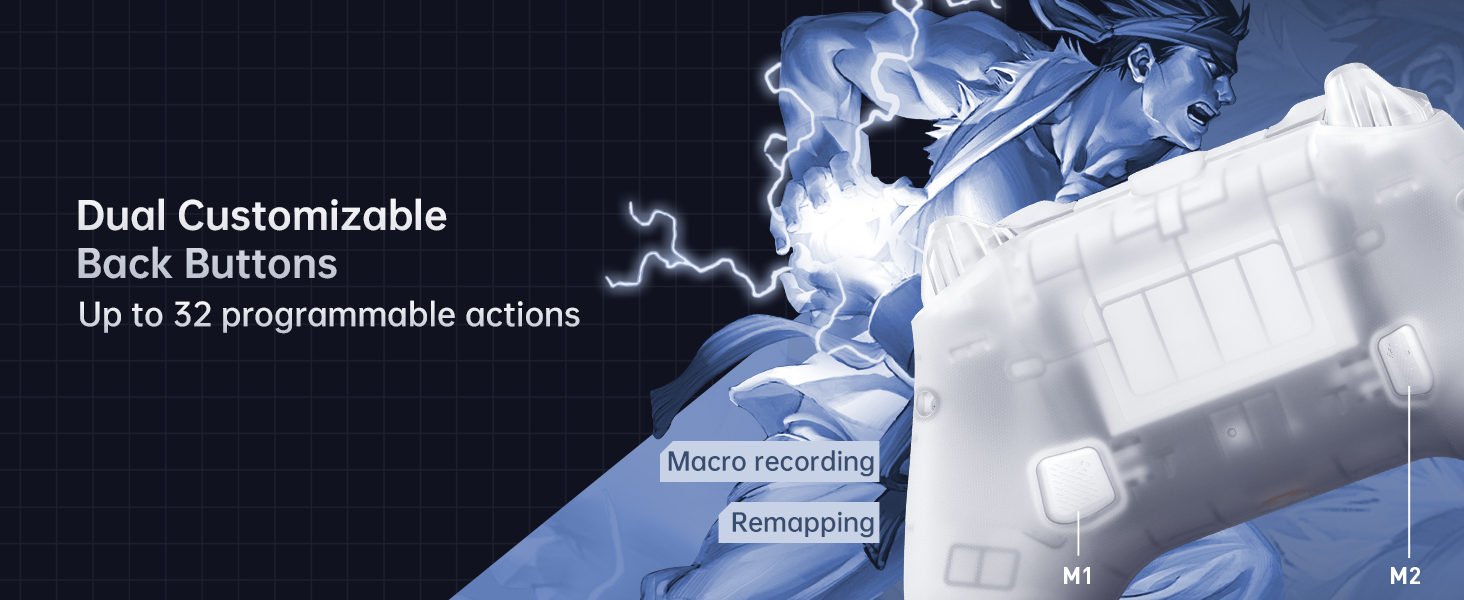
Imatge 5.1: Primer pla view of the dual customizable back buttons (M1 and M2) on the controller, highlighting their placement for easy access and the ability to program up to 32 actions.
5.4 Retroalimentació de vibració
The controller provides 4-level native vibration feedback. This feature enhances immersion by replicating in-game actions through asymmetrical rotor motors. Vibration intensity can often be adjusted via the Keylinker 2.0 app.
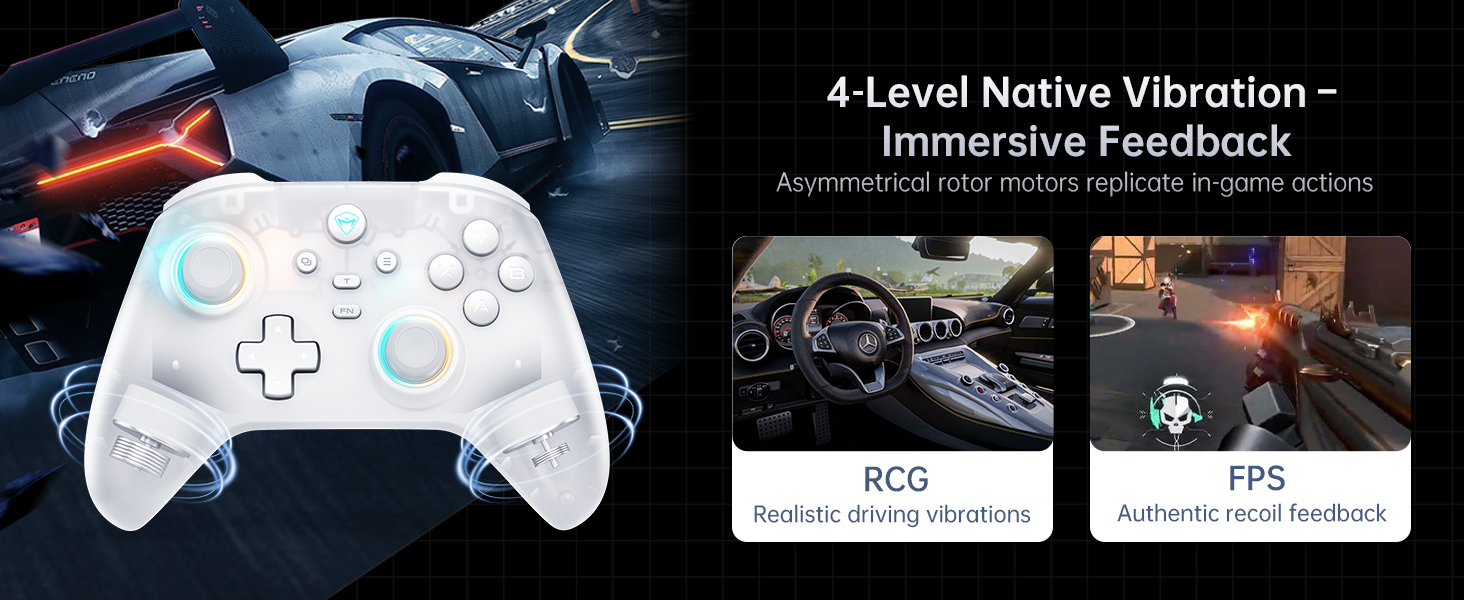
Image 5.2: Visual representation of the 4-level native vibration feature, showing how it provides realistic driving vibrations for racing games and authentic recoil feedback for shooting games.
5.5 Keylinker 2.0 APP Support
The Machenike G3V2 controller is compatible with the Keylinker 2.0 application, allowing for smart, hassle-free quick setup and advanced customization without manual pairing. This app enables fine-tuning of settings such as button remapping, joystick dead zones, trigger sensitivity, vibration intensity, and RGB lighting effects.
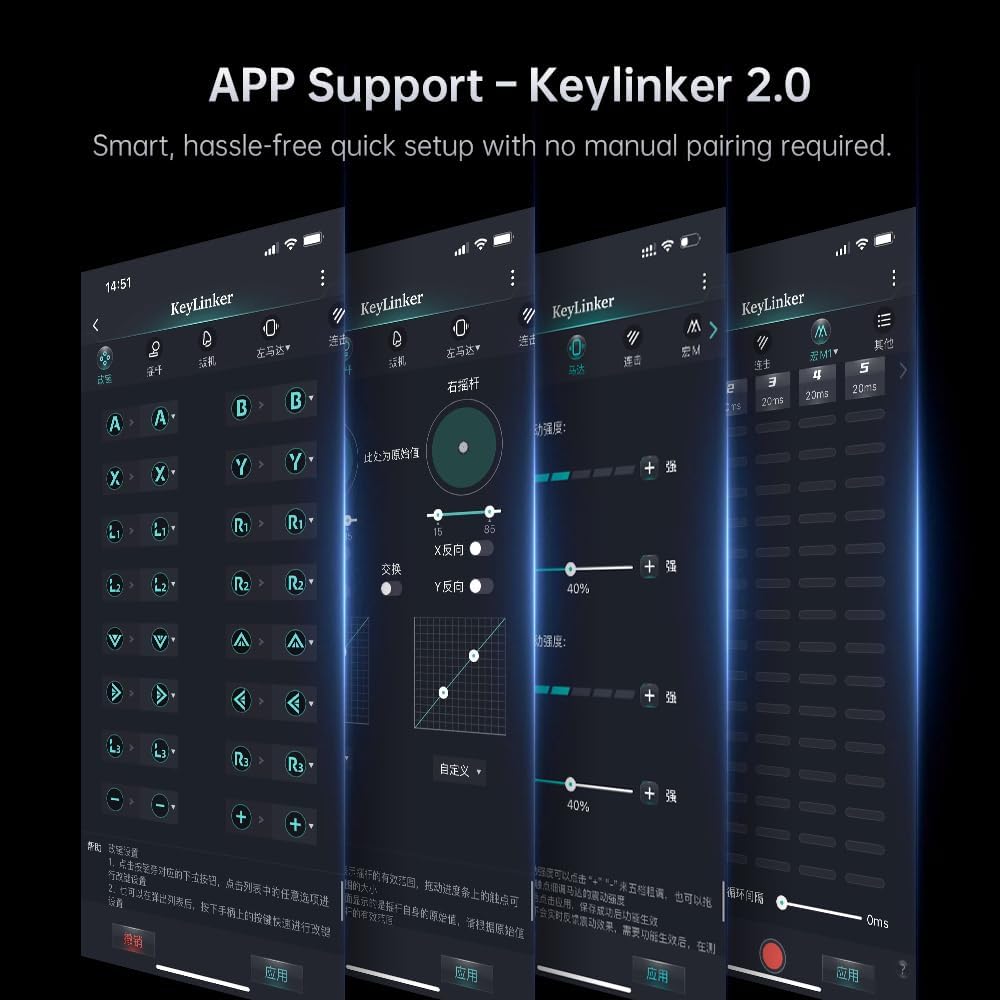
Image 5.3: Screenshots of the Keylinker 2.0 mobile application interface, demonstrating various customization options for the controller, including button remapping, joystick calibration, and vibration settings.
5.6 Vídeo de demostració del producte
Video 5.4: An official product video demonstrating the Machenike G3V2 game controller in use, highlighting its RGB lighting, ergonomic design, and responsiveness during gameplay. This video showcases the controller's features and user experience.
6. Manteniment
6.1 Neteja
Per netejar el controlador, feu servir un drap suau i sec. Per a la brutícia resistent, netegeu-lo lleugerament.ampen the cloth with water or a mild, non-abrasive cleaner. Do not use harsh chemicals or solvents, as they may damage the surface.
6.2 Emmagatzematge
Guardeu el controlador en un lloc fresc i sec, allunyat de la llum solar directa i de temperatures extremes. Si feu servir la base de càrrega, assegureu-vos que estigui col·locada sobre una superfície estable.
6.3 Cura de la bateria
- Eviteu descarregar completament la bateria amb freqüència.
- If storing for an extended period, charge the battery to about 50% to prolong its lifespan.
- No exposeu la bateria a altes temperatures.
7. Solució De Problemes
7.1 Problemes de connexió
- El controlador no es connecta: Ensure the controller is charged. For wireless connections, check if the receiver is properly inserted or if Bluetooth is enabled and discoverable on your device. Try re-pairing the controller.
- Desconnexions freqüents: Ensure the controller is within range of the receiver/device. Minimize interference from other wireless devices. Update controller firmware via the Keylinker 2.0 app if available.
7.2 Button/Joystick Issues
- Botons/joysticks que no responen: Clean around the buttons to remove any debris. Calibrate joysticks and triggers using the Keylinker 2.0 app.
- Deriva del joystick: The Hall Effect joysticks are designed to prevent drift. If you experience drift, try recalibrating through the Keylinker 2.0 app. Ensure the controller's firmware is up to date.
7.3 Problemes de càrrega
- El comandament no es carrega: Check the USB cable and charging dock for damage. Ensure the power source is active. Try a different USB port or power adapter.
8. Especificacions
| Característica | Detall |
|---|---|
| Número de model | G3V2PE |
| Connectivitat | Cablejat, sense fil 2.4G, Bluetooth |
| Taxa de votació | 1000Hz (Wired & 2.4G Wireless), 150Hz (Bluetooth) |
| Joysticks i disparadors | Efecte Hall |
| Capacitat de la bateria | Polímer de liti de 1000 mAh |
| Botons programables | 2 (M1, M2) |
| Vibració | 4-level Native Vibration (Asymmetrical Motors) |
| Dimensions | 6.69 x 2.76 x 5.12 polzades |
| Pes | 0.53 unces |
| Fabricant | Machenike |
| País d'origen | Xina |
9. Garantia i Suport
Machenike products are designed and manufactured to the highest quality standards. For warranty information and technical support, please refer to the warranty card included with your product or visit the official Machenike weblloc web. Conserveu el rebut de compra com a comprovant de compra per a reclamacions de garantia.