1. Pautes importants de seguretat
Before operating your Caroma Electric Scooter, please read and understand all safety instructions. Failure to follow these guidelines may result in serious injury or property damage.
- Porteu sempre casc i equip de protecció adequat (genolleres, colzeres) quan aneu en bicicleta.
- Assegureu-vos que tots els cargols i els mecanismes de desenganxament ràpid estiguin ben fixats abans de cada viatge.
- Do not ride in wet conditions, heavy rain, or through standing water to prevent damage to electrical components and loss of traction.
- Respecteu les lleis i regulacions de trànsit locals pel que fa a l'ús de patinets elèctrics.
- Mantingueu una velocitat i una distància de seguretat amb els vianants i altres vehicles.
- Avoid riding on steep slopes, uneven terrain, or over obstacles that may cause loss of control.
- No feu acrobàcies ni maniobres brusques.
- Regularly inspect tires, brakes, and all components for wear and damage.
- The maximum weight limit for this scooter is 265 pounds.
2. Producte acabatview
The Caroma E22 PRO-Black Electric Scooter is designed for efficient urban commuting, featuring a powerful motor, long-range battery, and smart app control.

Figure 2.1: Caroma Electric Scooter E22 PRO-Black
Característiques principals:
- 350W Rear-Wheel Motor: Delivers up to 630W peak power, reaching a max speed of 20 mph and handling 20° max slopes.
- 285Wh Large Capacity Battery: Provides a travel range of up to 20 miles on a single charge.
- 9-inch Honeycomb Solid Tires: Explosion-proof, anti-puncture, and self-healing for a smooth ride.
- Auto Triple Lighting System: Automatic headlight, taillight, and pedal light for enhanced visibility.
- Sistema de frenada dual: Combines EABS (Electronic Anti-lock Braking System) and drum braking for reliable stopping power.
- Adjustable Handlebar Height: Accommodates users from 40 to 46 inches.
- Intelligent APP Control: Manage speed modes, cruise control, and lighting via a mobile application.
- Folding Portable Design: One-step folding system for easy storage and transport.
3. Muntatge i muntatge
3.1 Desembalatge i inspecció inicial
Carefully remove all components from the packaging. Verify that all parts listed in the packing list are present and undamaged. The package includes: 1x Electric Scooter, 1x Charger, 1x User Manual, 1x Tool Kit.
Video 3.1: Caroma Electric Scooter Installation Tutorial. This video demonstrates the unboxing and assembly process for the scooter.
3.2 Muntatge del manillar
- Lift the main stem of the scooter until it locks into the upright position.
- Connect the handlebar to the top of the stem. Ensure the cables are not pinched.
- Secure the handlebar using the provided screws and Allen key from the tool kit.
- Adjust the handlebar height by loosening the quick-release clamp, extending or retracting the handlebar, and then securely re-fastening the clamp.
3.3 Càrrega inicial
Before first use, fully charge the scooter's battery. The charging time is approximately 5.5 hours.
- Locate the charging port on the side of the scooter deck.
- Ensure the charging port cover is removed.
- Connect the charger to the scooter's charging port, then plug the charger into a standard wall outlet.
- El llum indicador del carregador canviarà (per exemple, de vermell a verd) quan la càrrega s'hagi completat.
- Disconnect the charger and securely close the charging port cover to protect it from dust and moisture.
4. Instruccions de funcionament
4.1 Engegada/Apagada i Visualització
To power on the scooter, press and hold the power button on the handlebar display. The LED display will illuminate, showing real-time speed, battery life, and current speed mode.
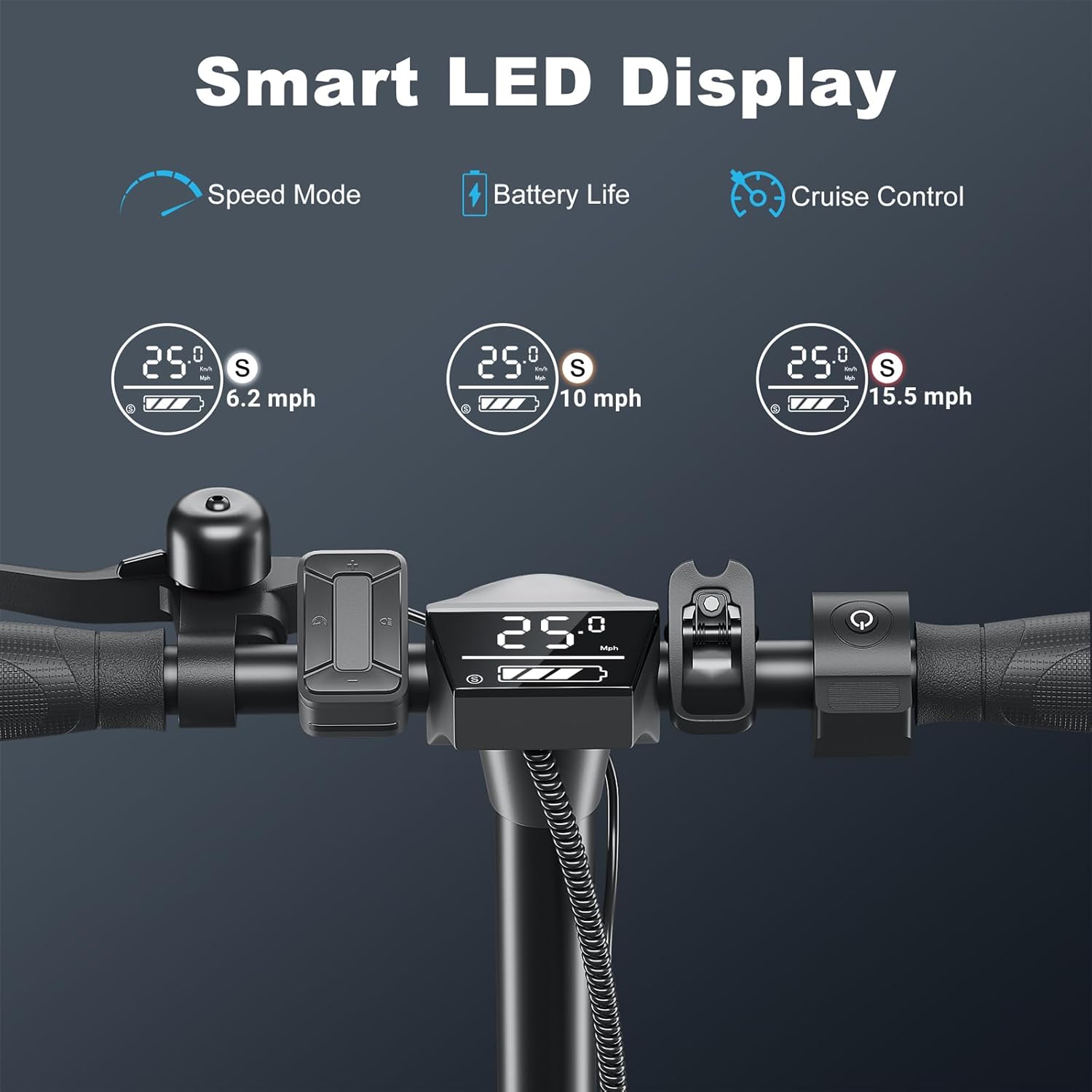
Figure 4.1: Smart LED Display showing speed mode, battery life, and cruise control indicator.
Per apagar l'aparell, premeu i manteniu premut el botó d'engegada de nou fins que la pantalla s'apagui.
4.2 Conduint el scooter
- Inici de sessió: The scooter requires a kick-start for safety. Push off with your foot to gain a small amount of momentum (approx. 1.8 mph / 3 km/h).
- Accelerar: Once moving, press the accelerator lever on the right handlebar to engage the motor.
- Modes de velocitat: Use the mode button on the display or the mobile app to switch between three speed gears: 9.3 mph, 15.5 mph, and 20 mph.
- Control de creuer: To activate cruise control, maintain a consistent speed for a few seconds. The scooter will beep, and the cruise control indicator will light up. To deactivate, lightly press the brake or accelerator.
Video 4.2: Caroma Electric Scooter for Adults, Ideal for Commute. This video demonstrates the scooter in various riding scenarios, highlighting its performance and features.
4.3 Sistema de frenada
The Caroma E22 PRO-Black is equipped with a dual braking system for enhanced safety.
- EABS (Electronic Anti-lock Braking System): Engages when the brake lever is pressed, providing smooth and controlled deceleration.
- Drum Braking: Provides additional mechanical stopping power.
- Press the brake lever on the left handlebar to activate both braking systems simultaneously. The taillight will flash to alert others.

Figure 4.3: Illustration of the dual braking system, combining electronic and drum brakes for effective stopping.
4.4 Sistema d'il·luminació
The scooter features an Auto Triple Lighting System for visibility and safety, especially during night rides.
- Far automàtic: Il·lumina el camí que hi ha per davant.
- Llum de la cua: Enhances rear visibility.
- Pedal Light: Provides under-deck illumination.
- These lights can be controlled via the mobile app or the multifunctional button console.

Figure 4.4: The scooter's lighting system, including the automatic headlight, taillight, and pedal light, for safe night riding.
4.5 Control d'aplicacions mòbils
Download the official Caroma app to unlock additional features and customize your riding experience.
- Connect the app to the scooter via Bluetooth.
- Control speed mode, cruise control, headlight, and pedal light settings.
- Record ride data and track your mileage.
Figure 4.5: The Caroma Electric Scooter with a smartphone displaying the control app interface.
4.6 Plegament i portabilitat
The scooter features a convenient one-step folding system for easy storage and transport.
- Assegureu-vos que el patinet estigui apagat.
- Localitza el mecanisme de plegat a la base de la tija del manillar.
- Engage the release lever and fold the handlebar stem downwards until it locks into place with the rear fender.
- The folded size is 44.5" x 18.5" x 19.7", making it suitable for carrying on public transport or storing in a car trunk.

Figure 4.6: A person demonstrating the one-step folding mechanism of the Caroma Electric Scooter for easy portability.
5. Manteniment
5.1 Atenció general
- Keep the scooter clean and dry. Wipe down with a damp tela després del seu ús.
- Eviteu utilitzar productes químics o materials abrasius per netejar.
- Guardeu el patinet en un lloc fresc i sec, allunyat de la llum solar directa i de temperatures extremes.
5.2 Cura de la bateria
- Carregueu la bateria regularment, fins i tot si el patinet no està en ús, per mantenir-ne el bon estat.
- No sobrecarregueu ni esgoteu completament la bateria.
- Feu servir només el carregador original que s'inclou amb el patinet.

Figura 5.1: Detallada view of the scooter's 285Wh lithium battery and intelligent battery management system (BMS).
5.3 Manteniment dels pneumàtics
The scooter is equipped with 9-inch honeycomb solid tires, which are designed to be maintenance-free and resistant to punctures.
- Regularly inspect tires for any signs of wear or damage.
- While puncture-resistant, avoid riding over sharp objects that could cause severe damage.

Figure 5.2: The scooter's wheels are shown splashing through water, indicating its water-resistant design and solid tires.
6. Solució De Problemes
If you encounter any issues with your scooter, please refer to the following common troubleshooting steps.
6.1 Scooter Will Not Turn On
- Ensure the battery is sufficiently charged. Connect the charger and allow it to charge for at least 30 minutes before attempting to power on again.
- Verify that the power button is being pressed and held correctly.
- Check for any visible damage to the power button or display unit.
Video 6.1: Scooter Won't Turn On. This video addresses common reasons why the scooter might not power on and provides potential solutions.
6.2 Motor Not Engaging
- Remember the scooter requires a kick-start to activate the motor. Ensure you push off to gain initial momentum before pressing the accelerator.
- Check the battery level on the display or app. A low battery may prevent the motor from engaging.
- Ensure the accelerator lever is functioning correctly and not stuck.
6.3 Problemes de connectivitat de l'aplicació
- Assegureu-vos que el Bluetooth estigui habilitat al vostre dispositiu mòbil.
- Make sure the scooter is powered on and within Bluetooth range of your device.
- Try restarting both the scooter and your mobile device.
- Reinstall the Caroma app if problems persist.
7. Especificacions
| Característica | Especificació |
|---|---|
| Marca | Caroma |
| Nom del model | E22 PRO |
| Color | 350W-E22 PRO-Black |
| Potència del motor | 350W (up to 630W peak) |
| Velocitat màxima | 20 Mph |
| Interval de distància màxim | 20 milles |
| Capacitat de la bateria | 285 Wh |
| Temps de càrrega | 5.5 hores |
| Mida de la roda | 9 polzades |
| Tipus de roda | Solid (Honeycomb) |
| Estil de fre | Front Braking, Rear Braking (EABS & Drum) |
| Límit de pes | 265 lliures |
| Pes de l'article | 34.7 lliures |
| Dimensions del producte (LxWxH) | 43.3 cm de llargada x 18.5 cm d'amplada x 45.7 cm d'alçada |
| Mida plegada (L x A x A) | 44.5" x 18.5" x 19.7" |
| Material del marc | Alumini |
| Característiques especials | Adjustable Handlebar Height, Anti-Puncture Tire, App Control, Cruise Control, Digital Display |
8. Garantia i Suport
8.1 Garantia del producte
The Caroma Electric Scooter E22 PRO-Black comes with a limited warranty. Please refer to the warranty description for specific coverage details:
- Descripció de la garantia: 12 months or 6 months for different parts replacement.
For detailed warranty terms and conditions, please consult the full warranty document included with your purchase or contact Caroma customer support.
8.2 Atenció al client
If you have any questions, require technical assistance, or need to claim warranty service, please contact Caroma customer support through the following channels:
- Refer to the contact information provided in your user manual.
- Visit the official Caroma weblloc web per a recursos de suport i dades de contacte.


