Introducció
This manual provides detailed instructions for the installation, operation, and maintenance of your Inefala Android 15 Car Stereo for Dodge Journey 2009-2011. Please read this manual thoroughly before using the product to ensure proper function and safety.
Què hi ha a la caixa
Verifiqueu que tots els components siguin presents abans de començar la instal·lació:
- 1 x Android Car Stereo
- 1 x cable d'alimentació
- 1 x Antena GPS
- 2 antena de ràdio
- 1 x Backup Camera Input Cable
- 1 x cable RCA
- 2 x cable USB
- 1 x Eina d’instal·lació
- 1 x manual d'instruccions
- 1 x micròfon extern
- 1 x càmera de seguretat
- 1 x Canbus
- 1 accessori

Image: All components included in the Inefala Android Car Stereo package.
Configuració i instal·lació
Una instal·lació correcta és crucial per a un rendiment òptim. Si no esteu segurs de cap dels passos, es recomana demanar ajuda professional.
1. Removing the Original Car Stereo
Carefully remove the trim pieces and screws securing the factory radio. Use appropriate tools to avoid damage.
Video: Demonstration of central control wiring and removal for a similar car model.
Video: Detailed demonstration of central control installation and removal process.

Image: Comparison of the Dodge Journey dashboard before and after car stereo installation.
2. Connexions de cablejat
Connect the provided wiring harness to the car stereo and the vehicle's existing wiring. Ensure all connections are secure.

Image: Stereo wiring diagram illustrating connections for power, RCA, GPS, USB, and camera input.
3. Instal·lació de la càmera de marxa enrere
Connect the included HD night vision backup camera. Route the cable carefully to the rear of the vehicle.
Video: Instructions on how to connect the included backup camera.

Image: Backup camera view amb línies d'assistència a l'aparcament.
Instruccions de funcionament
1. CarPlay sense fil i Android Auto
Connect your smartphone wirelessly for seamless integration of navigation, music, and calls.
Video: Demonstration of wireless CarPlay and Android Auto connection and features.

Image: Wireless CarPlay and Android Auto functionality.
2. Navegació GPS
Utilize built-in GPS for online and offline navigation. Download maps via WiFi for offline use.

Image: GPS Accurate Positioning and WiFi connection for app downloads.
3. Connectivitat Bluetooth
Pair your phone via Bluetooth for hands-free calling and audio streaming. The external microphone ensures clear communication.

Image: Ultra-clear microphone for Bluetooth hands-free calls and EQ functionality.
4. EQ Settings and Audio
Customize your audio experience with the built-in EQ settings. Enjoy high-quality sound through FM/RDS radio and various media sources.

Image: Superb sound quality with YD7388 amplifier chip and custom EQ options.
5. Comandaments del volant
The unit supports existing steering wheel controls for convenient operation without taking your hands off the wheel.
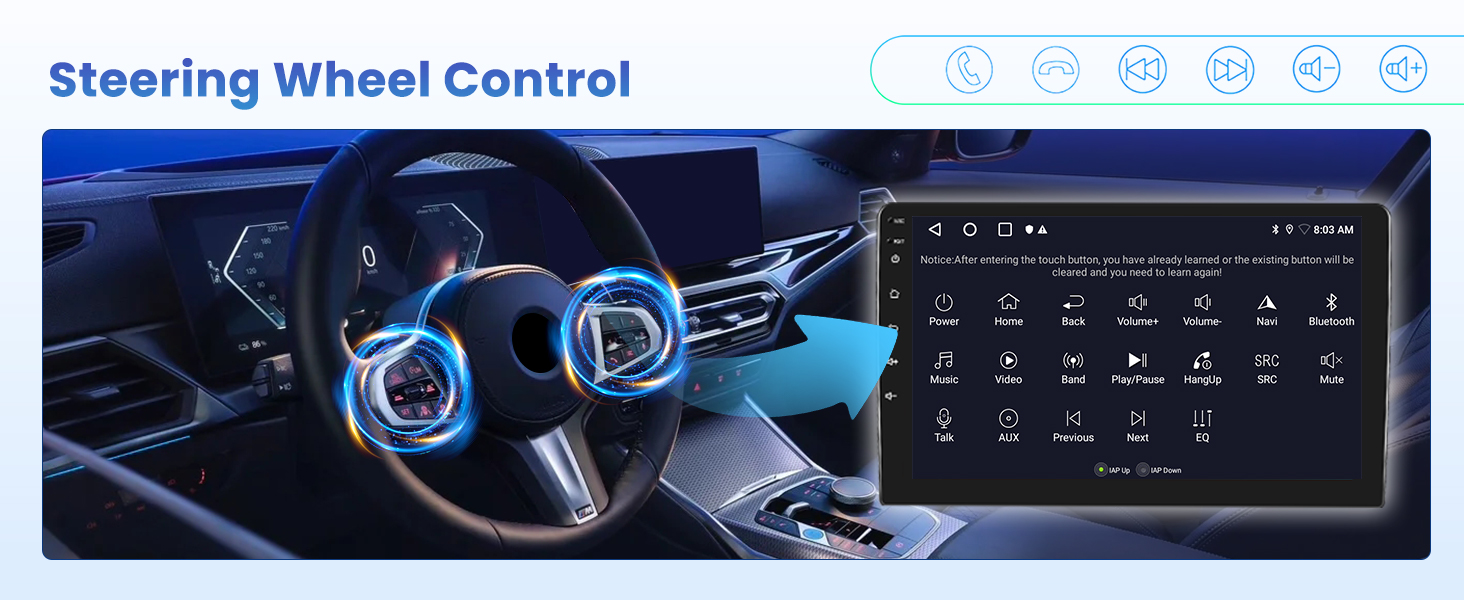
Image: Steering Wheel Control functionality.
Manteniment
- Neteja de pantalla: Feu servir un drap suau i sense borrissol per netejar la pantalla tàctil. Eviteu productes de neteja o dissolvents abrasius.
- Actualitzacions de programari: Periodically check for software updates to ensure optimal performance and access to new features. Updates can typically be found on the manufacturer's weblloc web o a través de la configuració del dispositiu.
- Inspecció del cable: Regularly inspect all cables and connections for any signs of wear or damage. Ensure they are securely plugged in.
- Control de temperatura: Avoid exposing the unit to extreme temperatures for prolonged periods, as this can affect its lifespan and performance.
Resolució de problemes
- Sense energia:
- Comproveu totes les connexions d'alimentació per assegurar-vos que estiguin ben fixades.
- Verify the vehicle's fuse for the stereo is not blown.
- Sense so:
- Assegureu-vos que el volum no estigui silenciat ni massa baix.
- Comproveu les connexions dels altaveus.
- Verify audio settings in the EQ/DSP menu.
- Pèrdua de senyal GPS:
- Assegureu-vos que l'antena GPS estigui instal·lada correctament i que tingui una vista clara view del cel.
- Comproveu si hi ha algun obstacle que pugui bloquejar el senyal.
- Problemes de connexió Bluetooth:
- Assegureu-vos que el Bluetooth estigui activat tant a l'estèreo com al telèfon intel·ligent.
- Suprimeix els emparellaments anteriors i intenta tornar a connectar-te.
- Reinicieu els dos dispositius.
- CarPlay/Android Auto no es connecta:
- Assegureu-vos que el sistema operatiu del vostre telèfon estigui actualitzat.
- Check USB cable connection if using wired mode.
- For wireless, ensure Wi-Fi and Bluetooth are enabled on your phone and connected to the stereo.
Especificacions
| Característica | Detall |
|---|---|
| Pes de l'article | 7 lliures |
| Dimensions del producte | 8.87 x 10.24 x 5.32 polzades |
| Mida de la pantalla | 9 polzades |
| Comandament de veu | Micròfon, pantalla tàctil |
| Marca | Inefala |
| Tipus de servei del vehicle | Cotxe |
| Característica especial | EQ, Bluetooth, FM/RDS, GPS Navigation, WiFi Connection, HD Backup Camera & Steering Wheel Controls, Touchscreen, Wireless/Wired Carplay Android Auto & Mirror Link |
| Tecnologia de connectivitat | Bluetooth, USB, Wi-Fi |
| Tipus de mapa | A tot el món |
| Mode de sortida d'àudio | estèreo |
| Tipus de muntatge | Muntatge al quadre de comandament |
| Sistema operatiu | Android, iOS |
Garantia i Suport
Your Inefala Android Car Stereo comes with a 24 mesos de garantia. For any technical assistance, product inquiries, or warranty claims, please contact Inefala-US customer support.
- Online Consultation Support: Response within 24 hours.
- Devolucions: 30-day refund/replacement policy.
- Contact Seller: You can contact Inefala-US directly through the Amazon platform or via email at inefalatech@163.com.

Image: Inefala 24/7 Technical Support details.


