1. Introducció
This manual provides detailed instructions for the installation, operation, and maintenance of your darkFlash DG240 240mm All-in-One (AIO) Liquid CPU Cooler. Please read this manual thoroughly before installation to ensure proper setup and optimal performance.
The darkFlash DG240 is designed to provide efficient cooling for your CPU, featuring a high-performance pump, ARGB lighting, and PWM-controlled fans. It is compatible with various Intel and AMD CPU sockets.
2. Contingut del paquet
Verifiqueu que tots els components siguin presents al paquet:
- DG240 AIO Cooler (Radiator, Pump, and Fans pre-attached)
- Suports de muntatge per a sòcols Intel i AMD
- Backplates for Intel and AMD Sockets
- Cargols i separadors de muntatge
- Pasta tèrmica (preaplicada o en tub)
- Manual d'usuari

Image 2.1: darkFlash DG240 240mm AIO Liquid CPU Cooler with ARGB fans and pump.
3. Guia d'instal·lació
Before beginning installation, ensure your system is powered off and unplugged. Refer to your motherboard manual for specific header locations.
3.1. CPU Socket Compatibility
The darkFlash DG240 supports the following CPU sockets:
- Intel: LGA 1200, 115X, 1700, 1851
- AMD: AM4, AM5

Image 3.1: Mounting brackets for Intel and AMD CPU sockets.
3.2. Preparació de la placa base
- Identify the correct backplate for your CPU socket (Intel or AMD).
- Attach the backplate to the rear of your motherboard, aligning the holes with the CPU cooler mounting holes.
- Insert the appropriate standoffs through the motherboard from the front, securing them to the backplate.
3.3. Installing the Radiator and Fans
The DG240 features a 240mm radiator with two fans. The fans are designed for high wind pressure and efficient airflow.
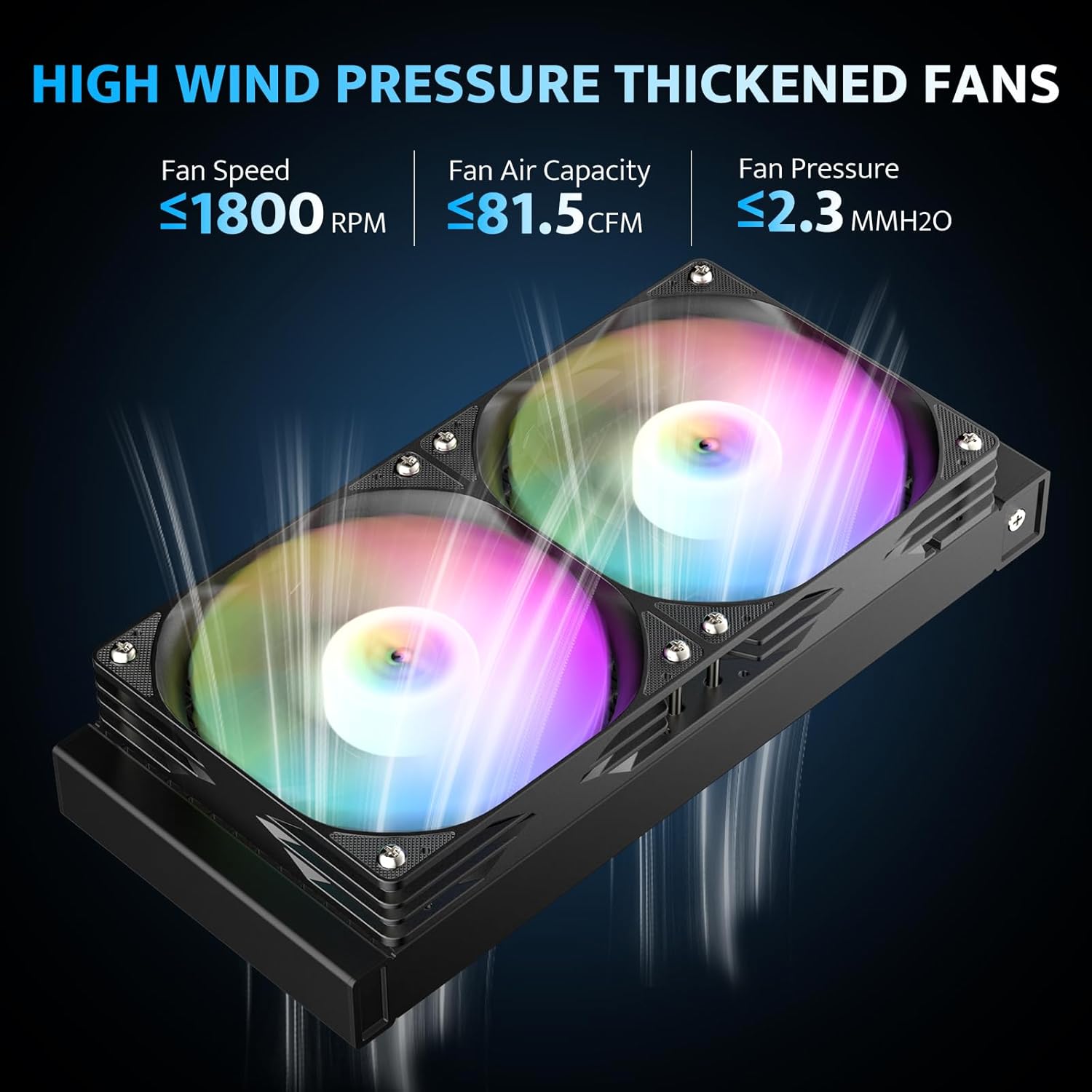
Image 3.2: Illustration of the high wind pressure fans, indicating fan speed, air capacity, and pressure.

Image 3.3: Diagram showing the high-density cooling radiator with optimized airflow and IIR+EPDM dual-material tubing.
- Determine the optimal mounting location for the radiator within your PC case (e.g., top, front, or rear). Ensure adequate clearance.
- Secure the radiator to the case using the provided screws.
- Ensure the fans are oriented to push or pull air as desired for optimal case airflow.
3.4. Mounting the Pump/Cold Plate
The pump features a 3-phase 6-pole motor and a ceramic bearing for efficient and durable operation.

Imatge 3.4: Desplegada view of the pump, highlighting the 3-phase 6-pole motor, ceramic bearing, and copper cold plate.

Image 3.5: Close-up of the optimized copper cooling plate, showing its dimensions and micro-channel design for improved heat transfer.
- If thermal paste is not pre-applied, apply a small, pea-sized amount to the center of your CPU's integrated heat spreader (IHS).
- Carefully place the pump/cold plate assembly onto the CPU, aligning the mounting holes with the standoffs.
- Secure the pump with the provided thumb screws or nuts, tightening them in a diagonal pattern until snug. Do not overtighten.
3.5. Connexions de cable
The DG240 features ARGB lighting and PWM fan control.

Imatge 3.6: Ex.ample of the DG240 cooler installed in a PC case, demonstrating ARGB lighting synchronization with other components.
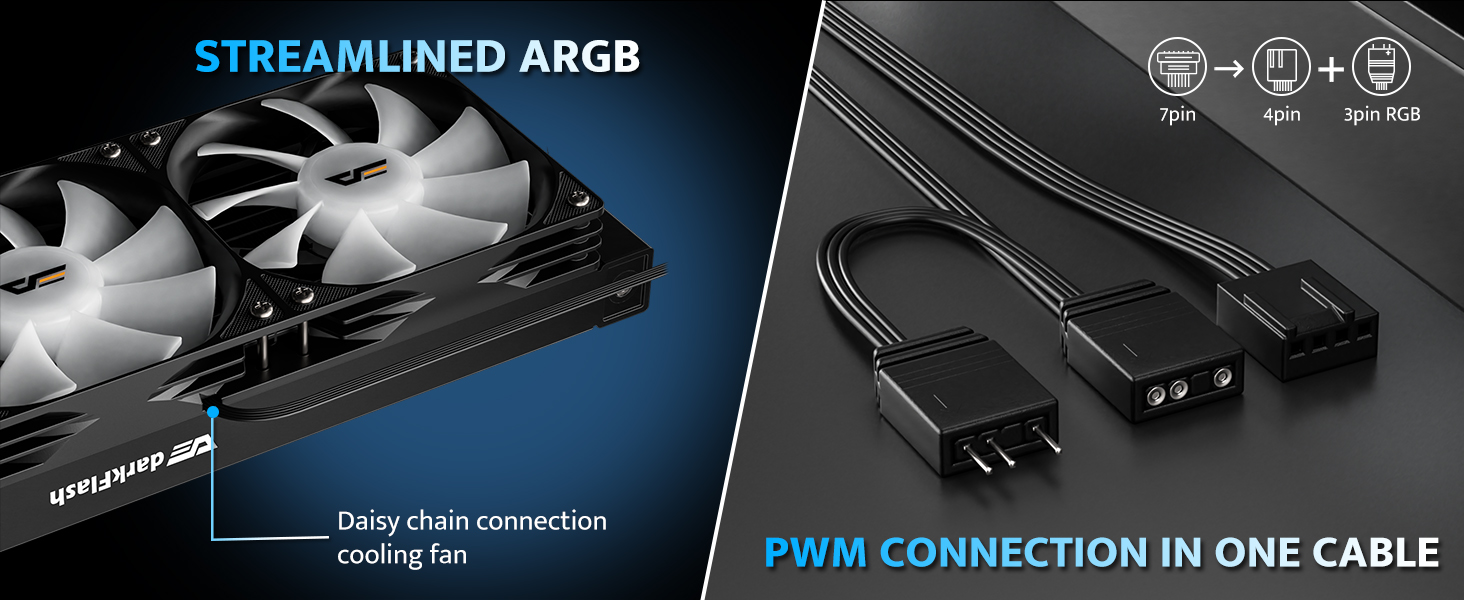
Image 3.7: Diagram illustrating the daisy-chain connection for the cooling fans and the consolidated PWM connection cable.
- Connect the pump's 3-pin power cable to an available 3-pin or 4-pin fan header on your motherboard (usually labeled "AIO_PUMP" or "CPU_FAN"). Ensure it receives full power.
- Connect the fans' PWM cable to the CPU_FAN header on your motherboard. The fans support daisy-chain connection for simplified wiring.
- Connect the 5V 3-pin ARGB cable from the pump and fans to a compatible 5V 3-pin ARGB header on your motherboard. This allows for synchronized lighting effects.
- Organize cables to ensure proper airflow and a clean build.
4. Instruccions de funcionament
4.1. Engegada inicial
After installation, double-check all connections before powering on your system. Upon first boot, monitor CPU temperatures using system monitoring software.
4.2. Control del ventilador PWM
The fans are PWM-controlled, meaning their speed adjusts automatically based on CPU temperature. This provides optimal cooling performance when needed and quieter operation during lighter loads. You can configure fan curves in your motherboard's BIOS/UEFI settings or through compatible software.
4.3. ARGB Lighting Synchronization
The DG240 supports 5V 3-pin Addressable RGB (ARGB) synchronization. Connect the ARGB cable to a compatible motherboard header (e.g., ASUS Aura Sync, MSI Mystic Light Sync, Gigabyte RGB Fusion, ASRock Polychrome RGB) to control lighting effects through your motherboard's software. This allows for unified lighting across your system components.
5. Manteniment
Un manteniment regular ajuda a garantir la longevitat i el rendiment òptim del refrigerador líquid de CPU.
- Eliminació de pols: Netegeu periòdicament la pols de les aletes del radiador i de les pales del ventilador amb aire comprimit. Assegureu-vos que els ventiladors no girin durant la neteja.
- Gestió de cables: Verifiqueu que tots els cables estiguin connectats correctament i que no obstrueixin el flux d'aire.
- Comprovació del refrigerant: As an AIO unit, the coolant is sealed and does not require refilling. However, inspect the tubing for any signs of leaks or damage.
- Soroll de la bomba: A slight hum from the pump is normal. Excessive noise or grinding sounds may indicate an issue and should be investigated.
6. Solució De Problemes
If you encounter issues with your darkFlash DG240 cooler, refer to the following common problems and solutions:
| Problema | Causa possible | Solució |
|---|---|---|
| Temperatures altes de la CPU |
|
|
| Els ventiladors no giren |
|
|
| La il·luminació ARGB no funciona |
|
|
| Soroll inusual de la bomba |
|
|
7. Especificacions
Detailed technical specifications for the darkFlash DG240 Liquid CPU Cooler:
| Característica | Especificació |
|---|---|
| Número de model | DG240 |
| Dimensions del producte | 10.91" de llargada x 4.72" d'amplada x 1.06" d'alçada (radiador) |
| Pes | Aproximadament 3.68 lliures |
| Compatibilitat de socket de CPU | Intel LGA 1200/115X/1700/1851, AMD AM4/AM5 |
| Mètode de refrigeració | Líquid (Aigua) |
| Material del radiador | Alumini |
| Material de placa freda | Coure, Aletes Micro Skived |
| Velocitat de la bomba | Fins a 3000 RPM |
| Suport TDP | Fins a 315 W |
| Flux d'aire del ventilador | Fins a 81.5 CFM |
| Nivell de soroll del ventilador | 33 dBA (màxim) |
| Velocitat màxima de rotació (ventiladors) | 1800 RPM |
| Tipus de connector d'alimentació | 5-Pin (for pump/fans, typically splits to 3-pin pump and 4-pin PWM fan) |
| Voltage | 12 Volts |
| Wattage | 1.8 watts (Bomba) |
| Sincronització ARGB | 5V 3-pin ARGB compatible with major motherboard brands |
| Longitud de la tuberia | 400 mm (15.75 polzades) |

Image 7.1: Diagram showing the dimensions of the darkFlash DG240 cooler, including radiator and water block size.
8. Garantia i Suport
8.1. Informació de la garantia
The darkFlash DG240 All-in-One Liquid CPU Cooler comes with a 3 any de garantia. This warranty covers defects in materials and workmanship under normal use. For warranty claims, please retain your proof of purchase.
For additional protection, extended protection plans may be available through your retailer:
- Pla de protecció de 3 anys
- Pla de protecció de 4 anys
- Protecció completa (pla mensual)
8.2. Suport tècnic
For technical assistance, troubleshooting, or further inquiries, please visit the official darkFlash website or contact their customer support. Refer to the product packaging or the darkFlash brand store on Amazon for the most current contact information.
darkFlash Brand Store: Visit darkFlash Store on Amazon


