1. Introducció
The Moman HOBS Car HUD Digital GPS Speedometer is an advanced head-up display designed to enhance your driving experience by projecting essential vehicle information directly onto your windshield. This device provides real-time data such as speed, compass direction, and various alarms, ensuring you stay informed without diverting your attention from the road.
This OBD2 gauge display is primarily suitable for cars equipped with an OBD2 interface. The OBD mode specifically applies to vehicles with OBD2 and EU-OBD protocols. Please verify your car's compatibility with OBD mode before installation. The device is designed for clarity with high-definition, three-dimensional imaging, minimizing ghosting for optimal visibility day or night.
2. Què hi ha a la caixa
Upon opening your Moman HOBS Car HUD package, you should find the following components:
- 1 x OBD2 HUD Unit
- 1 x OBD Cable
- 1 x Anti-Slip Mat
- 1 x manual d'instruccions

3. Característiques del producte
The Moman HOBS Car HUD is equipped with a range of features designed for convenience and safety:
- High-Definition Large Screen Display: Provides clear, three-dimensional imaging without ghosting, ensuring accurate speed readings and other data.
- Pantalla multifuncional: Includes GPS speed, clock, RPM, water temperature, voltage, fuel consumption, driving time, altitude, number of satellites, compass, turbo pressure, mileage, shutdown delay, and automatic brightness adjustment.
- Funcions d'alarma múltiples: Features over-speed alarms (3-segment customizable), fatigue driving reminders, RPM alarm, water temperature alarm, and voltage alarm to enhance driving safety.
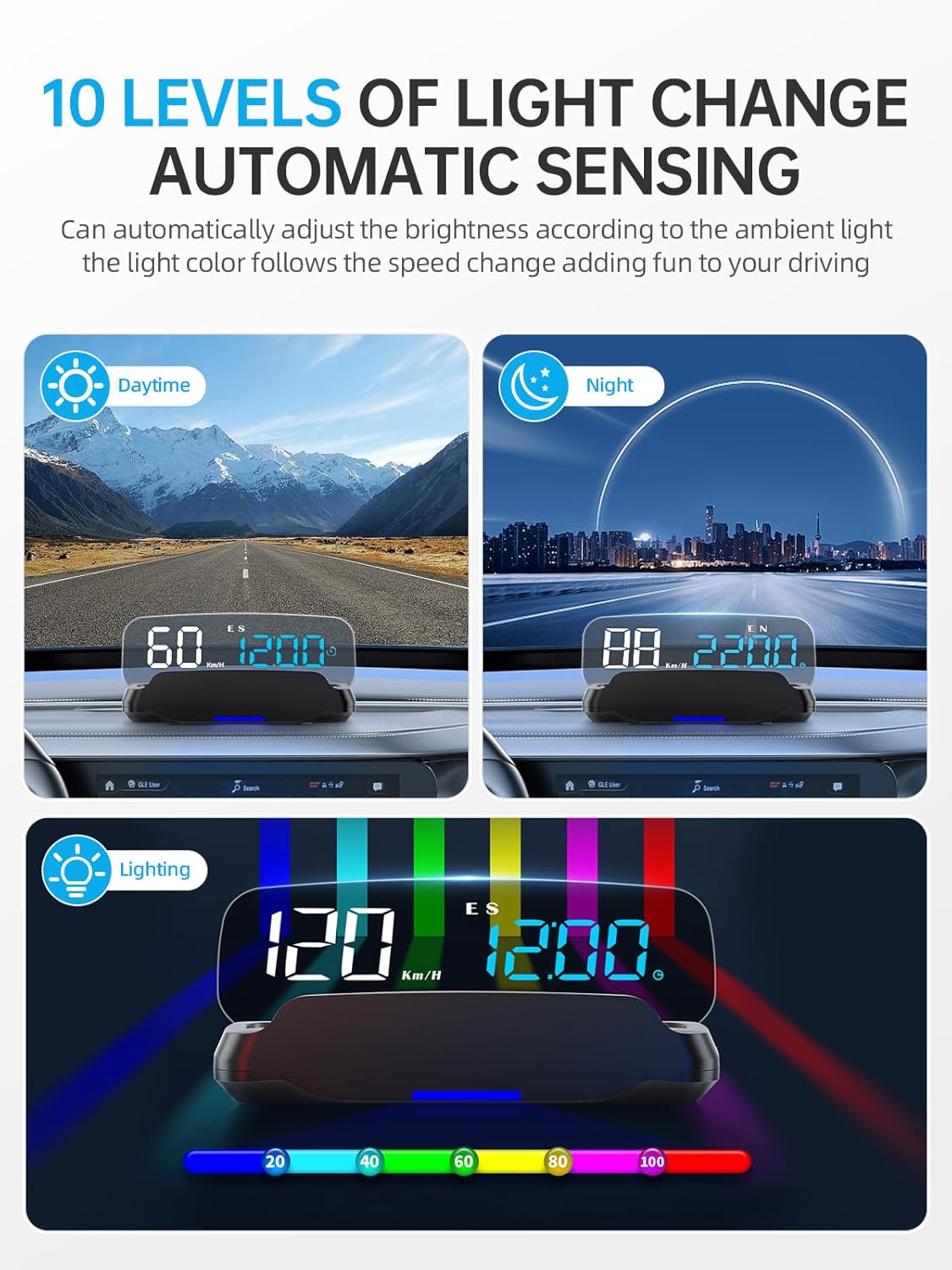
- Automatic Light Sensing: Ten levels of automatic light-sensitive adjustment ensure clear visibility during the day and prevent blinding at night.
- Ambient Light Design: The light color changes according to the car's speed, adding a dynamic visual element.
- Àmplia compatibilitat: Suitable for most cars with OBD2/EU-OBD protocol manufactured after 2008.

4. Configuració i instal·lació
Follow these steps to properly set up and install your Moman HOBS Car HUD:
- Step 1: Locate the OBD Port. The OBD port is typically found under the steering wheel in Japanese cars, near the dash in German cars, or inside the inspection cover on American pickups. Refer to your vehicle's manual if you have difficulty locating it.
- Step 2: Connect the OBD Cable. Plug one end of the provided OBD cable into your car's OBD port and the other end into the HUD unit. Route the cable neatly, possibly hiding it along the A-pillar, to avoid obstruction.
- Step 3: Position the HUD Unit. Place the HUD unit on your dashboard using the anti-slip mat. Ensure it is positioned where the projected display is clearly visible on your windshield without obstructing your view de la carretera.
- Step 4: Power On and Wait for Signal. Once connected, the HUD unit will power on. Wait a few seconds for the satellite icon to stop blinking, indicating that it has acquired a GPS signal and is ready for use.
5. Instruccions de funcionament
The Moman HOBS Car HUD offers various display modes and settings. Familiarize yourself with the controls for optimal use.
5.1 Modes de visualització
The unit can switch between multiple display modes to show different combinations of information. Use the control button (often a wave wheel or multi-function button) to cycle through these modes:
- Speed + Distance + Direction of Travel
- Speed + Altitude + Direction of Travel
- Speed + Date + Direction of Travel
- Velocitat + rellotge
- Speed + Travel Time + Direction of Travel
- Speed (single display)
- Speed + Voltage
- Speed + Water Temperature
- Speed + Turbo Pressure
- Velocitat de gir (RPM)

5.2 Understanding Display Elements
The HUD display includes several key indicators:
- Velocitat: Your current driving speed.
- Unitat de velocitat: Indicates whether speed is displayed in KM/H (kilometers per hour) or MPH (miles per hour).
- Àrea de visualització multifunció: Shows additional data like date, time, altitude, traveling time, driving distance, driving direction (N, S, E, W), number of satellites, turbo pressure, voltage, water temperature, and RPM.
- Fatigue Driving Icon: Appears when the fatigue driving reminder is active.
- Speed Alarm Icon: Indicates an active speed warning.
- Icona de satèl·lit: Shows GPS signal status.
- Brúixola: Displays current driving direction.

5.3 Configuració d'alarmes
The HUD allows you to set various alarms for enhanced safety:
- Alarma de sobrevelocitat: You can set up to three different speed thresholds. If your vehicle exceeds these speeds, the HUD will provide a visual alert.
- Recordatori de conducció per fatiga: Customize the time interval for this reminder to prompt you to take breaks during long drives.
- RPM, Water Temperature, Voltage Alarmes: These can be configured to alert you if your engine's RPM, coolant temperature, or battery voltage exceed safe operating limits.

6. Manteniment
To ensure the longevity and optimal performance of your Moman HOBS Car HUD, follow these simple maintenance guidelines:
- Neteja: Use a soft, dry cloth to wipe the display and exterior of the unit. Avoid abrasive cleaners or solvents that could damage the surface.
- Col·locació: Ensure the unit is securely placed on the anti-slip mat to prevent movement during driving. Avoid placing heavy objects on top of the unit.
- Cura del cable: Do not bend or crimp the OBD cable excessively. Store it neatly to prevent damage.
- Temperatura: While designed for automotive environments, avoid exposing the unit to extreme temperatures for prolonged periods when not in use.
7. Solució De Problemes
If you encounter issues with your Moman HOBS Car HUD, refer to the following common problems and solutions:
| Problema | Causa possible | Solució |
|---|---|---|
| No hi ha pantalla/la unitat no s'encén | Loose cable connection, vehicle's OBD port issue, unit malfunction. | Ensure the OBD cable is securely connected to both the HUD and the car's OBD port. Check if your car's OBD port is functioning correctly (e.g., by testing with another OBD device). |
| Lectura de velocitat incorrecta | GPS signal interference, incorrect calibration. | Assegureu-vos que la unitat tingui una vista clara view of the sky for optimal GPS signal reception. Refer to the detailed instruction manual for calibration steps if available. |
| Display shows KM/H instead of MPH (or vice-versa) | Incorrect unit setting. | The unit has a button (often a wave wheel or multi-function button) to switch between KM/H and MPH. Press or hold this button as per the detailed manual's instructions to change the unit. Some models may require entering a settings menu (e.g., short click to #5 for unit change, then long hold to save). |
| Display is dim or too bright | Automatic light sensor obstruction or manual setting override. | Ensure the light sensor on the unit is not obstructed. The unit features 10 levels of automatic light adjustment; allow it to adapt to ambient light. If issues persist, check the manual for manual brightness adjustment options. |
| No compass display or incorrect direction | GPS signal issue, unit not calibrated for compass. | Ensure strong GPS signal. Some units may require initial calibration by driving in a circle or specific pattern. Consult the full instruction manual for compass calibration procedures. |
If the problem persists after trying these solutions, please contact Moman customer support for further assistance.
8. Especificacions
| Atribut | Detall |
|---|---|
| Dimensions del producte | 6.3 x 2.76 x 2.36 polzades; 7.05 unces |
| Número de model de l'article | PLAQUES |
| Data de primera disponibilitat | 25 de febrer de 2025 |
| Fabricant | mare |
| ASIN | B0DYDPPMSX |
| Marca | mare |
| Material | Policarbonat (PC) |
| Pes de l'article | 0.2 quilos |
9. Garantia i Suport
Moman products are designed for reliability and performance. For information regarding product warranty, returns, or technical support, please refer to the official Moman weblloc web o contacteu directament amb el seu servei d'atenció al client. Conserveu el rebut de compra com a comprovant de compra per a qualsevol reclamació de garantia.
Per obtenir recursos addicionals i preguntes freqüents, visiteu la Botiga Moman a Amazon.