Introducció
This manual provides detailed instructions for the setup, operation, and maintenance of your Pyle PHSKR28.5 Mini Hi-Fi Bluetooth Stereo System. Please read this manual thoroughly before using the product to ensure proper function and to maximize your listening experience.

Image: The Pyle PHSKR28.5 Mini Hi-Fi Bluetooth Stereo System, featuring a central unit and two accompanying speakers, all in black.
Què hi ha a la caixa
Verifiqueu que tots els components siguin presents a l'embalatge:
- Main Stereo Unit
- Dos ponents
- BT Stereo System Remote Control
- Cable de connexió AV
- Un micròfon sense fil
- Cable d'alimentació
- Cable d'antena FM

Image: An illustration showing all items included in the product package: the main stereo unit, two speakers, a microphone, an AV cable, an FM antenna, and a remote control.
Instruccions de configuració
1. Connexió d'altaveus
- Connect the speaker wires from the main unit to the corresponding speaker terminals on each speaker. Ensure correct polarity (positive to positive, negative to negative).
- Col·loqueu els altaveus per a una distribució òptima del so.
2. Connexió d'antena
- Connect the supplied FM antenna cable to the FM antenna input on the rear of the main unit.
- Extend the antenna for better reception.
3. Connexió d'alimentació
- Plug the power cord into the AC inlet on the main unit.
- Connect the other end of the power cord to a standard AC power outlet.
4. Connexions opcionals
- Dispositius USB: Insert a USB flash drive into the USB port for media playback or recording.
- Entrada AUX: Connect external audio devices (e.g., smartphone, MP3 player) using an AUX cable to the AUX input.
- Sortida HDMI: Connect an HDMI cable from the unit's HDMI output to a compatible display for video output from CD/DVD playback.
- Micròfon: Connect the wireless microphone receiver or a wired microphone to the microphone input for karaoke or recording.

Image: The Pyle PHSKR28.5 stereo system highlighting its various input options including Aux, HDMI, and USB ports, alongside visual cues for Bluetooth connectivity with a laptop and smartphone.
Instruccions de funcionament
Encès/Apagat
Premeu el botó PODER botó del panell frontal o del comandament a distància per encendre o apagar la unitat.
Selecció de la font
Premeu el botó FONT or FUNCIÓ button on the front panel or remote control to cycle through available input sources: Bluetooth, CD/DVD, FM Radio, USB, AUX, HDMI.
Emparellament Bluetooth
- Select the Bluetooth source using the FONT button. The display will show "BT" and indicate pairing mode.
- Al dispositiu mòbil, activeu el Bluetooth i cerqueu els dispositius disponibles.
- Select "Pyle PHSKR28.5" (or similar) from the list.
- Un cop emparellat, la unitat confirmarà la connexió.
Reproducció de CD/DVD
- Select the CD/DVD source.
- Premeu el botó OBRIR/TANCAR botó per obrir la safata del disc.
- Place a CD or DVD (compatible with MP3, CD-R/RW) onto the tray with the label side up.
- Premeu OBRIR/TANCAR again to close the tray. Playback will begin automatically or can be started with the REPRODUCCIÓ/PAUSA botó.

Imatge: Un primer pla view of the Pyle PHSKR28.5 stereo system's tray-loading CD player, with a hand inserting a disc.
Sintonització de ràdio FM
- Select the FM Radio source.
- Utilitza el TUNE +/- botons per sintonitzar manualment una emissora.
- Mantén premut TUNE +/- for automatic scanning to the next available station.
- To save a preset, press MEMÒRIA, després utilitza PRECONFIGURACIÓ +/- per seleccionar un número preestablert i premeu MEMÒRIA de nou per confirmar.
USB Playback, Recording, and CD Ripping
- Reproducció USB: Insert a USB flash drive. Select the USB source. The unit will automatically detect and play compatible audio files.
- Gravació USB: While playing audio from another source (e.g., FM radio, AUX, microphone input), press the REGISTRAR button to begin recording to the connected USB drive.
- CD Ripping: While a CD is playing, press the CD RIP button to convert tracks from the CD to MP3 format and save them onto the USB drive.
Ús del micròfon
Connect the microphone to the designated input. Use the MIC VOL knob to adjust microphone volume. Adjust ECO i REVERB effects as desired for vocal enhancement.
Configuració de l'equalitzador
Premeu el botó EQ button on the front panel or remote to cycle through various equalizer presets such as Jazz, Rock, Pop, Classical, and Bass. These settings adjust the audio frequency response for different music genres.

Image: The Pyle PHSKR28.5 stereo system with its speakers illuminated by colorful LED lights, illustrating the visual feedback of equalizer effects and strong bass output.


Image: Icons representing various equalizer presets: Jazz (saxophone), Classical (cello), and Pop (person with headphones).
Volume, Bass, and Treble Adjustment
Utilitza el MÀSTER VOLUM botó del panell frontal o del VOL +/- buttons on the remote to adjust the overall volume. Separate BASS i AGUTS controls are available on the remote for fine-tuning the audio output.
Funcions de control remot
The included remote control provides convenient access to all major functions, including power, source selection, volume, track control, equalizer settings, and microphone effects.

Imatge: Una imatge detallada view of the Pyle PHSKR28.5 main unit's control panel, showing buttons for digital amplifier, Bluetooth 5.0, USB ports, LED indicators, and microphone volume/bass/treble adjustments.
Manteniment
- Neteja: Use a soft, dry cloth to clean the exterior surfaces of the unit and speakers. Do not use liquid cleaners or abrasive materials.
- Ventilació: Assegureu-vos que les obertures de ventilació de la unitat no estiguin bloquejades per evitar el sobreescalfament.
- Cura del disc: Handle CDs and DVDs by their edges. Store them in their cases to prevent scratches. Clean discs with a soft, lint-free cloth, wiping from the center outwards.
- Emmagatzematge: Si guardeu la unitat durant un període prolongat, desconnecteu-la de la presa de corrent i guardeu-la en un lloc fresc i sec.
Resolució de problemes
| Problema | Causa possible | Solució |
|---|---|---|
| Sense poder | Cable d'alimentació no connectat; Presa de corrent no activa. | Assegureu-vos que el cable d'alimentació estigui ben connectat. Proveu la presa de corrent amb un altre dispositiu. |
| Sense so | Volume too low; Incorrect source selected; Speaker wires loose. | Increase volume. Select the correct input source. Check speaker wire connections. |
| Bluetooth no emparellat | La unitat no està en mode d'emparellament; Dispositiu massa lluny; Dispositiu prèviament emparellat connectat. | Ensure unit is in Bluetooth pairing mode. Move device closer. Disconnect from other Bluetooth devices. |
| El CD/DVD no es reprodueix | Disc inserted incorrectly; Disc is scratched or dirty; Incompatible disc format. | Insert disc correctly. Clean or replace disc. Ensure disc is compatible (MP3, CD-R/RW). |
| Mala recepció FM | Antena no connectada o estesa correctament; Senyal feble. | Adjust FM antenna position. Try repositioning the unit. |
| El comandament a distància no funciona | Piles esgotades; Obstrucció entre el comandament a distància i la unitat. | Replace remote control batteries. Ensure clear line of sight to the unit's IR sensor. |
Especificacions
| Característica | Detall |
|---|---|
| Número de model | PHSKR28.5 |
| Marca | Pyle |
| Potència de sortida | 160W RMS |
| Connectivitat | Bluetooth 5.0, USB, AUX, HDMI |
| Reproducció multimèdia | CD, DVD, VCD, CD-R/RW, MP3, FM Radio |
| Característiques especials | DSP Technology, Equalizer Settings (Jazz, Rock, Pop, Classical, Bass), Microphone Inputs with Echo/Reverb, USB Recording, CD Ripping |
| Color | Negre |
| Dimensions del producte (L x A x A) | 10.8 x 12 x 15.5 polzades (unitat principal + altaveus) |
| Pes de l'article | 16 lliures |
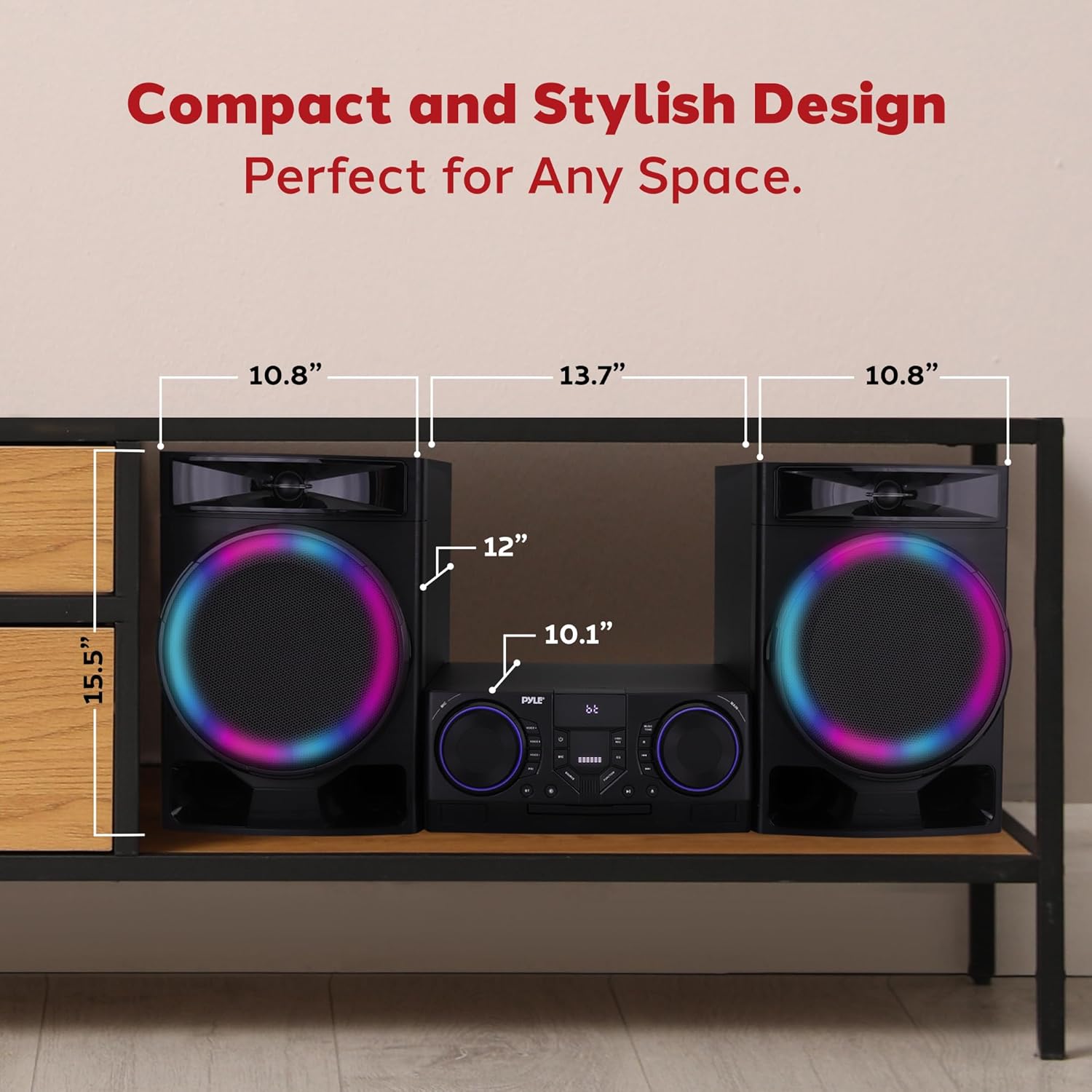
Image: A diagram illustrating the dimensions of the Pyle PHSKR28.5 stereo system, including the main unit and speakers, with measurements for length, width, and height.
Garantia i Suport
Pyle products are designed for reliability and performance. For warranty information, please refer to the warranty card included with your product or visit the official Pyle website. For technical support or service inquiries, please contact Pyle customer service.
Nota: Conserveu el rebut de compra com a comprovant de compra per a reclamacions de garantia.


