1. Producte acabatview
The XTRONS Android 14 Car Stereo is an advanced in-dash navigation and entertainment system designed to upgrade your vehicle's capabilities. Featuring a 7-inch IPS touch screen, 4GB RAM, and 64GB ROM, it offers seamless performance and extensive storage for applications. Key functionalities include built-in DSP for superior audio, wireless CarPlay and Android Auto for smartphone integration, global 4G LTE connectivity, and an off-road inclinometer function.
2. Models i anys aplicables
This car stereo is compatible with the following Mercedes-Benz and Volkswagen models:
- Mercedes-Benz B-Class W245 (2005-2011)
- Mercedes-Benz A-Class W169 (2004-2012)
- Mercedes-Benz Viano & Vito W639 (2006-2018) - Please check dimensions before purchase.
- Mercedes-Benz Sprinter W906 (2006-2022)
- Volkswagen Crafter (2006-Now)
The plug-and-play kit retains original vehicle functions such as steering wheel controls, air-conditioner information, and door status.

Image: Comparison of a Mercedes-Benz dashboard before and after installing the XTRONS car stereo, showing the integrated 7-inch display.
3. Important Notes on Compatibility
Before installation, ensure your car's central console is quadrate-shaped. This unit is not compatible with oval-shaped or trapezoidal central consoles. The original CD changer will not function after installing this unit. This unit does not support decoding your vehicle's air conditioning information. Verify if your car has a COMAND system, as this unit may not be compatible.

Image: Visual guide for central console compatibility and notes on specific vehicle features.
4. Característiques principals
- Pantalla tàctil IPS d'7 polzades: 1280*720 high-definition display with 178° viewAngle d'inclinació per a unes imatges clares.
- Android 14 with Octa Core: Stable and responsive performance with 4GB RAM and 64GB ROM for app storage.
- 4G LTE global: Supports Micro-SIM card for mobile broadband connection (up to 300Mbps download speed), compatible with 99% of worldwide carriers.
- CarPlay sense fil i Android Auto: Enhances phone usage safety with voice commands (Hey Siri, Hey Google) and seamless integration.
- DSP integrat: Advanced Digital Sound Processor for a customizable audio experience.
- Wi-Fi de doble banda: Supports both 2.4GHz and 5GHz bands for faster and more stable internet connectivity.
- Off-Road Inclinometer Function: High-precision gyroscope sensors display current ride height, roll, and pitch angles for driving safety.

Image: Highlighting the 7-inch IPS screen and Bluetooth 5.0 capabilities.

Imatge: Showcasing 4G LTE, Dual Band Wi-Fi, and USB Tethering features.

Image: Illustrating various smartphone connectivity methods.

Image: Displaying the built-in AKM DSP for audio customization.

Image: Demonstrating the Off-Road Inclinometer function.
5. Accessoris inclosos
The following accessories are included with your XTRONS Android 14 Car Stereo:
- 1 × Main Unit
- 2 × Arnès de cablejat ISO
- 1 × Cable de càmera
- 1 × Antena 4G
- 1 × Antena GPS
- 1 × Cable d'antena de ràdio
- 1 × Cable de ranura per a targeta SIM
- 1 x Radio Cable Adapter
- 1 × CANbus Extension Cable
- 1 x micròfon
- 1 × Caixa CANbus
- 2 cable USB
- 1 × Manual d'usuari
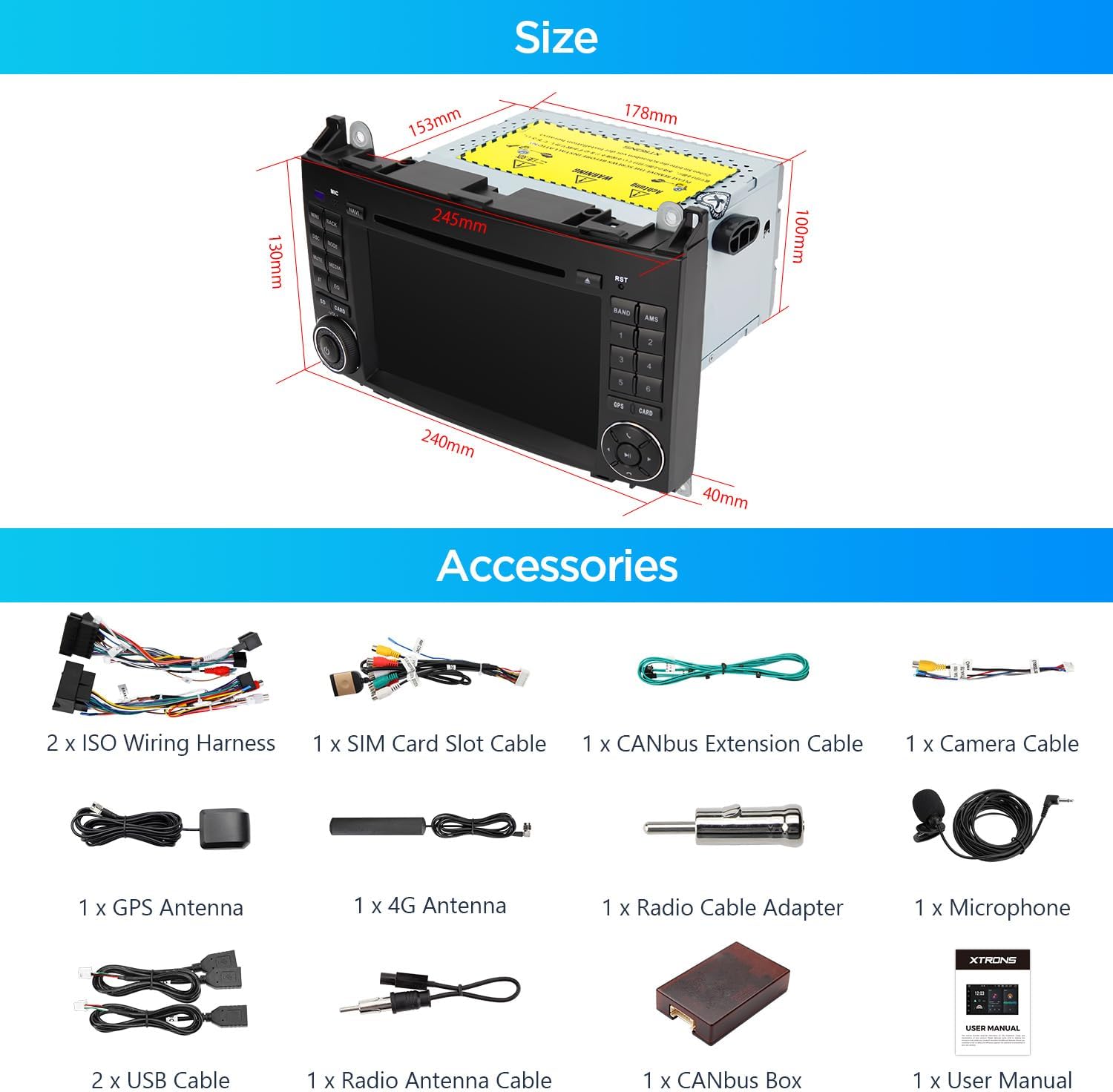
Image: Product dimensions and a visual list of included accessories.
6. Accessoris opcionals
Enhance your experience with these optional accessories (sold separately):
- OBD Function: For vehicle diagnostics.
- Funció TPMS: For tire pressure monitoring.
- Front / Reversing Camera: For improved visibility and parking assistance.
- External DVR: For recording driving footage.
7. Configuració i instal·lació
Installation typically involves removing the existing head unit, connecting the provided wiring harnesses, CANbus box, and antennas, then securing the new XTRONS unit. Ensure all connections are secure before reassembling the dashboard. Refer to your vehicle's specific dashboard disassembly instructions if needed.
7.1 Connecting CANbus
Check if your unit's CANbus box is compatible with your car's CANbus system. If not, you may need to connect the 3 connectors in the picture to the male connector with one of the female connectors. If this does not resolve the issue, try the other female connector.
7.2 Darrera View Càmera
If your car has an original rear view system, you may need to order XTRONS ICE/ACS/FZMRM01 to retain its functionality.
8. Instruccions de funcionament
8.1 Navegació bàsica
The unit features a responsive 7-inch IPS touch screen. Navigate through menus and applications by tapping or swiping. Physical buttons on the side provide quick access to common functions like volume control, home, and back.
8.2 UI Themes
The XTRONS unit supports multiple UI themes to customize your interface. To change themes:
- Connecta el teu dispositiu a la Wi-Fi.
- Open the App Store and navigate to the 'Themes' section.
- Choose and install your preferred theme.
- Tap 'Apply' to activate the new theme.
Video: Demonstrates how to refresh and apply multiple UI themes on XTRONS ID series units.
8.3 Smartphone Connectivity (CarPlay/Android Auto)
Connect your smartphone wirelessly for Apple CarPlay or Android Auto. This allows access to navigation, music, calls, and voice assistants directly from the head unit. Android Auto also supports wired connections.
8.4 Built-in DSP
Access the built-in Digital Sound Processor (DSP) settings to fine-tune your audio. Adjust equalizer settings, bass levels, and sound field to optimize your listening experience.
8.5 Inclinometer Function
For off-road enthusiasts, the inclinometer displays real-time vehicle pitch, roll, and compass information, enhancing awareness in challenging terrains.
9. Manteniment
To ensure optimal performance and longevity of your XTRONS car stereo, follow these maintenance guidelines:
- Neteja de pantalla: Use a soft, lint-free cloth to gently wipe the touch screen. Avoid abrasive cleaners or harsh chemicals.
- Actualitzacions de programari: Periodically check for available software updates via the unit's settings or the XTRONS weblloc web per assegurar-vos que disposeu de les darreres funcions i correccions d'errors.
- Ventilació: Ensure the unit's ventilation areas are not obstructed to prevent overheating.
10. Solució De Problemes
If you encounter issues with your XTRONS car stereo, try the following steps:
- Sense energia: Check all power connections and ensure the vehicle's ignition is on. Verify fuses if necessary.
- Sense so: Check speaker connections, volume levels, and DSP settings. Ensure the correct audio source is selected.
- La pantalla tàctil no respon: Perform a soft reset by pressing the RST button (if available) or by turning the vehicle off and on.
- Pèrdua de senyal GPS: Assegureu-vos que l'antena GPS estigui instal·lada correctament i que tingui una vista clara view del cel.
- CarPlay/Android Auto Issues: Verify your phone's connection (Wi-Fi/USB) and ensure the apps are updated on your phone.
For persistent issues, consult the detailed user manual or contact XTRONS customer support.
11. Especificacions
- Sistema operatiu: Android 14
- Mida de la pantalla: 7 polzades
- Tipus de pantalla: IPS Touch Screen (1280*720 High Definition)
- Processador: Octa Core
- RAM: 4 GB
- ROM: 64 GB
- Connectivitat: Built-in 4G LTE, Dual Band Wi-Fi (2.4GHz & 5GHz), Bluetooth 5.0
- Integració del telèfon intel·ligent: Wireless CarPlay, Wireless/Wired Android Auto, Screen Mirroring
- Àudio: DSP incorporat
12. Garantia i assistència
The XTRONS Android 14 Car Stereo comes with a manufacturer's warranty. Please refer to the warranty card included in your package for specific terms and conditions. For technical support, product inquiries, or warranty claims, please visit the official XTRONS weblloc o poseu-vos en contacte amb el seu departament d'atenció al client.


