1. Introducció
This manual provides detailed instructions for the operation and maintenance of your Genérico GN-408 Portable MP3 MP4 Player. Please read this manual thoroughly before using the device to ensure proper functionality and to maximize your user experience.
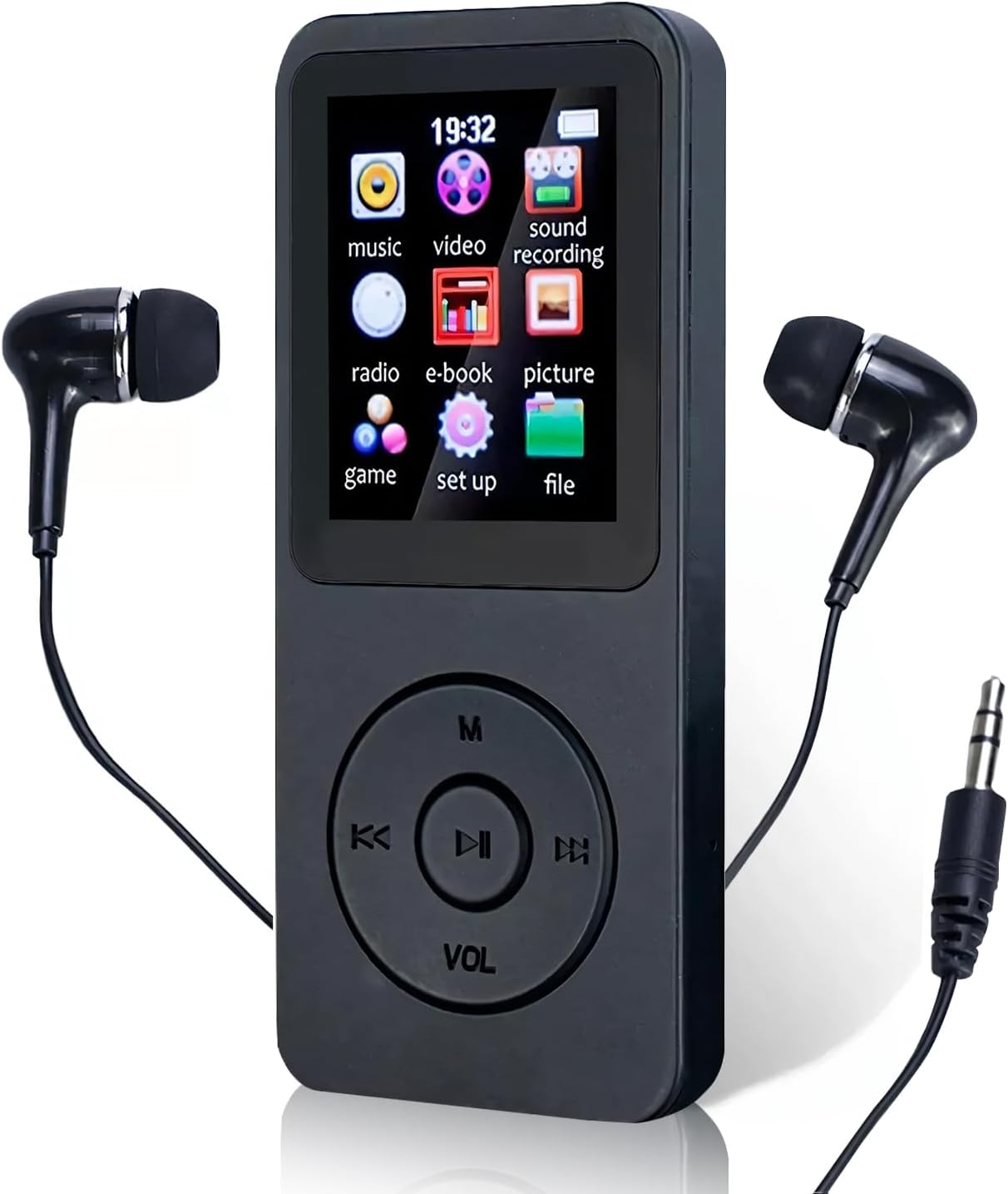
Image 1.1: The Genérico GN-408 Portable MP3 MP4 Player with wired earphones connected. The screen displays icons for music, video, sound recording, radio, e-book, picture, game, setup, and file.
Important Note on Bluetooth Connectivity:
The Bluetooth function on this device is designed for connecting to Bluetooth headphones or external Bluetooth speakers ONLY. It DOES NOT connect to mobile phones, computers, car radios, or other similar devices for data transfer or control.
2. Contingut del paquet
Si us plau, verifiqueu que tots els elements que s'enumeren a continuació estiguin inclosos al vostre paquet:
- 1 x Genérico GN-408 MP3/MP4 Player
- 1 x cable de càrrega USB
- 1 x Wired Earphones (P2 connection)
- 1 x Manual d'usuari (aquest document)

Image 2.1: The complete package contents, including the MP3/MP4 player, wired earphones, USB charging cable, and user manual, alongside the product packaging.
3. Dispositiu acabatview
3.1. Característiques físiques

Imatge 3.1: Detallada view of the player's side, showing the MicroSD card slot, and the bottom, showing the 3.5mm headphone jack and the built-in speaker.
- Pantalla TFT d'1.8 polzades: Mostra menús, contingut multimèdia i configuració.
- Botons de control: Navigation and playback controls (M, K<, ||>, >K, VOL).
- Ranura per a targetes Micro SD: For expandable memory (up to 64GB, card not included).
- Presa d'auriculars de 3.5 mm: For wired earphones.
- Port USB: Per a càrrega i transferència de dades.
- Altaveu integrat: Per a la reproducció d'àudio sense auriculars.
- Micròfon: Per a l'enregistrament de veu.
3.2. Característiques clau
- Multi-format Playback: Supports MP3, WMA, APE, WAV, FLAC audio formats and video playback.
- Ràdio FM: Listen to FM broadcasts (requires wired earphones as antenna).
- Gravadora de veu: Built-in microphone for recording audio.
- Lector de llibres electrònics: Supports TXT format files.
- Imatge Viewer: Displays JPG/GIF images.
- Connectivitat Bluetooth: Connects to Bluetooth headphones and speakers for wireless audio.
- Emmagatzematge ampliable: Admet targetes Micro SD de fins a 64 GB.
- Llarga vida útil de la bateria: Up to 20 hours standby, 3 hours music/video playback.
4. Configuració
4.1. Càrrega del dispositiu
- Connect the small end of the included USB cable to the player's USB port.
- Connecteu l'extrem més gran del cable USB a un adaptador de corrent USB (no inclòs) o al port USB d'un ordinador.
- The device will begin charging. A full charge typically takes 2 to 3 hours.
- L'indicador de bateria a la pantalla mostrarà l'estat de càrrega.
Note: Ensure the device is fully charged before first use for optimal battery performance.
4.2. Instal·lació d'una targeta Micro SD
The Genérico GN-408 does NOT have internal memory. A Micro SD card is REQUIRED for storing and playing media files.
- Localitza la ranura per a targetes Micro SD al lateral del reproductor.
- Gently insert a Micro SD card (up to 64GB, not included) into the slot with the gold contacts facing down, until it clicks into place.
- To remove the card, gently push it in again until it clicks, and it will spring out.
Note: Ensure the device is powered off before inserting or removing the Micro SD card to prevent data corruption.
4.3. Transferència Files
- Connecteu el reproductor a l'ordinador mitjançant el cable USB.
- El reproductor apareixerà com una unitat de disc extraïble a l'ordinador.
- Drag and drop your music, video, image, and e-book files into the appropriate folders on the Micro SD card.
- Una vegada fileUn cop es transfereixin, expulseu el disc extraïble de l'ordinador amb seguretat abans de desconnectar el cable USB.
5. Instruccions de funcionament
5.1. Encendre/apagar
- Per encendre: Premeu i manteniu premut el botó d'engegada (normalment situat al lateral o a la part superior) durant uns segons fins que la pantalla s'il·lumini.
- Per apagar: Press and hold the Power button for a few seconds until the device shuts down.
5.2. Navegació bàsica
The player features a central circular control pad with several buttons:
- M (Menu/Back): Press to go back to the previous menu or access context-sensitive options.
- K< (Previous/Rewind): Press to go to the previous track/item or hold to rewind.
- ||> (Play/Pause/Confirm): Press to play/pause media or confirm a selection.
- >K (Next/Fast Forward): Press to go to the next track/item or hold to fast forward.
- VOL (volum): Press to enter volume adjustment mode, then use K< and >K to adjust volume.
Use the K< and >K buttons to navigate through menu options, and ||> to select.
5.3. Reproducció de música
- Al menú principal, seleccioneu "Música".
- Browse through your folders and files using K< and >K.
- Press ||> to select a song and start playback.
- During playback, use K< and >K for previous/next track, and ||> to play/pause.
- Press VOL to adjust volume.
- Press M for music options (e.g., repeat mode, shuffle, equalizer).
5.4. Reproducció de vídeo
- Al menú principal, seleccioneu "Vídeo".
- Navega fins al teu vídeo files.
- Press ||> to select and play a video.
- Use playback controls as with music.
5.5. Ràdio FM
Wired earphones must be connected to the 3.5mm jack to act as an antenna for FM radio reception.
- Connect the wired earphones.
- Al menú principal, seleccioneu "Ràdio".
- Use the navigation buttons to scan for stations or select a preset.
5.6. Enregistrament de veu
- From the main menu, select "Sound Recording".
- Segueix les instruccions que apareixen a la pantalla per iniciar, pausar i desar gravacions.
5.7. E-book Reader
- Al menú principal, seleccioneu "Llibre electrònic".
- Navigate to your TXT files.
- Press ||> to open and read an e-book.
5.8. Imatge Viewer
- From the main menu, select "Picture".
- Navigate to your JPG/GIF image files.
- Press ||> to view una imatge.
5.9. Bluetooth Connection (for Audio Output)
- From the main menu, select "Setup" or "Bluetooth" (if available as a direct option).
- Activa el Bluetooth.
- Assegureu-vos que els vostres auriculars o altaveu Bluetooth estiguin en mode d'emparellament.
- El reproductor buscarà els dispositius disponibles. Seleccioneu el vostre dispositiu de la llista.
- Once connected, audio will be routed to the Bluetooth device.
Reminder: Bluetooth is for audio output to headphones/speakers only. It does not connect to phones, computers, or car radios.
6. Manteniment
- Neteja: Feu servir un drap suau i sec per netejar el dispositiu. No utilitzeu netejadors líquids ni materials abrasius.
- Emmagatzematge: Guardeu el reproductor en un lloc fresc i sec, allunyat de la llum solar directa i de temperatures extremes.
- Cura de la bateria: Per allargar la durada de la bateria, eviteu descarregar-la completament amb freqüència. Carregueu el dispositiu regularment, fins i tot si no l'utilitzeu durant períodes prolongats.
- Exposició a l'aigua: Aquest dispositiu no és impermeable. Eviteu l'exposició a l'aigua o a una humitat elevada.
7. Solució De Problemes
- El dispositiu no s'encén:
- Ensure the battery is charged. Connect the player to a power source and charge for at least 30 minutes.
- Prova de prémer i mantenir premut el botó d'engegada durant un període més llarg (5-10 segons).
- No sound from headphones/speaker:
- Comproveu el nivell de volum.
- Ensure headphones are properly plugged into the 3.5mm jack.
- If using Bluetooth, ensure the Bluetooth device is paired and connected, and its volume is also up.
- Test with different headphones or speakers to rule out faulty accessories.
- Cannot read Micro SD card:
- Ensure the Micro SD card is inserted correctly and fully clicked into place.
- Verify the card is not damaged. Try another Micro SD card if available.
- Ensure the card is formatted to a compatible file sistema (per exemple, FAT32).
- Bluetooth does not connect to my phone/computer:
This is expected behavior. The player's Bluetooth is designed ONLY for connecting to Bluetooth headphones or external Bluetooth speakers for audio output. It does not support connection to phones, computers, or car radios for data transfer or control.
- Files are not playing:
- Comproveu si el files are in a supported format (MP3/WMA/APE/WAV/FLAC for audio, JPG/GIF for images, TXT for e-books).
- Assegureu-vos el files no estan malmeses.
- Verifiqueu que la targeta Micro SD tingui prou espai lliure.
8. Especificacions
| Marca: | Genérico |
| Model: | GN-408 |
| Fabricant: | IIGENAI |
| Emmagatzematge: | No internal memory; supports Micro SD card up to 64GB (not included) |
| Interfície: | USB 2.0 |
| Bluetooth: | Yes (for audio output to headphones/speakers only) |
| Pantalla: | 1.8-inch TFT LCD, 128 x 160 pixels |
| Pantalla tàctil: | No |
| Formats d'àudio: | MP3, WMA, APE, WAV, FLAC |
| Formats d'imatge: | JPG, GIF |
| Format de llibre electrònic: | TXT |
| Bateria: | 450mAh Ió de liti |
| Temps de càrrega: | Aproximadament 2 hores |
| Temps de reproducció: | Up to 3 hours (music, video, FM radio) |
| Temps d'espera: | Fins a 20 hores |
| Dimensions: | 9.0 cm x 4.0 cm x 0.8 cm |
| Pes: | 31 g |
| Material: | ABS |
9. Garantia i Suport
9.1. Garantia del producte
This Genérico GN-408 MP3 MP4 Player comes with a 3 mesos de garantia des de la data de compra. Aquesta garantia cobreix els defectes de fabricació. Si us plau, conserveu el comprovant de compra per a reclamacions de garantia.
Note: The warranty does not cover damage caused by misuse, accidents, unauthorized repairs, or normal wear and tear.
9.2. Atenció al client
For technical assistance, troubleshooting not covered in this manual, or warranty inquiries, please contact your retailer or the manufacturer, IIGENAI.
Please have your product model (GN-408) and proof of purchase ready when contacting support.


