1. Introducció
This manual provides detailed instructions for the installation, operation, and maintenance of your Bisofice 80mm Thermal Receipt Printer, Model POS-8370. This high-speed direct thermal printer is designed for various business environments, offering reliable performance with an auto-cutter and versatile connectivity options.
2. Contingut del paquet
Si us plau, verifiqueu que tots els elements que s'enumeren a continuació estiguin inclosos al vostre paquet:
- 1 x Bisofice Thermal Receipt Printer (Model POS-8370)
- 1 x cable d'alimentació
- 1 x cable USB
- 1 x Paper Roll (80*30mm)
- 1 x Manual d'usuari (aquest document)
3. Producte acabatview
The Bisofice POS-8370 is an efficient thermal receipt printer featuring a compact design and robust functionality. It utilizes direct thermal printing technology, eliminating the need for ink cartridges or ribbons, which reduces operational costs.

Davant view of the Bisofice Thermal Receipt Printer, showing the paper output slot and control panel.
Característiques principals:
- Impressió d'alta velocitat: Up to 220mm/s for efficient transaction processing.
- Talladora automàtica: Partial auto-cutter for clean and precise receipt separation.
- Connectivitat dual: USB and LAN interfaces for flexible integration with various systems.
- Àmplia compatibilitat: Supports Win2003/XP/7/8/10, Linux, and MAC OS. Compatible with ESC/POS print commands.
- Large Paper Bin: Accommodates thermal paper rolls up to 83mm in diameter, reducing frequent paper changes.
- Disseny de penjolls de paret: Features two hanging holes on the bottom for convenient wall mounting, saving counter space.
- Impressió clara: 203DPI resolution ensures crisp and readable receipts.

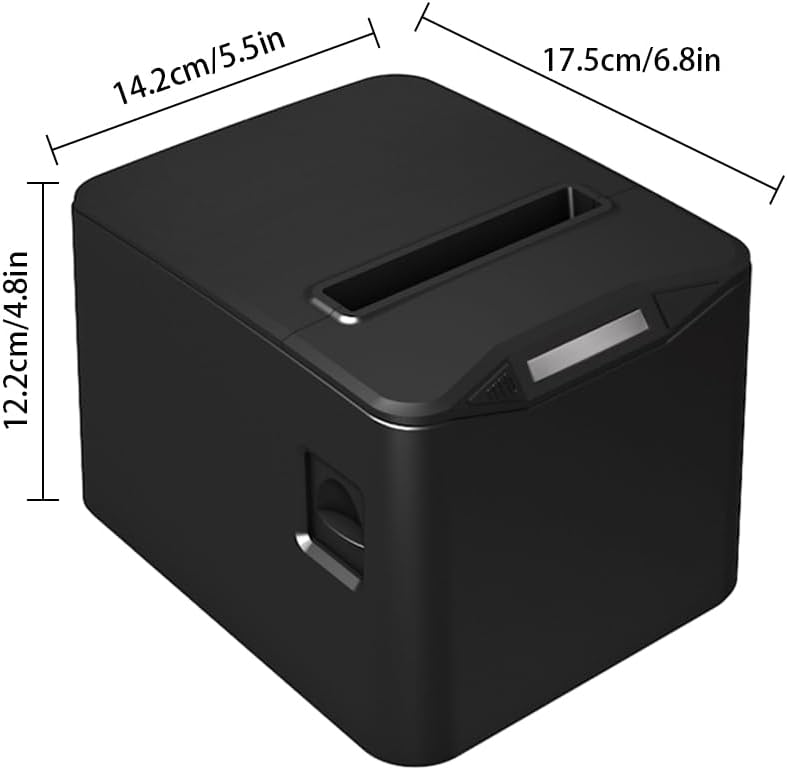
Diagram illustrating the dimensions of the printer: 17.5cm (6.8in) length, 14.2cm (5.5in) width, and 12.2cm (4.8in) height.

The printer operates without ribbons or ink, using only thermal paper rolls, shown alongside the device.

The printer features bottom holes for convenient wall mounting, demonstrated in a kitchen environment.

The printer's internal mechanism, showing its capacity for a large thermal paper roll with a maximum diameter of 83mm.
4. Configuració
4.1 Desembalatge
Traieu amb cura la impressora i tots els accessoris de l'embalatge. Conserveu l'embalatge per a futurs transports o emmagatzematges.
4.2 Connexió de potència
- Assegureu-vos que l'interruptor d'alimentació de la impressora estigui en la posició OFF.
- Connecteu el cable d'alimentació al port d'entrada d'alimentació de la impressora.
- Connecteu l'altre extrem del cable d'alimentació a una presa de corrent estàndard.
4.3 Càrrega de paper tèrmic
- Press the cover open button (if available) or gently lift the top cover of the printer.
- Insert the thermal paper roll into the paper bin, ensuring the printing side of the paper faces upwards and feeds out from the top.
- Pull a small length of paper out past the cutter.
- Tanqueu la coberta superior fermament fins que encaixi al seu lloc.

The printer actively printing a receipt, demonstrating proper paper loading and output.
4.4 Connexió a un ordinador
The printer supports both USB and LAN connections.
- Connexió USB: Connect one end of the provided USB cable to the printer's USB port and the other end to an available USB port on your computer.
- Connexió LAN: Connecteu un cable Ethernet des del port LAN de la impressora al vostre encaminador o commutador de xarxa.
4.5 Instal·lació del controlador
Before using the printer, you must install the appropriate driver on your computer. The driver supports Windows, Linux, and MAC OS.
Baixeu l'últim controlador des de l'oficial weblloc: http://www.cnfujun.com/d/33Seguiu les instruccions que apareixen a la pantalla per a la instal·lació.
5. Funcionament
5.1 Engegada/apagada
- To power on, flip the power switch to the 'ON' position. The indicator light will illuminate.
- To power off, flip the power switch to the 'OFF' position.
5.2 Impressió
Once the printer is connected and drivers are installed, you can send print jobs from your application. The printer supports ESC/POS commands and can print various content types, including multi-language text, images, logos, 1D barcodes (UPC-A, UPC-E, JAN13, JAN8, CODE39, ITF, CODABAR, CODE93, CODE128), and 2D barcodes (QR CODE, PDF417).
Un example of a clearly printed receipt, highlighting the 203dpi resolution and 100KM print head life.
5.3 Cash Drawer Connection
The printer supports cash drawer driving. Connect your cash drawer to the dedicated port on the printer. The cash drawer will open automatically upon receiving the appropriate print command.
6. Manteniment
6.1 Neteja de la impressora
Una neteja regular ajuda a mantenir la qualitat d'impressió i allarga la vida útil de la impressora.
- Assegureu-vos que la impressora estigui apagada i desendollada abans de netejar-la.
- Utilitzeu un drap suau i sense pelusa dampened with isopropyl alcohol to gently wipe the thermal print head. Avoid touching the print head with bare hands.
- Clean the paper path and rollers to remove any paper dust or debris.
- Netegeu l'exterior de la impressora amb un drap suau i sec.
6.2 Substitució del rotlle de paper
Replace the thermal paper roll when it runs out or when the red line appears, indicating low paper. Refer to section 4.3 for detailed instructions on loading thermal paper.
7. Solució De Problemes
If you encounter issues with your printer, refer to the following common problems and solutions:
- La impressora no s'encén: Comproveu la connexió del cable d'alimentació i assegureu-vos que la presa de corrent funcioni.
- No printing: Verify that the printer is powered on, connected correctly (USB/LAN), and the driver is installed. Check for paper jams or if the paper roll is empty.
- Mala qualitat d'impressió: Ensure you are using thermal paper. Clean the thermal print head as described in section 6.1.
- Embús de paper: Power off the printer, open the cover, carefully remove any jammed paper, and then close the cover and power on.
- Auto-cutter not working: Ensure no paper debris is obstructing the cutter. If the issue persists, contact support.
8. Especificacions
| Característica | Especificació |
|---|---|
| Model | POS-8370 |
| Mètode d'impressió | Tèrmica de línia directa |
| Interfícies | USB + LAN |
| Ordre d'impressió | Compatible amb ESC/POS |
| Velocitat d'impressió | 220 mm/s |
| Resolució | 203DPI (8 dots/mm) |
| TPH Reliability (Print Head Life) | 100 km |
| Tallador automàtic | Parcial |
| Vida del tallador | 1 milió de retallades |
| Tipus de paper | Thermal Roll Paper |
| Amplada del paper | 79.5 ± 0.5 mm |
| Diàmetre del rotllo de paper | Max φ 83mm |
| Amplada d'impressió | 72 mm |
| Gruix del paper | 0.06-0.08 mm |
| Memòria intermèdia d’entrada | 96 K bytes |
| NV Flash | 256 K bytes |
| Controladors de sistema operatiu compatibles | Win2003 / WinXP / Win7 / WIN8 / WIN10; Linux; MAC; |
| Entrada de potència | AC 110V/220V, 50~60Hz |
| Potència de sortida | DC 24V/2.5A |
| Mida del producte | 17.5 x 14.2 x 12.2 cm (6.8 x 5.5 x 4.8 polzades) |
| Pes del producte | 0.84 kg (29.6 oz) |
| Codis 1D compatibles | UPC-A / UPC-E / JAN13 (EAN13) / JAN8 (EAN8) / CODE39 / ITF / CODABAR / CODE93 / CODE128 |
| Codis 2D compatibles | QR CODE, PDF417 |
9. Garantia i Suport
Bisofice products are manufactured to high-quality standards. For warranty information, technical support, or service inquiries, please refer to the contact information provided with your purchase or visit the official Bisofice website. Please have your product model (POS-8370) and purchase details ready when contacting support.


