1. Producte acabatview
This manual provides instructions for the CAMECHO Android 15 Car Radio, a multimedia system designed for Opel Vivaro B (2014-2018) and Renault Traffic 3 (2014-2021) vehicles. It features a 9-inch IPS touchscreen, Android 15 operating system, 4-Core processor, 4GB RAM, and 64GB ROM. Key functionalities include wireless Carplay and Android Auto, Mirrorlink, Bluetooth 5.0, GPS navigation, Wi-Fi connectivity, 32-band equalizer, FM/RDS radio, and support for steering wheel controls and a backup camera.
2. Configuració i instal·lació
2.1 Contingut del paquet
Abans de la instal·lació, comproveu que tots els components siguin presents al paquet:
- 1 x Android Car Radio (with frame)
- 1 descodificador CANBUS
- 1 x micròfon extern
- 1 x càmera de seguretat
- 1 x CAM-IN Cable
- 2 x cables d’energia
- 1 adaptador d'antena
- 2 x cables USB
- 1 x Antena GPS
- 1 x cable RCA
- 1 x Manual d'usuari
- Eines d'instal·lació
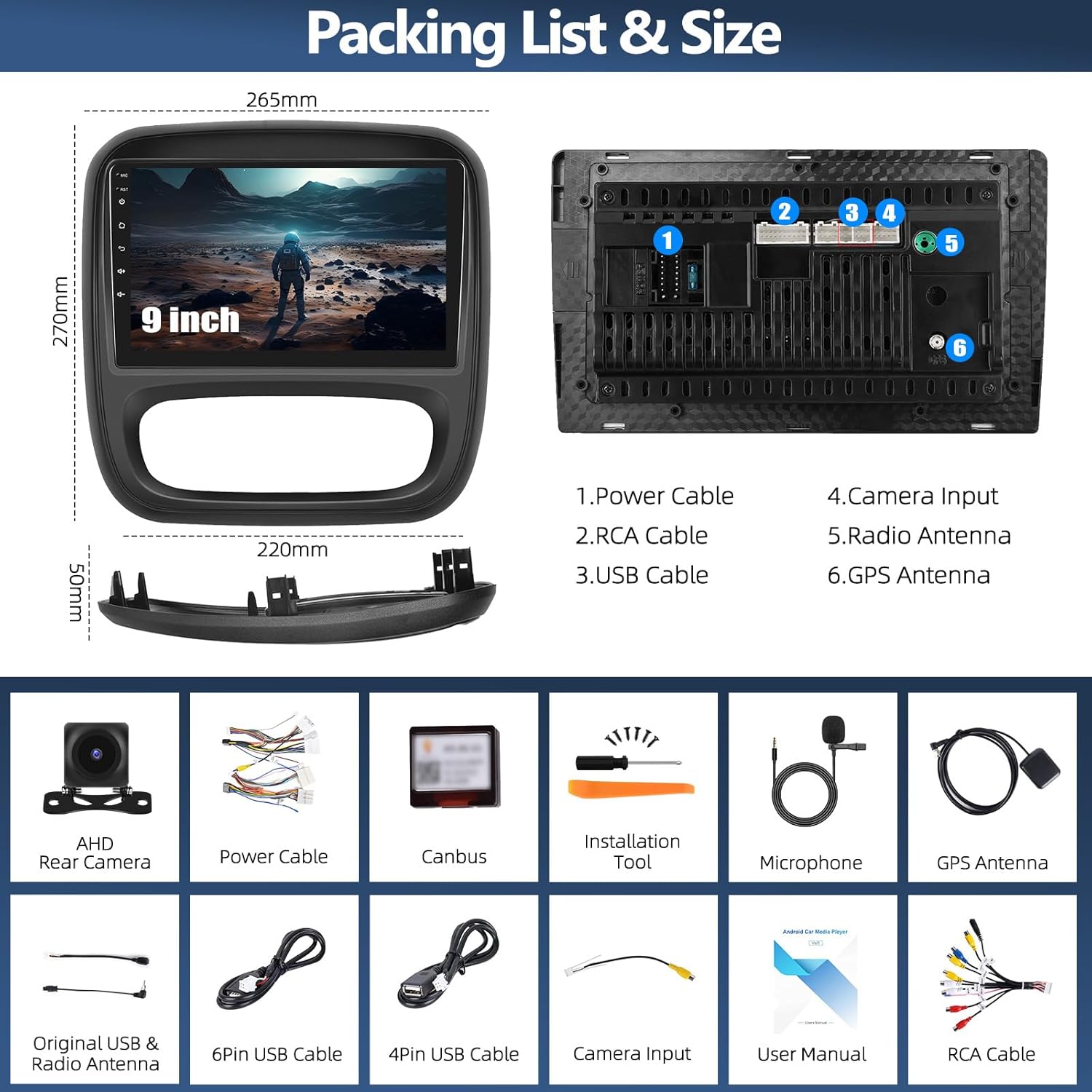
Figura 1: Components inclosos i dimensions de la unitat.
2.2 Compatibilitat del vehicle
This car radio is designed for specific vehicle models and dashboard configurations. Please confirm your vehicle's original car center console matches Model A as shown in Figure 2. This product does not support Model B configurations.

Figure 2: Compatible (Model A) and incompatible (Model B) car console types. Ensure your vehicle matches Model A.
2.3 Notes d'instal·lació
The installation process involves connecting the power cables, RCA cables, USB cables, GPS antenna, and the included backup camera. The CANBUS decoder facilitates integration with your vehicle's steering wheel controls. For some Renault Traffic 3 models, minor modifications to the dashboard's internal fixations may be required for proper fitment. It is recommended to consult a professional for installation if you are unsure.
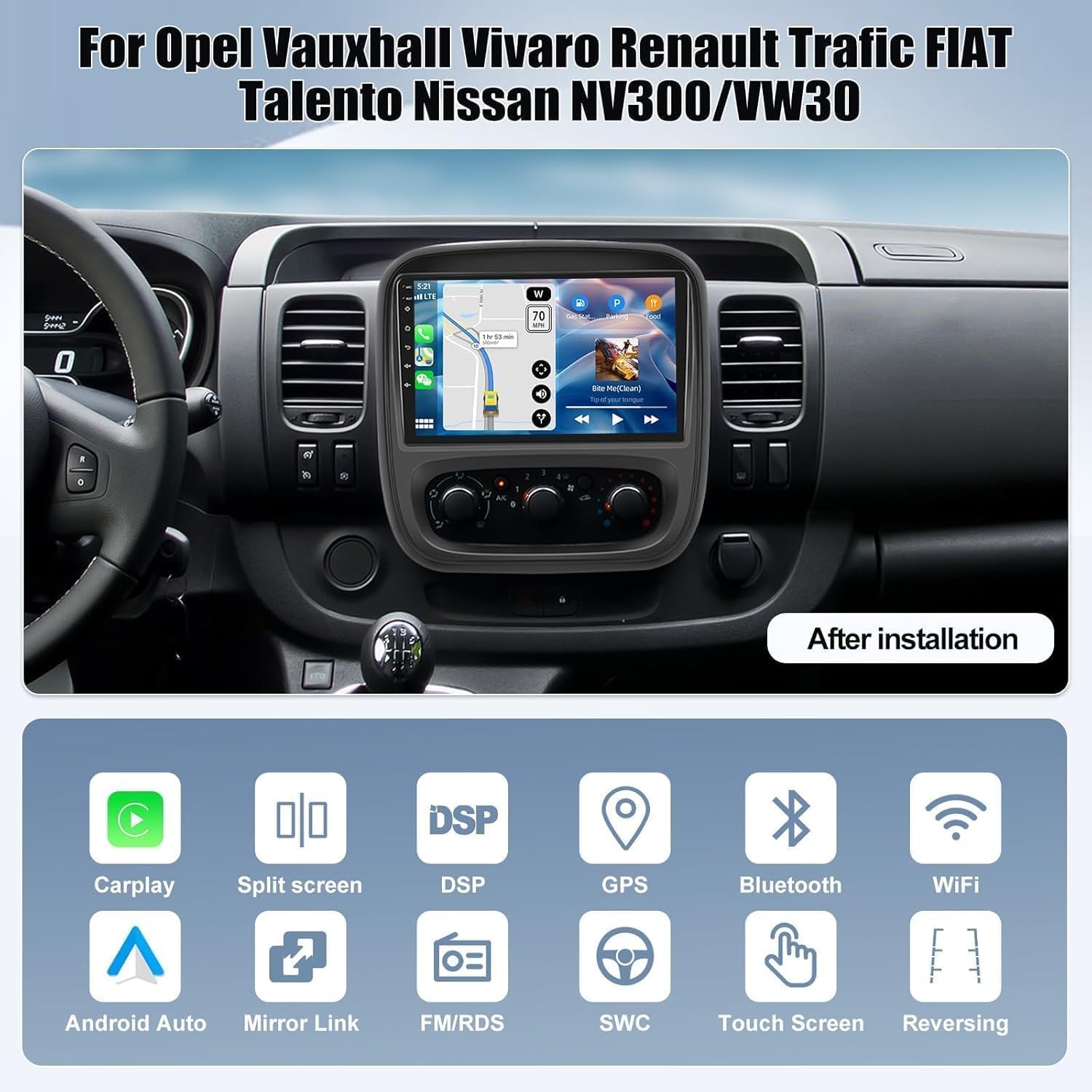
Figura 3: Example of the car radio after successful installation.
3. Instruccions de funcionament
3.1 Carplay sense fil i Android Auto
The unit supports wireless Apple Carplay and Android Auto via USB and Wi-Fi. This allows access to phone functions such as contacts, navigation, and music playback directly on the car radio screen.
- For Wireless Carplay: Activate Bluetooth on your iPhone and pair it with the car radio. Then, open the Zlink app on the unit. Ensure Bluetooth and hotspot connections are maintained.
- Per a Android Auto sense fil: Install the Android Auto app on your phone. Activate Bluetooth on your phone and pair it with the car radio. Switch to the Zlink app on the unit.
Note: Some Samsung and Huawei phones may not be compatible with this feature.

Figure 4: Wireless Carplay and Android Auto functionality.
3.2 Enllaç de mirall
Mirror Link allows you to display your phone's screen content on the car radio. This feature enhances driving safety by reducing phone interaction.
- Per a dispositius iOS: Connect via Wi-Fi. Turn on your iPhone's hotspot, connect the car radio to it, then use the Airplay function on your iPhone or scan the QR code in the app to establish the connection.
- Per a dispositius Android: Connect via Wi-Fi or USB cable. Click on 'phonelink' and scan the QR code to download the app, or connect via USB, enable 'USB debugging' in developer options, and set USB configuration to data transmission.

Figure 5: Mirror Link functionality for screen mirroring.
3.3 Navegació GPS i Wi-Fi
The car radio includes advanced GPS/Galileo/Glonass for precise online and offline navigation. Integrated Wi-Fi allows internet browsing, video streaming, and downloading various applications like YouTube, TikTok, and Spotify.

Figure 6: GPS navigation in use.
3.4 Bluetooth 5.0
Equipped with Bluetooth 5.0, the unit provides a fast and stable wireless connection for hands-free calling and audio streaming. You can manage calls and play music directly from your paired smartphone.

Figure 7: Bluetooth 5.0 connectivity for communication and audio.
Ràdio 3.5 FM/RDS
Enjoy your favorite radio stations with the integrated FM/RDS tuner. The RDS function provides additional information such as station name and song titles where available.

Figure 8: FM/RDS radio interface.
3.6 32-Band Equalizer (EQ)
Customize your audio experience with the 32-band equalizer. Adjust sound parameters to your preference and save settings for different music genres or listening environments.

Figure 9: 32-band equalizer settings.
3.7 Control del volant (SWC)
The included CANBUS decoder enables learning functions for your vehicle's steering wheel buttons. This allows you to control essential functions of the car radio directly from your steering wheel, enhancing convenience and safety.

Figure 10: Steering wheel control configuration.
3.8 Càmera de marxa enrere
The car radio integrates with the included backup camera, providing a clear view of the area behind your vehicle when reversing. This assists with precise parking and helps prevent collisions.

Figure 11: Backup camera display.
3.9 Funcionalitat de pantalla dividida
The split-screen feature allows you to run two applications simultaneously on the 9-inch display, such as navigation and music playback, enhancing multitasking capabilities.

Figure 12: Split screen mode in operation.
4. Manteniment
To ensure optimal performance and longevity of your CAMECHO car radio, follow these general maintenance guidelines:
- Keep the screen clean using a soft, dry, lint-free cloth. Avoid abrasive cleaners or solvents.
- Protect the unit from extreme temperatures, direct sunlight for prolonged periods, and excessive moisture.
- Assegureu-vos que tots els cables estiguin connectats correctament per evitar problemes intermitents.
- Regularly check for software updates to improve performance and add new features.
5. Solució De Problemes
Si teniu problemes amb la ràdio del cotxe, consulteu els passos habituals següents per resoldre problemes:
- Sense energia: Check all power connections. Ensure the vehicle's ignition is on. Verify fuses.
- Sense so: Comproveu les connexions dels altaveus. Assegureu-vos que el volum no estigui silenciat ni massa baix. Verifiqueu la configuració de la sortida d'àudio.
- Pantalla tàctil que no respon: Restart the unit. If the issue persists, a factory reset might be necessary (refer to settings menu).
- Pèrdua de senyal GPS: Assegureu-vos que l'antena GPS estigui instal·lada correctament i que tingui una vista clara view del cel.
- Carplay/Android Auto Connection Issues: Verify Bluetooth and Wi-Fi connections on both the phone and the car radio. Ensure the Zlink app is running. Check phone compatibility (e.g., some Samsung/Huawei models may have limitations).
- Els comandaments del volant no funcionen: Ensure the CANBUS decoder is correctly connected. Re-perform the steering wheel button learning process in the unit's settings.
- Càmera de marxa enrere no es mostra: Check the CAM-IN cable connection. Ensure the camera is receiving power and is properly installed.
- Installation Fitment Issues (Renault Traffic 3): As noted in user feedback, some Traffic 3 models may require modification of the original dashboard's internal fixations for the unit to fit correctly. If you encounter significant resistance during installation, re-evaluate the fitment and consider professional assistance.
Per a problemes persistents que no es resolen amb aquests passos, poseu-vos en contacte amb l'atenció al client.
6. Especificacions
| Característica | Especificació |
|---|---|
| Marca | CAMECHO |
| Model | 4-Core 4+64G Carplay |
| Sistema operatiu | Android 15 |
| Processador | 4-Nucli |
| RAM | 4 GB |
| ROM | 64 GB |
| Mida de la pantalla | 9 polzades |
| Resolució de pantalla | IPS de 1280 * 720 |
| Versió Bluetooth | 5.0 |
| Connectivitat | RCA, USB, Bluetooth, Wi-Fi |
| Característiques especials | Wireless Carplay & Android Auto, Mirrorlink, GPS Navigation, FM/RDS, 32-Band EQ, Steering Wheel Control, Backup Camera Support |
| Dispositius compatibles | Smartphone, Tablet, PC, Game Console, TV, Speaker, Amplifier, Subwoofer, DVR |
7. Garantia i Suport
7.1 Informació de la garantia
This product comes with a 2-year manufacturer's warranty. For warranty claims or issues, please contact customer support.
7.2 Atenció al client
For technical assistance, installation queries, or any other support needs, please contact CAMECHO customer service. Responses are typically provided within 24 hours. Returns are accepted within 30 days of purchase.
Correu electrònic: CAMECHOVIP@126.com

Figure 13: Contact information for customer support.


