Introducció
The NACON Revolution 5 Pro controller is an officially licensed PlayStation wireless gaming controller designed for high-end performance on PS5, PS4, and PC. It incorporates advanced features such as magnetic Hall Effect technology, customizable trigger blockers, and a specialized D-pad design to enhance your gaming experience.
Característiques clau
- Control sense fil: Features a USB-A wireless adapter for PS5, PS4, and PC, offering up to 10 hours of battery-powered gaming. A 3-meter USB-C to USB-A cable is included for wired play, ideal for competitive gaming.
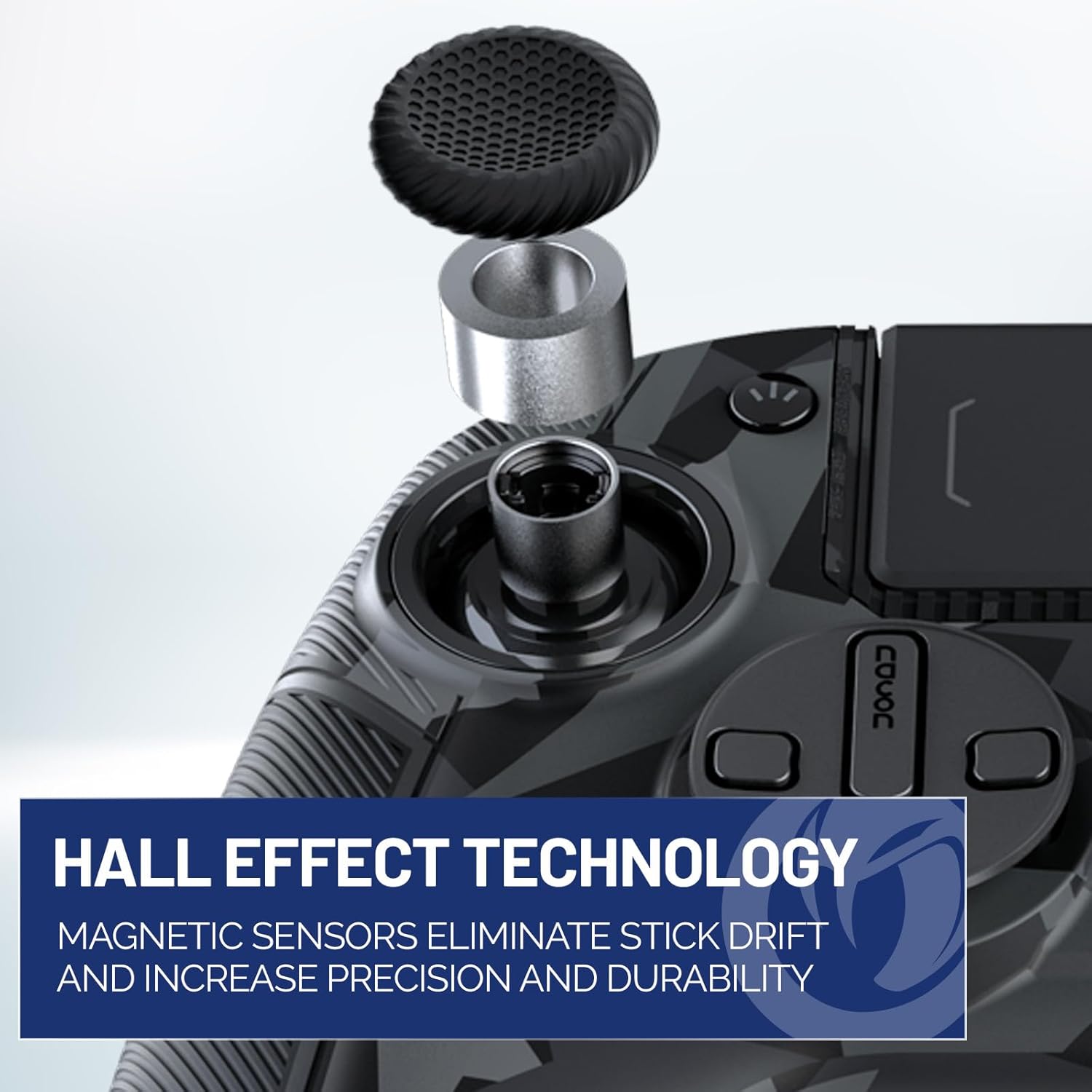
- Hall Effect Technology: Magnetic sensors are utilized in both joysticks and triggers to eliminate stick drift, significantly increasing precision and durability.
- Trigger Blockers: Allows users to select between long or short trigger pulls, adapting to various gaming styles and in-game scenarios.
- Remappable Shortcuts: Equipped with four Omron micro-switch back paddles for fast reactions and a distinct tactile feel.
- Specialized D-Pad: Developed in collaboration with professional fighting game player Mister Crimson, this D-pad design allows for easy swapping between specialized and traditional D-pad configurations.
- Full Customization: Comes with interchangeable weights, thumbstick sizes, and thumbstick heads, all stored in an included carry case, enabling personalized setup.
- Aplicació dedicada: Provides advanced customization options including programmable buttons, individual profile settings, and software updates via a dedicated PC/Mac application.
- Maximum Control: Onboard controls allow for profile selection, audio adjustments, and RGB lighting effects via the built-in touchpad and selector switches.
- Bluetooth Game Audio: Connect Bluetooth earbuds or headsets for wireless game audio in PS4 or PS5 mode. An optional plug-in mic supports in-game chat. A 3.5mm wired headset connection port is also available for PS4/PS5 mode (audio not available in PC Mode).
Guia de configuració
1. Unboxing i Inspecció Inicial
Traieu amb cura tots els components de l'embalatge. Assegureu-vos que hi hagi els elements següents:
- NACON Revolution 5 Pro Controller
- USB-A Wireless Adapter
- Cable USB-C a USB-A de 3 metres
- Interchangeable Weights
- Various Thumbstick Sizes & Heads
- Specialized D-Pad (and traditional D-pad)
- Estoig d'emmagatzematge
- Optional Plug-in Microphone Adapter

Image: The NACON Revolution 5 Pro controller in Urban Camo, showcasing its design and the EVO Global Partner logo.

Imatge: Una part frontal detallada view of the NACON Revolution 5 Pro controller, highlighting its wireless control capabilities and official PlayStation license.
2. Connexió del controlador
Wireless Connection (PS5, PS4, PC)
- Insert the USB-A wireless adapter into an available USB port on your console (PS5/PS4) or PC.
- Ensure the controller is powered on. The controller should automatically pair with the adapter.
- Verify the connection by checking the indicator lights on the controller.
Wired Connection (PS5, PS4, PC)
- Connect the USB-C end of the provided 3-meter cable to the controller.
- Connect the USB-A end of the cable to an available USB port on your console (PS5/PS4) or PC.
- The controller will operate in wired mode, which is recommended for competitive play to minimize latency.
Imatge: Un costat view of the NACON Revolution 5 Pro controller, showing its ergonomic design and textured grips.

Imatge: L'esquena view of the NACON Revolution 5 Pro controller, revealing the remappable back paddles and mode switches.
3. Customization (Hardware)
The Revolution 5 Pro offers extensive hardware customization to suit your preferences.
Interchangeable Weights
Adjust the controller's weight by inserting or removing the included weights into the designated compartments on the controller's handles. This allows for a personalized feel and balance.
Thumbstick Sizes & Heads
Swap out the thumbsticks and their heads to find the optimal height and grip for your playstyle. Different sizes can affect precision and comfort.
Specialized D-Pad
The controller includes a specialized D-pad designed for fighting games, as well as a traditional D-pad. To change, gently pry off the current D-pad and snap the desired one into place.

Image: The NACON Revolution 5 Pro controller alongside its included customization accessories, such as interchangeable weights, thumbsticks, and the carry case.
Instruccions de funcionament
1. Hall Effect Joysticks & Triggers
The Hall Effect technology ensures precise and durable input by using magnetic sensors instead of traditional mechanical contacts. This eliminates common issues like stick drift over time.

Imatge: Un primer pla view illustrating the Hall Effect technology within the NACON Revolution 5 Pro's joysticks, designed for enhanced precision and durability.
2. Trigger Blockers
Utilize the trigger blockers located on the underside of the controller to adjust the travel distance of the L2 and R2 triggers. This allows for quick shots in FPS games (short pull) or precise control in racing games (long pull).

Image: Hands demonstrating the adjustment of trigger blockers on the NACON Revolution 5 Pro controller, allowing for customizable trigger pull lengths.
3. Remappable Buttons & Onboard Controls
The four Omron micro-switch back paddles (S1, S2, S3, S4) can be remapped using the dedicated PC/Mac application. The controller also features onboard controls for quick adjustments:
- Profile Botó: Cycle through custom profiles stored on the controller.
- PS5/PS4/PC Switch: Select the desired platform mode.
- A/C Switch: Adjust audio settings or control RGB lighting effects.
- Touchpad: Functions as a standard PlayStation touchpad.

Image: A close-up of the remappable back buttons and control switches on the underside of the NACON Revolution 5 Pro controller.
4. Bluetooth Audio Connectivity
For wireless audio, connect your Bluetooth earbuds or headset directly to the Revolution 5 Pro when operating in PS4 or PS5 mode. An included microphone adapter can be plugged into the controller for in-game voice chat. A 3.5mm wired headset port is also available for PS4/PS5 mode. Note: Audio is not available in PC Mode via Bluetooth.

Image: The NACON Revolution 5 Pro controller shown with its Bluetooth audio adapter, highlighting its wireless audio capabilities.
5. Retroalimentació de vibració
Experience enhanced immersion with integrated vibration motors. Note: Vibration feature is not available on PlayStation 5 consoles.

Image: Hands holding the NACON Revolution 5 Pro controller, with visual effects indicating vibration feedback for immersive gameplay.
Manteniment
To ensure the longevity and optimal performance of your NACON Revolution 5 Pro controller, follow these maintenance guidelines:
- Neteja: Feu servir un drap suau i sec per netejar el controlador regularment. Per a la brutícia persistent, netegeu lleugerament.ampen the cloth with water or a mild electronic cleaner. Avoid abrasive materials or harsh chemicals.
- Emmagatzematge: When not in use, store the controller in its included storage case to protect it from dust, spills, and physical damage.
- Cura de la bateria: For optimal battery life, avoid fully discharging the controller frequently. Charge it regularly, and if storing for an extended period, ensure it has a partial charge (around 50%).
- Eviteu condicions extremes: Do not expose the controller to extreme temperatures, direct sunlight, or high humidity.
Resolució de problemes
If you encounter issues with your NACON Revolution 5 Pro controller, refer to the following common troubleshooting steps:
- Controller Not Connecting/Disconnecting Randomly:
- Ensure the USB-A wireless adapter is securely plugged into the console/PC.
- Try connecting the controller via the wired USB-C cable to rule out wireless interference or battery issues.
- Check for any obstructions between the controller and the wireless adapter.
- Ensure the controller's battery is sufficiently charged.
- Restart your console/PC and the controller.
- If using the dedicated app, ensure it is updated to the latest version. Some users have reported issues with app connectivity or stability.
- Deriva de pal:
- The Hall Effect technology is designed to prevent stick drift. If you experience this, ensure the controller's firmware is up to date via the dedicated PC/Mac application.
- Recalibrate the joysticks using the dedicated application if available.
- Buttons Not Responding/Lagging:
- Ensure the controller is fully charged or connected via cable.
- Clean around the buttons to ensure no debris is obstructing movement.
- If using wireless, try moving closer to the adapter or switching to wired mode.
- Bluetooth Audio Issues:
- Ensure your Bluetooth earbuds/headset are in pairing mode and within range.
- Verify the controller is in PS4 or PS5 mode, as Bluetooth audio is not supported in PC mode.
- Check the controller's audio settings via the onboard controls.
- Vibration Not Working on PS5:
- As noted in the features, the vibration function is not supported on PlayStation 5 consoles. This is expected behavior.
For further assistance, please refer to the official NACON support weblloc o poseu-vos en contacte amb el seu servei d'atenció al client.
Especificacions
| Atribut | Detall |
|---|---|
| Número de model | Revolution 5 Pro |
| ASIN | B0DYSDLW9L |
| Marca | NACON |
| Compatibilitat | PlayStation 5, PlayStation 4, PC |
| Connectivitat | Wireless (USB-A adapter), Wired (USB-C to USB-A cable), Bluetooth Audio |
| Durada de la bateria | Up to 10 hours (wireless) |
| Dimensions | 2.36 x 6.38 x 4.49 polzades |
| Pes de l'article | 10.58 unces |
| Característiques especials | Hall Effect Joysticks & Triggers, Trigger Blockers, Remappable Back Paddles, Specialized D-Pad, Interchangeable Weights/Thumbsticks, Dedicated PC/Mac App |
| Data de llançament | 27 de febrer de 2025 |
Garantia i Suport
For information regarding the product warranty, please refer to the warranty card included in your product packaging or visit the official NACON website. For technical support, troubleshooting beyond this manual, or service inquiries, please contact NACON customer support directly through their official channels.
Official NACON Weblloc: www.nacongaming.com


