Manual d'usuari dels auriculars sense fil Masajoy
Model: Spark 06
Introducció
The Masajoy Wireless Headset with Mic for Work (Model: Spark 06) is designed to provide clear and reliable audio communication for various professional and personal uses. Featuring multiple connection modes, AI noise cancellation, and a comfortable design, this headset is ideal for business video conferencing, online courses, and call center environments.

Figure 1: Masajoy Wireless Headset and included accessories.
Què hi ha a la caixa
Si us plau, verifiqueu que tots els components siguin presents al paquet:
- Wireless Headset with Mic for Work
- USB A / C Dongle
- USB C to 3.5MM Cable
- Cable de càrrega tipus C.
- Manual d'usuari
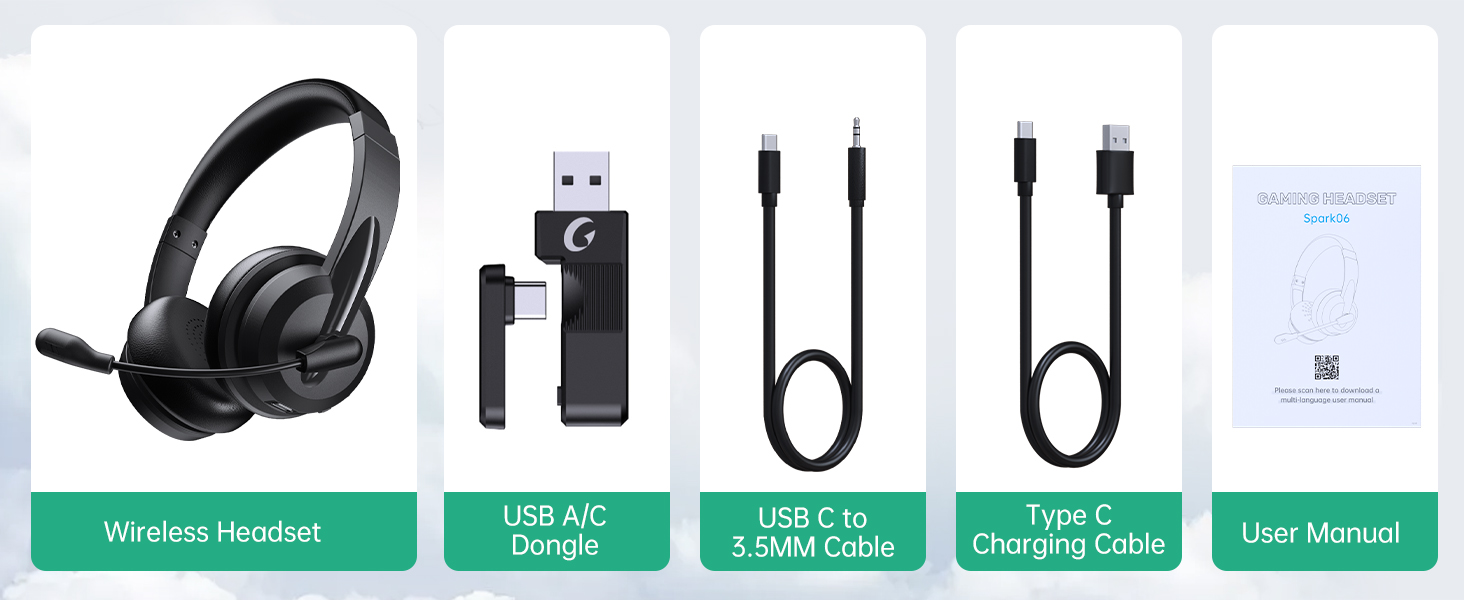
Figura 2: Contingut del paquet.
Configuració
Càrrega dels auriculars
Before first use, fully charge the headset. Connect the Type C Charging Cable to the headset's charging port and the other end to a USB power source (e.g., computer USB port, wall adapter). The charging indicator light will show the charging status.
- Temps de càrrega completa: aproximadament 2.5 hores
- Temps de conversa: fins a 30 hores
- Temps de reproducció de música: fins a 25 hores

Figure 3: Long Battery Life for Extended Use.
Modes de connexió
The Masajoy headset supports three connection modes:
-
Bluetooth V5.3 Connection:
For wireless connection to Bluetooth-enabled devices (e.g., smartphones, laptops). Ensure the headset is in pairing mode (refer to operating instructions for details). Cerca "Spark 06" in your device's Bluetooth settings and connect.
-
2.4G Wireless (USB A/C Dongle):
For wireless connection to computers without Bluetooth or for a dedicated connection. Plug the USB A or USB C dongle into an available USB port on your computer. The headset will automatically connect to the dongle.
-
Wired 3.5mm Audio Cable:
For a wired connection to devices with a 3.5mm audio jack. Connect one end of the USB C to 3.5MM Cable to the headset's USB-C port and the other end to your device's 3.5mm audio jack. This mode is useful when battery is low or for devices that do not support wireless connections.

Figure 4: Dual Connection Options (Bluetooth & 2.4G Wireless).
NOTE: This headset does not support dual device connection simultaneously.
Instruccions de funcionament
Encès/Apagat
- To Power On: Press and hold the Power button until you hear a voice prompt.
- To Power Off: Press and hold the Power button until you hear a voice prompt.
Control de volum
Use the volume control buttons located on the headset to adjust the listening volume.
Micròfon amb cancel·lació de soroll d'IA
The headset features advanced AI noise cancellation to reduce background noise during calls. This feature enhances clarity for the listener.
NOTE: This AI Noise Cancelling feature is only available when connected via Bluetooth.

Figure 5: AI Noise Cancelling in action.
Microphone Mute Function
To mute the microphone, simply rotate the microphone boom to the upright position. A voice prompt will confirm "MIC mute". To unmute, rotate the microphone boom back down.

Figure 6: Microphone Mute Control by Rotation.
Comoditat i disseny
The headset is designed for all-day wear with protein memory foam ear cups that are soft and breathable, preventing overheating. The adjustable and expandable headband ensures a comfortable fit for most head shapes.

Figure 7: Comfortable and Breathable Design.
Especificacions
| Característica | Detall |
|---|---|
| Nom del model | Spark 06 |
| Tecnologia de connectivitat | Wireless (Bluetooth V5.3, 2.4G), Wired (3.5mm) |
| Control de soroll | AI Noise Cancellation (Bluetooth mode only), Passive Noise Cancellation |
| Durada de la bateria (temps de conversa) | Fins a 30 hores |
| Durada de la bateria (reproducció de música) | Fins a 25 hores |
| Temps de càrrega | Aprox. 2.5 hores |
| abast sense fils | Up to 36 feet (11 meters) for Bluetooth |
| Mida del controlador d'àudio | 40 mil·límetres |
| Sensibilitat del micròfon | 43 dB |
| Conector d'auriculars | USB-C (for charging/wired audio) |
| Dispositius compatibles | PC, Mac, Laptop, Chromebook, tablet, smartphones, MP3 players, PS5, PS4, Xbox one, gaming systems with an aux port |
| Material | Faux Leather, Polycarbonate (PC), Metal, Acrylonitrile Butadiene Styrene (ABS) |
| Pes de l'article | 10.2 unces |
| Color | Negre |
Manteniment
- Neteja: Use a soft, dry cloth to clean the headset. Do not use abrasive cleaners or solvents.
- Emmagatzematge: Guardeu els auriculars en un lloc fresc i sec, allunyat de la llum solar directa i de temperatures extremes.
- Cura de la bateria: Per allargar la durada de la bateria, eviteu descarregar completament els auriculars amb freqüència. Carregueu-los regularment, fins i tot si no els feu servir durant períodes prolongats.
- Manipulació: Avoid dropping the headset or subjecting it to strong impacts. Do not twist or bend the microphone boom excessively beyond its intended rotation.
Resolució de problemes
| Problema | Causa possible | Solució |
|---|---|---|
| Els auriculars no s'encén. | Bateria baixa. | Charge the headset fully using the provided Type C charging cable. |
| No es pot connectar per Bluetooth. | Headset not in pairing mode; device Bluetooth off; out of range. | Ensure headset is in pairing mode. Turn Bluetooth on your device. Move headset closer to the device (within 36 feet). |
| No hi ha so dels auriculars. | Volume too low; incorrect audio output selected on device; headset not connected. | Increase headset volume. Check device's audio output settings. Re-establish connection. |
| El micròfon no funciona. | Microphone muted; incorrect input device selected; AI Noise Cancellation issue. | Ensure microphone boom is not in the upright (muted) position. Check device's microphone input settings. Note that AI Noise Cancellation is only active in Bluetooth mode. |
| Poor sound quality / static. | Interferència; fora de l'abast; bateria baixa. | Move away from other wireless devices. Move closer to the connected device. Charge the headset. |
Garantia i Suport
Masajoy products are designed for reliability and performance. For warranty information and technical support, please refer to the official Masajoy website or contact customer service using the details provided in the original product packaging or purchase receipt.
També podeu visitar el Masajoy Store on Amazon per obtenir més informació sobre el producte i recursos d'assistència.


