1. Introducció
This manual provides detailed instructions for the GODIYMODULES 0.96 inch IIC I2C Serial White OLED Display Module (SSD1306 128x64). This compact display is designed for integration with microcontrollers such as Arduino and Raspberry Pi, offering a clear 128x64 pixel white display. Please read this manual thoroughly before use to ensure proper setup and operation.
2. Característiques clau
- 0.96 inch IIC I2C Serial White OLED Display Module with 128x64 resolution.
- Integrated SSD1306 driver/controller for efficient operation.
- Compatible with a wide range of microcontrollers including Arduino, 51 Series, MSP430 Series, STM32/2, CSR IC, and Raspberry Pi.
- Ultra-low power consumption, approximately 0.08W when the full screen is lit.
- Adjustable super high brightness and contrast.
- Standard 4-pin IIC interface: GND, VCC, SCL, SDA.
- Vol. Operatiutage range: 3V to 5V DC.
- Wide operating temperature range: -30 ℃ to 70 ℃.
3. Què hi ha a la caixa
Cada paquet conté els articles següents:
- 2 x 0.96 inch IIC I2C Serial White OLED Display Modules (128x64)

Image: Two 0.96 inch IIC I2C OLED Display Modules, as typically included in the package, shown with their respective pin headers.
4. Especificacions tècniques
| Característica | Especificació |
|---|---|
| Tipus de visualització | OLED |
| Color de la pantalla | Blanc |
| Resolució | 128 x 64 píxels |
| Mida de la pantalla | 0.96 polzades |
| IC del conductor | SSD1306 |
| Tipus d'interfície | IIC (I2C) Serial |
| Vol. Operatiutage | 3 V ~ 5 V CC |
| Power Consumption (Full Screen) | Aprox. 0.08W |
| Temperatura de funcionament | -30 ℃ ~ 70 ℃ |
| Dimensions del panell | 26.70 x 19.26 x 1.85 mm (approx. 1.03 x 0.76 x 0.07 inch) |
| Àrea Activa | 21.74 x 11.2 mm (approx. 0.86 x 0.44 inch) |
| Pins | 4 (GND, VCC, SCL, SDA) |
5. Configuració i connexió
This section details how to connect your OLED display module to a microcontroller. The module uses an IIC (I2C) serial interface, requiring only four connections.
5.1 Definicions de pins
The module features a 4-pin header for connection. Refer to the image below for pin identification:

Image: The 0.96 inch OLED Display Module showing the four pins and their respective labels: GND (Ground), VCC (Power Positive), SCL (Clock Line), and SDA (Data Line).
- GND: Ground connection. Connect to the ground (0V) of your microcontroller.
- VCC: Power supply. Connect to a 3.3V to 5V DC power source from your microcontroller.
- SCL: Serial Clock Line. Connect to the I2C SCL pin of your microcontroller.
- SDA: Serial Data Line. Connect to the I2C SDA pin of your microcontroller.
5.2 Connection Diagram (Example for Arduino/Raspberry Pi)
Below is a general connection diagram. Specific pin assignments on your microcontroller may vary. Consult your microcontroller's documentation for exact I2C pin locations.
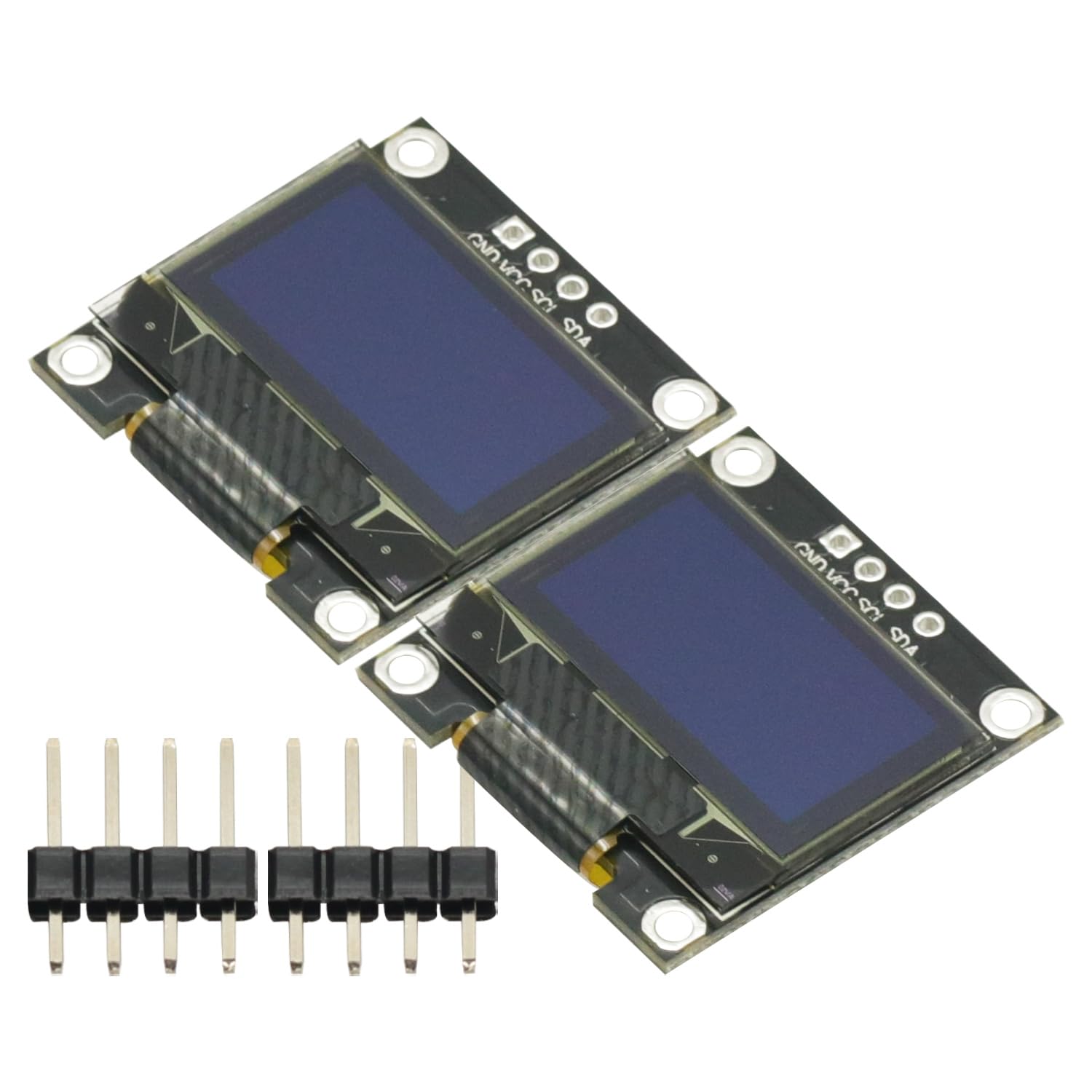
Image: Detailed circuit diagram of the SSD1306 OLED module, illustrating the I2C connections (SDA, SCL, VCC, GND) and the internal reset circuit. Note the I2C slave address information.
Important Note on Reset Circuit: The reset circuit of the SSD1306 needs to be reset at the moment of power on in order to function properly. This is typically handled by the driver library or internal circuitry, but awareness is useful for advanced debugging.
I2C Slave Address: The default I2C slave address is typically 0x3C. If the I2C slave address is D/C# pin (pin 15) to VCC, the I2C slave address will be 0x3D. Refer to the circuit diagram for details.
6. Instruccions de funcionament
To operate the OLED display, you will need to use a compatible library for your chosen microcontroller platform (e.g., Arduino, Raspberry Pi). These libraries handle the low-level communication with the SSD1306 driver IC.
6.1 Software Setup (General Guidance)
- Install I2C Library: Ensure your microcontroller environment has the necessary I2C communication library installed.
- Install SSD1306 Library: Download and install an SSD1306-compatible OLED display library. Popular choices include:
- For Arduino: Adafruit SSD1306 library and Adafruit GFX library.
- For Raspberry Pi (Python): Luma.OLED library.
- Exampel codi: Most libraries come with example sketches or scripts. Start with these to verify your connections and display functionality.
- Inicialitzar la pantalla: In your code, you will typically initialize the display object, specifying the I2C address (usually 0x3C or 0x3D) and the display resolution (128x64).
- Mostra contingut: Use the library functions to draw text, shapes, or bitmaps on the display. Remember to call a display update function (e.g.,
display.display()in Adafruit library) to push the buffer content to the physical screen.
6.2 Consum d'energia
The OLED module is designed for ultra-low power consumption. When the full screen is lit, it consumes approximately 0.08W. This makes it suitable for battery-powered projects.
7. Manteniment
The 0.96 inch OLED display module is a robust electronic component, but proper care can extend its lifespan and ensure optimal performance.
- Manipulació: Handle the module by its edges to avoid touching the display surface or the delicate flex cable. Static electricity can damage electronic components, so use anti-static precautions when handling.
- Neteja: If the display surface becomes dirty, gently wipe it with a soft, lint-free cloth. Avoid using abrasive cleaners or excessive pressure.
- Emmagatzematge: Store the module in a dry, cool environment, away from direct sunlight and extreme temperatures. Keep it in its original anti-static packaging if not in use for extended periods.
- Font d'alimentació: Assegureu-vos sempre que el volum de la font d'alimentaciótage is within the specified 3V to 5V DC range. Incorrect voltagPots danyar el mòdul.
8. Solució De Problemes
If you encounter issues with your OLED display module, refer to the following troubleshooting tips:
- La pantalla no s'il·lumina:
- Verify all connections (GND, VCC, SCL, SDA) are secure and correctly wired to your microcontroller.
- Comproveu la font d'alimentació voltage (VCC) to ensure it is within the 3V-5V range.
- Confirm that your microcontroller is powered on and running the code.
- Ensure the SSD1306 library is correctly initialized in your code and that the display update function is being called.
- Visualització il·legible o incorrecta:
- Check the I2C address in your code. The default is usually 0x3C, but it can be 0x3D depending on the D/C# pin configuration (refer to Section 5.2 and the circuit diagram).
- Ensure the display resolution (128x64) is correctly set in your library initialization.
- Verify that the SCL and SDA lines are not swapped.
- Check for any loose connections or shorts on the I2C lines.
- I2C Communication Errors:
- Use an I2C scanner sketch (available for Arduino) to detect if the module is visible on the I2C bus and to confirm its address.
- Ensure pull-up resistors are present on the SCL and SDA lines if your microcontroller does not have internal ones or if they are insufficient (many development boards include them).
- Parpelleig de la pantalla:
- Assegureu-vos d'una font d'alimentació estable.
- Comproveu la connexió a terra adequada.
9. Garantia i Suport
For technical assistance or inquiries regarding your GODIYMODULES 0.96 inch IIC I2C Serial White OLED Display Module, please contact your retailer or the manufacturer directly. Please have your purchase information and product model number ready when seeking support.
This product is covered by the standard warranty provided by the retailer at the time of purchase. Please refer to your purchase documentation for specific warranty terms and conditions.


