Introducció
Thank you for choosing the Raddy WF-50T Indoor Outdoor Thermometer Hygrometer Wireless Weather Station. This device is designed to provide accurate, real-time environmental data for both indoor and outdoor conditions, including temperature, humidity, and weather forecasts. Its user-friendly display and stable wireless transmission make it an essential tool for monitoring your home environment.
Informació de seguretat
- No exposeu el dispositiu a temperatures extremes, llum solar directa ni humitat excessiva.
- Eviteu deixar caure o sotmetre el dispositiu a forts impactes.
- No intenteu desmuntar ni reparar el dispositiu vosaltres mateixos. Encarregueu tot el manteniment a personal qualificat.
- Eliminar les bateries usades de manera responsable d'acord amb la normativa local.
- Mantingueu el dispositiu i els seus components fora de l'abast dels nens.
Contingut del paquet
- Raddy WF-50T Main Display Unit
- Sensor remot sense fils
- Cable de càrrega USB-C
- Manual d'usuari (aquest document)
Producte acabatview
The Raddy WF-50T consists of a main display unit and a wireless remote sensor. The main unit displays all collected data, while the remote sensor transmits outdoor temperature and humidity readings.

Figure 1: Raddy WF-50T Main Display Unit (left) and Wireless Remote Sensor (right).
This image shows the primary components of the Raddy WF-50T weather station. The main unit features a large, clear display for indoor and outdoor readings, while the compact remote sensor is designed for outdoor placement.
Configuració
1. Alimentació dels dispositius
The main display unit can be powered via USB-C or AAA batteries. The remote sensor requires AAA batteries.
- Unitat de visualització principal:
- For continuous backlight and power, connect the included USB-C cable to the unit and a compatible USB power adapter (not included).
- For battery-only operation or as a backup during power outages, insert 2 x AAA batteries into the battery compartment on the back of the unit. In battery mode, the backlight will turn off after 10 seconds to conserve power.
- Sensor remot sense fil:
- Open the battery compartment on the remote sensor and insert 2 x AAA batteries, observing the correct polarity (+/-).
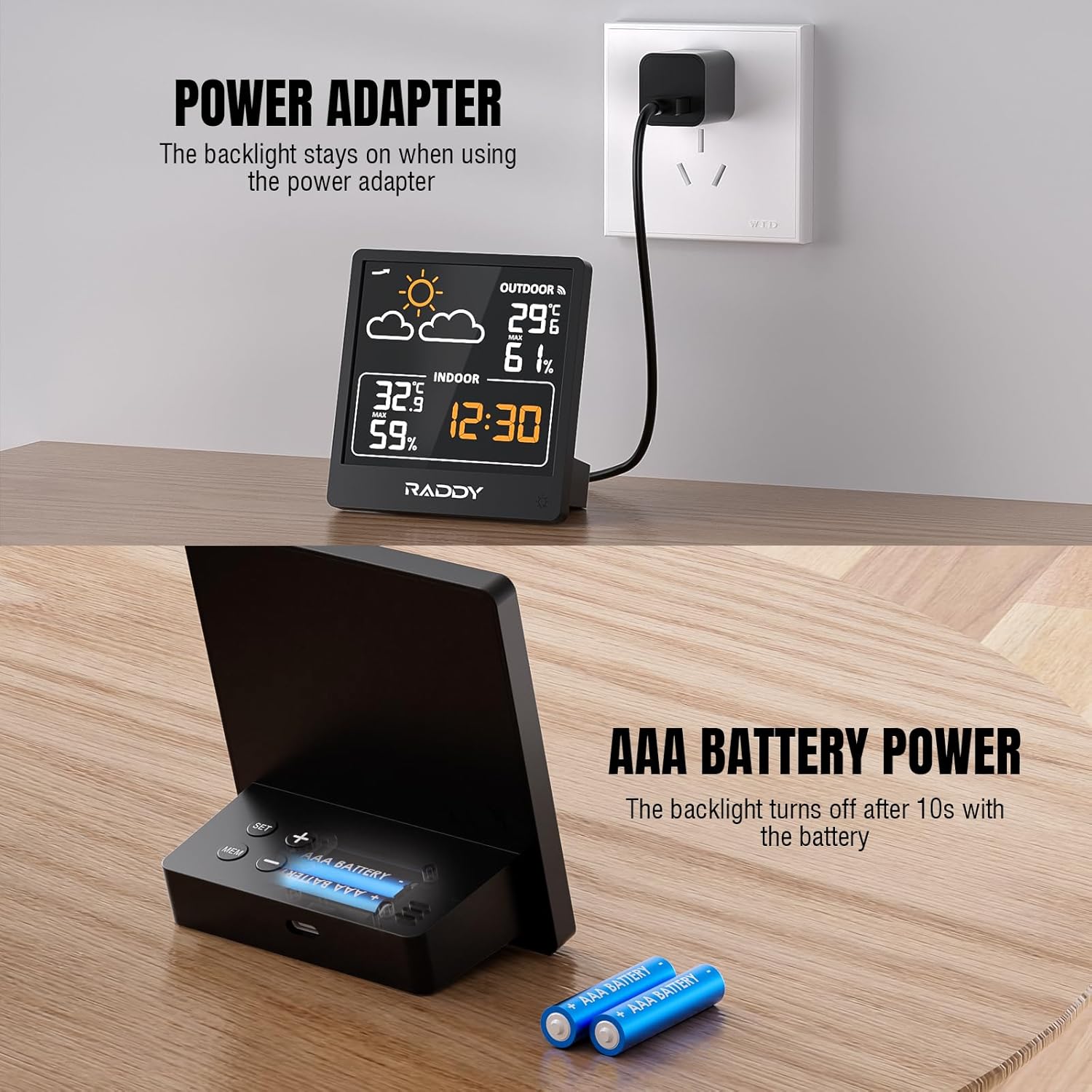
Figure 2: Powering the Raddy WF-50T. The image illustrates connecting the main unit via USB-C for continuous power and inserting AAA batteries for portable or backup power.
2. Col·locació del sensor
Place the wireless remote sensor in a location that provides accurate outdoor readings and is within the transmission range of the main unit (up to 330 feet / 100 meters).
- Choose a shaded area to avoid direct sunlight, which can cause inaccurate temperature readings.
- Protect the sensor from direct rain and snow.
- Ensure there are no major obstructions (e.g., thick walls, large metal objects) between the sensor and the main unit that could interfere with the wireless signal.

Figure 3: Wireless transmission range of the Raddy WF-50T. The image demonstrates the 330ft (100m) transmission capability, showing the main unit indoors and the remote sensor placed outdoors.
3. Sincronització inicial
Once both units are powered, they should automatically synchronize. The outdoor temperature and humidity readings will appear on the main display within a few minutes. If readings do not appear, try repositioning the sensor or pressing the 'RESET' button on both units (if available, refer to specific button layout on device).
Instruccions de funcionament
1. Mostra mésview
La pantalla LCD de 5 polzades ofereix una visió nítidaview of all essential information:
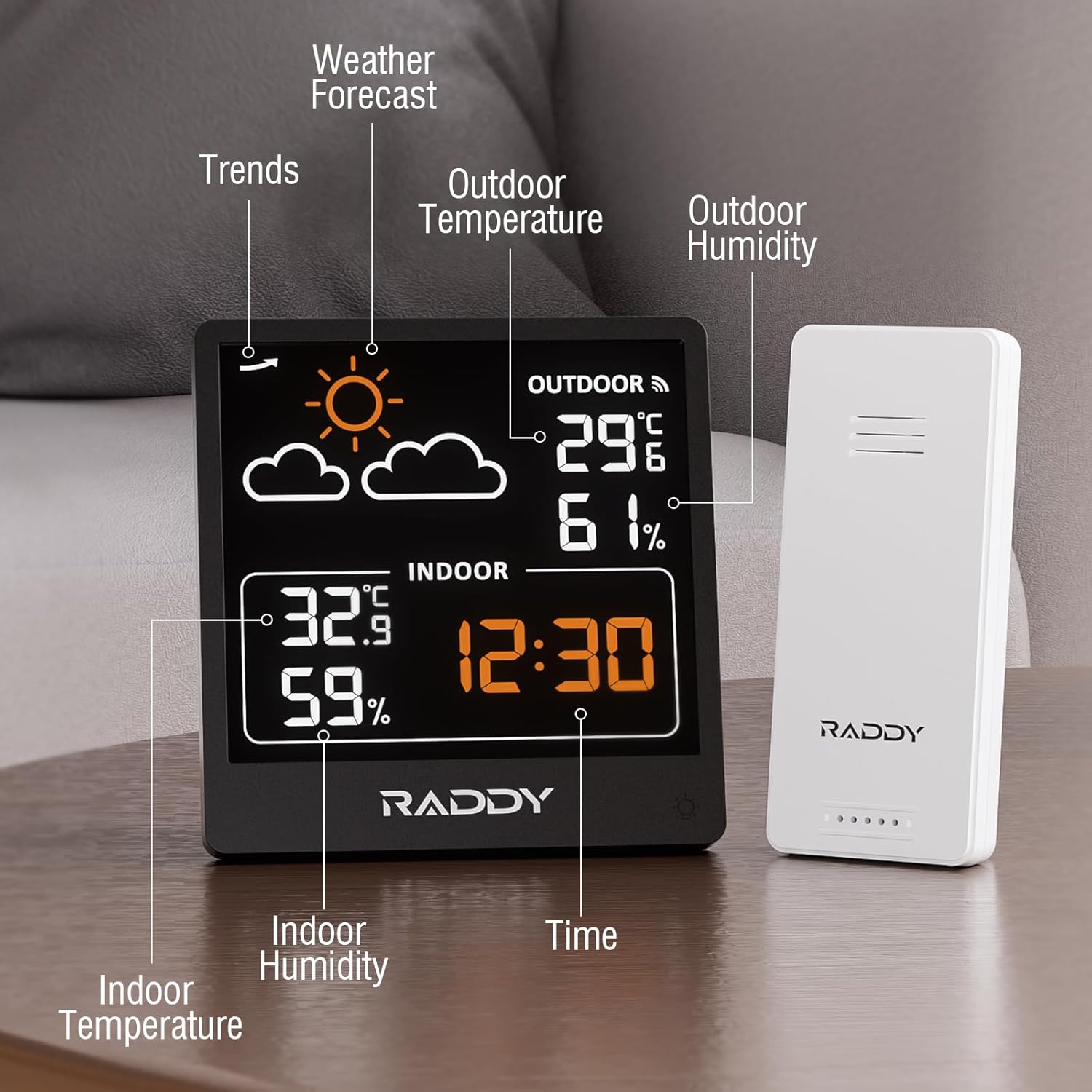
Figura 4: Detallada view of the Raddy WF-50T display. This image highlights various sections of the screen, including weather forecast icons, outdoor temperature and humidity, indoor temperature and humidity, and the current time.
- Pronòstic del temps: Icons indicating predicted weather conditions (sunny, cloudy, rainy, etc.).
- Temperatura i humitat exteriors: Readings from the wireless remote sensor.
- Temperatura i humitat interiors: Readings from the main unit's built-in sensors.
- Hora: Visualització de l'hora actual.
- Pressure Trends: (If applicable, based on product description) Indicates changes in atmospheric pressure.
2. Setting Time and Units
Refer to the buttons on the back or side of the main unit for specific controls. Typically:
- Premeu el botó "CONFIGURAR" button to enter time setting mode. Use "+" or "-" buttons to adjust values. Press "CONFIGURAR" again to confirm and move to the next setting (e.g., hour, minute, 12/24-hour format).
- Premeu el botó "°C/°F" botó per canviar entre les unitats de temperatura Celsius i Fahrenheit.
3. Control de la llum de fons
The main unit features adjustable backlight levels:

Figure 5: Three adjustable backlight levels. This image demonstrates the display with backlight off, low brightness, and high brightness, illustrating the visual difference for each setting.
- When powered by USB-C, the backlight remains on. You can typically adjust its brightness using a dedicated button (often labeled with a light icon).
- When powered by batteries, the backlight will illuminate for approximately 10 seconds after pressing any button to conserve power.
4. Viewing MAX/MIN Records
The device tracks the maximum and minimum temperature and humidity readings over the past 24 hours.

Figure 6: 24-hour maximum and minimum temperature and humidity records. The image shows graphs illustrating the fluctuation of outdoor temperature and humidity over a 24-hour period, with peak and lowest values highlighted.
- Premeu el botó "MAX/MIN" button (or similar) to cycle through the maximum and minimum recorded values for indoor and outdoor temperature and humidity.
- To clear the records, typically press and hold the "MAX/MIN" botó durant uns segons.
5. Weather Forecasting
The built-in pressure sensor predicts 12-24 hour weather trends. The forecast icons are based on atmospheric pressure changes and are not a guarantee of actual weather conditions.
- Assolellat: Indicates rising pressure.
- Slightly Cloudy: Indicates stable pressure.
- Ennuvolat: Indicates falling pressure.
- Plujós: Indicates significant falling pressure.
- Heavy Rainy: Indicates rapid falling pressure.
- Snowy: Indicates very low temperatures with falling pressure.
Manteniment
- Neteja: Netegeu la unitat de visualització i el sensor amb un drap suauamp tela. No utilitzeu netejadors abrasius ni dissolvents.
- Substitució de la bateria: Replace batteries in both units when the low battery indicator appears on the display. Ensure correct polarity.
- Emmagatzematge: Si guardeu el dispositiu durant un període prolongat, traieu totes les piles per evitar fuites. Guardeu-lo en un lloc fresc i sec.
Resolució de problemes
| Problema | Causa possible | Solució |
|---|---|---|
| No hi ha cap pantalla a la unitat principal. | No power; batteries inserted incorrectly or depleted; USB-C cable not connected properly. | Check battery polarity and charge; replace batteries; ensure USB-C cable is securely connected to a working power source. |
| Outdoor readings not appearing or inaccurate. | Remote sensor batteries depleted; sensor out of range; interference; sensor not synchronized. | Replace sensor batteries; move sensor closer to main unit; reduce interference (e.g., large metal objects); re-synchronize by removing and reinserting batteries in both units. |
| Weather forecast seems incorrect. | Forecast is based on atmospheric pressure trends, not real-time weather. | Understand that the forecast is a prediction based on pressure changes and may not always match actual conditions perfectly. |
| La retroiluminació no es manté encesa. | Unit is running on battery power. | Connect the USB-C cable to keep the backlight continuously on. Battery mode is designed to conserve power. |
Especificacions

Figure 7: Dimensions of the Raddy WF-50T main unit and remote sensor. The image provides measurements in both centimeters and inches for both components, along with the USB-C cable length.
- Model: WF-50V
- Interval de temperatura interior: +14.2℉ to +122℉ (-9.9℃ to 50℃)
- Interval de temperatura exterior: -40℉ to +158℉ (-40℃ to 70℃)
- Rang d'humitat: 20% a 95% HR
- Interval de transmissió sense fil: Fins a 100 metres (330 peus) a l'aire lliure
- Font d'alimentació (unitat principal): USB-C (cable included) or 2 x AAA batteries (not included)
- Power Source (Remote Sensor): 2 piles AAA (no incloses)
- Dimensions del producte (unitat principal): 8.9 cm (3.5") width x 12.7 cm (5.0") height
- Product Dimensions (Remote Sensor): 3.9 cm (1.5") width x 9.3 cm (3.7") height
- Fabricant: Raddy
- País d'origen: Xina
Garantia i Suport
For warranty information and technical support, please refer to the documentation provided with your purchase or visit the official Raddy weblloc web. Conserveu el comprovant de compra per a reclamacions de garantia.
Official Raddy Store: https://www.amazon.ca/stores/Raddy/page/04DBB4EB-56F8-4C26-A5D7-3758811F83CB


