Introducció
This manual provides detailed instructions for the setup, operation, and maintenance of your Moukey MAMP1 2.0 Channel Bluetooth Stereo Receiver. This amplifier is designed to deliver powerful, high-quality audio for various applications, including home theater systems, acoustic setups, and karaoke. Please read this manual thoroughly before using the device to ensure proper and safe operation.
Instruccions de seguretat
- Do not expose this unit to rain or moisture to prevent fire or shock hazards.
- No obriu la c.asing. No hi ha peces a l'interior que l'usuari pugui reparar. Demaneu totes les tasques de manteniment a personal de servei qualificat.
- Assegureu-vos una ventilació adequada. No bloquegeu les obertures de ventilació.
- Place the unit on a stable, flat surface away from direct sunlight, heat sources, or excessive dust.
- Utilitzeu només la font d'alimentació especificadatage.
- Disconnect the power cord from the outlet if the unit will not be used for a long period.
- Mantenir fora de l'abast dels nens.
Contingut del paquet
Si us plau, comproveu que tots els elements siguin presents al paquet:
- Moukey MAMPReceptor estèreo 1
- Control remot
- Antena FM
- Manual d'usuari (aquest document)
Producte acabatview
Front Panel Controls and Inputs

The front panel of the MAMP1 receiver provides access to all primary controls and convenient input options:
- Interruptor d'alimentació: Encén/apaga la unitat.
- USB / SD Card Slots: Per reproduir àudio files from USB drives (up to 32GB) and SD cards (up to 16GB).
- Botó de mode: Canvia pels modes d'entrada (Bluetooth, USB, SD, AUX, FM).
- Botó BT: Directly switches to Bluetooth mode.
- Prev/Next Buttons: For track navigation in USB/SD/Bluetooth modes or station tuning in FM mode.
- Botó Reprodueix / Pausa: Controls playback for USB/SD/Bluetooth.
- Pantalla LED: Mostra el mode actual, la informació de la pista i la freqüència FM.
- Folder / Track Knob: Navigates folders and tracks on USB/SD.
- Control de volum mestre: Ajusta el volum de sortida general.
- Headphone Jack (1/4"): Per a una escolta privada.
- Microphone Inputs (MIC 1, MIC 2 - 1/4"): Connect microphones for karaoke or public address.
- Control de volum del micròfon: Ajusta el volum dels micròfons connectats.
- Botó d'eco: Controla l'efecte d'eco dels micròfons.
- Pom de baix: Ajusta la sortida d'àudio de baixa freqüència.
- Pom treble: Ajusta la sortida d'àudio d'alta freqüència.
- Pom d'equilibri: Ajusta el balanç del canal esquerre/dret.
- AUX Input Jack (3.5mm): Per connectar dispositius d'àudio externs.
- Input Selector Knob: Selects between CD/DVD RCA inputs and the front panel AUX/MP3/FM/BT inputs.


Connexions del panell posterior
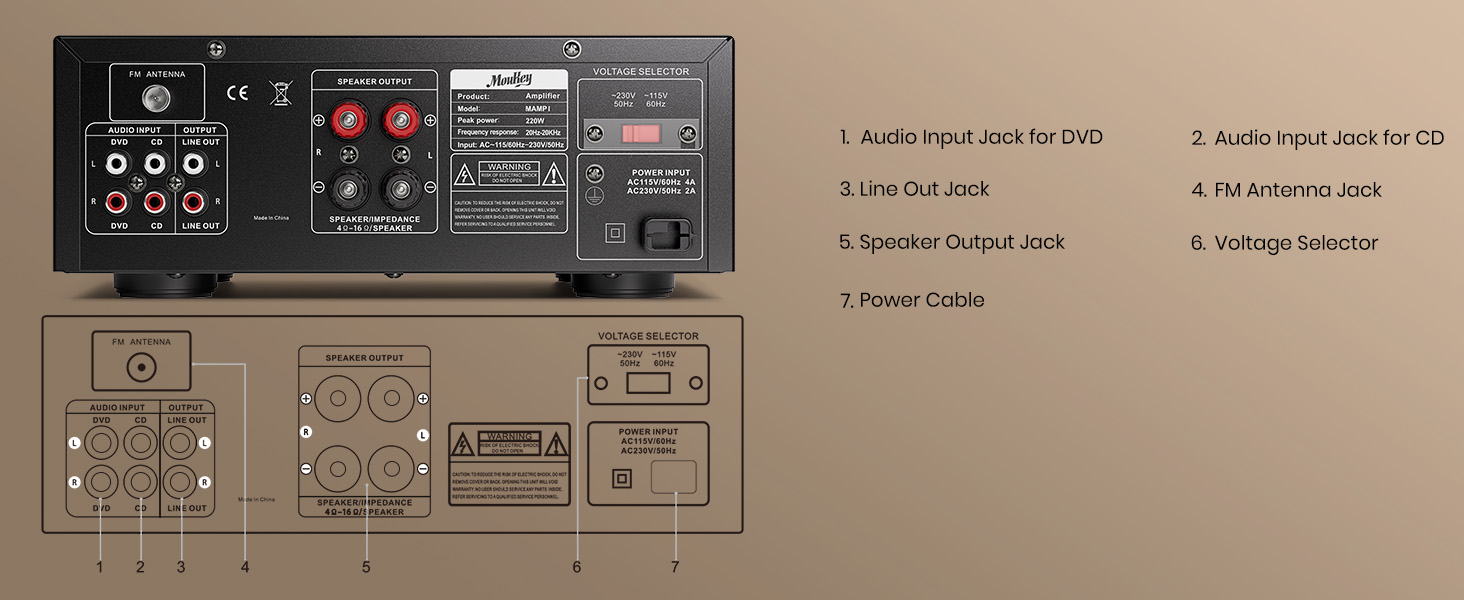
The rear panel provides essential connections for your audio system:
- Audio Input Jack for DVD (RCA): Connect audio output from a DVD player or similar source.
- Audio Input Jack for CD (RCA): Connect audio output from a CD player or similar source.
- Line Out Jack (RCA): Provides an audio output signal for connecting to another ampmés elevat o dispositiu de gravació.
- Presa d'antena FM: Connecteu l'antena FM inclosa per a la recepció de ràdio.
- Speaker Output Jacks (Banana Plug/Binding Post): Connect your passive speakers.
- VoltagSelector: Allows selection between 110V and 220V power input (ensure this matches your local voltage before connecting power).
- Entrada de cable d'alimentació: Connecteu el cable d'alimentació de CA.
Configuració
Connexió d'altaveus
La MAMP1 uses banana plug/binding post terminals for speaker connections. Ensure your speakers are passive and match the impedance requirements (typically 4-16 ohms).

- Prepareu els cables: If using bare speaker wire, strip approximately 10mm (0.4 inches) of insulation from the ends of each wire. Twist the exposed strands tightly.
- Loosen Terminal: Rotate and loosen the speaker knob on the rear panel.
- Inseriu el cable: Insert the bare wire into the hole in the center of the binding post. Ensure no stray strands touch the other terminal.
- Tighten Terminal: Tighten the knob to secure the wire firmly.
- Polaritat: Ensure correct polarity (+ to + and - to -) for both speakers and the receiver to avoid phase issues.
Connexió de fonts d'àudio
- RCA Inputs (CD/DVD): Connect audio output from your CD player, DVD player, or other audio sources using RCA cables to the corresponding "CD" or "DVD" input jacks on the rear panel.
- Entrada AUX (3.5 mm): Connect smartphones, tablets, or other devices with a 3.5mm audio output to the "AUX" jack on the front panel.
- Targeta USB/SD: Insert a USB flash drive (up to 32GB) or an SD card (up to 16GB) into the respective slots on the front panel.
- Micròfons: Plug 1/4" microphones into the "MIC 1" or "MIC 2" inputs on the front panel.
- Antena FM: Connect the included FM antenna to the "FM ANTENNA" jack on the rear panel for radio reception.
Connexió d'alimentació
Before connecting power, ensure the Voltage Selector on the rear panel is set to match your local power supply (110V or 220V). Then, connect the power cable to the receiver and plug it into a wall outlet.
Instruccions de funcionament
Encès/Apagat
Press the "POWER" switch on the front panel to turn the unit on or off. The LED display will illuminate when the unit is powered on.
Selecció d'entrada
Use the "MODE" button on the front panel or the "Input Selector" knob to choose your desired audio source (Bluetooth, USB, SD, AUX, FM, CD, DVD).
Funcionament Bluetooth

- Press the "BT" button or cycle the "MODE" button until "BLUE" appears on the LED display.
- On your smartphone or Bluetooth-enabled device, search for "Moukey MAMP1" in the Bluetooth settings.
- Seleccioneu "Moukey M"AMP1" to pair. Once connected, you will hear a confirmation tone.
- You can now stream audio wirelessly from your device to the receiver. Control playback (play/pause, next/prev track) using the buttons on the receiver or your connected device.
Reproducció de targetes USB/SD
Inseriu una unitat USB o una targeta SD amb àudio files into the corresponding slot. The unit will automatically switch to USB/SD mode and begin playback. Use the "Prev/Next" and "Play/Pause" buttons to control playback. The "Folder/Track" knob allows navigation through folders and tracks.
Note: The unit supports USB drives up to 32GB and SD cards up to 16GB. Larger capacities may not be recognized.
Funcionament de la ràdio FM
Ensure the FM antenna is connected. Press the "MODE" button until "FM" appears on the display.
- Escaneig automàtic: Press and hold the "Play/Pause" button to initiate an auto-scan for available FM stations. The unit will save detected stations.
- Sintonització manual: Use the "Prev/Next" buttons to manually tune to specific frequencies or cycle through saved stations.
Microphone and Karaoke Functions

Connect up to two 1/4" microphones to the "MIC 1" and "MIC 2" inputs on the front panel.
- MIC VOL: Adjusts the overall volume of both microphones.
- ECO: Adjusts the echo effect applied to the microphone audio.
- Ensure the main "Master Volume" is also adjusted appropriately for the desired output level.
Tone and Balance Control

- BAIX: Rotate the Bass knob to increase or decrease the low-frequency response of the audio.
- AGUTS: Rotate the Treble knob to increase or decrease the high-frequency response of the audio.
- SALDO: Adjust the Balance knob to shift the audio output between the left and right speakers.
Manteniment
- Neteja: Feu servir un drap suau i sec per netejar l'exterior de la unitat. No utilitzeu netejadors líquids ni aerosols.
- Ventilació: Assegureu-vos que les obertures de ventilació estiguin netes de pols i deixalles per evitar el sobreescalfament.
- Emmagatzematge: Si guardeu la unitat durant un període prolongat, desconnecteu-la de l'alimentació i guardeu-la en un lloc fresc i sec.
Resolució de problemes
| Problema | Causa possible | Solució |
|---|---|---|
| Sense poder | Power cord not connected; Power switch off; Voltage selector incorrect. | Ensure power cord is securely plugged in. Turn power switch ON. Verify voltage selector matches local power. |
| Sense sortida de so | Incorrect input selected; Volume too low; Speakers not connected properly; Source device issue. | Select correct input. Increase Master Volume. Check speaker connections and polarity. Verify source device is playing audio. |
| Bluetooth no connectat | Not in Bluetooth mode; Device too far; Device already connected to another unit. | Switch to Bluetooth mode. Ensure device is within 40ft range. Disconnect from other Bluetooth devices and try pairing again. |
| No es reconeix la targeta USB/SD | Card/drive capacity too large; Incorrect file format; La targeta/unitat no s'ha inserit correctament. | Ensure capacity is within limits (USB 32GB, SD 16GB). Use supported audio formats. Reinsert card/drive firmly. |
| Microphone echo/volume issues | MIC VOL or ECHO knobs incorrectly set. | Adjust MIC VOL and ECHO knobs to desired levels. |
| Mala recepció FM | Antena no connectada o mal posicionada. | Connect FM antenna securely. Adjust antenna position for better signal. |
Especificacions
| Característica | Detall |
|---|---|
| Marca | Moukey |
| Número de model | MAMP1 |
| Potència màxima de sortida | 220 watts |
| Nombre de canals | 2.0 |
| Tecnologia de connectivitat | RCA, Bluetooth 5.0, USB, SD, 3.5mm AUX |
| Dispositius compatibles | Smartphone, Tablet, iPad, iPhone, Computer, Speaker |
| Mode de sortida d'àudio | estèreo |
| Entrades de micròfon | 2 x 1/4" with Echo Control |
| Compatibilitat amb targetes USB/SD | USB up to 32GB, SD up to 16GB |
| Ràdio FM | Built-in with LED screen |
| Dimensions (L x A x A) | Aprox. 10 x 8 x 4 polzades (25 x 21.3 x 9.5 cm) |
| Pes de l'article | 6.87 lliures |

Garantia i Suport
Moukey products typically come with a standard manufacturer's warranty. For specific warranty details, including duration and coverage, please refer to the warranty card included with your product or visit the official Moukey website. For technical support, troubleshooting assistance beyond this manual, or warranty claims, please contact Moukey customer service through their official channels.
Sovint podeu trobar informació de contacte d'assistència a la pàgina web del fabricant weblloc web o a l'embalatge del producte.


