Introducció
Thank you for choosing the OBA R15 Smart Ring. This manual provides essential information for setting up, operating, and maintaining your device. Please read it carefully to ensure proper use and to maximize the benefits of your smart ring.
The OBA R15 is a versatile smart ring designed for daily activity and health monitoring. It features a display, wireless charging, 5ATM water resistance, and compatibility with both iOS and Android devices.
Contingut del paquet
- OBA R15 Smart Ring
- Estació de càrrega sense fils
- Manual d'usuari
Configuració
1. Charging the Ring
Before first use, fully charge your OBA R15 Smart Ring.
- Connect the wireless charging station to a power source using a standard USB adapter (not included).
- Place the OBA R15 Smart Ring onto the charging station. Ensure the ring is correctly positioned for charging to begin.
- The ring's display will indicate charging status. A full charge typically takes approximately 1.5 hours.

Image: The OBA R15 Smart Ring placed on its wireless charging station. The image also highlights the battery life of 5-7 days and a standby time of 15 days.
2. Instal·lació i emparellament de l'aplicació
The OBA R15 Smart Ring requires the QRing app for full functionality and data synchronization.
- Download the QRing App: Scan the QR code provided in the packaging or search for "QRing" in your device's app store (compatible with Android 5.1 and above, iOS 8.0 and above).
- Crea un compte: Open the QRing app and follow the on-screen instructions to create a new user account or log in if you already have one.
- Aparella l'anell:
- Ensure your OBA R15 Smart Ring is charged and within Bluetooth range of your smartphone.
- Activa el Bluetooth al teu telèfon intel·ligent.
- In the QRing app, navigate to the device pairing section (usually found under "Device" or "My Ring").
- Select "Add Device" and choose the OBA R15 from the list of available devices.
- Confirm the pairing request on both your phone and, if prompted, on the ring.
- Pro completfile: Enter your personal information (e.g., age, height, weight) in the app for accurate health and activity tracking.
Instruccions de funcionament
Display and Basic Interaction
The OBA R15 features a discreet display that shows key information.
- One-Touch Display: Tap the ring's display area once to cycle through information such as Time, Steps, Heart Rate, and Battery Level.
- Change Font Direction: Long press the display area to change the orientation of the text on the screen.

Image: The OBA R15 Smart Ring displaying various metrics like steps, heart rate, battery level (power), and current time.
Vigilància de la salut
The ring continuously monitors various health metrics. View detailed data in the QRing app.
- Freqüència cardíaca: Monitors your heart rate 24/7.
- Oxigen en sang (SpO2): Fa un seguiment dels nivells de saturació d'oxigen a la sang.
- Monitorització del son: Analitza el sontages (profund, lleuger, REM) i proporciona una puntuació de son.
- Monitorització de l'estrès: Measures stress levels and heart rate variability (HRV).

Image: A visual representation of the QRing app interface, displaying comprehensive health data such as 24-hour heart rate, blood oxygen saturation, sleep quality, daily activity (mileage, calories), and stress levels.
Seguiment de l'activitat
The OBA R15 tracks your daily movements and exercise.
- Activitat diària: Counts steps, distance traveled, and calories burned.
- Múltiples modes esportius: Select specific sports modes within the QRing app to track various activities more accurately.
Altres Funcions
- Comandament a distància: Use the ring to remotely control your smartphone's camera or music playback.
- Ring Search: Locate your ring using the app if it's within Bluetooth range.
- Control de gestos: Utilize specific gestures for certain functions (e.g., interacting with games or apps).
- Seguiment del cicle femení: Monitor and predict menstrual cycles through the app.
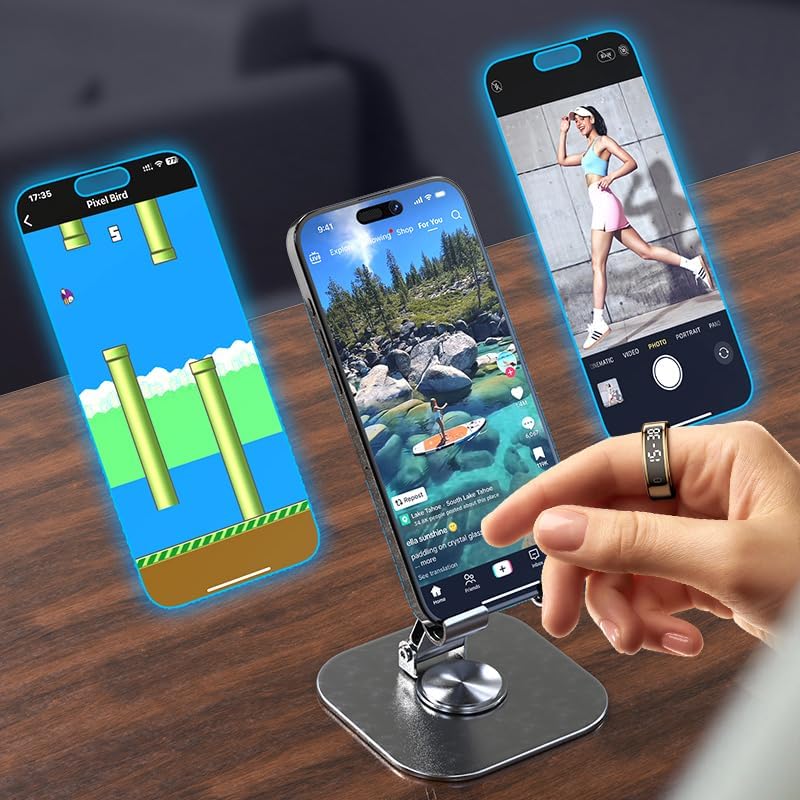
Image: A person wearing the OBA R15 Smart Ring on their finger, demonstrating its use for gesture control or remote interaction with a smartphone displaying various applications.
Manteniment
Resistència a l'aigua
The OBA R15 Smart Ring has a 5 ATM water resistance rating. This means it can withstand splashes, rain, showering, and shallow-water activities like swimming. It is not suitable for diving or high-pressure water activities.
- You can wear the ring while washing hands or showering.
- It can be worn for swimming in the sea or pool.
- Avoid exposing the ring to hot water, steam, or harsh chemicals.

Image: The OBA R15 Smart Ring shown partially submerged in water, with text indicating its 5ATM waterproof rating and explaining that it can be worn during hand washing, showering, or swimming.
Neteja
Clean your OBA R15 Smart Ring regularly to ensure optimal performance and hygiene.
- Wipe the ring with a soft, damp tela.
- No utilitzeu netejadors abrasius ni dissolvents.
- Assegureu-vos que els contactes de càrrega estiguin nets i secs abans de carregar.
Cura de la bateria
Per allargar la durada de la bateria:
- Eviteu temperatures extremes.
- Charge the ring fully before long periods of inactivity.
- The ring offers 5-7 days of typical usage and up to 15 days of standby time on a full charge.
Resolució de problemes
Ring Not Turning On
- Ensure the ring is fully charged. Place it on the charging station for at least 30 minutes.
- Check if the charging station is properly connected to a power source.
Cannot Pair with App
- Assegureu-vos que el Bluetooth estigui habilitat al vostre telèfon intel·ligent.
- Ensure the ring is charged and close to your phone.
- Restart both your smartphone and the OBA R15 Smart Ring (if possible, or place on charger to reset).
- Try unpairing and re-pairing the device through the QRing app settings.
- Verify that the QRing app is updated to the latest version.
Lectures de dades inexactes
- Ensure the ring is worn correctly and snugly on your finger.
- Netegeu els sensors de l'interior de l'anell.
- Update your personal information (height, weight, age) in the QRing app.
- Calibra el dispositiu si hi ha una opció disponible a l'aplicació.
L'aplicació no sincronitza les dades
- Comprova la connexió a Internet del teu telèfon.
- Ensure the QRing app has necessary permissions (e.g., Bluetooth, location).
- Close and reopen the QRing app.
- Reinicieu el telèfon.
Especificacions
| Característica | Especificació |
|---|---|
| Model | OBA Ring R15 |
| Material | Acer inoxidable |
| Pes | 3.3 g |
| Mides disponibles | Medium (18.3mm), Large (20mm), XL (21.6mm) |
| Resistència a l'aigua | 5 caixers automàtics |
| Chipset | Realtek RTL8762 ESF |
| App | QRing |
| Sistema operatiu compatible | Android 5.1+, iOS 8.0+ |
| Memòria Flash | 104 KB de RAM, 512 KB de memòria flaix |
| Bluetooth | 5.2 BLE |
| Sensors | ST LIS2DOC, Vcare VC30F-S (Heart Rate) |
| Bateria | Lithium Polymer 15mAh (18mAh for sizes 11+) |
| Tipus de càrrega | Sense fil |
| Temps de càrrega | Aprox. 1.5 hores |
| Temps de treball | 5-7 days (usage) |
| Temps d'espera | 15 dies |
| Tipus de visualització | LCD |
| Característiques especials | Custom Activity Tracking, Gesture Control, Lightweight, Notifications, Shockproof |
Garantia i Suport
Informació de la garantia
Your OBA R15 Smart Ring is covered by a standard warranty. For specific details regarding warranty duration and terms, please refer to your purchase documentation or contact your retailer. In general, a 30-day refund/replacement policy may apply from the date of purchase for manufacturing defects.
Atenció al client
If you encounter any issues or have questions not covered in this manual, please contact OBA customer support or your retailer for assistance.
- Refer to the contact information provided with your product packaging.
- Visit the official OBA weblloc web per a preguntes freqüents i recursos de suport.


