1. Introducció
The Foscam PD5 is an advanced 3K 5MP outdoor security camera designed to provide comprehensive surveillance for your home or property. Featuring 2.4G/5G dual-band Wi-Fi connectivity, 20X digital zoom, 360° Pan-Tilt-Zoom (PTZ) capabilities, and AI-powered motion detection, the PD5 offers robust security features. This manual provides detailed instructions for installation, operation, and maintenance to ensure optimal performance of your camera.

Figure 1.1: Foscam PD5 3K Security Camera overview.
2. Què hi ha a la caixa
Verifiqueu que tots els components siguin presents abans de continuar amb la instal·lació:
- Cos de la càmera
- Manual d'instruccions
- Cargols de muntatge
- Adaptador d'alimentació
3. Guia de configuració
3.1 Instal·lació física
The Foscam PD5 is designed for outdoor use and can be wall-mounted. Choose a location that provides the desired viewing angle and has access to a power source. Ensure the mounting surface is stable and can support the camera's weight.
- Mark the drilling points using the mounting template (if provided, or by holding the camera base).
- Perforeu forats pilot als llocs marcats.
- Inseriu ancoratges de paret si el munteu sobre plaques de guix o maçoneria.
- Secure the camera base to the wall using the provided mounting screws.
- Adjust the camera's physical orientation as needed before final tightening.

Figura 3.1: Example of camera wall mounting and panoramic view capacitat.
3.2 Connexió d'alimentació
Connect the provided power adapter to the camera's power input port and then plug it into a standard electrical outlet. Ensure the connection is secure and protected from weather elements if installed outdoors.
3.3 Instal·lació de l'aplicació i configuració inicial
To set up and control your Foscam PD5 camera, download the official Foscam app on your smartphone.
- Download the "Foscam" app from your device's app store (iOS App Store or Google Play Store).
- Open the Foscam app and create an account or log in.
- Toqueu la icona "+" per afegir un dispositiu nou.
- Scan the QR code located on the bottom of your Foscam PD5 camera.
- Follow the on-screen prompts to connect the camera to your Wi-Fi network. The camera supports both 2.4GHz and 5GHz dual-band Wi-Fi for flexible connectivity.
- Un cop connectat, pots posar nom a la teva càmera i començar a fer directe viewing.

Figure 3.2: The Foscam PD5 supports blazing-fast 2.4GHz and 5GHz dual-band Wi-Fi for reliable streaming.
4. Instruccions de funcionament
4.1 Viu View i control PTZ
Access the live feed of your camera through the Foscam app. You can control the camera's pan (horizontal), tilt (vertical), and digital zoom functions directly from the app.
- Panorama/inclinació: Swipe on the live video feed or use the directional controls in the app to rotate the camera 355° horizontally and 90° vertically.
- Zoom digital: Pinch to zoom in or out on the live video to utilize the 20X digital zoom feature.

Figure 4.1: The camera offers 3K 5MP resolution and up to 20X digital zoom for detailed viewing.
4.2 Auto-Tracking and Smart Motion Detection
The Foscam PD5 features advanced AI-powered detection capabilities to minimize false alarms and enhance security.
- Seguiment automàtic: When a human is detected, the camera can automatically pan and tilt to follow their movement, keeping them in the frame.
- Detecció d'IA: Configure the camera to detect humans and vehicles specifically, reducing alerts from pets or environmental factors.
- Custom Detection Zones: Defineix àrees específiques dins de la càmera view where motion detection should be active, ignoring irrelevant areas.
- Alertes: Receive real-time push notifications, emails, or FTP alerts when motion, sound, or light is detected.

Figure 4.2: Automatic human tracking ensures subjects remain in view.

Figure 4.3: Smart security with automatic human, vehicle, and pet detection.
4.3 Modes de visió nocturna
The Foscam PD5 offers versatile night vision capabilities to ensure clear monitoring in low-light conditions.
- Visió nocturna a tot color: With 8 IR LEDs and a 6500K spotlight, the camera can provide vibrant, full-color images up to 66ft even in total darkness. This mode can be set to manual or automatic.
- Mode IR: Visió nocturna infraroja estàndard per a imatges nítides en blanc i negre en la foscor completa.
- Mode intel·ligent: Motion triggers the spotlights to turn on, enabling color night vision when activity is detected.

Figure 4.4: Different night vision modes: Smart, Color, and IR.
4.4 Two-Way Audio and Alarm
Communicate with visitors or deter intruders using the camera's built-in microphone and speaker.
- Àudio bidireccional: Speak and listen through the camera using the Foscam app.
- Sound & Light Alarms: Activate the 110dB siren and flashing spotlights to deter unwanted visitors.

Figure 4.5: Instant notifications with sound and light alarms for double protection.
4.5 Opcions d'emmagatzematge
Your Foscam PD5 camera offers multiple options for storing recorded footage:
- Targeta MicroSD: Supports up to 256GB microSD cards (not included) for local storage.
- FTP: Configure the camera to upload recordings to an FTP server.
- NVR: Compatible with Foscam Network Video Recorders (NVRs) for continuous recording.
- Foscam Cloud Storage: Secure cloud storage options are available, offering industry-leading privacy protection.
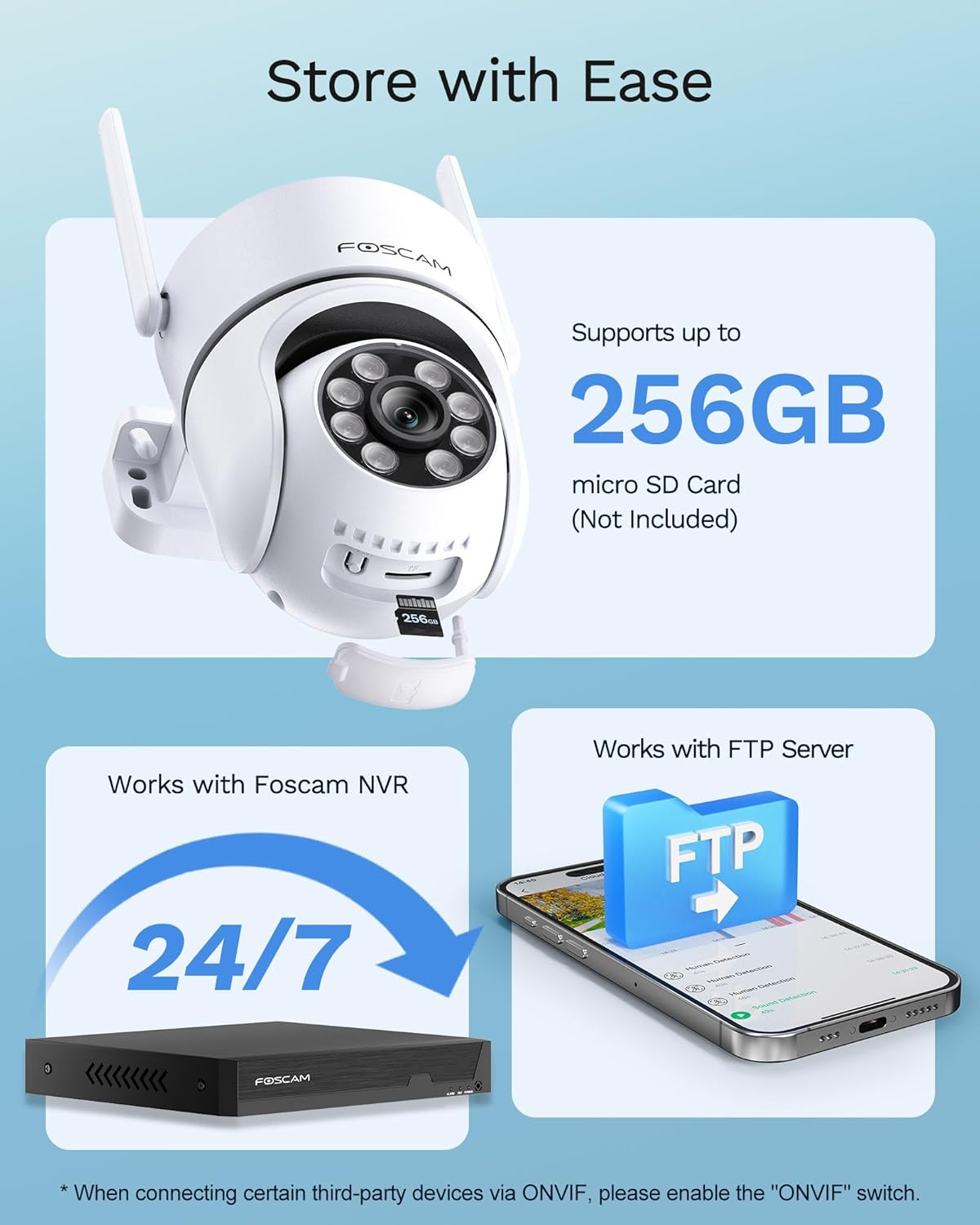
Figure 4.6: Flexible storage options including microSD, NVR, FTP, and cloud.
4.6 Integració de la llar intel·ligent
The Foscam PD5 seamlessly integrates with popular smart home platforms for convenient control.
- Amazon Alexa: Utilitzeu ordres de veu per view your camera feed on compatible Alexa devices.
- Google Home: Integrate with Google Home for voice control and viewing on Google Assistant-enabled displays.

Figure 4.7: The camera is compatible with Amazon Alexa and Google Assistant for hands-free control.
4.7 Multi-User Shared Viewing
Share access to your camera's live feed and recordings with family members or trusted individuals through the Foscam app. This allows multiple users to monitor the property simultaneously.

Figure 4.8: Multi-user shared viewing allows family members to monitor the home.
5. Manteniment
5.1 Neteja
To maintain optimal image clarity, regularly clean the camera lens and housing. Use a soft, damp cloth to wipe away dust and dirt. Avoid abrasive cleaners or solvents that could damage the camera's surface.
5.2 actualitzacions de microprogramari
Periodically check for and install firmware updates through the Foscam app. Updates often include performance improvements, new features, and security enhancements.
5.3 Impermeabilització
The Foscam PD5 has an IP65 weatherproof rating, meaning it is protected against dust and low-pressure water jets. While designed for outdoor use, ensure all connections are properly sealed to prevent water ingress, especially the power cable connection.

Figure 5.1: The IP65 waterproof design protects the camera in various weather conditions.
6. Solució De Problemes
This section addresses common issues you might encounter with your Foscam PD5 camera.
| Problema | Causa possible | Solució |
|---|---|---|
| La càmera no es connecta a la Wi-Fi | Incorrect Wi-Fi password, camera too far from router, router settings. |
|
| Falses alarmes freqüents | Environmental factors (e.g., trees, animals), sensitive detection settings. |
|
| Mala qualitat d'imatge a la nit | Lens obstruction, insufficient lighting, incorrect night vision mode. |
|
| ONVIF compatibility issues | ONVIF protocol not enabled, third-party software configuration. |
|
7. Especificacions
Key technical specifications for the Foscam PD5 3K Security Camera:
| Característica | Detall |
|---|---|
| Nom del model | PD5 |
| Ús interior/exterior | A l'aire lliure |
| Resolució de captura de vídeo | 3K (3072x1728) |
| Resolució de fixes efectius | 5 MP |
| Velocitat de fotogrames | 25 fotogrames per segon |
| Tecnologia de connectivitat | Wireless (Wi-Fi 6 Dual-Band: 2.4GHz & 5GHz) |
| PTZ Capabilities | 355° horitzontal, 90° vertical |
| Tipus de zoom | Zoom digital (20X) |
| Gamma de visió nocturna | 66 Feet (Color Night Vision available) |
| Àudio | 2-Way Audio (Built-in microphone & speaker) |
| Alarma | 110dB Siren, Spotlights |
| Opcions d'emmagatzematge | MicroSD (up to 256GB), FTP, NVR, Foscam Cloud |
| Resistència a la intempèrie | Impermeable IP65 |
| Dimensions (L x A x A) | 3.7 x 5.71 x 5 polzades |
| Pes | 1.46 lliures |
| Font d'alimentació | Elèctric amb cable (12 volts, 12 watts) |
| Dispositius compatibles | Telèfon intel·ligent, Amazon Alexa, Assistent de Google |
8. Garantia i Suport
FOSCAM is committed to providing excellent customer service and support for your product.
- 24/7 Fast Reply & Lifetime Tech Support: Access technical assistance whenever you need it.
- Garantia de qualitat de 180 dies: Ensures the quality of your product for 180 days from purchase.
- Devolucions gratuïtes de 30 dies: Return the product within 30 days for free if you are not satisfied.
- Free Replacement & Fast Delivery: In case of eligible issues, receive a free replacement with fast delivery.
For further assistance, please visit the official Foscam support weblloc o poseu-vos en contacte amb el seu equip d'atenció al client.


