1. Introducció
Thank you for choosing the navycrest A2Pro 4K & 5G WiFi Dash Cam. This device is designed to provide comprehensive front and rear vehicle recording, ensuring your safety and peace of mind on the road. Featuring 4K front recording, 5G WiFi connectivity, and 24/7 parking monitoring with the included hardwire kit, the A2Pro offers advanced functionality for reliable vehicle surveillance. Please read this manual thoroughly before operation to ensure proper installation and usage.
2. Què hi ha a la caixa
Desembaleu amb cura tots els components i comproveu-los amb la llista següent:
- A2Pro Front Dash Camera
- Càmera posterior
- Hardwire Kit (Type C)
- Muntatge de la ventosa
- Targeta de memòria de 64 GB
- Installation Tools (Fuse Taps)

Image: All components included in the A2Pro Dash Cam bundle.
3. Producte acabatview
Familiarize yourself with the main parts of your A2Pro Dash Cam system:
- Front Camera Unit: Main recording unit with 4K lens, 3-inch IPS display, and control buttons.
- Càmera posterior: Connects to the main unit for 2.5K rear recording.
- Muntatge amb ventosa: For secure attachment of the front camera to the windshield.
- Kit de cablejat: Enables 24/7 parking mode by connecting directly to your vehicle's fuse box.
- Ranura per a targeta de memòria: Supports up to 64GB (included) for video storage.

Image: Front dash camera, rear camera, and a representation of the smartphone application interface.
4. Configuració i instal·lació
4.1. Installing the Front Dash Camera
- Netegeu la zona del parabrisa on voleu muntar la càmera del salpicader.
- Fixeu el suport de ventosa a la càmera frontal.
- Press the suction cup firmly against the windshield and lock it into place.
- Ajusta l'angle de la càmera per garantir una visió clara view del camí per davant.
- Insert the 64GB memory card into the designated slot until it clicks.
4.2. Instal·lació de la càmera posterior
- Identify a suitable location on your rear windshield, ensuring a clear view.
- Netegeu bé la superfície de muntatge.
- Attach the rear camera using its adhesive pad.
- Route the rear camera cable to the front dash camera, tucking it neatly along the vehicle's headliner and A-pillars.
- Connect the rear camera cable to the dedicated port on the front dash camera.
4.3. Hardwire Kit Installation for 24/7 Parking Mode
The included Type C Hardwire Kit is essential for enabling the 24/7 Parking Mode feature. This kit connects directly to your vehicle's fuse box to provide continuous power even when the engine is off.
- Localitza la caixa de fusibles del teu vehicle (consulta el manual del propietari del vehicle).
- Identify a constant power fuse (B+) and an ACC (Accessory) fuse that powers on/off with the ignition.
- Using the provided fuse taps, connect the red wire (B+) of the hardwire kit to the constant power fuse and the yellow wire (ACC) to the accessory fuse.
- Connect the black wire (GND) to a metal bolt or screw on the vehicle's chassis for grounding.
- Route the Type C connector cable from the hardwire kit to the front dash camera and plug it into the Type C power input port.
- Ensure all connections are secure and cables are neatly tucked away to avoid interference with driving.
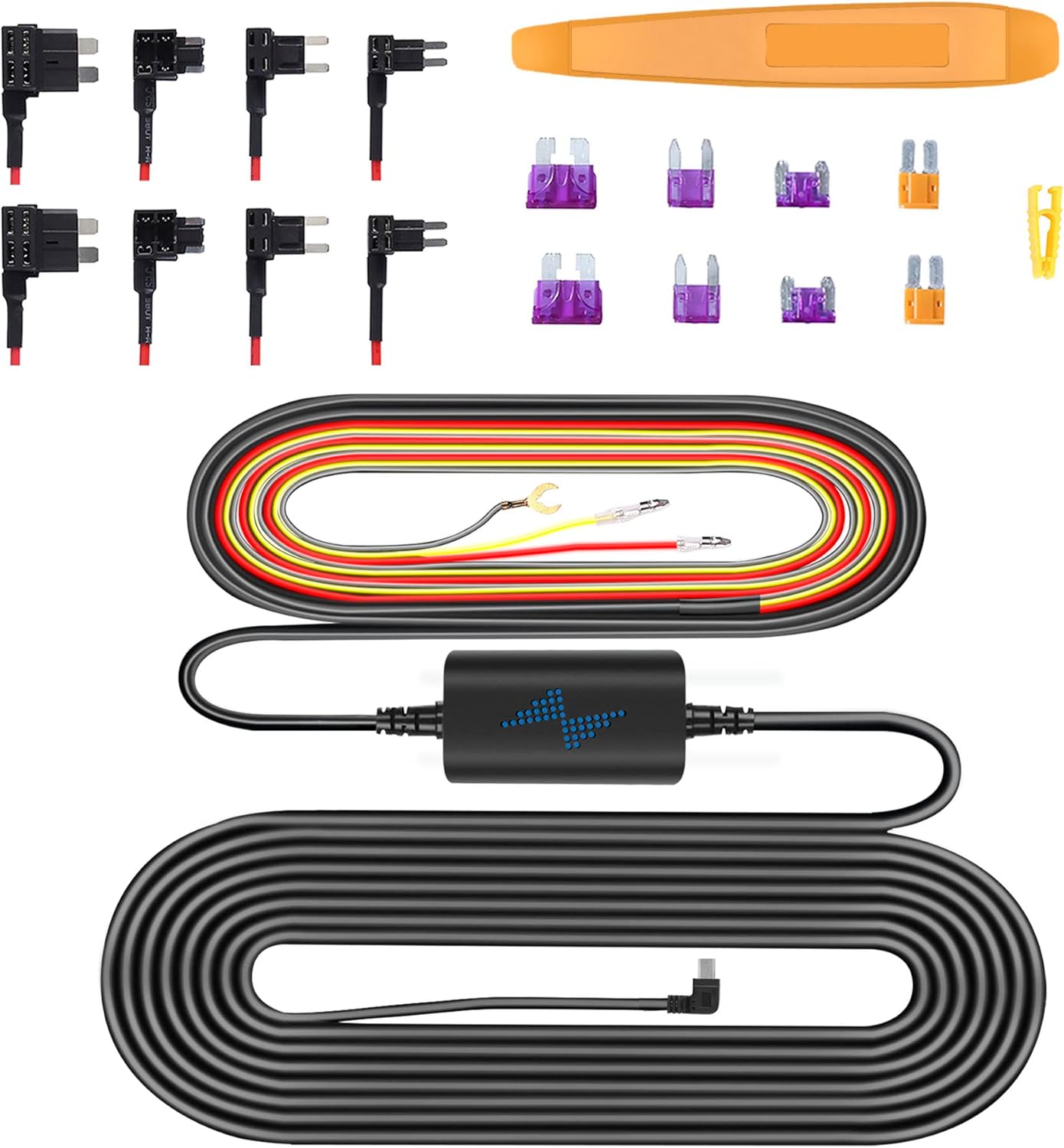
Image: Components of the Type C Hardwire Kit, including various fuse taps for different vehicle types.
5. Instruccions de funcionament
5.1. Encès / apagat
- Encès: The dash cam will automatically power on and begin recording when connected to a power source and the vehicle's ignition is turned on.
- Apagar: The dash cam will automatically power off shortly after the vehicle's ignition is turned off.
5.2. Enregistrament bàsic
- Enregistrament en bucle: La càmera del salpicader grava vídeo contínuament en segments curts (per exemple, 1, 3 o 5 minuts). Quan la targeta de memòria està plena, sobreescriu automàticament el vídeo desbloquejat més antic.tage.
- Enregistrament d'emergència (sensor G): En cas d'impacte o col·lisió sobtada, el sensor G integrat detectarà automàticament l'esdeveniment i bloquejarà el segment de vídeo actual, evitant que es sobreescrigui amb l'enregistrament en bucle.
5.3. Connectivitat Wi-Fi i ús d'aplicacions
The A2Pro features 5G WiFi for fast connection to your smartphone. Download the dedicated app (refer to the packaging or quick start guide for app name) from your app store.
- Enable Wi-Fi on your dash cam via the settings menu.
- Al telèfon intel·ligent, connecteu-vos a la xarxa Wi-Fi de la càmera del salpicader (l'SSID i la contrasenya es mostraran a la pantalla de la càmera del salpicader).
- Obriu l'aplicació a view viu footage, reproducció de vídeos gravats, descàrrega files al telèfon i ajusta la configuració de la càmera.
5.4. Mode d'aparcament 24/7
With the hardwire kit properly installed, the dash cam can monitor your vehicle even when parked. This mode activates when the vehicle's ignition is off.
- Detecció de moviment: The camera will start recording if it detects motion around your vehicle.
- Detecció d'impacte: If an impact is detected while parked, the camera will automatically record and lock the footage.
- Gravació per lapse de temps: Some parking modes offer time-lapse recording, compressing long periods into short videos.

Image: Visual representation of the 24/7 Parking Mode feature, showing the dash cam monitoring a parked vehicle for suspicious events.
6. Manteniment
- Formatació de la targeta de memòria: It is recommended to format the memory card regularly (e.g., once a month) to ensure optimal performance and prevent data corruption. This can be done through the dash cam's settings menu.
- Cleaning Lenses and Screen: Use a soft, lint-free cloth to gently wipe the camera lenses and LCD screen. Avoid using abrasive cleaners or solvents.
- Actualitzacions de firmware: Comproveu el del fabricant webVisiteu el lloc web periòdicament per obtenir actualitzacions de firmware per assegurar-vos que la càmera del salpicader tingui les darreres funcions i correccions d'errors.
7. Solució De Problemes
| Problema | Possible solució |
|---|---|
| La càmera del salpicader no s'encén. | Check power connection. Ensure the vehicle's ignition is on (if not using hardwire kit). Verify hardwire kit connections if applicable. |
| L'enregistrament s'atura o es congela. | Format the memory card. Try a different, high-speed (Class 10 or U3) memory card. |
| Problemes de connexió Wi-Fi. | Ensure Wi-Fi is enabled on the dash cam. Restart both the dash cam and your smartphone. Check Wi-Fi password. |
| El mode d'aparcament no funciona. | Verify hardwire kit installation and connections. Ensure parking mode is enabled in settings. |
| Poca qualitat de vídeo. | Clean the camera lenses. Ensure the protective film is removed from the lenses. Check resolution settings. |
8. Especificacions
| Característica | Detall |
|---|---|
| Nom del model | A2Pro |
| Marca | navycrest |
| Resolució de captura de vídeo | 4K (Front) + 2.5K (Rear) |
| Tecnologia de connectivitat | Wi-Fi (5 G) |
| Tipus de visualització | LCD |
| Tipus de muntatge | Dashboard Mount (Suction Cup) |
| Components inclosos | Memory Card, Suction Cup, Hardwire Kit |
| Tipus de servei del vehicle | Cotxe |
9. Garantia i Suport
For product support, technical assistance, or warranty inquiries, please contact navycrest customer service. Refer to the product packaging or the official navycrest weblloc web per obtenir la informació de contacte més actualitzada.
Conserveu el vostre comprovant de compra per a reclamacions de garantia.


