1. Introducció
The YUNZII x MADLIONS MAD68 HE is a high-performance 60% wired mechanical gaming keyboard featuring Hall Effect magnetic switches. Designed for speed and precision, it offers advanced customization options and a durable build for competitive gaming and efficient typing.
Les característiques clau inclouen:
- Ultra-Fast Hall Effect Magnetic Switches: Experience rapid 0.125ms latency and an 8K polling rate for instant keystroke registration and 0.02mm accuracy.
- Advanced Rapid Trigger and DKS Technology: Benefit from adjustable actuation points and Dynamic Keystroke (DKS) technology for faster stops, quicker movements, and seamless key combinations.
- Construcció duradora: Built with a sturdy metal positioning plate and multi-layer sound foams for enhanced stability and longevity. N-Key Rollover (NKRO) ensures every key press is registered accurately.
- Fàcil d'usar Web Programari: Customize Hall Effect settings, remap keys, set macros, and personalize RGB lighting effects via intuitive web-based software compatible with Windows and Mac.
- Compact RGB Design: A 60% layout with 16 million customizable RGB colors and dynamic lighting effects, including directional keys, for a personalized and space-saving setup.
2. Contingut del paquet
Verifiqueu que tots els elements siguin presents al paquet:
- MAD68 Keyboard x1
- TYPE-C Cable x1
- Extractor de tecles x1
- Manual d'usuari x1
- Custom Ribbon x1
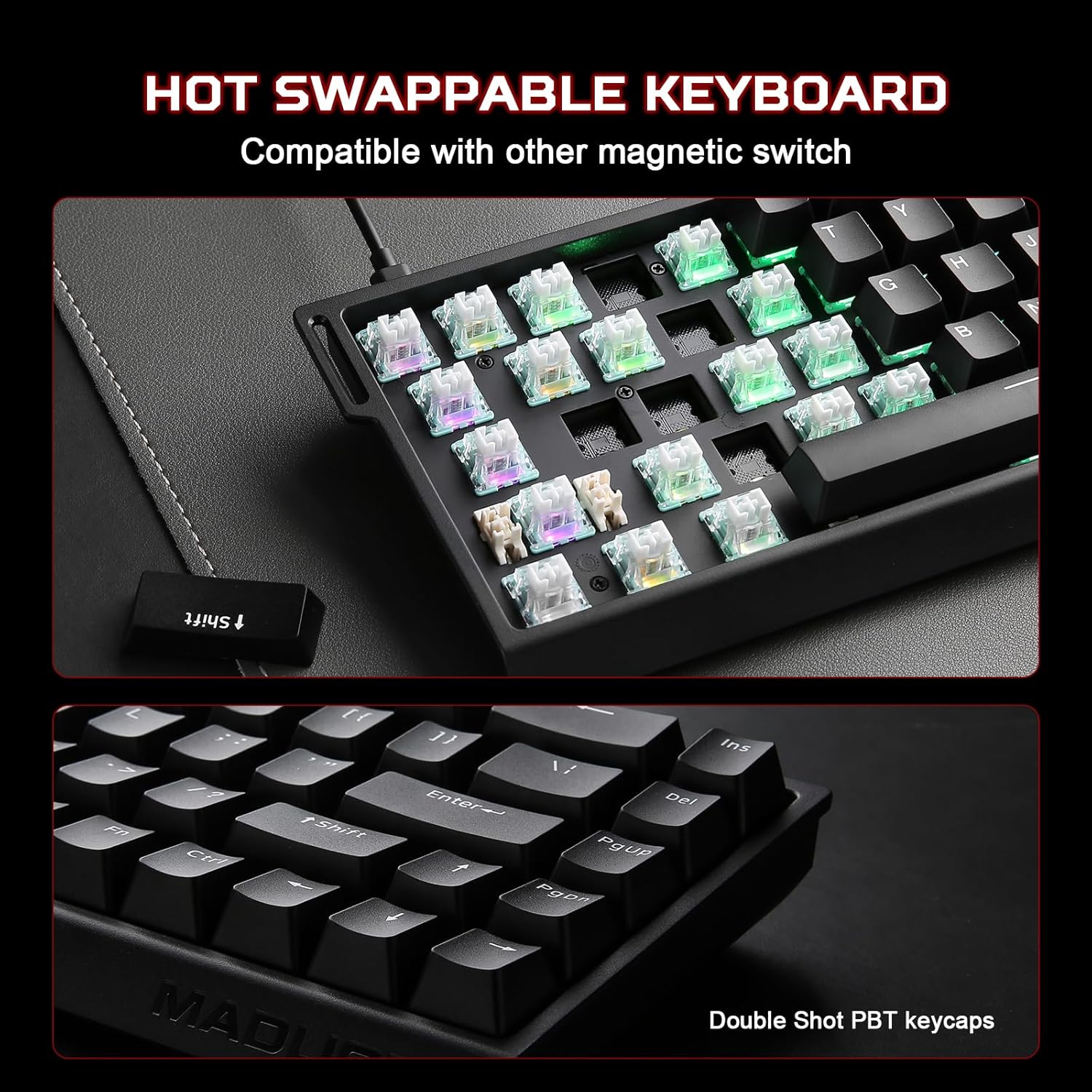
Figure 2.1: Contents of the MAD68 HE package, including the keyboard, USB-C cable, keycap puller, and a custom ribbon.
3. Configuració
3.1 Connexió del teclat
- Locate the USB-C port on the MAD68 keyboard, typically on the top edge.
- Connect one end of the provided TYPE-C cable to the keyboard.
- Connect the other end of the TYPE-C cable to an available USB port on your computer (PC, Laptop) or compatible device (Smartphone, Tablet).
- The keyboard will automatically power on, and the RGB backlighting will illuminate.

Figure 3.1: The MAD68 HE keyboard connected via its wired Type-C cable, demonstrating compatibility with various devices.
3.2 Initial RGB Backlighting
Upon connection, the keyboard's RGB backlighting will activate with a default effect. You can customize these effects using the FN shortcuts or the webprogramari basat en -.

Figure 3.2: The MAD68 HE keyboard displaying its full RGB backlighting, illustrating the FN + Tab key combination for controlling the lighting.
4. Instruccions de funcionament
4.1 Funcions bàsiques de les tecles
The MAD68 HE features a 60% layout. Standard alphanumeric keys function as labeled. Access to certain functions and multimedia controls is achieved through the Function (FN) key combinations.
4.2 FN Shortcuts
Utilize the FN key in combination with other keys for various functions:

Figure 4.1: A visual guide to the FN key shortcuts available on the MAD68 HE keyboard for system and media control.
4.3 RGB Lighting Shortcuts
Control the keyboard's RGB lighting effects directly using FN key combinations:

Figure 4.2: RGB lighting control shortcuts using the FN key on the MAD68 HE keyboard.
4.4 Rapid Trigger and Dynamic Keystroke (DKS)
The MAD68 HE features Rapid Trigger technology, allowing keys to activate and deactivate based on movement rather than a fixed actuation point. DKS enables multiple actions per key press based on press depth.

Figure 4.3: Explanation of Rapid Trigger technology, emphasizing precision and speed in gaming.
4.5 Web-Based Software Customization
For advanced customization, access the dedicated web-based software. This software allows you to:
- Adjust Hall Effect settings, including actuation points.
- Remap individual keys.
- Crear i assignar macros.
- Personalitza els efectes d'il·luminació i els colors RGB.

Figura 4.4: El/La/Els/Les web-based software interface for customizing the MAD68 HE keyboard.
Vídeo 4.1: Un overview of the YUNZII x MADLIONS MAD68 HE keyboard, demonstrating its unboxing, features, and typing sound. This video provides a visual and auditory demonstration of the product in use.
5. Manteniment
5.1 Neteja del teclat
Per mantenir un rendiment i un aspecte òptims, netegeu el teclat regularment:
- Desconnecta el teclat de l'ordinador.
- Utilitzeu un drap suau i sense pelusa dampened with a small amount of water or a mild cleaning solution to wipe down the keycaps and chassis.
- Per a la pols i les restes entre les tecles, feu servir aire comprimit.
- Eviteu ruixar líquids directament sobre el teclat.
5.2 Keycap and Switch Replacement (Hot-Swappable)
The MAD68 HE features hot-swappable switches, allowing for easy replacement without soldering. Use the provided keycap puller and switch puller (if included) for this process.
- Feu servir suaument l'extractor de tecles per treure la tecla desitjada.
- If replacing a switch, use a switch puller to carefully extract the switch from the PCB.
- Alineeu els pins del nou interruptor amb els forats de la placa de circuit imprès i premeu fermament fins que encaixi al seu lloc.
- Place the new keycap onto the switch stem.
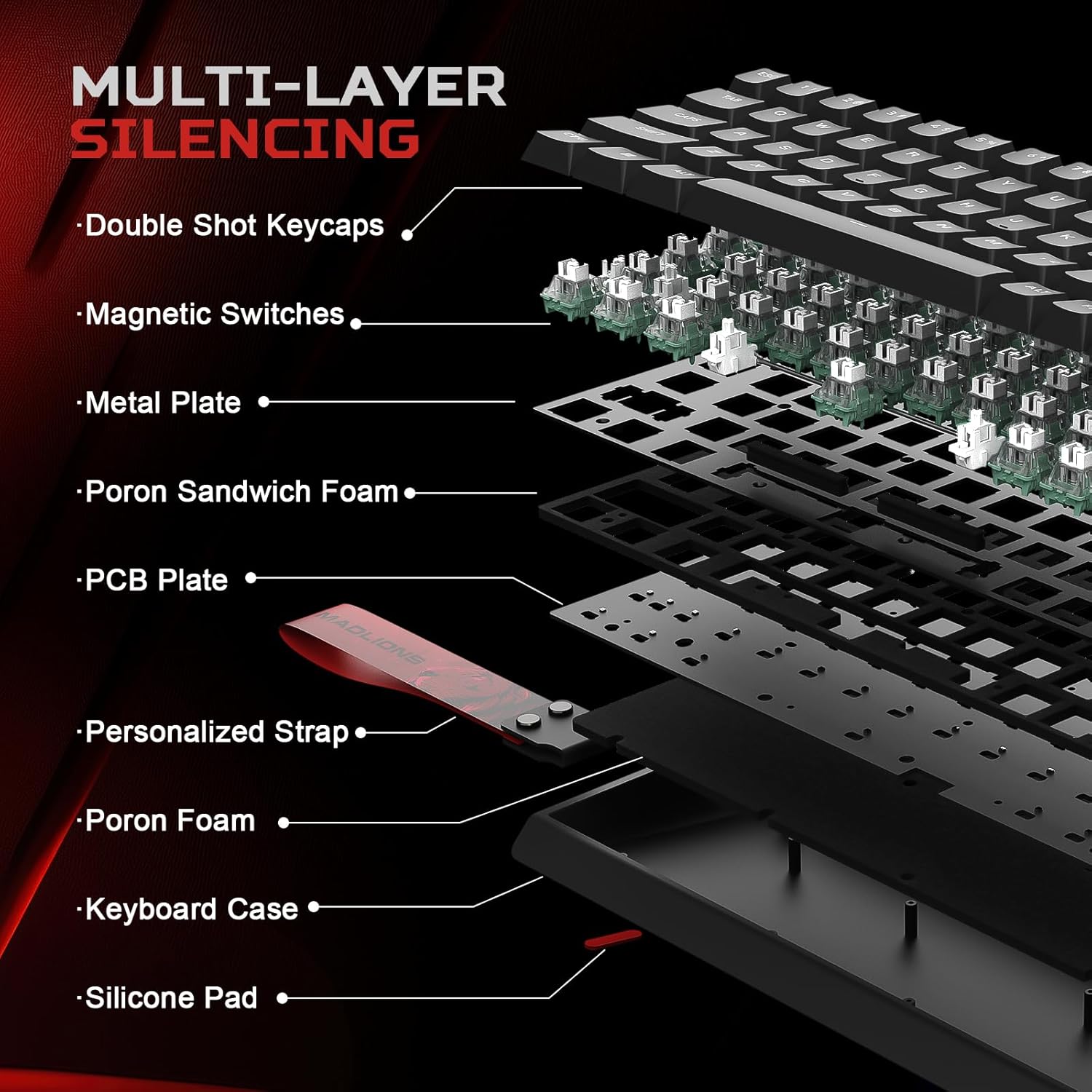
Figure 5.1: The hot-swappable design of the MAD68 HE keyboard, allowing for easy switch and keycap replacement.
6. Solució De Problemes
6.1 El teclat no respon
- Assegureu-vos que el cable USB-C estigui connectat correctament tant al teclat com a l'ordinador.
- Prova de connectar el teclat a un port USB diferent de l'ordinador.
- Prova el teclat en un altre ordinador per descartar problemes específics del sistema.
- Check if the cable is damaged; try using a different USB-C cable if available.
6.2 Problemes d'il·luminació RGB
- Verify that RGB lighting is not turned off using the FN + Tab shortcut.
- Adjust brightness using FN + Q (increase) or FN + A (decrease).
- Si s'utilitza el web software, ensure settings are applied correctly.
6.3 Key Input Errors or Ghosting
- Ensure the N-Key Rollover (NKRO) function is active (if applicable via FN shortcut or software).
- Clean around the affected keys to remove any debris that might be interfering with switch operation.
- If a specific switch is faulty, consider replacing it due to the hot-swappable design.
6.4 Resetting the Keyboard
If you encounter persistent issues, you can perform a factory reset:
- Mantén premut FN + ESC + Backspace simultàniament durant 5 segons.
- The keyboard's lighting may flash to indicate a successful reset.
Figure 6.1: Instructions for resetting the MAD68 HE keyboard by holding FN + ESC + Backspace for 5 seconds.
7. Especificacions
| Característica | Detall |
|---|---|
| Número de model | 68 MAD |
| Dimensions del producte | 12.6 x 4.57 x 1.46 polzades |
| Pes de l'article | 0.029 unces |
| Fabricant | YUNZII |
| Tecnologia de connectivitat | USB-C |
| Descripció del teclat | Mecànica |
| Característica especial | Backlit, Customizable Display Keys, Ergonomic, Hot-Swappable |
| Color | Negre |
| Il·luminació del teclat | RGB (16.8 million colors) |
| Material | Plàstic |
| Taxa de votació | 8 KHz |
| Tipus de canvi | Hall Effect Magnetic (Amber Pro Switch) |
| Punt d'actuació | Adjustable (0.1-3.8mm) |
| Latència | 0.125 ms |
8. Garantia i Suport
8.1 Garantia del producte
YUNZII products are covered by a limited warranty against manufacturing defects. Please refer to the official YUNZII weblloc web o la documentació de compra per conèixer els termes i condicions específics de la garantia.
8.2 Atenció al client
For technical assistance, troubleshooting, or warranty claims, please contact YUNZII customer support. You can typically find contact information on the official YUNZII weblloc web o a través del venedor on vau comprar el producte.
If you purchased through Amazon, you can reach us directly:
- Visit the YUNZII product page on Amazon.
- Select the seller's name, "Yunzii Keyboard".
- Click "Ask a question" to send a message.
Alternatively, after placing an order, go to your orders, select "Problem with order", and send us a message.

Figure 8.1: Guide on how to contact YUNZII customer support through Amazon.


