1. Introducció
This user manual provides comprehensive instructions for the TABWEE T20 Android Tablet. It covers setup, operation, maintenance, and troubleshooting to help you maximize your device's performance and ensure a smooth user experience. Please read this manual thoroughly before using your tablet.
2. Contingut del paquet
Verifiqueu que tots els elements que s'enumeren a continuació siguin presents al vostre paquet:
- TABWEE T20 Android Tablet
- Teclat desmuntable
- Bolígraf
- Ratolí
- Funda protectora
- Suport per a tauletes
- Protector de pantalla (preaplicat o separat)
- Cable de càrrega USB tipus C
- Adaptador d'alimentació (5 V/2 A)
- Manual d'usuari (aquest document)
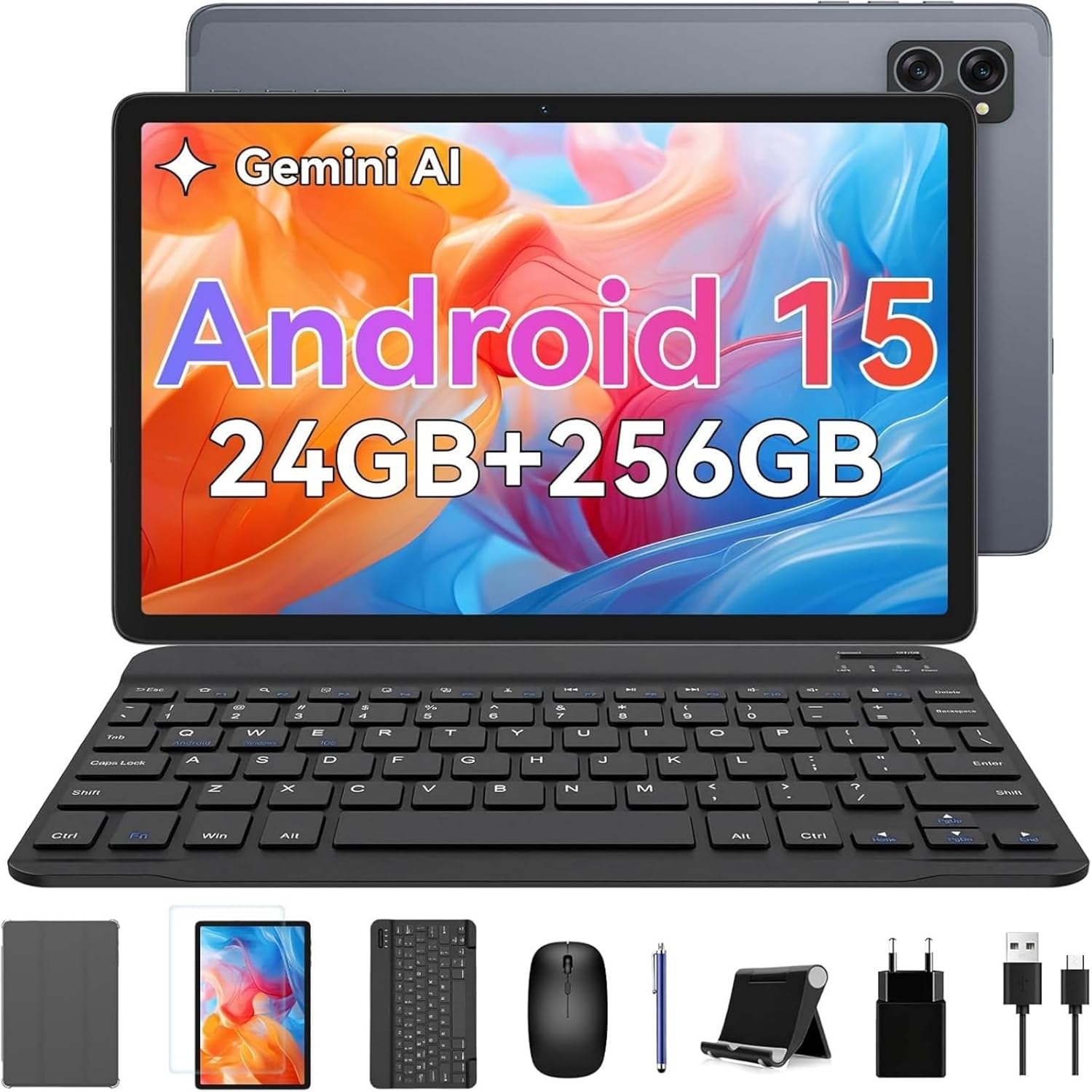
Image: The TABWEE T20 tablet displayed with its full set of accessories, including the detachable keyboard, mouse, stylus, protective case, tablet stand, charging cable, and power adapter.
3. Producte acabatview
3.1 Característiques clau
- Sistema operatiu: Android 15 with Gemini AI 2.0
- Processador: Octa-Core Unisoc T606, 1.6 GHz
- Memòria (RAM): 24 GB (8GB built-in + up to 16GB expansion)
- Emmagatzematge (ROM): 256 GB internal, expandable up to 2 TB via TF card
- Visualització: 10.1-inch HD+ IPS (1280 x 800 pixels), Widevine L1 support, 350 nits brightness
- Càmeres: 5 MP Front Camera, 8 MP Rear Camera
- Bateria: 5000 mAh, providing extended usage times
- Connectivitat: Dual-band 2.4G/5G Wi-Fi (802.11ac/b/g/n), Bluetooth 5, GPS
- Àudio: Dual smart speakers for stereo sound, 3.5mm headphone jack
- Seguretat: Identificació facial
- Dimensions: 24.64 x 15.49 x 0.76 cm (L x A x A)
- Pes: Aproximadament 412 grams
3.2 Tablet Layout
Familiarize yourself with the physical components of your TABWEE T20 Tablet.


Image: Left: Rear view of the TABWEE T20 tablet, highlighting its camera array and slim profile. Right: Front view of the tablet in use, demonstrating the vibrant display.
- Càmera frontal: Located at the top center when held vertically, used for video calls and selfies.
- Càmera posterior: Situat a la part posterior, s'utilitza per fer fotos i vídeos.
- Botó d'encesa: Typically on the side, used to turn the tablet on/off or wake/sleep the screen.
- Botons de volum: Adjacent al botó d'engegada, que serveix per ajustar el volum de l'àudio.
- Port USB tipus C: Per a càrrega i transferència de dades.
- Presa d'auriculars de 3.5 mm: Per connectar auriculars amb cable.
- Reixes d'altaveus: Dual speakers for enhanced audio output.
- Ranura per a targeta MicroSD: For expanding storage with a TF card.
4. Configuració
4.1 Càrrega inicial
Before first use, fully charge your tablet. Connect the USB Type-C cable to the tablet's charging port and the other end to the power adapter. Plug the adapter into a wall outlet. The charging indicator will show the charging status. A full charge typically takes a few hours.
4.2 Encès/Apagat
- Per encendre: Press and hold the Power button until the TABWEE logo appears on the screen.
- Per apagar: Mantingueu premut el botó d'engegada fins que aparegui un menú d'engegada. Seleccioneu "Apagar" i confirmeu.
- Per dormir/despertar-se: Briefly press the Power button to turn the screen off/on without powering down the tablet.
4.3 Assistent de configuració inicial
Upon first power-on, the tablet will guide you through an initial setup process:
- Seleccioneu el vostre preferit Llengua.
- Connecta't a a Xarxa Wi-Fi to enable internet access.
- Inicia la sessió amb el teu Compte de Google or create a new one. This is essential for downloading apps from the Google Play Store and syncing data.
- Configurar Identificació facial for convenient and secure unlocking.
- Review i acceptar els termes i condicions.
- Complete the setup to access the Android home screen.
4.4 Inserting a TF (MicroSD) Card
To expand the tablet's storage up to 2TB:
- Locate the TF card slot on the side of the tablet.
- Introduïu suaument la targeta TF a la ranura amb els contactes daurats cap avall fins que encaixi al seu lloc.
- The tablet will detect the new storage. You may be prompted to format it for internal or portable storage.
4.5 Connecting Accessories (Keyboard, Mouse, Stylus)
The included keyboard and mouse connect via Bluetooth. The stylus may connect via Bluetooth or be passive, depending on its type.
Bluetooth Keyboard and Mouse:
- Ensure the keyboard/mouse are charged and powered on.
- A la tauleta, vés a Configuració > Dispositius connectats > Bluetooth.
- Activa el Bluetooth. La tauleta cercarà els dispositius disponibles.
- Select the keyboard or mouse from the list of available devices (e.g., "Bluetooth Keyboard", "Bluetooth Mouse").
- Seguiu les indicacions de la pantalla per completar l'aparellament.
Bolígraf:
If your stylus is Bluetooth-enabled, follow the same Bluetooth pairing steps as for the keyboard/mouse. If it's a passive stylus, no pairing is required; simply use it directly on the screen.
5. Com utilitzar la tauleta
5.1 Navegació bàsica
- Toca: Selecciona un element o obre una aplicació.
- Toca i mantén premut: Accedir a menús contextuals o moure icones.
- Llisca: Scroll through pages, home screens, or menus.
- Pessiga per fer zoom: Zoom in or out on photos, maps, or web pàgines.
5.2 Característiques d'Android 15
Your TABWEE T20 runs on Android 15, offering enhanced performance and features:
- Gemini AI 2.0: Utilize the integrated AI for smart suggestions, personalized settings, and intelligent automation.
- Mode de pantalla dividida: Run two apps simultaneously side-by-side for improved multitasking. To activate, open an app, swipe up from the bottom to view recent apps, tap the app icon at the top of its card, and select "Split screen".
- Multi-User Modes: Create separate user profiles for different family members or work/personal use, ensuring data privacy and customized experiences. Access via Configuració > Sistema > Múltiples usuaris.
- Enhanced Privacy & Security: Benefit from advanced encryption, granular permission management, and private notification modes.
5.3 Connexió Wi-Fi
Per connectar-se a una xarxa Wi-Fi:
- Vés a Configuració > Xarxa i Internet > Internet.
- Ensure Wi-Fi is turned on.
- Seleccioneu la xarxa desitjada de la llista.
- Introduïu la contrasenya si us demana i toqueu Connecta't.
5.4 Ús de la càmera
La tauleta té una càmera frontal de 5 MP i una càmera posterior de 8 MP.
- Obriu el Càmera aplicació.
- Toqueu la icona del canvi de càmera per alternar entre la càmera frontal i la posterior.
- Toqueu el botó de l'obturador per fer una foto o iniciar/aturar la gravació de vídeo.
- Access settings within the camera app to adjust modes, resolution, and other parameters.
5.5 Media Playback and Widevine L1
The TABWEE T20 supports Widevine L1, allowing you to stream high-definition content from popular streaming services like Netflix, Amazon Prime Video, and Disney+ in full HD resolution.
- Download your preferred streaming apps from the Google Play Store.
- Ensure a stable internet connection for optimal streaming quality.
- Utilize the dual smart speakers for an immersive audio experience, or connect headphones via the 3.5mm jack or Bluetooth.
6. Manteniment
6.1 Neteja de la tauleta
- Use a soft, lint-free cloth (e.g., microfiber) to clean the screen and body.
- Per a taques persistents, lleugerament dampNetegeu el drap amb aigua o un netejador de pantalles dissenyat per a electrònica.
- Eviteu l'ús de productes químics agressius, materials abrasius o humitat excessiva.
6.2 Actualitzacions de programari
Comproveu i instal·leu regularment si hi ha actualitzacions de programari per garantir un rendiment òptim, seguretat i accés a noves funcions.
- Vés a Configuració > Sistema > Actualització del sistema.
- Toqueu Comproveu si hi ha actualitzacions.
- If an update is available, follow the on-screen instructions to download and install it. Ensure your tablet has sufficient battery life or is connected to power during updates.
6.3 Gestió d'emmagatzematge
To maintain smooth operation, periodically manage your tablet's storage:
- Vés a Configuració > Emmagatzematge a view ús d'emmagatzematge.
- Desinstal·la les aplicacions que no fas servir.
- Clear cache data for apps.
- Moure en gran files (photos, videos) to the TF card or cloud storage.
6.4 Cura de la bateria
- Eviteu les temperatures extremes, ja que poden reduir la durada de la bateria.
- No deixeu que la bateria es descarregui completament amb freqüència.
- Feu servir el carregador i el cable originals que s'inclouen.
7. Solució De Problemes
| Problema | Possible solució |
|---|---|
| La tauleta no s'encén. | Ensure the tablet is charged. Connect to the charger and wait a few minutes before attempting to power on again. If unresponsive, press and hold the Power button for 10-15 seconds to force a restart. |
| Problemes de connexió Wi-Fi. | Restart the tablet and your Wi-Fi router. Forget the network in Wi-Fi settings and reconnect. Ensure you are within range of the Wi-Fi signal. |
| Slow performance or apps crashing. | Close unused apps running in the background. Clear app cache (Settings > Apps > [App Name] > Storage & cache > Clear cache). Ensure sufficient free storage space. Restart the tablet. |
| La pantalla tàctil no respon. | Reinicia la tauleta. Si el problema persisteix, assegura't que la pantalla estigui neta i sense brutícia. |
| La bateria s'esgota ràpidament. | Reduce screen brightness. Close background apps. Disable Wi-Fi/Bluetooth/GPS when not in use. Check battery usage in Settings to identify power-hungry apps. |
| Cannot connect Bluetooth accessories. | Ensure the accessory is in pairing mode and charged. Turn Bluetooth off and on again on the tablet. Restart both devices. |
| Tablet freezes or crashes frequently. | Perform a factory reset as a last resort. Avís: Això esborrarà totes les dades de la tauleta. Fes una còpia de seguretat de les dades importants abans de continuar. Vés a Configuració > Sistema > Restablir opcions > Esborra totes les dades (restabliment de fàbrica). |
8. Especificacions
| Característica | Detall |
|---|---|
| Marca | TABWEE |
| Nom del model | Tabwee Tablet T20 2025 |
| Número de model | TABWEE T20 Tablette |
| Sistema operatiu | Android 15 & Gemini AI 2.0 |
| Processador | Unisoc Octa-Core, 1.6 GHz |
| RAM | 24 GB (8GB built-in + 16GB virtual) |
| Emmagatzematge intern | 256 GB |
| Emmagatzematge ampliable | Up to 2 TB via Micro SD (TF) card |
| Mida de la pantalla | 10.1 polzades |
| Resolució de visualització | 1280 x 800 Pixels (HD+ IPS) |
| Xipset gràfic | Unisoc T606 (Integrated) |
| Càmera frontal | 5 MP |
| Càmera posterior | 8 MP |
| Capacitat de la bateria | 5000 mAh (liti-polímer) |
| Connectivitat | Wi-Fi (802.11a/b/g/n/ac, 2.4G/5G), Bluetooth 5, GPS |
| Ports | USB Type-C, 3.5mm Audio Jack, Micro SD Slot |
| Dimensions (L x A x A) | 24.64 x 15.49 x 0.76 cm |
| Pes | 412 grams |
| Característiques especials | Stereo Speakers, Expandable Storage, USB OTG Support, Detachable Keyboard Support, Stylus Support |
9. Garantia i Suport
9.1 Garantia del producte
The TABWEE T20 Tablet comes with a 24 mesos de garantia des de la data de compra. Aquesta garantia cobreix defectes de fabricació i avaries en condicions d'ús normal. Conserveu el comprovant de compra per a reclamacions de garantia.
La garantia no cobreix els danys causats per:
- Accidents, mal ús o abús.
- Reparacions o modificacions no autoritzades.
- Operating the device outside the specified environmental conditions.
- Desgast normal.
9.2 Atenció al client
For technical assistance, troubleshooting, or warranty inquiries, please contact TABWEE customer support:
- Correu electrònic: Refer to the contact information provided on the official TABWEE website or your purchase platform (e.g., Amazon seller contact).
- Assistència en línia: Visit the official TABWEE weblloc web amb preguntes freqüents, articles de suport i formularis de contacte.
TABWEE is committed to providing professional technical support and excellent customer service to resolve any issues you may encounter.


