1. Introducció
This manual provides comprehensive instructions for the installation, operation, and maintenance of your NICGIGA 10-Port 2.5G PoE+ Switch (Model S25-0802P). This unmanaged switch is designed to provide high-speed network connectivity and Power over Ethernet (PoE) capabilities for various devices, including WiFi6 Access Points, Network Attached Storage (NAS), and 4K PoE cameras. It features 8x 2.5Gb PoE+ ports and 2x 10G SFP+ uplink ports, ensuring stable and efficient data transmission.
Please read this manual carefully before using the product to ensure proper setup and to maximize its performance and longevity.
2. Contingut del paquet
Verify that all items listed below are present and in good condition. If any item is missing or damaged, please contact your vendor.
- 1 x NICGIGA S25-0802P 10-Port 2.5G PoE+ Switch
- 1 x Power Adapter (AC 100-240V 50/60Hz)
- 1 x Kit de muntatge en bastidor
- 1 x paquet de cargols
- 1 x Guia d'inici ràpid

Image: The NICGIGA S25-0802P PoE Switch, power adapter, rack mount kit, screws, and quick start guide are included in the package.
3. Producte acabatview
3.1 Tauler frontal
The front panel of the NICGIGA S25-0802P switch features 8x 2.5Gb PoE+ ports, 2x 10G SFP+ uplink ports, and LED indicators for status monitoring.

Imatge: Detallada view of the switch's front panel, showing 8x 2.5G PoE ports and 2x 10G SFP+ ports, along with Link/Act and 2.5G Link indicators.
- 8x 2.5G PoE Ports (Ports 1-8): These ports support 10/100/1000/2500Mbps speeds and provide Power over Ethernet (PoE+) compliant with IEEE 802.3af/at standards. Each port can deliver up to 30W of power.
- 2x 10G SFP+ Ports (Ports 9-10): These are uplink ports for high-speed fiber optic connections, supporting 1G, 2.5G, and 10G optical fiber modules (modules not included).
- Link/Act Indicators: Green LED indicates a successful link and data activity.
- 2.5G Link Indicators: Green LED indicates a 2.5Gbps link speed.
- PoE Indicators (P1-P8): Indicate PoE status for respective ports.
- Indicador d'alimentació: Indica l'estat d'alimentació de l'interruptor.
3.2 Panell posterior
The rear panel includes the AC power input.

Imatge: Part posterior view of the switch showing the built-in power supply input (AC 100-240V 50/60Hz).
3.3 Dimensions físiques

Image: The switch measures approximately 10.6 inches in length, 7.3 inches in depth, and 1.7 inches in height.
4. Configuració
The NICGIGA S25-0802P is an unmanaged plug-and-play switch, requiring no software configuration. Follow these steps for basic setup:
- Connecteu-vos a l'alimentació: Plug the power cord into the AC power input on the rear panel of the switch, then connect the other end to a standard AC power outlet. The Power LED on the front panel will illuminate.
- Connectar dispositius de xarxa:
- For PoE-powered devices (e.g., WiFi6 APs, PoE cameras, IP phones), connect them to any of the 8x 2.5G PoE+ ports (ports 1-8) using standard Ethernet cables. The switch will automatically detect and provide power to compliant devices (IEEE 802.3af/at, 44-57V).
- For non-PoE devices (e.g., PCs, NAS, routers), connect them to any of the 8x 2.5G PoE+ ports (ports 1-8) using standard Ethernet cables. The switch will provide data connectivity without power.
- For high-speed uplinks to other switches or network infrastructure, insert compatible 1G/2.5G/10G SFP+ modules (not included) into the 2x 10G SFP+ ports (ports 9-10), then connect fiber optic cables.
- Verifica les connexions: Check the Link/Act and 2.5G Link LEDs for each connected port. A solid green Link/Act LED indicates a successful connection, and a solid green 2.5G Link LED indicates a 2.5Gbps connection speed.

Image: A diagram illustrating the simple plug-and-play setup: connect power, then connect various devices like cameras, printers, computers, and routers to the switch.

Image: An illustration of a home network setup, demonstrating how the NICGIGA switch connects various 2.5G devices such as WiFi6 APs, PoE cameras, IP phones, PCs, NAS, and WiFi6E routers.
5. Instruccions de funcionament
The NICGIGA S25-0802P is an unmanaged switch, meaning it operates automatically without user configuration. Once connected, it facilitates high-speed data transfer and power delivery to connected devices.
- Automatic Speed Detection: The switch automatically detects the speed of connected devices (10/100/1000/2500Mbps) and adjusts accordingly.
- PoE Power Delivery: For IEEE 802.3af/at compliant PoE devices, the switch automatically detects their power requirements and supplies up to 30W per port, with a total PoE budget of 120W. Ensure your PoE devices operate within the 44-57V range.
- Non-Blocking Forwarding: The switch supports non-blocking data forwarding, ensuring full wire-speed performance across all ports simultaneously.
- Indicadors LED: Monitor the Link/Act and 2.5G Link LEDs to confirm active connections and data transfer speeds. The PoE LEDs indicate power delivery status.

Image: A visual comparison showing the NICGIGA S25-0802P switch providing 2.5 times faster data transfer (2500Mbps) compared to a standard Gigabit Ethernet switch (1000Mbps).
Video: An official product video demonstrating the features and connectivity of the NICGIGA 10-Port 2.5G PoE Ethernet Switch with 8x PoE and 2x 10Gb SFP+ ports.
6. Manteniment
To ensure optimal performance and extend the lifespan of your NICGIGA switch, follow these maintenance guidelines:
- Medi ambient: Operate the switch within the specified temperature range of -10°C to 50°C (14°F to 122°F). Avoid extreme temperatures, direct sunlight, and high humidity.
- Neteja: Feu servir un drap suau i sec per netejar l'exterior de l'interruptor. No utilitzeu netejadors líquids ni en aerosol. Assegureu-vos que el dispositiu estigui apagat abans de netejar-lo.
- Ventilació: The switch features a fanless design with double-sided cooling holes. Ensure these vents are not obstructed to allow for proper heat dissipation.
- Gestió de cables: Keep network cables organized and free from kinks or excessive bends to prevent signal degradation.
- Font d'alimentació: Use only the provided power adapter. Disconnect power during electrical storms or when the device is not in use for extended periods.
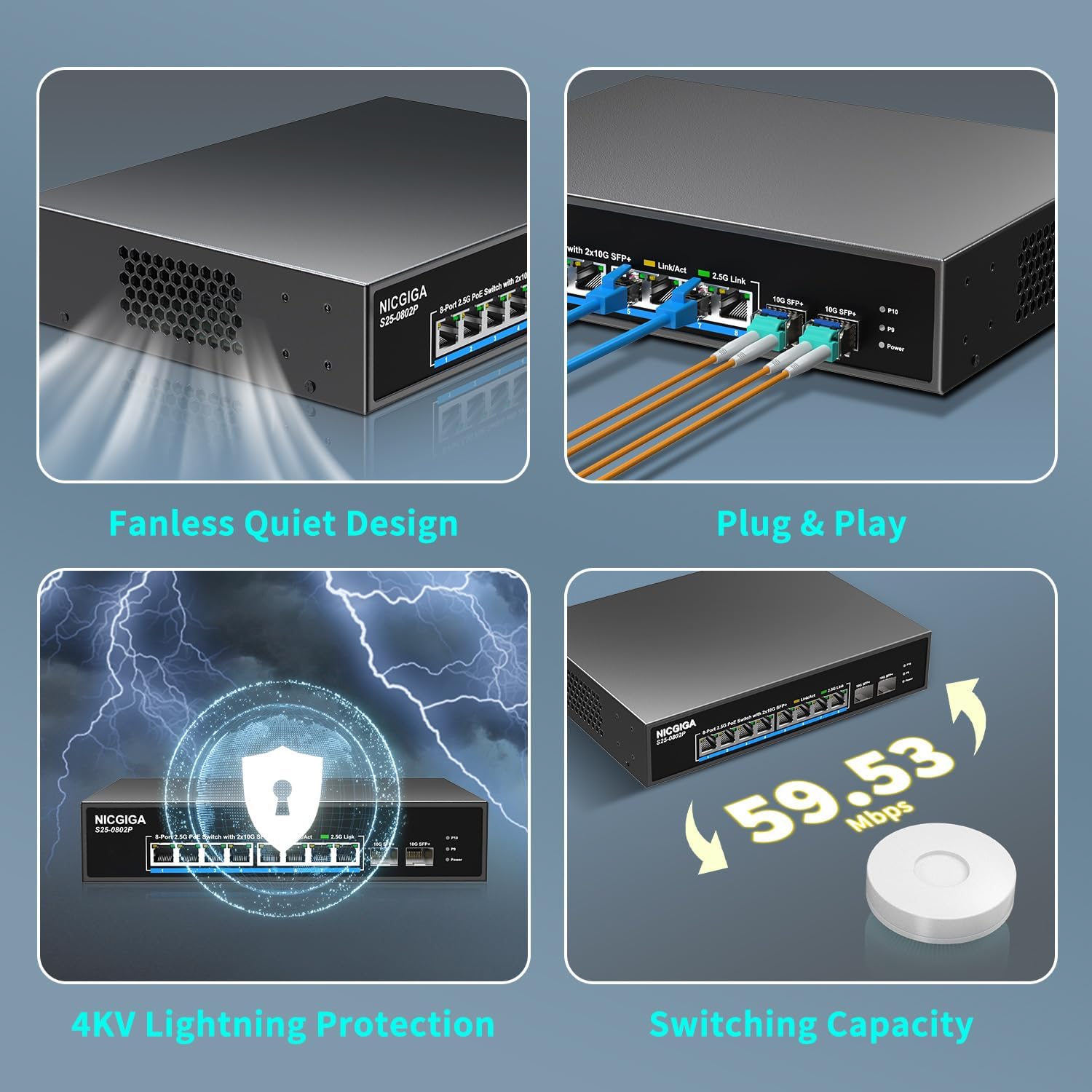
Image: Visual representation of the switch's fanless quiet design, plug-and-play functionality, 4KV lightning protection, and switching capacity.
7. Solució De Problemes
If you encounter issues with your NICGIGA switch, refer to the following common problems and solutions:
7.1 Sense poder
- Comproveu la connexió d'alimentació: Assegureu-vos que el cable d'alimentació estigui connectat correctament tant a l'interruptor com a una presa de corrent que funcioni.
- Verificar la presa de corrent: Proveu la presa de corrent amb un altre dispositiu per confirmar que subministra corrent.
- Adaptador d'alimentació: Ensure you are using the original power adapter provided with the switch.
7.2 Cap enllaç/activitat en un port
- Comproveu el cable: Ensure the Ethernet cable is securely connected to both the switch port and the network device. Try a different cable.
- Estat del dispositiu: Verifiqueu que el dispositiu de xarxa connectat estigui encès i funcioni correctament.
- Compatibilitat del port: Ensure the SFP+ modules (if used) are compatible with the 10G SFP+ ports and that the fiber cables are correctly installed.
7.3 El dispositiu PoE no rep alimentació
- Estàndard PoE: Confirm that your device is IEEE 802.3af/at compliant and operates within the 44-57V range.
- Pressupost PoE: Ensure the total power consumption of all connected PoE devices does not exceed the switch's total PoE budget of 120W.
- Longitud del cable: For PoE, ensure Ethernet cable length does not exceed 100 meters (328 feet) to avoid power loss.
- LED PoE: Check the PoE LED for the specific port. If it's off, the device might not be detected as PoE or is drawing too much power.
7.4 Velocitat de xarxa lenta
- Qualitat del cable: Use high-quality Cat5e or Cat6 Ethernet cables for 2.5Gbps connections.
- Capacitat del dispositiu: Ensure your connected devices (NICs, routers, etc.) support 2.5Gbps speeds.
- Congestió de la xarxa: Check for other high-bandwidth activities on your network that might be causing congestion.
8. Especificacions
| Característica | Descripció |
|---|---|
| Model | S25-0802P |
| Ports | 8x 2.5G Base-T PoE+ Ports, 2x 10G SFP+ Uplink Ports |
| Estàndard PoE | IEEE 802.3af / at |
| Potència màxima per port PoE | 30W |
| Pressupost total d'energia PoE | 120W |
| Velocitat de transferència de dades | Up to 2.5 Gbps (per 2.5G port), Up to 10 Gbps (per SFP+ port) |
| Tipus d'interfície | PoE+, SFP+ |
| Temperatura de funcionament | -10 °C a 50 °C (de 14 °F a 122 °F) |
| Font d'alimentació | AC 100-240V, 50/60Hz (Built-in) |
| Dimensions (L x A x A) | Aprox. 10.6 x 7.3 x 1.7 polzades |
| Pes de l'article | 3.26 lliures (1.48 quilograms) |
| Habitatge | Durable Metal Case, Fanless Design |
| Protecció | Protecció contra llamps de 6KV |
| Muntatge | Escriptori, muntatge en rack de 19 polzades |
9. Garantia i Suport
NICGIGA products are rigorously tested for reliability, quality, and performance.
- Garantia: Aquest producte té una garantia d'un any des de la data de compra.
- Suport tècnic: Lifetime technical support is provided for the entire product.
- Informació de contacte: For technical assistance, warranty claims, or product inquiries, please refer to the contact information provided in the Quick Start Guide or visit the official NICGIGA weblloc.


