1. Introducció
The TP-Link Deco X20 AX1800 Whole Home Mesh Wi-Fi 6 System is designed to provide seamless, high-speed wireless connectivity throughout your home. Utilizing advanced Wi-Fi 6 technology, this system eliminates dead zones and ensures consistent performance for multiple connected devices. This instruction manual will guide you through the setup, operation, and maintenance of your Deco X20 system.
2. Què hi ha a la caixa
Your Deco X20 package includes the following components:
- Deco X20 Unit(s)
- Adaptador(s) de corrent
- Cable Ethernet
- Guia d'instal·lació ràpida
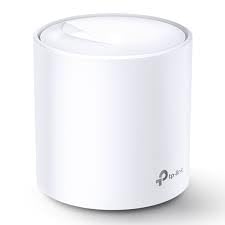
Image: The retail box for the TP-Link Deco X20 AX1800 Whole Home Mesh Wi-Fi 6 System, showing three white cylindrical Deco units and key features like Wi-Fi 6, AX3000, and coverage up to 7,000 sq ft.
3. Producte acabatview
3.1. Aesthetics and Design
The Deco X20 units feature a sleek, cylindrical white design, allowing them to blend seamlessly into various home environments. Their compact size is comparable to a large coffee mug, offering flexible placement options.
3.2. Ports i indicadors
Each Deco X20 unit is equipped with two Ethernet ports and a power input. One Ethernet port is used to connect to your modem for the main Deco unit, while the other can be used for wired connections to devices requiring maximum speed, such as gaming consoles or desktop computers. The units also feature an LED indicator that communicates the connection status:
- groc: Posada en marxa
- Blau: Setting up / Ready for setup
- Verd: All is well / Connected
- Vermell: Has an issue

Image: A close-up of the rear of a Deco X20 unit, highlighting the two Ethernet ports labeled '1' and '2', and the 'POWER' input. The TP-Link logo is visible above the ports.
4. Instruccions de configuració
Setting up your Deco X20 system is a straightforward process guided by the Deco mobile application. Follow these steps:
- Descarrega l'aplicació Deco: Cerca "TP-Link Deco" in your device's app store (App Store for iOS or Google Play Store for Android) and download the application.
- Registra't/Iniciar sessió: Open the Deco app and create a TP-Link ID or log in if you already have one.
- Identify Your Deco: Select your Deco X20 model from the list within the app.
- Apagueu el mòdem: Disconnect your existing modem from power. If your modem has a backup battery, remove it.
- Connecta la decoració principal: Plug one Deco unit into your modem using the provided Ethernet cable. Then, connect the Deco unit to power.
- Wait for LED: Wait for the Deco unit's LED to pulse blue, indicating it's ready for setup.
- Connecta't a la xarxa Wi-Fi de Deco: Ves a la configuració Wi-Fi del telèfon i connecta't a la xarxa Wi-Fi predeterminada de Deco (l'SSID normalment es troba a l'etiqueta del producte).
- Segueix les instruccions de l'aplicació: Return to the Deco app and follow the on-screen prompts to configure your new Wi-Fi network, including setting a network name (SSID) and password.
- Afegir unitats addicionals: If you have multiple Deco units, the app will guide you through adding them one by one. Place them strategically around your home for optimal coverage. The LED will blink yellow, then pulse blue, and finally turn solid green when successfully added to the network.
5. Instruccions de funcionament
The Deco app provides comprehensive control over your mesh Wi-Fi system.
5.1. Monitoring Your Network
- Dispositius connectats: View all devices connected to your network and which Deco unit they are connected to.
- Real-time Usage: Monitor internet usage levels in real-time.
5.2. Xarxa de convidats
Easily create a separate guest network for visitors, keeping your main network secure and private. You can set a password or leave it open for convenience.
5.3. Controls parentals
Manage and monitor internet access for family members with robust parental controls. Features include:
- Content filtering to block inappropriate webllocs.
- Time limits for internet usage.
- Monitoring internet history.
5.4. Security Features (TP-Link HomeCare)
The Deco X20 includes a lifetime subscription to TP-Link HomeCare, offering advanced security features:
- Built-in antivirus and anti-malware software.
- Intrusion prevention system.
- Infected device quarantine to prevent network damage.
5.5. Wi-Fi Optimization
The system utilizes advanced technologies to optimize your Wi-Fi experience:
- Wi-Fi 6 Technology (AX1800): Delivers speeds up to 1800Mbps (1201Mbps on 5GHz and 574Mbps on 2.4GHz) for faster streaming and downloads.
- Mesh System: Provides whole-home coverage, eliminating dead zones and ensuring consistent connectivity.
- Connectivitat intel·ligent: Supports seamless roaming with auto-switching between bands for optimal performance as you move through your home.
- OFDMA and MU-MIMO: Handle multiple connected devices simultaneously with increased efficiency and lower latency.
- Band Steering and Beamforming: Enhance wireless range and stability by directing Wi-Fi signals directly to devices.
- Capacitat del dispositiu: Connects over 150 devices simultaneously.
- Diagnostic Wi-Fi: Checks your network for potential issues, scans for interference, and adjusts settings to use an open channel.
- Qualitat de servei (QoS): Prioritize network traffic for specific applications (e.g., gaming, streaming) to ensure optimal performance.
6. Manteniment
Regular maintenance ensures optimal performance and security for your Deco X20 system:
- Actualitzacions de firmware: The Deco app will notify you of available firmware updates. It is recommended to install these promptly to benefit from new features, security patches, and performance improvements. Updates are typically seamless through the app.
- Regular Security Scans: Utilize the security tab in the Deco app to perform quick scans for any potential vulnerabilities or issues.
- Neteja física: Keep the Deco units clean and free from dust to ensure proper ventilation and prevent overheating. Use a soft, dry cloth for cleaning.
- Reinici d'unitats: Periodically restarting your Deco units and modem can help resolve minor connectivity issues and refresh network performance.
7. Solució De Problemes
If you encounter issues with your Deco X20 system, consider the following:
- Sense connexió a Internet:
- Check the LED status on your main Deco unit. If it's red, there's an issue.
- Ensure your modem is working correctly and has an internet connection.
- Verify all cables are securely connected between the modem and the main Deco unit.
- Restart your modem and all Deco units.
- Weak Wi-Fi Signal/Dead Zones:
- Relocate Deco units to optimize coverage. Ensure they are not too far apart or obstructed by thick walls or large appliances.
- Use the Deco app's network optimization feature to identify and resolve signal issues.
- Velocitats lentes:
- Perform a speed test using the Deco app or a reliable online tool.
- Check for any active downloads or streaming on multiple devices that might be consuming bandwidth.
- Ensure your firmware is up to date.
- Consider using a wired Ethernet connection for devices requiring maximum speed.
- El dispositiu no es connecta:
- Ensure the device is within range of a Deco unit.
- Verifiqueu que la contrasenya del Wi-Fi sigui correcta.
- Reinicieu el dispositiu problemàtic.
- Temporarily disable and re-enable Wi-Fi on the device.
Per obtenir més ajuda, consulteu el suport de TP-Link. weblloc o contacteu amb el servei d'atenció al client.
8. Especificacions
| Característica | Detall |
|---|---|
| Nom del model | DECO X20(1-PACK)_ISP - AX1800 WHOLE HOME MESH WI-FI 6 WRLS UNIT ISP VERSION |
| Tecnologia Wi-Fi | Wi-Fi 6 (802.11ax) |
| Velocitat sense fil | AX1800 (1201 Mbps a 5 GHz, 574 Mbps a 2.4 GHz) |
| Classe de banda de freqüència | Doble banda |
| Característica especial | MU-MIMO, OFDMA, Beamforming, Band Steering |
| Ports Ethernet | 2 Gigabit Ethernet ports per unit |
| Cobertura | Wi-Fi de malla per a tota la casa |
| Capacitat del dispositiu | Connecta més de 150 dispositius |
| Dimensions | 8.5 x 5 x 8.3 polzades |
| Pes de l'article | 12 unces |
| Color | Blanc |
| Fabricant | TP-LINK |
| Components inclosos | Router (Deco Unit), Power Adapter, Ethernet Cable |
9. Garantia i Suport
For warranty information and technical support, please visit the official TP-Link website or refer to the documentation included with your product. The Deco app also provides access to support resources and troubleshooting guides.
TP-Link HomeCare: Your Deco X20 includes a lifetime subscription to TP-Link HomeCare, providing advanced security features and parental controls.