Introducció
This manual provides detailed instructions for the KEFEYA 15.6" Portable Monitor S5 PRO. This device is designed to expand your laptop's display capabilities, offering a versatile multi-screen setup for enhanced productivity and entertainment. It features a 1080P FHD IPS display with 120% sRGB color gamut, a magnetic 10,000 mAh power bank, and broad compatibility with various operating systems and devices.
Què hi ha a la caixa
Si us plau, comproveu el contingut del paquet en desempaquetar-lo:
- Monitor (SS Monitor) *1
- Banc d'energia *1
- Adaptador d'alimentació *1
- Cable de tipus C a tipus C *2
- HDMI to Type-C Cable *1
- USB-A to Type-C Cable *1
- USB Flash Disk *1 (Contains drivers and user manual)
- Bossa de transport *1
- User Manual *1 (This document)
- Guia d'inici ràpid * 1
- Caixa *1

Figure 1: Contents of the KEFEYA Portable Monitor package.
Configuració
Follow these steps to set up your KEFEYA Portable Monitor:
- Desempaquetar el monitor: Traieu amb cura tots els components de l'embalatge.
- Posicionament: The monitor features an autonomous stand. For laptops between 13 and 17 inches, the monitor attaches securely. Laptops under 14.2 inches can be used without additional clamps. The chassis pivots 180° for flexible positioning.
- Connecteu el Power Bank: The magnetic 10,000 mAh power bank attaches to the back of the stand. Ensure the POGO PIN male and female connectors are perfectly aligned for proper power delivery. This provides 5-6 hours of wireless dual-screen operation. The power bank can also be removed for separate charging of mobile phones or tablets.
- Connecteu-vos al vostre dispositiu:
- Connexió USB-C: For devices with a full-featured USB-C port (supporting video and power), use one of the provided Type-C to Type-C cables. This single cable can transmit video, audio, and power.
- Connexió HDMI: For devices with an HDMI output, use the provided HDMI to Type-C cable. You may also need to connect a USB-A to Type-C cable for power if your HDMI port does not supply sufficient power.
- Instal·lació del controlador: The monitor is designed for plug-and-play convenience. However, if you encounter any display issues, especially with specific operating systems or older devices, use the provided USB flash disk to install necessary drivers.
- Encesa inicial: Press the multi-function button to power on the monitor.
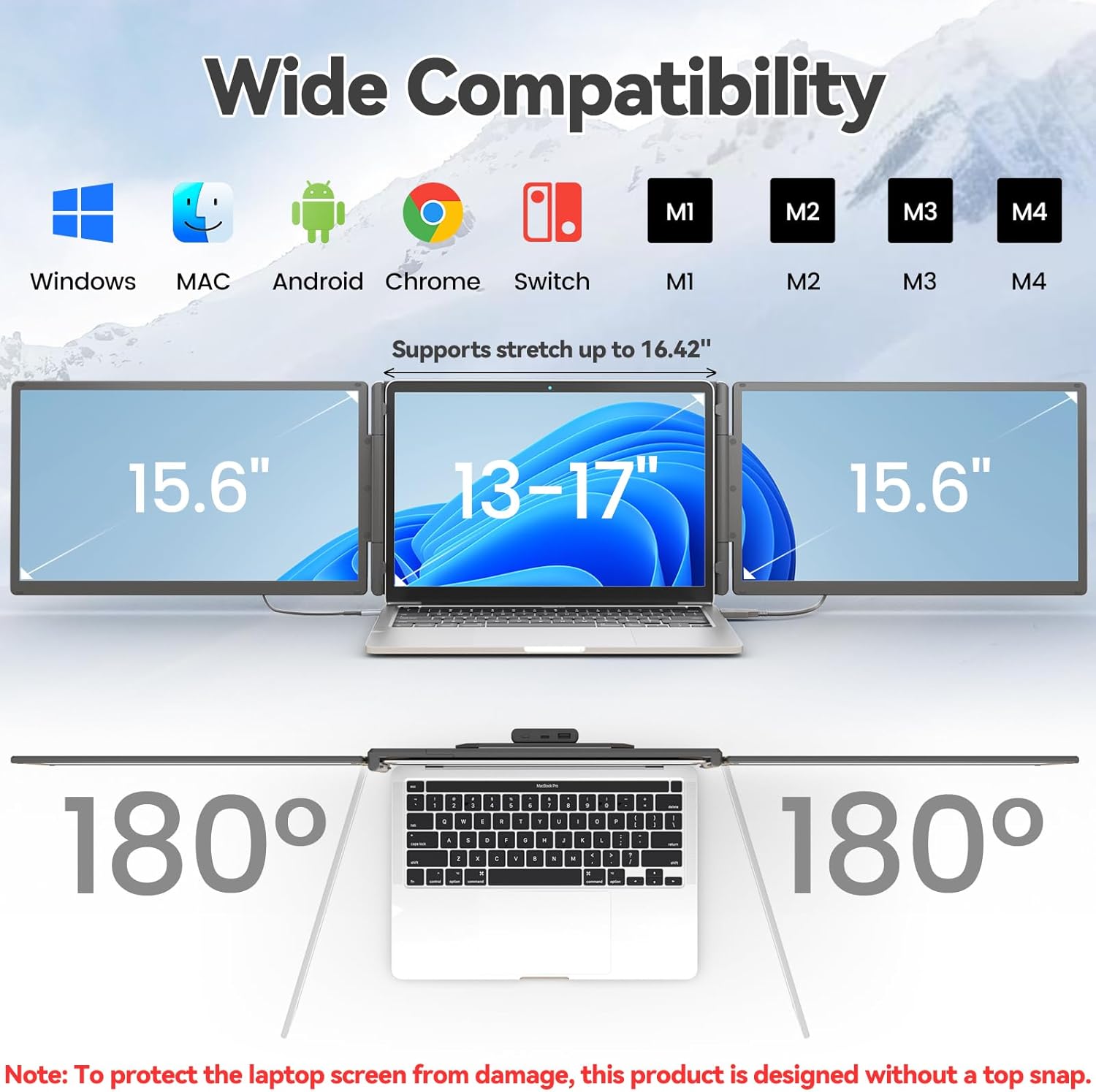
Figure 2: The monitor supports various devices and offers 180° rotation for flexible viewangles d'ajust.

Figure 3: Attaching the magnetic power bank to the monitor stand.

Figura 4: Mésview of the ports (Type-C1, Type-C2, USB-C with PD) and multi-function button on the monitor.
Instruccions de funcionament
The KEFEYA Portable Monitor offers various display modes and adjustable settings to optimize your viewexperiència.
Modes de visualització
The monitor supports the following display configurations:
- Mode d'extensió: Extends your laptop's desktop across multiple screens, allowing for increased workspace and multitasking.
- Duplication (Mirror) Mode: Duplicates your laptop's display onto the portable monitor, ideal for presentations or sharing content.
- Mode de retrat: The monitor can be rotated 180° to be used in portrait orientation, beneficial for coding, document viewing, or specific creative tasks.
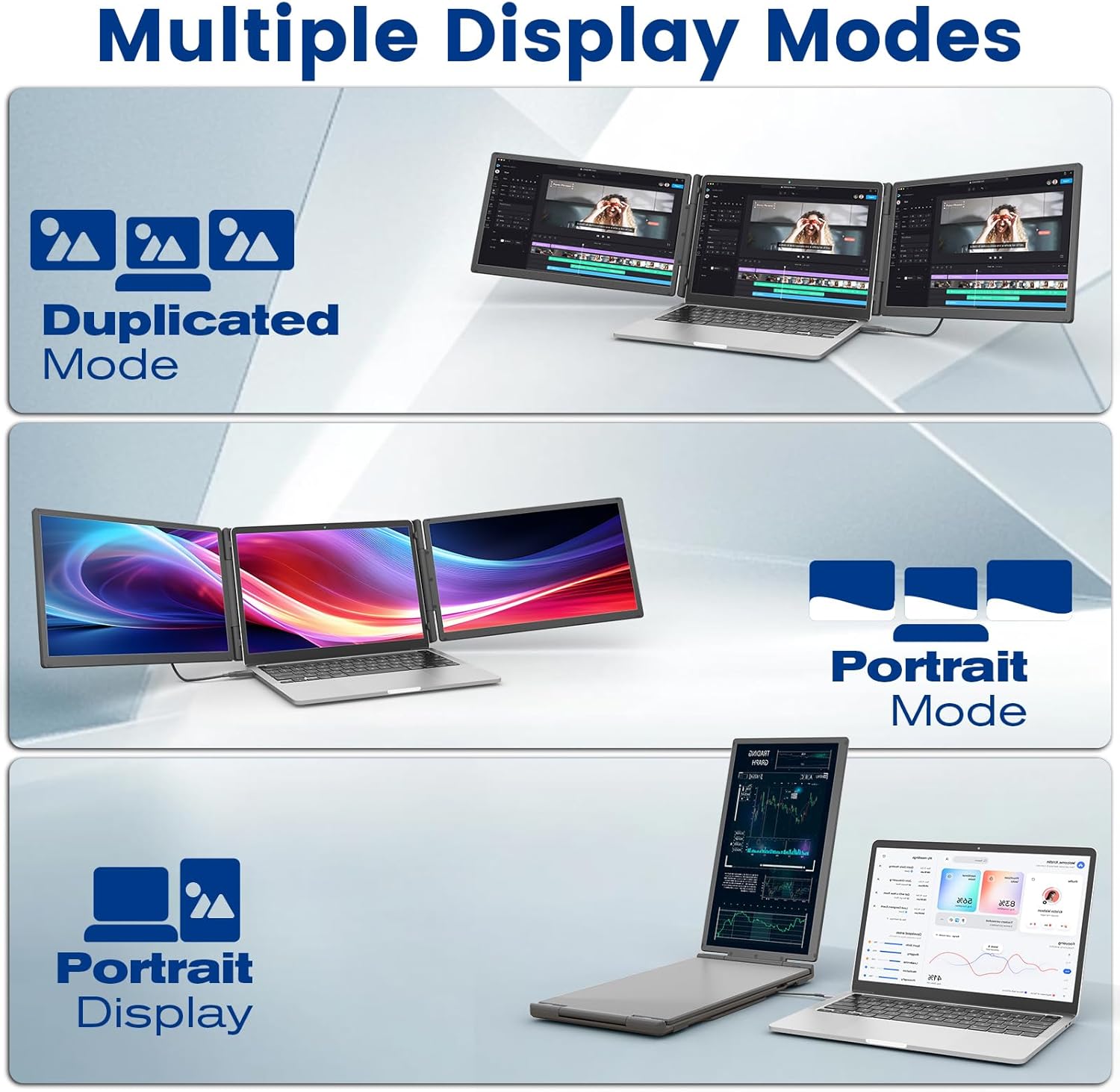
Figure 5: Illustration of Duplicated, Extended, and Portrait display modes.

Figura 6: Examples of using the monitor for multiple tasks like web programming, video conferencing, and online shopping.
Ajust de la configuració
The multi-function buttons on the monitor allow for precise control over display parameters:
- Brillantor: Adjust the screen brightness to suit your environment.
- Tint/Color: Fine-tune color settings for optimal visual accuracy.
- Volum: Control the volume of the integrated speakers.
The monitor also features advanced low blue light technology, anti-glare design, and flicker-free operation for a comfortable viewexperiència.
Ús del banc d'energia
The integrated 10,000 mAh power bank provides 5-6 hours of battery life for the monitor, reducing reliance on your laptop's battery. It can also be detached and used as a standalone power source for other USB-powered devices.

Figure 7: Details of the power bank, including its capacity display and ports (Type-C, USB-A).
Manteniment
To ensure the longevity and optimal performance of your KEFEYA Portable Monitor, follow these maintenance guidelines:
- Neteja de la pantalla: Feu servir un drap suau i sense borrissol dissenyat específicament per a electrònica. Netegeu lleugeramentampen the cloth with water or a screen-cleaning solution. Avoid harsh chemicals, alcohol, or abrasive materials.
- Neteja de la Casing: Netegeu l'exterior amb un drap suau i sec.
- Emmagatzematge: When not in use, store the monitor in its provided carrying bag to protect it from dust and scratches. Avoid placing heavy objects on top of the monitor.
- Condicions ambientals: Keep the monitor away from extreme temperatures, direct sunlight, and high humidity.
- Cura del cable: Handle cables gently. Avoid bending or twisting them sharply, which can damage the internal wires.
Resolució de problemes
If you encounter issues with your KEFEYA Portable Monitor, refer to the following common problems and solutions:
| Problema | Possible causa/solució |
|---|---|
| Sense pantalla / Pantalla negra |
|
| Unstable Connection / Screen Flickering |
|
| Drivers Not Working / System Bugs |
|
| Monitor Does Not Stay Firmly Attached |
|
| Mala qualitat d'imatge / Colors incorrectes |
|
Especificacions
| Característica | Detall |
|---|---|
| Marca | KEFEYA |
| Número de model | S5 PRO |
| Mida de la pantalla | 15.6 polzades |
| Tipus de visualització | IPS |
| Resolució | 1920 x 1080 píxels (FHD 1080p) |
| Relació d'aspecte | 16:9 |
| Gamma de colors | 120% sRGB |
| Brillantor | 300 nits (cd/m²) |
| Relació de contrast | 1000:1 |
| Temps de resposta | 2 mil·lisegons |
| Freqüència d'actualització | 60 Hz |
| Superfície de la pantalla | Mat, antireflexos |
| Connectivitat | USB Type C (x2), USB Type A, HDMI |
| Característiques especials | 120% sRGB, Anti-glare screen, Energy efficiency, Blue light filter, Built-in speakers, Magnetic 10,000 mAh Power Bank |
| Dimensions (L x A x A) | 39.1 x 21.5 x 3.3 centímetres |
| Compatibilitat | Windows, Chrome, Android, Mac (M1/M2/M3/M4), Linux, Dex, PS4/5, Xbox |
Garantia i Suport
KEFEYA offers a one-year warranty for this product. Our customer service team is available 24 hours a day, 7 days a week, 365 days a year to assist you.
For questions regarding compatibility, installation assistance, or if you find any missing accessories, please contact us using the contact information provided inside the product packaging. Our professional team will provide prompt assistance.
For the latest information and support resources, please visit our official website or refer to the contact details in your Quick Start Guide.


