1. Introducció
Thank you for choosing the ASD 12 Inch Smart RGBW Flush Mount Ceiling Light. This fixture combines a stylish minimalist design with efficient, versatile lighting solutions. Featuring multicolor RGBW capabilities, smart app control, and remote operation, it offers a wide range of lighting effects for your space. This manual provides essential information for safe installation, effective operation, and proper maintenance of your new lighting fixture.

Figure 1.1: ASD 12 Inch Smart RGBW Flush Mount Ceiling Light with accessories.
3. Contingut del paquet
Verifiqueu que tots els components siguin presents abans de començar la instal·lació:
- ASD 12 Inch Smart RGBW Flush Mount Ceiling Light Fixture (4 units)
- Control remot
- Maquinari de muntatge (cargols, femelles de cable)
- Manual d'instruccions
4. Especificacions
| Característica | Detall |
|---|
| Marca | ASD |
| Nom del model | LOFT |
| Número de part | A-LFM12D20SRGBW-N-4p |
| Color | 12" | Nickel | RGBW |
| Material | Acer d'aliatge, Acrílic |
| Estil | Modern |
| Dimensions del producte | 11.3 cm de llargada x 11.3 cm d'amplada x 3.4 cm d'alçada |
| Usos específics | Només per a ús interior |
| Font d'alimentació | Cablejat |
| Tipus de font de llum | LED |
| Tipus d'acabat | Pintat |
| Material d'ombra | Plàstic |
| Voltage | 120 Volts |
| Wattage | 20 watts |
| Tipus de muntatge | Muntatge encastat |
| Vida Mitjana | 50,000 hores |
| Característiques especials | 1064/1220LM, Remote Control, RGBW, Smart App, CCT Adjustable 2700-6500K |

Figura 4.1: Dimensions del producte i característiques principals.
5. Instal·lació
Follow these steps to install your ASD Smart RGBW Flush Mount Ceiling Light:
- Preparació per a la instal·lació: Turn off power at the circuit breaker before starting. Ensure the mounting surface is clean and stable.
- Remove the Lens: Gently remove the lens from the fixture by rotating it clockwise. This will expose the mounting holes and wiring connections.
- Muntar l'aparell: Attach the fixture's base to the electrical outlet box using the provided screws. Ensure it is securely fastened.
- Connexions de cable: Connect the wires: Black to Black (Live), White to White (Neutral), and Ground to Ground. Secure all connections with wire nuts. Carefully tuck all wires back into the outlet box.
- Connecteu la lent: Once wiring is complete and secure, attach the lens by aligning it with the fixture and rotating it counter-clockwise until it locks into place.
- Restaura l'alimentació: Torneu a encendre l'alimentació al disjuntor.
- Download ASD SMART App: For smart control features, download the "ASD SMART" application from your smartphone's app store. Scan the QR codes below or click the links to download.
Google Play Store (Android)
Apple App Store (iOS) - Add Fixture to App: Follow the in-app instructions to add your new ceiling light to the ASD SMART app. This typically involves putting the light into pairing mode and connecting it to your Wi-Fi network.

Figure 5.1: Initial installation steps: removing the lens and wiring.
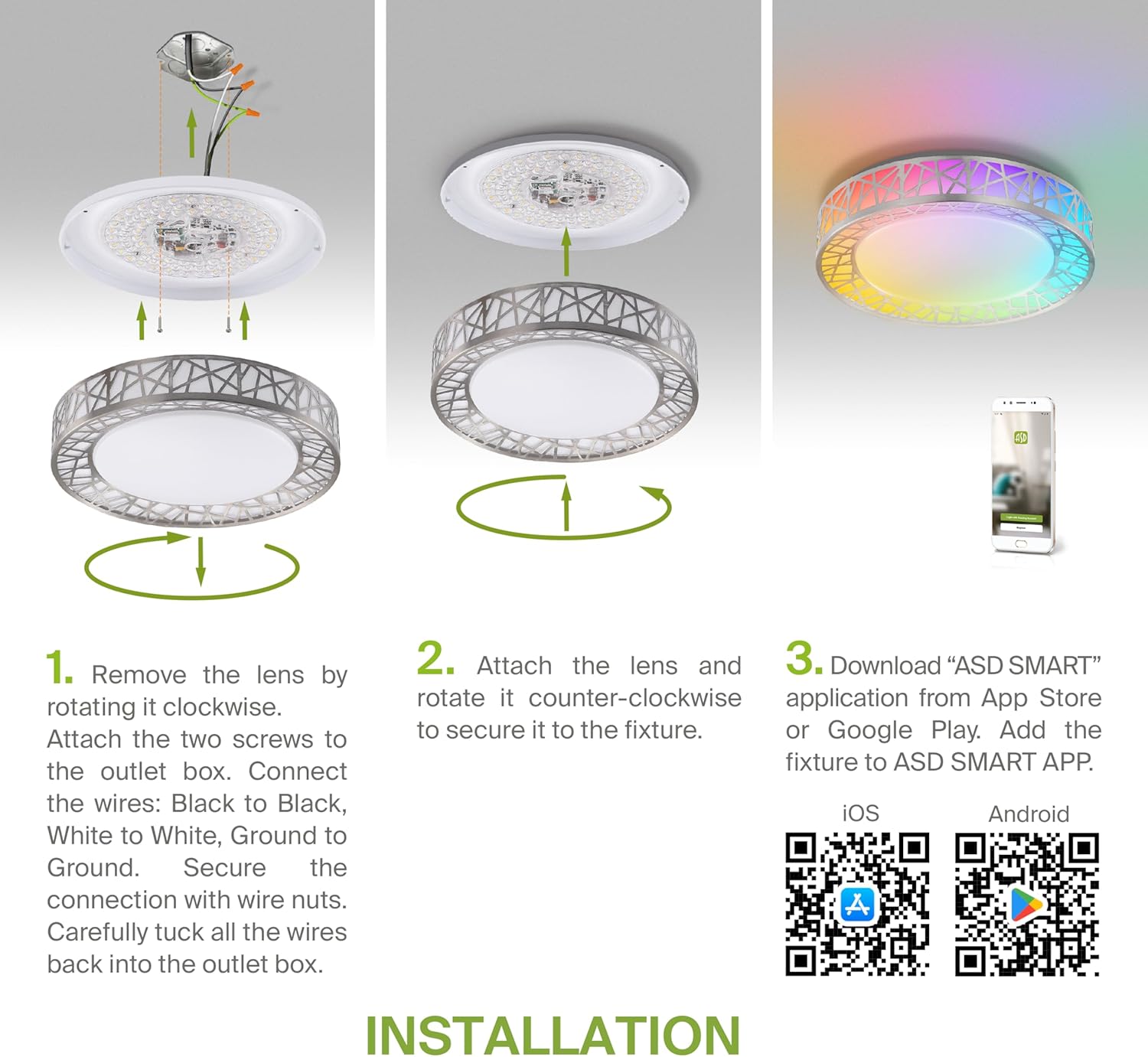
Figure 5.2: Complete installation overview including app download.
6. Instruccions de funcionament
Your ASD Smart RGBW Flush Mount Ceiling Light offers multiple control methods:
6.1 Control remot
El comandament a distància inclòs permet les funcions bàsiques:
- On/Off: Encendre o apagar el llum.
- Dimecres: Adjust brightness levels smoothly.
- Ajust de CCT: Change color temperature (e.g., from warm white to cool white).
- Selecció de color RGB: Cycle through or select specific RGB colors.
6.2 ASD SMART App Control
The ASD SMART app provides full control and advanced features:
- 16.7 milions de colors: Choose any color from the full RGBW spectrum.
- Smooth Dimming & CCT: Precisely adjust brightness and color temperature (2700K-6500K).
- Lighting Patterns: Select pre-set or custom lighting scenes and effects.
- Agrupació: Control multiple fixtures simultaneously.
- Programació: Set timers for lights to turn on/off or change settings automatically.

Figure 6.1: RGBW color capabilities.

Figure 6.2: Control via remote and smart app.

Figure 6.3: Seamless dimming functionality.
6.3 Control per veu (Alexa i Assistent de Google)
The fixture is compatible with Amazon Alexa and Google Assistant for convenient voice commands:
- Ensure your ASD SMART app is linked to your Alexa or Google Home account.
- Use commands such as "Alexa, turn on the living room light" or "Hey Google, set the bedroom light to blue."

Figure 6.4: Compatibility with Alexa and Google Assistant.
7. Manteniment
Per garantir la longevitat i el rendiment òptim del vostre llum de sostre:
- Neteja: Desconnecteu l'alimentació abans de netejar-la. Netegeu l'aparell amb un drap suau i sec. No utilitzeu netejadors abrasius ni dissolvents.
- Substitució de bombetes: Aquest llum utilitza tecnologia LED integrada i no requereix substitució de bombetes.
8. Solució De Problemes
Si teniu problemes amb el llum de sostre, consulteu els següents problemes i solucions habituals:
| Problema | Causa possible | Solució |
|---|
| La llum no s'encén | Sense corrent, cablejat solt, interruptor defectuós | Comproveu l'interruptor. Assegureu-vos que totes les connexions dels cables estiguin ben fixades. Proveu l'interruptor de paret. |
| El comandament a distància no funciona | Dead battery, out of range, interference | Replace remote battery. Ensure you are within range. Remove any obstructions. |
| L'aplicació no es pot connectar a la llum | Incorrect Wi-Fi password, light not in pairing mode, 5GHz Wi-Fi network | Verify Wi-Fi password. Reset light to pairing mode (refer to app instructions). Ensure you are on a 2.4GHz Wi-Fi network. |
| El control per veu no respon | App not linked to voice assistant, incorrect device name | Check linking in ASD SMART app and voice assistant app. Verify device name in voice assistant app. |
9. Garantia i Suport
ASD provides a Garantia limitada d'5 any for this product, guaranteeing top quality and safety. The fixture is ETL certified, ensuring compliance with North American safety standards.
For technical support, warranty claims, or any questions not covered in this manual, please contact ASD customer service. Refer to the product packaging or the official ASD weblloc per obtenir informació de contacte.


