1. Introducció
Thank you for choosing the Kaidi TWS KD-777 Wireless Earbuds. This manual provides essential information for the proper setup, operation, and maintenance of your new earbuds. Please read this manual thoroughly before use to ensure optimal performance and longevity of the product.
2. Contingut del paquet
Verifiqueu que tots els elements que s'enumeren a continuació siguin presents al vostre paquet:
- Kaidi TWS KD-777 Wireless Earbuds (Left and Right)
- Estoig de càrrega
- Cable de càrrega USB tipus C
- Coixins per a les orelles (diverses mides)
- Manual d'usuari
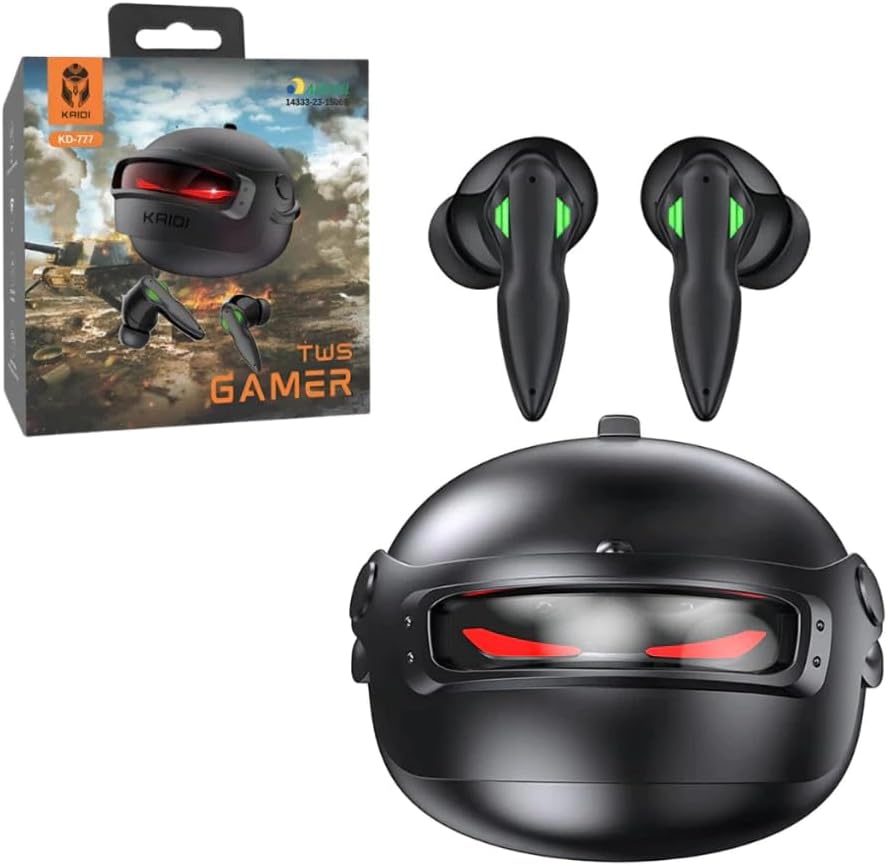
Imatge 2.1: Kaidi TWS KD-777 Earbuds, charging case, and retail packaging.
3. Producte acabatview
The Kaidi TWS KD-777 earbuds feature an intra-auricular design for a secure fit and include a compact charging case for portability and extended battery life. Each earbud is equipped with touch controls for various functions.

Imatge 3.1: The Kaidi TWS KD-777 earbuds and their charging case, showcasing the design and Kaidi branding.
3.1 Components
- Auriculars: Left and right earbuds with integrated touch sensors and microphones.
- Estoig de càrrega: Stores and charges the earbuds. Features a unique helmet-like design.
- Port de càrrega: USB Type-C port located on the charging case.
- Indicadors LED: On both earbuds and the charging case to show charging status and connection.
4. Configuració
4.1 Càrrega inicial
Abans del primer ús, carregueu completament els auriculars i l'estoig de càrrega.
- Col·loca els dos auriculars a l'estoig de càrrega. Assegura't que estiguin correctament col·locats.
- Connect the USB Type-C cable to the charging port on the case and the other end to a USB power source (e.g., wall adapter, computer USB port).
- The LED indicators on the case and earbuds will illuminate to show charging status. A full charge takes approximately 2 hours.
- Once fully charged, the indicators may change color or turn off. Disconnect the charging cable.

Imatge 4.1: Earbuds placed inside the open charging case, ready for charging or pairing.
4.2 Vinculació Bluetooth
To connect your Kaidi TWS KD-777 earbuds to a device:
- Assegureu-vos que els auriculars estiguin carregats i col·locats dins de l'estoig de càrrega.
- Open the charging case lid. The earbuds will automatically enter pairing mode, and their LED indicators will flash.
- Al dispositiu (telèfon intel·ligent, tauleta, ordinador), activeu el Bluetooth.
- Cerca available Bluetooth devices. Select "KD-777" de la llista.
- Once connected, the earbud LED indicators will stop flashing or change to a solid color, indicating a successful connection.
- Els auriculars es tornaran a connectar automàticament a l'últim dispositiu emparellat quan es treguin de l'estoig, si el Bluetooth està activat al dispositiu.
5. Instruccions de funcionament
The Kaidi TWS KD-777 earbuds feature touch controls for various functions. Specific touch gestures may vary slightly; refer to the quick start guide included in your package for precise commands.
5.1 Encès/Apagat
- Encès: Open the charging case lid, or remove the earbuds from the case. They will power on automatically.
- Apagar: Torna a col·locar els auriculars a l'estoig de càrrega i tanca la tapa. S'apagaran automàticament.
5.2 Reproducció de música
- Reproduir/pausa: Toqueu una vegada a qualsevol dels auriculars.
- Pista següent: Fes doble toc a l'auricular dret.
- Pista anterior: Fes doble toc a l'auricular esquerre.
5.3 Gestió de trucades
- Respondre/Finalitzar la trucada: Tap once on either earbud during an incoming call or an active call.
- Rebutja la trucada: Press and hold either earbud for approximately 2 seconds during an incoming call.
5.4 Cancel·lació de soroll
The KD-777 earbuds feature active noise cancellation (ANC), passive noise cancellation, and sound isolation.
- Activar/Desactivar ANC: Typically, a long press (e.g., 3 seconds) on one of the earbuds cycles through noise cancellation modes (ANC On, Transparency Mode, ANC Off). Refer to your quick start guide for the exact gesture.
6. Manteniment
6.1 Neteja
- Netegeu regularment els auriculars i l'estoig de càrrega amb un drap suau, sec i sense borrissol.
- Remove ear cushions and clean them separately with mild soap and water if necessary. Ensure they are completely dry before reattaching.
- Feu servir un bastonet de cotó o un raspall petit i suau per netejar suaument els contactes de càrrega tant dels auriculars com de l'interior de la funda.
- Eviteu utilitzar materials abrasius, alcohol o netejadors químics.
6.2 Emmagatzematge
- Quan no els utilitzeu, guardeu sempre els auriculars a la seva funda de càrrega per protegir-los i mantenir-los carregats.
- Guardeu el dispositiu en un lloc fresc i sec, allunyat de la llum solar directa i de temperatures extremes.
6.3 Resistència a l'aigua
The Kaidi TWS KD-777 earbuds are rated IPX4 water-resistant, meaning they are protected against splashing water from any direction. This makes them suitable for workouts and light rain. However, they are not designed for submersion in water or exposure to heavy rain. Do not use them while swimming or showering.
7. Solució De Problemes
If you encounter issues with your Kaidi TWS KD-777 earbuds, try the following solutions:
- Auriculars que no s'aparellen amb el dispositiu:
- Assegureu-vos que els dos auriculars estiguin carregats.
- Desactiva i activa el Bluetooth al dispositiu.
- Forget/delete "KD-777" from your device's Bluetooth list and attempt to pair again.
- Assegureu-vos que els auriculars estiguin dins de l'abast de Bluetooth de 10 metres del vostre dispositiu.
- Només funciona un auricular:
- Place both earbuds back into the charging case, close the lid, wait a few seconds, then open the lid and remove them.
- Assegureu-vos que els dos auriculars estiguin carregats.
- Sense so:
- Comprova el nivell de volum tant del dispositiu com dels auriculars.
- Assegureu-vos que els auriculars estiguin connectats correctament al dispositiu.
- Prova de reproduir àudio des d'una altra aplicació o font.
- Auriculars que no es carreguen:
- Assegureu-vos que el cable de càrrega estigui connectat correctament tant a la carcassa com a la font d'alimentació.
- Verifiqueu que la font d'alimentació estigui activa.
- Netegeu els contactes de càrrega dels auriculars i de l'interior de la funda.
8. Especificacions
| Característica | Especificació |
|---|---|
| Nom del model | Kaidi TWS KD-777 |
| Tecnologia de connectivitat | Sense fil (Bluetooth V5.3) |
| Tecnologia de comunicació sense fils | Bluetooth |
| Earbud Type | Intra-auricular |
| Control de soroll | Active Noise Cancellation, Passive Noise Cancellation, Sound Isolation |
| Mida de l'altaveu | 13 mm |
| Capacitat de la bateria dels auriculars | 30 mAh |
| Caixa de càrrega Capacitat de la bateria | 300 mAh |
| Temps de càrrega | Aproximadament 2 hores |
| Hora de reproducció de música | Fins a 5 hores (amb un 70% de volum) |
| Distància d'operació | Fins a 10 metres |
| Nivell de resistència a l'aigua | IPX4 (Resistant to splashing water) |
| Tipus de control | Touch Control, Media Control, Remote Control |
| Dispositius compatibles | All devices via Bluetooth V5.3 |
| Material | Policarbonat (PC), Silicona |
| Components inclosos | Ear cushions, Charging station, Protective case, User manual, Type-C cable |
9. Garantia i Suport
9.1 Garantia del fabricant
The Kaidi TWS KD-777 Wireless Earbuds come with a Garantia del fabricant de 2 anys. This warranty covers defects in materials and workmanship under normal use. It does not cover damage caused by misuse, accidents, unauthorized modifications, or normal wear and tear.
Conserveu el vostre comprovant de compra per a reclamacions de garantia.
9.2 Atenció al client
For technical support, warranty claims, or any questions regarding your Kaidi TWS KD-777 earbuds, please contact your retailer or the manufacturer's customer service through the contact information provided with your purchase.


