1. Introducció
This manual provides detailed instructions for the installation, operation, and maintenance of your ARENTI PoE Security Camera System. This system includes 5MP cameras and an 8-channel Network Video Recorder (NVR) designed for comprehensive home and business surveillance.
Please read this manual thoroughly before using the product to ensure proper setup and functionality.
2. Què hi ha a la caixa
Verifiqueu que tots els components siguin presents al vostre paquet:
- 4 càmeres PoE de 5MP
- 1 x NVR (Network Video Recorder) with pre-installed 2TB HDD
- 1 x NVR Power Cable
- 1 x HDD Data Cable
- 1 x HDD Power Cable
- 1 x RJ45 Cat5e UTP Network Cable (1m, for NVR to Switch connection)
- 1 x ratolí
- 1 x Manual (Quick Guide)
- 2 packs of Screw Pack
- 4 x Waterproof Terminals
- 1 x NVR Power Adapter
- 1 x cable HDMI
- 1 plantilla de perforació
- 4 adhesius d'advertència
Descripció: An image displaying all the components included in the ARENTI PoE Security Camera System package, neatly arranged. This includes the NVR, four cameras, various cables, power adapters, a mouse, and installation accessories.
3. Configuració
3.1. S'ha acabat el sistemaview i connexions
The ARENTI PoE Security Camera System is designed for plug-and-play installation. A single Ethernet cable provides both power and data to each camera.

Descripció: A detailed diagram illustrating the rear panel of the NVR with labeled ports (PoE ports for cameras, Audio out, VGA, HDMI, WAN, USB, Power) and a connected camera showing its PoE port. This image helps users identify where to connect each component.
3.2. Instal·lació de la càmera
- Lloc de muntatge: Choose a location that provides optimal viewing angles and is within the cable length from the NVR. The cameras are IP66 weatherproof, suitable for both indoor and outdoor use.
- Perforació: Use the provided drill template to mark screw holes. Drill pilot holes as needed.
- Càmera segura: Fixeu la base de la càmera fermament a la superfície de muntatge amb els cargols proporcionats.
- Connexió per cable: Connect the Ethernet cable from the camera to one of the PoE ports on the NVR. Use the waterproof terminal for outdoor connections to protect the RJ45 connector.

Descripció: An image showing an ARENTI security camera mounted on an exterior wall, demonstrating a typical installation scenario. The camera is white and blends with the wall color.
3.3. Connexió de l'NVR
- Connectar càmeres: Plug the Ethernet cables from your cameras into the PoE ports (1-8) on the back of the NVR.
- Connecta a la pantalla: Connect the NVR to a monitor or TV using an HDMI or VGA cable.
- Connecteu-vos a la xarxa: Connect the NVR's WAN port to your router using the provided network cable for remote access features.
- Connecta el ratolí: Connecteu el ratolí USB a un dels ports USB de l'NVR.
- Encès: Connect the NVR power adapter and plug it into an electrical outlet. The system will power on automatically.
Descripció: An official ARENTI video demonstrating the setup process for the NVR security camera system, including connecting cameras, display, network, and power. This video provides a visual guide for installation.
3.4. Configuració Inicial
En el primer inici, l'NVR us guiarà a través d'un assistent de configuració inicial. Seguiu les instruccions que apareixen a la pantalla per a:
- Set language and time zone.
- Create an administrator password (highly recommended for security).
- Configura els paràmetres de xarxa (normalment n'hi ha prou amb DHCP).
- Format the pre-installed 2TB HDD if prompted.
The cameras should automatically connect to the NVR via PoE. If not, refer to the troubleshooting section.
4. Funcionament del sistema
4.1. En directe View
After initial setup, you will see the live feed from all connected cameras on your display. Use the mouse to navigate the NVR interface.
- Càmera única View: Double-click on any camera feed to view it in full screen. Double-click again to return to multi-camera view.
- Múltiples càmeres View: The NVR supports simultaneous live viewing of multiple cameras.
4.2. Gravació
The NVR comes with a pre-installed 2TB HDD for continuous 24/7 recording. It uses H.265 video compression for efficient storage.
- Gravació contínua: The system is configured for 24/7 recording by default.
- Enregistrament activat per moviment: You can configure specific channels to record only when motion is detected, saving storage space.
- Expansió d'emmagatzematge: The system supports HDD expansion up to 10TB.
4.3. Reproducció
Accés gravat footage through the NVR interface. You can search by date, time, and event type (e.g., motion detection).
4.4. Smart AI Detection
The ARENTI system features advanced AI detection to minimize false alarms.
- Tipus de detecció: Intelligently identifies people, vehicles, pets, and packages.
- Alertes en temps real: Each detection is outlined with a real-time frame on the live view and triggers alerts.
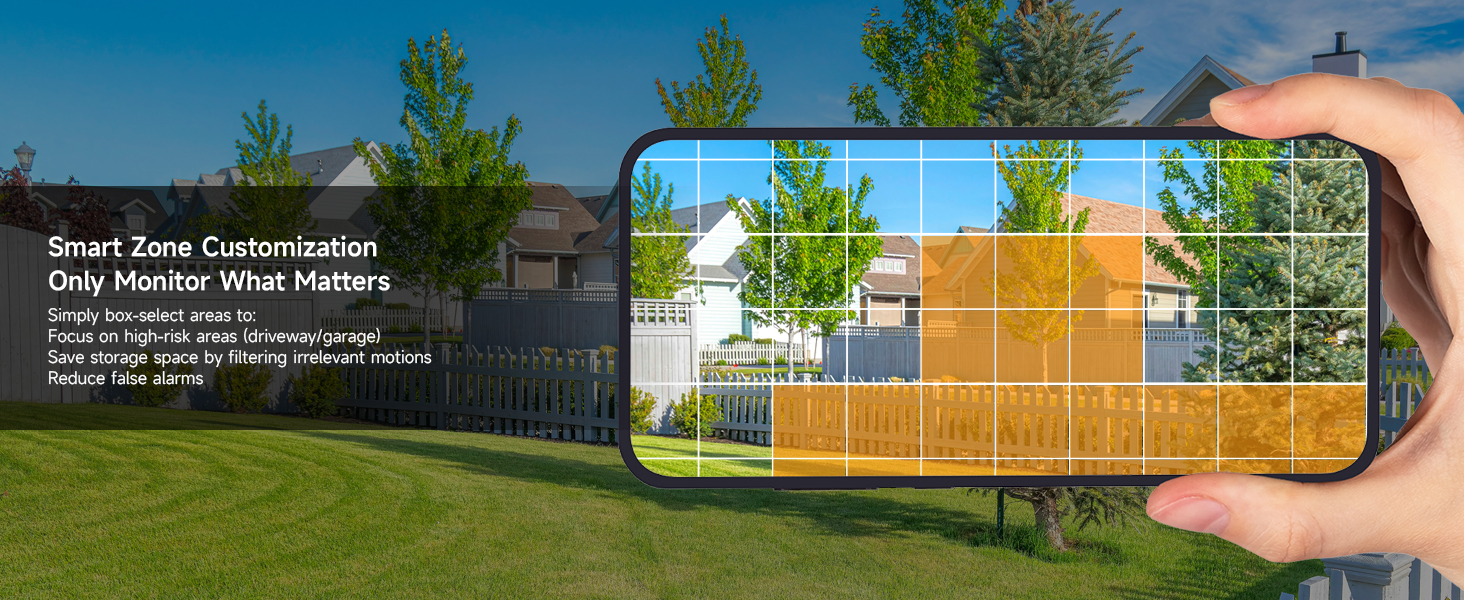
- Personalització: Configure detection zones and sensitivity settings to focus on specific areas and reduce irrelevant alerts.

Descripció: An image showing a house driveway with a car, a person, a pet, and a package, each highlighted with a bounding box and a label indicating AI detection (Person, Car, Pet, Package). This illustrates the system's smart detection capabilities.
4.5. Àudio bidireccional
Each 5MP camera supports two-way audio, allowing you to communicate with individuals near the camera.
- Activació: Use the mobile app or NVR interface to activate the microphone and speaker functions.
- Aplicacions: Useful for greeting visitors, instructing delivery personnel, or deterring intruders.
4.6. Remote Access (Mobile App)
Monitor your property anytime, anywhere using the free ARENTI mobile app.
- Descarregar l'aplicació: Download the ARENTI app from your smartphone's app store.
- Configuració del compte: Create an account and add your NVR system by scanning the QR code or entering the device ID.
- Característiques: Accés en directe view, playback recordings, receive push notifications for events, and utilize two-way audio.

Descripció: A hand holding a smartphone displaying the ARENTI app interface, showing a live camera feed of a person handling a package. Smaller screens in the background show other devices (laptop, tablet) also monitoring the feed, illustrating remote access capabilities.
4.7. Intelligent Color Night Vision
The 5MP cameras provide clear footagel dia i la nit.
- Visió nocturna a tot color: Equipped with powerful IR sensors and spotlights, cameras support full-color night vision up to 32 ft in darkness or ambient light.
- Claredat: Capture every detail with 5MP Ultra HD clarity at 25fps.

Descripció: A split image comparing infrared night vision (monochrome) and color night vision from an ARENTI camera, showcasing the enhanced detail and color provided by the intelligent color night vision feature in low-light conditions.
5. Manteniment
5.1. Resistent a la intempèrie
The cameras feature an IP66 weatherproof rating and durable metal housing, designed to withstand various weather conditions.
- Interval de temperatura: Operates effectively from -4°F to 122°F (-20°C to 50°C).
- Durabilitat: Resistant to rust, rain, and dust.

Descripció: An ARENTI camera mounted outdoors, with rain falling, illustrating its IP66 weatherproof rating and ability to withstand extreme weather conditions from -4°F to 122°F.
5.2. Seguretat de dades
The NVR system uses AES-128 encryption to safeguard every data stream. All footage is stored locally on the NVR's HDD, ensuring no cloud involvement or external access.
6. Solució De Problemes
| Problema | Causa possible | Solució |
|---|---|---|
| No camera feed | Loose cable connection, no power to NVR/camera, network issue. | Check all cable connections (Ethernet, power). Ensure NVR is powered on. Verify network connectivity. |
| False motion alarms | High sensitivity, environmental factors (e.g., moving leaves, shadows). | Adjust AI detection sensitivity. Configure specific detection zones to exclude irrelevant areas. |
| No remote access | NVR not connected to network, incorrect app settings, firewall issues. | Ensure NVR WAN port is connected to router. Check router settings. Verify app login and device addition. |
| Mala visió nocturna | Obstruction in front of camera, insufficient ambient light for color mode. | Clear any obstructions. Ensure camera lens is clean. Adjust camera position or add external lighting if needed. |
7. Especificacions
| Característica | Detall |
|---|---|
| Número de model | AIK8-510B4-MRUS |
| Resolució de captura de vídeo | 5MP (2880 × 1600) |
| Velocitat de fotogrames | 25 fotogrames per segon |
| Gamma de visió nocturna | Up to 100 Feet (32 ft for full-color) |
| Ús interior/exterior | Interior, Exterior |
| Classificació resistent a la intempèrie | IP66 |
| Temperatura de funcionament | -4 °F a 122 °F (-20 °C a 50 °C) |
| Capacitat d'emmagatzematge | 2TB HDD (expandable up to 10TB) |
| Compressió de vídeo | H.265 |
| Característiques especials | 2-Way Audio, 24/7 Recording, Human/Vehicle/Pet/Package AI Detection, Plug and Play PoE |
| Tecnologia de connectivitat | Wired (Ethernet, ONVIF) |
| Font d'alimentació | Cable elèctric (PoE) |
| Dimensions del producte | 16.68 x 16.22 x 6.1 polzades |
| Pes de l'article | 12.89 lliures |
8. Garantia i assistència
ARENTI offers a 2-Year Protection Plan for this product. For technical support or warranty claims, please contact ARENTI customer service:
- Suport telefònic: 1-866-799-7868
- Suport per correu electrònic: support@arenti.com
Additional support resources and FAQs may be available on the official ARENTI weblloc.


