1. Producte acabatview
The EZON GPS Running Watch T031B03 is designed for runners and fitness enthusiasts, offering precise GPS tracking, activity monitoring, and essential timekeeping functions. It features a durable design suitable for various outdoor activities.
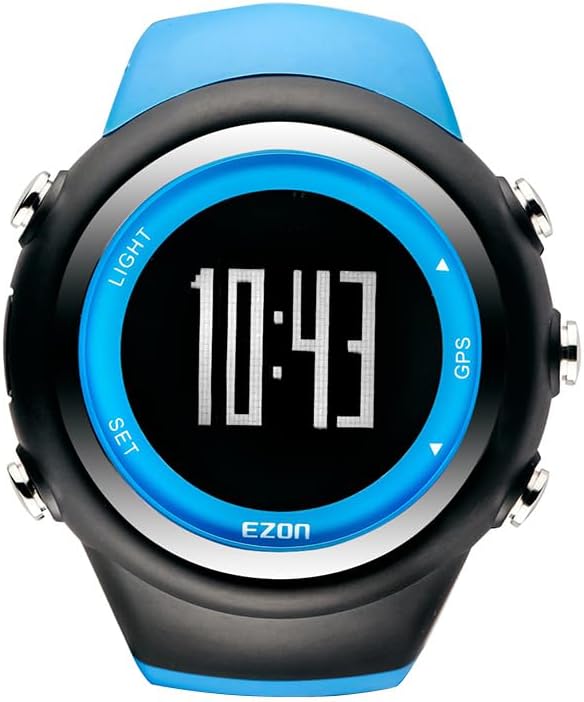
Imatge 1.1: Davant view of the EZON GPS Running Watch T031B03, displaying the time 10:43 on its digital screen with blue accents around the bezel and buttons.
2. Què hi ha a la caixa
Verifiqueu que tots els elements siguin presents a l'embalatge del producte:
- EZON GPS Running Watch T031B03
- Cable de càrrega
- Manual d'usuari
3. Guia de configuració
3.1 Càrrega inicial
Before first use, fully charge the watch using the provided charging cable. Connect the charging cable to the watch and a standard USB power source. The watch display will indicate charging status.
3.2 GPS Auto Time Synchronization
The watch is equipped with a built-in GPS receiver that automatically synchronizes the time based on the city you set. This ensures accurate time display without manual adjustments.

Imatge 3.1: A diagram illustrating a satellite transmitting a signal to the EZON GPS Running Watch, highlighting its built-in GPS chip for superior accuracy.
3.3 Professionals Personalitzatsfile Entrada
For accurate fitness data, enter your personal profile information. This includes your height, weight, age, and gender. You can also select your preferred units (imperial or metric). The watch uses this data to tailor fitness monitoring.
4. Instruccions de funcionament
4.1 Funcions dels botons
The watch features four buttons for navigation and function control:

Imatge 4.1: A detailed diagram showing the EZON GPS Running Watch with labels for each button: 'LIGHT' (top left), 'SET' (bottom left), 'GPS' (top right), and an unlabeled button (bottom right) for DATA mode. Instructions indicate 'LIGHT' activates backlight for 5 seconds, 'SET' views time/date/battery and enters settings (hold for 2-3 seconds), 'GPS' enters GPS mode (hold for 2-3 seconds), and the bottom right button accesses STOPWATCH mode (press) and DATA mode (press).
- Botó LLUM (a dalt a l'esquerra): Press to activate the backlight. The light will glow for approximately 5 seconds.
- SET Button (Bottom Left): Premeu per view time, day of week, month-date, second, and battery level. Press and hold for 2-3 seconds to enter the setting screens. Use the top right (GPS) and bottom right (DATA) buttons to scroll through options like TIME-DATE, ALARM, and USER settings.
- GPS Button (Top Right): Hold for 2-3 seconds to enter GPS mode.
- DATA/STOPWATCH Button (Bottom Right): Press to get to STOPWATCH mode. Press again to get to DATA mode.
4.2 Seguiment GPS
The watch features advanced GPS technology for precise tracking. A cold start takes approximately 1 minute, while an instant hot start allows for seamless re-connection. This provides accurate and reliable positioning for your activities.

Imatge 4.2: The EZON GPS Running Watch displaying the time 10:43, with icons below representing its core features: GPS, Calorie, Pace, Distance, and Water Proof, set against a mountain landscape.
4.3 One-Tap Exercise Data Tracking
After completing an exercise, tap the watch button to view detailed workout data. This includes running distance, average pace, calories burned, and total time. The watch can save the last 10 exercise records, helping you understand and optimize your training.

Imatge 4.3: A runner wearing the EZON GPS Running Watch, with text indicating 'Running Data Record' and 'Stores up to 10 full workout records'. Below are icons for 'Get Feedback in Exercise', 'Improve Exercise Effect', and 'Track Exercise Target'.
4.4 Precise Stopwatch and Lap Tracking
The stopwatch function supports a maximum time of 99 hours, 59 minutes, and 59 seconds. It includes both countdown and lap timer modes. The watch automatically records lap data, including duration, pace, distance, and average speed, saving up to 50 laps of data.
4.5 Multi-Function Alarm Reminder
When activated, the alarm will chime for approximately 20 seconds at the set time. Press any button to stop the chime. This feature is useful for daily reminders and time management.
4.6 Backlight Display
The watch features a backlight display to ensure clear visibility of your data in low-light conditions, making night runs and outdoor activities more convenient.

Imatge 4.4: A person looking at their EZON GPS Running Watch, which has its backlight activated, making the display visible in dim lighting conditions.
5. Cura i Manteniment
5.1 Resistència a l'aigua
The running watch is water-resistant up to 5ATM, making it suitable for daily activities such as washing hands, showering, and swimming. Important: Do not wear the watch while diving or in a sauna. Do not press any buttons while the watch is submerged in water.
5.2 Cura de la bateria
The watch is designed for long-endurance battery life. To maintain optimal battery performance, avoid extreme temperatures and fully charge the watch regularly. The watch offers approximately 90 days of standby time and 6 hours with GPS on.
6. Solució De Problemes
6.1 GPS Connection Issues
If the GPS takes longer than expected to connect (e.g., over 1.5 minutes for a cold start), ensure you are in an open area with a clear view of the sky. Obstructions like tall buildings or dense tree cover can interfere with signal acquisition. If issues persist, try restarting the watch.
6.2 Backlight Visibility
The backlight is designed to stay on for approximately 5 seconds. If you find the display difficult to read in low light, press the LIGHT button again to reactivate the backlight. This duration is fixed and cannot be adjusted.
7. Especificacions del producte
| Característica | Detall |
|---|---|
| Marca | EZON |
| Número de model | T031B03 |
| Color | Blau |
| Mida de la pantalla | 1.2 polzades |
| Pes de l'article | 5.28 unces |
| Resistència a l'aigua | 5ATM |
| GPS | GPS integrat |
| Tecnologia de connectivitat | Bluetooth |
| Tipus de bateria | Lithium Polymer (Nonstandard Battery) |
| Sistema operatiu | RTOS |
8. Garantia i Suport
EZON is committed to product quality and customer satisfaction. The EZON GPS Running Watch T031B03 comes with the following support:
- Suport de per vida: Assistance available for the lifespan of your product.
- Resposta en 24 hores: Les consultes d'atenció al client es responen normalment en un termini de 24 hores.
- Política de devolució de 30 dies: Eligible for returns within 30 days of purchase.
- Substitució gratuïta durant 1 any: Product replacement offered free of charge within one year of purchase for manufacturing defects.
For further assistance, please refer to the contact information provided with your purchase or visit the official EZON support weblloc.


