1. Producte acabatview
The BAFANG DPC010 is a 4-inch TFT color display designed for BAFANG CAN protocol mid-drive motors. It provides essential riding data, allows for motor parameter customization, and enhances your ebike experience with its intuitive interface and robust features.

Figure 1.1: BAFANG DPC010 Ebike Display and control unit, showing the screen interface and connection cables.
2. Compatibilitat
The DPC010 display is specifically designed for BAFANG CAN protocol mid-motor systems. It is compatible with a wide range of BAFANG motors including M200, M300, M400, M410, M420, M500, M560, M510, M600, M620, M800, and M820 CAN Version motors.
Nota important: This display is no compatible with UART protocol motors (which typically have a 5-pin circular connector). Attempting to use adapter cables or modifying connectors will not resolve compatibility issues. Always verify your motor's protocol and connector type before installation.

Figure 2.1: Diagram illustrating compatibility with BAFANG CAN protocol motors (5-pin male triangular connector) and incompatibility with UART protocol motors and other brand motors.
The display mount is designed to fit most standard handlebar diameters, including 22.2mm, 25.4mm, 31.8mm, and 35mm, ensuring a secure fit on various ebike setups.
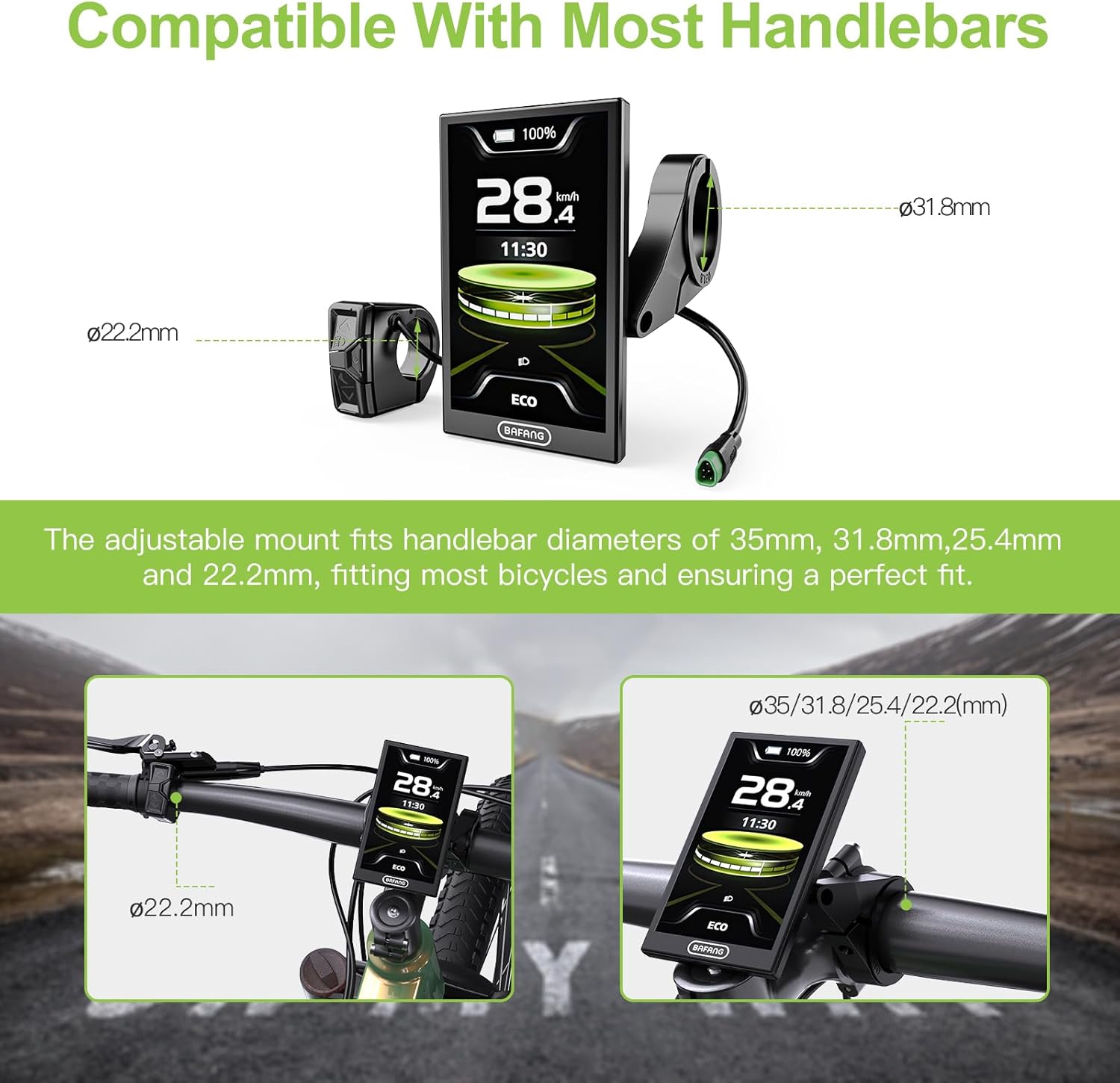
Figure 2.2: Diagram showing handlebar diameter compatibility for the BAFANG DPC010 display mount.
3. Configuració i instal·lació
3.1. Contingut del paquet
Abans de començar la instal·lació, assegureu-vos que hi hagi tots els components:
- BAFANG DPC010 Display Unit
- Control Unit (Button Holder)
- Suport de muntatge i cargols
- Connection Cable (integrated)
3.2. Muntatge de la pantalla
- Choose a suitable position on your handlebar for the display and control unit. Ensure it does not obstruct your view or interfere with braking/shifting.
- Loosen the screws on the display mounting bracket.
- Place the bracket around the handlebar at the desired position.
- Tighten the screws securely, ensuring the display is stable and does not rotate.
- Mount the separate control unit (button holder) next to your left grip for easy access.
3.3. Connexió dels cables
The DPC010 display connects to your ebike's main wiring harness (1T4 cable) via a 5-pin male triangular connector. Ensure a firm and secure connection.

Figure 3.1: Wiring diagram illustrating the female 5-pin EB1T4 connector and male 5-pin display connector, detailing pin assignments.
3.4. Engegada inicial
Once mounted and connected, power on your ebike system. The display should illuminate and show the default interface. If the display does not power on, check all connections and ensure your ebike battery is charged.
4. Instruccions de funcionament
4.1. Funcionament bàsic
- Encès/apagat: Press and hold the power button on the control unit to turn the display on or off.
- Navegació: Use the up/down arrows on the control unit to cycle through different information screens or adjust settings. The 'M' button typically enters/exits menus or confirms selections.
4.2. Display Modes and UI
The DPC010 features a 4-inch TFT screen with multiple UI modes (Sports, Fashion, Technology) to suit your preference. It displays real-time data such as speed, voltage, power, cadence, calories, trip distance, odometer, and error codes.

Figure 4.1: The DPC010 digital display interface showing various data points and app integration details.
4.3. Automatic Backlight
The display features an automatic light sensor that adjusts the screen brightness based on ambient light conditions. It also automatically activates your ebike's headlight at dusk for improved safety.

Figure 4.2: Comparison demonstrating the automatic backlight feature of the display in day and night conditions.
4.4. Bluetooth Navigation & App Control
Connect the DPC010 display to the "Bafang Go+" app (available on iOS/Android) via Bluetooth. The app allows you to:
- Customize motor parameters.
- Track real-time navigation.
- Sync ride routes.
- Monitor battery health with low-voltage alertes.
- Share GPS-tracked adventures.
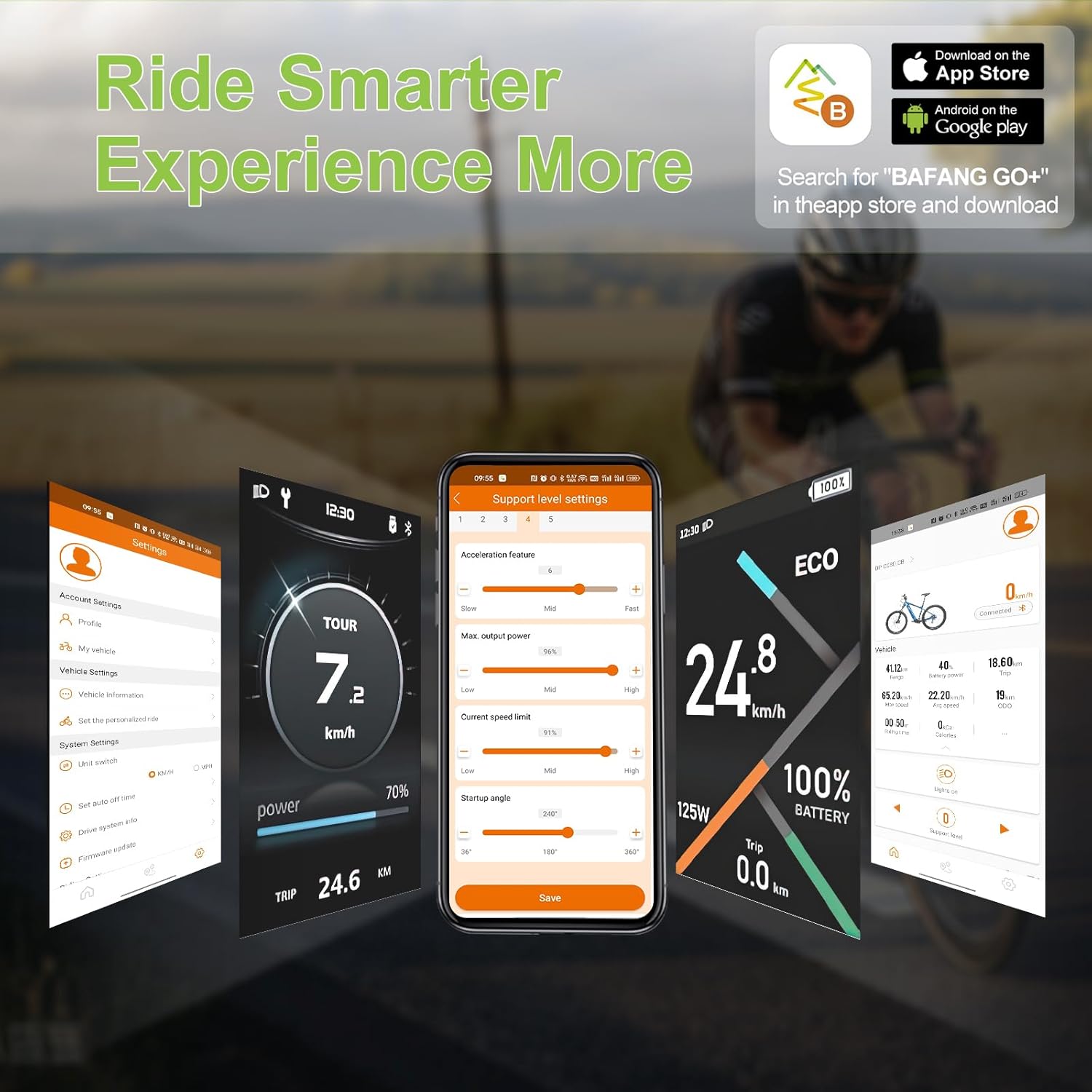
Figure 4.3: Visual representation of the Bafang Go+ app interface and its features.
4.5. PAS Levels and Riding Modes
The display supports 5 PAS (Pedal Assist System) levels and 6 adjustable riding modes, allowing you to adapt the motor's assistance to different road conditions and riding scenarios. This flexibility helps optimize energy consumption and reduce rider fatigue.
4.6. Type-C Fast Charging Port
The integrated Type-C port allows for convenient and quick charging of external devices on the go.
5. Especificacions
Detailed technical specifications for the BAFANG DPC010 Ebike Display:

Figure 5.1: Detailed product specification diagram for the BAFANG DPC010 display, including dimensions and key parameters.
| Característica | Especificació |
|---|---|
| Marca | Bafang |
| Número de model | LV-US DPC010 Display |
| Mida de la pantalla | 4 polzades |
| Tipus de visualització | LCD TFT |
| Connector | Male 5 PIN (Triangular) |
| Protocol | CAN |
| Voltage Compatibilitat | 36V/48V/52V/60V/72V |
| Nivell PAS | 0-3, 0-5 (Optional) |
| Límit de velocitat | 1km/h ~ 99km/h |
| Classificació impermeable | IP66 |
| Port de càrrega | Tipus-C |
| Temperatura de funcionament | -20 °C ~ 45 °C |
| Temperatura d'emmagatzematge | -20 °C ~ 60 °C |
| Apagat automàtic | OFF, 1~9min (Optional) |
| Material | Plàstic |
| Tipus de muntatge | Muntatge de manillar |
| Tipus de sensor | Speed Sensor, Cadence Sensor, GPS Sensor |
| Tecnologia de connectivitat | Bluetooth |
6. Manteniment
- Neteja: Utilitzeu un suau, damp cloth to clean the display screen and body. Avoid abrasive cleaners or solvents that could damage the surface.
- Impermeabilització: The display has an IP66 waterproof rating, protecting it from strong jets of water and dust. While it is resistant to rain and splashes, avoid submerging the display in water.
- Inspecció del cable: Periodically check all cables and connectors for signs of wear, damage, or corrosion. Ensure connections remain secure.
- Actualitzacions de programari: Check the Bafang Go+ app or BAFANG's official website for any available firmware updates for the display to ensure optimal performance and access to new features.
7. Solució De Problemes
- Display Does Not Power On:
- Ensure the ebike battery is charged.
- Check all cable connections, especially the 5-pin triangular connector, to ensure they are fully seated.
- Verify that your motor is a BAFANG CAN protocol motor. This display is not compatible with UART motors.
- Sense lectura de velocitat/cadència:
- Check the connection of the speed sensor and cadence sensor to the motor.
- Ensure the magnets for the sensors are correctly positioned and within range of the sensor units.
- Problemes de connexió Bluetooth:
- Assegureu-vos que el Bluetooth estigui habilitat al vostre telèfon intel·ligent.
- Make sure the Bafang Go+ app is installed and updated to the latest version.
- Restart both the display and your smartphone, then try connecting again.
- Codis d'error que es mostren:
- Refer to the Bafang Go+ app or BAFANG's official documentation for a comprehensive list of error codes and their meanings.
- Common error codes often relate to motor, battery, or sensor issues.
8. Garantia i Suport
8.1. Informació de la garantia
The BAFANG DPC010 Ebike Display comes with the following warranty terms:
- Devolució de 30 dies: Es pot retornar en un termini de 30 dies des de la compra.
- Reemplaçament de 90 dies: Eligible for replacement within 90 days for manufacturing defects.
- Lifetime Technical Guidance: Access to technical support and guidance for the lifetime of the product.
8.2. Atenció al client
For technical assistance, warranty claims, or any questions regarding your BAFANG DPC010 display, please contact BAFANG customer support through their official website or the retailer from whom you purchased the product. When contacting support, please have your product model number and purchase details ready.


