1. Introducció
This user manual provides comprehensive instructions for the installation, operation, and maintenance of your RESTMO Smart Sprinkler Timer with Flow Meter. This device is designed to automate your garden and lawn irrigation, offering precise control and water efficiency through its dual-zone capabilities and smart app integration. Please read this manual thoroughly before using the product to ensure optimal performance and longevity.

Image: The RESTMO Smart Sprinkler Timer unit, showing its dual outlets, digital display, and the accompanying WiFi hub and smartphone app interface.
2. Característiques del producte
- WiFi & Bluetooth Dual-Mode Control: Manage watering schedules, rain delays, and manual starts remotely via the Smart App when connected to a 2.4GHz WiFi network. Local control is available via Bluetooth within a 50-meter range. (Note: 5GHz WiFi is not supported).
- Precise Water Volume Control: Set exact water usage and frequency to prevent overwatering and track real-time consumption data (daily/weekly/monthly/yearly) in the app.
- Dual-Zone Independent Control: Two independent outlets allow for separate, customized watering schedules for different areas or plant types.
- Fully Customizable Plans: Choose from 4 flexible modes: Interval (1hr-7day frequency), Weekly, Odd Day, or Even Day. Set up to 8 independent schedules per zone with precise start times, durations (1min-24hrs), and frequencies.
- Durable Heavy-Duty Construction: Features pure brass inlet/outlet for superior corrosion resistance and leak-proof performance. Includes a metal filter to prevent dirt buildup and extend product lifespan.
- Smart Manual Control & Weather-Resistant Design: IP55 waterproof protection. Activate manual watering (1–24 hrs) via the app or one-touch button. Rain delay feature pauses irrigation for 24/48/72 hours during wet weather.
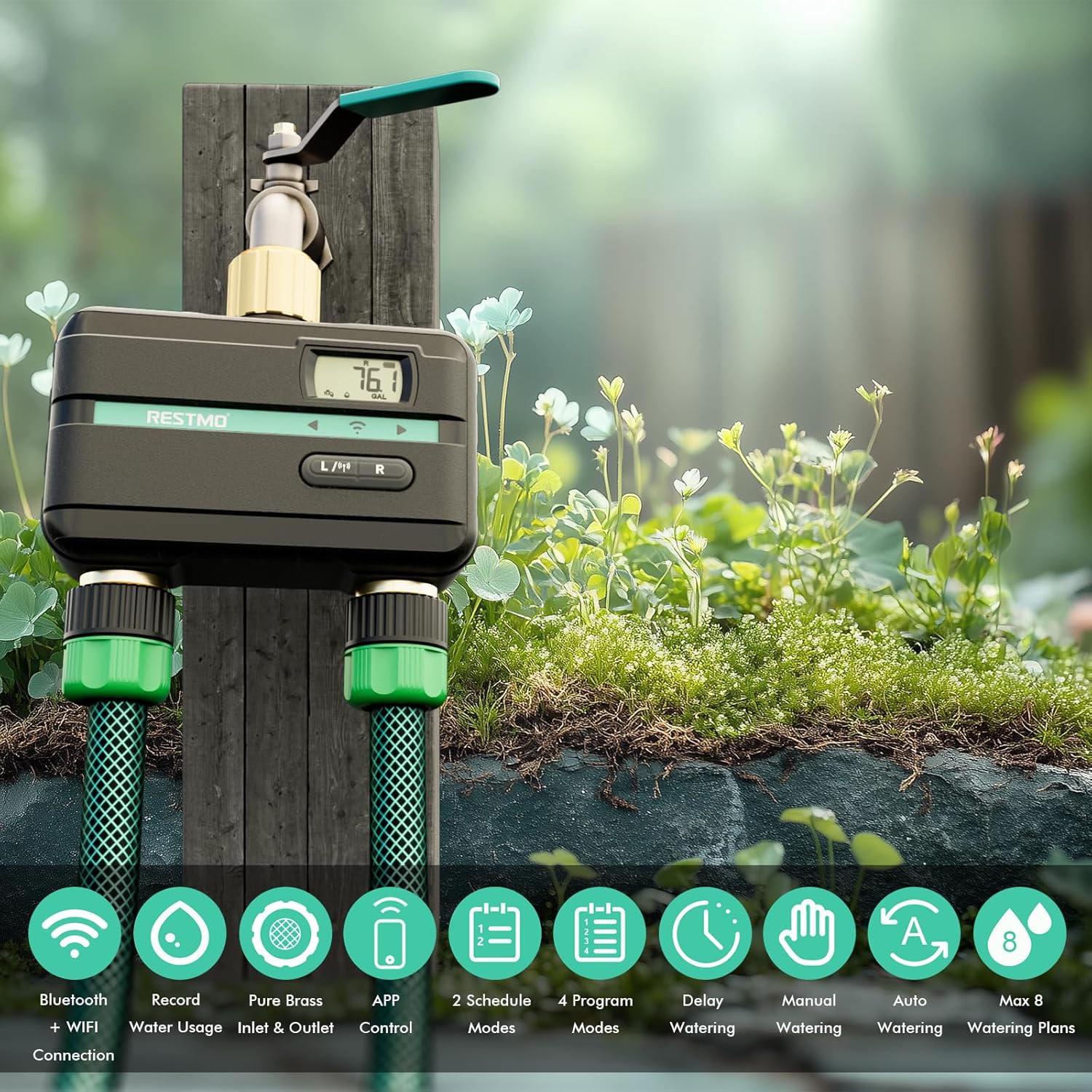
Image: Visual representation of the key features including Bluetooth + WiFi, water usage record, pure brass inlet & outlet, app control, 2 schedule modes, 4 program modes, delay watering, manual watering, auto watering, and max 8 watering plans.
3. Contingut del paquet
Si us plau, comproveu que tots els articles estiguin presents i en bon estat en obrir el paquet:
- RESTMO Smart Sprinkler Timer Unit (2-Zone)
- 2.4Ghz WiFi Hub (USB-A)
- Manual d'usuari (Aquest document)
- Guia d'inici ràpid
4. Guia de configuració
Follow these steps to set up your RESTMO Smart Sprinkler Timer and connect it to the Smart Life app.
4.1. Download and Install the Smart Life App
Download the "Smart Life" app from your device's app store. Log in or create a new account.

Image: Instructions for downloading the Smart Life app from the App Store or Google Play.
4.2. Pair the Sprinkler Timer Unit
To pair the timer unit, long press the L/R button on the device for more than 5 seconds until the LED indicator blinks green quickly. Then, open the Smart Life app, click "+" to add a device, and select "RESTMO BT 2-Zone Water Timer" to pair.
Image: Visual guide for pressing the pairing button on the timer and adding it within the Smart Life app.
4.3. Pair the WiFi Hub
Plug the WiFi hub into a USB-A adapter close to your router. Long press the pair button on the hub until its LED indicator flashes quickly. In the Smart Life app, click "+" to add a device, select the hub icon (Bluetooth-WiFi Gateway), and follow the app instructions to complete pairing.

Image: Steps for plugging in the WiFi hub, activating its pairing mode, and connecting it through the Smart Life app.
4.4. Connect Timer to WiFi Hub
Once both the timer and the hub are paired to the app, you will be prompted to link the timer to the hub. This enables remote control via WiFi. Ensure your WiFi network is 2.4GHz, as 5GHz is not supported.
Video: This video demonstrates the complete process of pairing both the RESTMO Smart Sprinkler Timer and its WiFi Hub to the Smart Life application, enabling remote control and monitoring.
5. Funcionament
The RESTMO Smart Sprinkler Timer offers various modes and settings for flexible and efficient watering.
5.1. Dual-Zone Independent Control
The timer features two independent outlets (Zone L and Zone R), allowing you to set distinct watering schedules for different areas of your garden or lawn. This is ideal for plants with varying water requirements.

Imatge: Una vista aèria view illustrating how the two independent zones (Zone L and Zone R) can cover different sections of a property, such as a lawn and a pool area.
5.2. Watering Modes
You can choose between two primary watering modes:
- Watering Time Mode: Set the duration for each watering cycle (e.g., 30 minutes).
- Mode de volum d'aigua: Specify the exact amount of water to be dispensed (e.g., 1 gallon). This mode is particularly useful for precise water management and sensitive plants.

Image: A split image showing a plant being watered (Water Volume Mode) and a sprinkler watering a lawn (Watering Time Mode), illustrating the two operational modes.
5.3. Customizable Watering Plans
The app allows for highly flexible scheduling with up to 8 independent schedules per zone. Choose from the following program modes:
- Interval Mode: Set watering frequency from 1 hour to 7 days.
- Weekly Mode: Seleccioneu dies específics de la setmana per regar.
- Odd Day Mode: Water on odd-numbered days of the month.
- Even Day Mode: Water on even-numbered days of the month.

Image: A collage demonstrating the four flexible program modes: Interval, Weekly, Odd Day, and Even Day, with examples of their settings and corresponding watering scenarios.
5.4. Manual Control and Rain Delay
You can manually activate watering for 1 to 24 hours directly from the timer's button or through the app. The rain delay feature allows you to pause scheduled watering for 24, 48, or 72 hours, conserving water during wet periods.

Image: Depicts two ways to manually water (button press or app screen tap) and the rain delay options for 24, 48, or 72 hours.
6. Manteniment
Proper maintenance ensures the longevity and optimal performance of your sprinkler timer.
- Cleaning the Metal Filter: The integrated metal filter prevents dirt buildup. Periodically remove the filter and rinse it under running water to clear any debris. This maintains consistent water flow.
- Substitució de la bateria: The timer operates on batteries (type not specified in provided data, but typically AA or AAA). When the battery indicator on the display or app shows low power, replace the batteries promptly to avoid interruption of watering schedules.
- Hivernització: Before the first frost, disconnect the timer from the faucet and hoses. Drain any remaining water from the unit and store it indoors in a dry, protected area to prevent freezing damage.
- Neteja general: Netegeu l'exterior del temporitzador amb un suau, damp tela. No utilitzeu netejadors abrasius ni dissolvents.
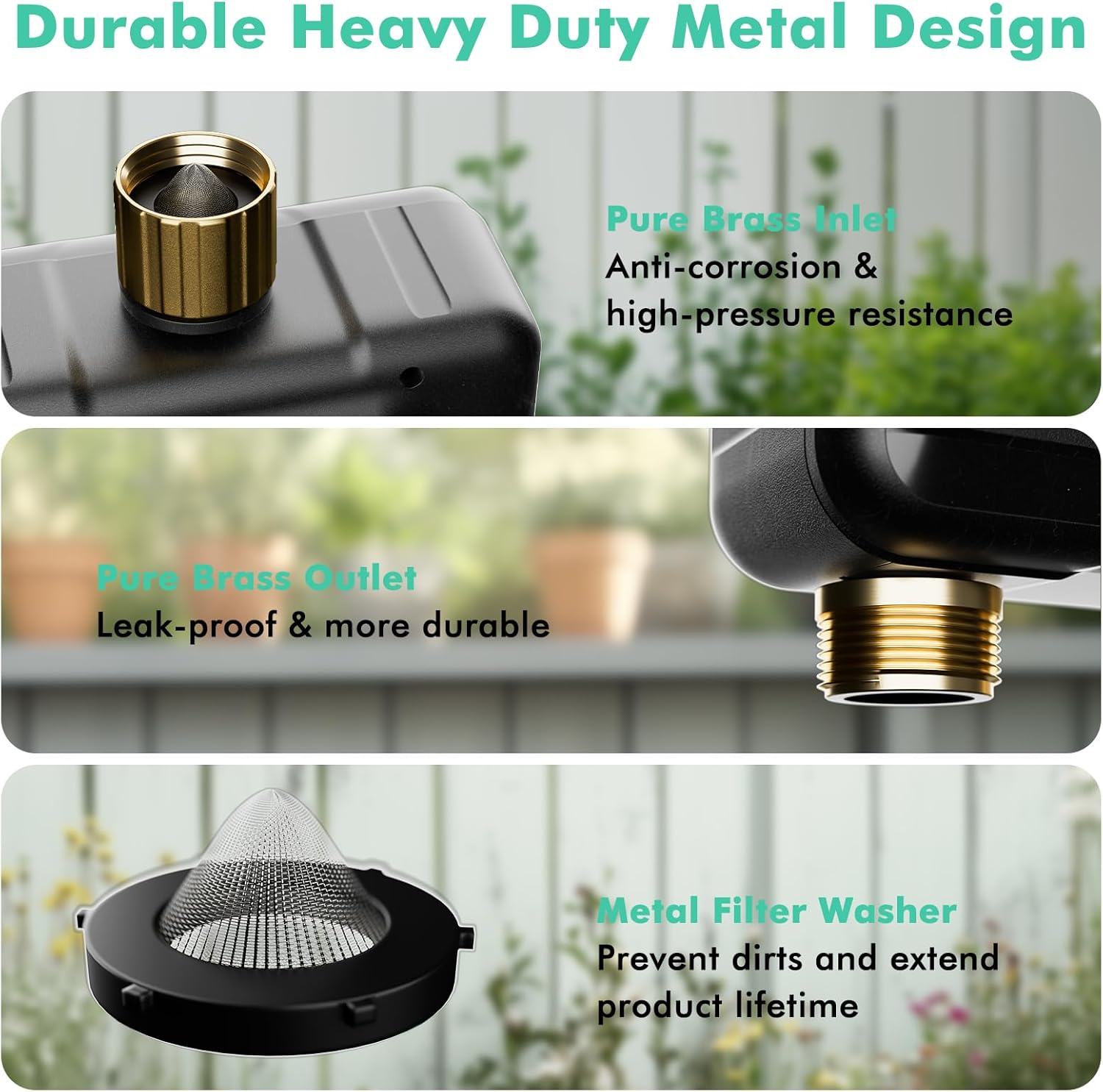
Imatge: Primer pla views of the pure brass inlet, pure brass outlet, and the metal filter washer, highlighting components important for maintenance.
7. Solució De Problemes
If you encounter issues with your RESTMO Smart Sprinkler Timer, refer to the following common problems and solutions:
| Problema | Causa possible | Solució |
|---|---|---|
| El temporitzador no es connecta al Wi-Fi. | Incorrect WiFi band (5GHz not supported), hub too far from router, pairing mode not active. | Ensure your WiFi is 2.4GHz. Move the WiFi hub closer to your router. Re-enter pairing mode for both the timer and the hub as per setup instructions. |
| El temporitzador no rega segons el programat. | Low battery, incorrect schedule settings, rain delay active, water supply off. | Check battery level and replace if necessary. Verify schedule settings in the app. Disable rain delay if active. Ensure the faucet is turned on. |
| Fuita d'aigua de les connexions. | Loose connections, worn-out washer, damaged brass fitting. | Tighten all connections. Check rubber washers for wear and replace if needed. Ensure the metal filter is properly seated. |
| Inaccurate water volume readings. | Clogged flow meter, specific hose type (e.g., soaker hose) affecting flow. | Clean the metal filter to ensure no obstructions. Note that certain hose types may affect flow measurement accuracy; consider using time-based watering for these. |
| Bluetooth connectivity is spotty. | Distance from timer to phone, interference. | Ensure your phone is within 50 meters of the timer for Bluetooth control. Minimize physical obstructions between the device and your phone. |
8. Especificacions
| Atribut | Detall |
|---|---|
| Número de model | O-HT-2B-BTWF |
| Marca | Restmo |
| Color | Verd |
| Dimensions del producte | 5 "P x 3" W x 5" H |
| Pes de l'article | 1.23 lliures (0.56 quilograms) |
| Nombre de configuracions | 35 |
| Connectivitat | 2.4GHz WiFi (via hub), Bluetooth |
| Resistència a l'aigua | Impermeable IP55 |
| Primera data disponible | 18 de març de 2025 |
9. Garantia i Suport
RESTMO products are designed for durability and performance. For specific warranty details, please refer to the warranty card included in your product packaging or visit the official Restmo website. If you require technical assistance, troubleshooting beyond this manual, or have any questions, please contact Restmo customer support through their official channels.
Podeu trobar més informació i suport a Restmo Store on Amazon.


