1. Introducció
Gràcies per la compraasing the Karlsson Vogue Alarm Clock. This versatile device combines a digital alarm clock, a wireless induction charger, and a Bluetooth speaker, designed to enhance your daily routine. Please read this manual carefully before using the product to ensure proper operation and to maximize its lifespan. Keep this manual for future reference.
Precaucions de seguretat
- No exposeu el dispositiu a l'aigua ni a una humitat excessiva.
- Eviteu temperatures extremes.
- No desmunteu ni intenteu reparar el dispositiu vosaltres mateixos.
- Use only the provided or recommended USB adapter for power.
- Assegureu-vos que hi hagi una ventilació adequada al voltant del dispositiu durant el funcionament.
2. Producte acabatview
The Karlsson Vogue Alarm Clock features a sleek design with a fabric-covered front and intuitive controls. Below is an overview of its main components and controls.
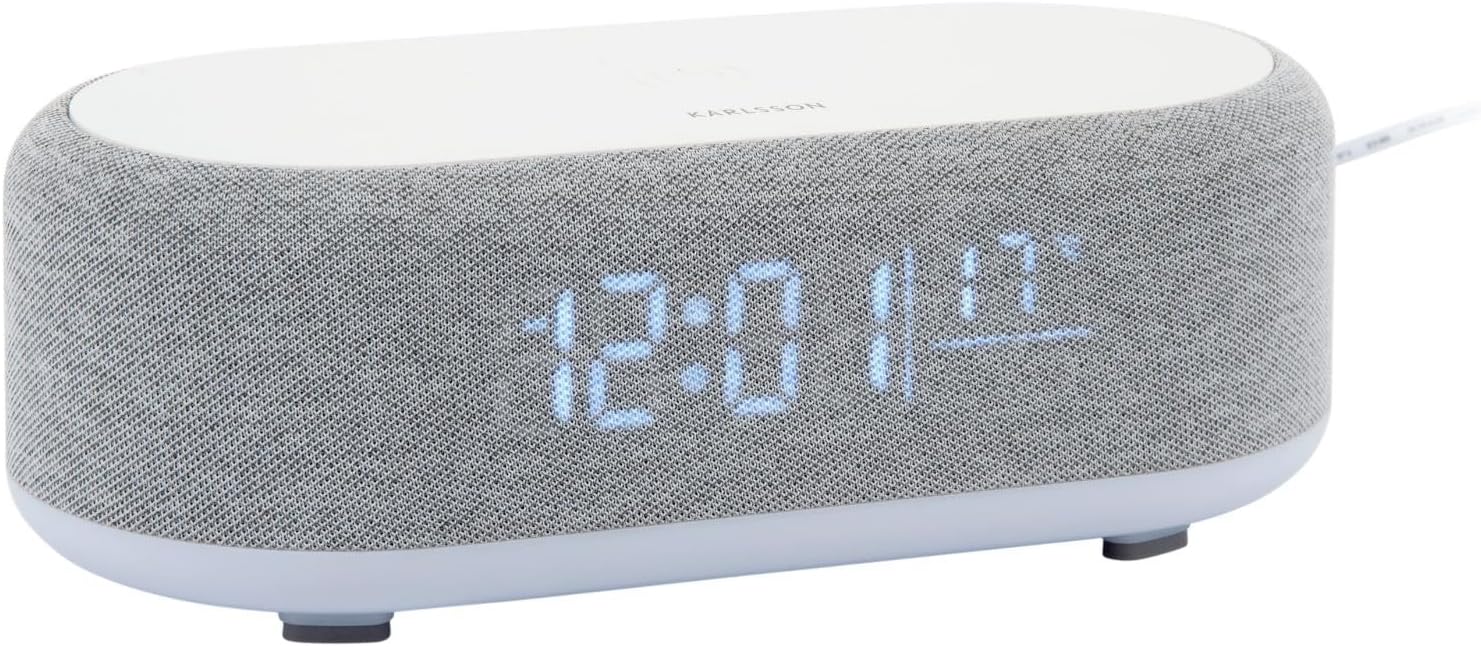
Figura 2.1: Frontal view of the Karlsson Vogue Alarm Clock, displaying the digital time and temperature.
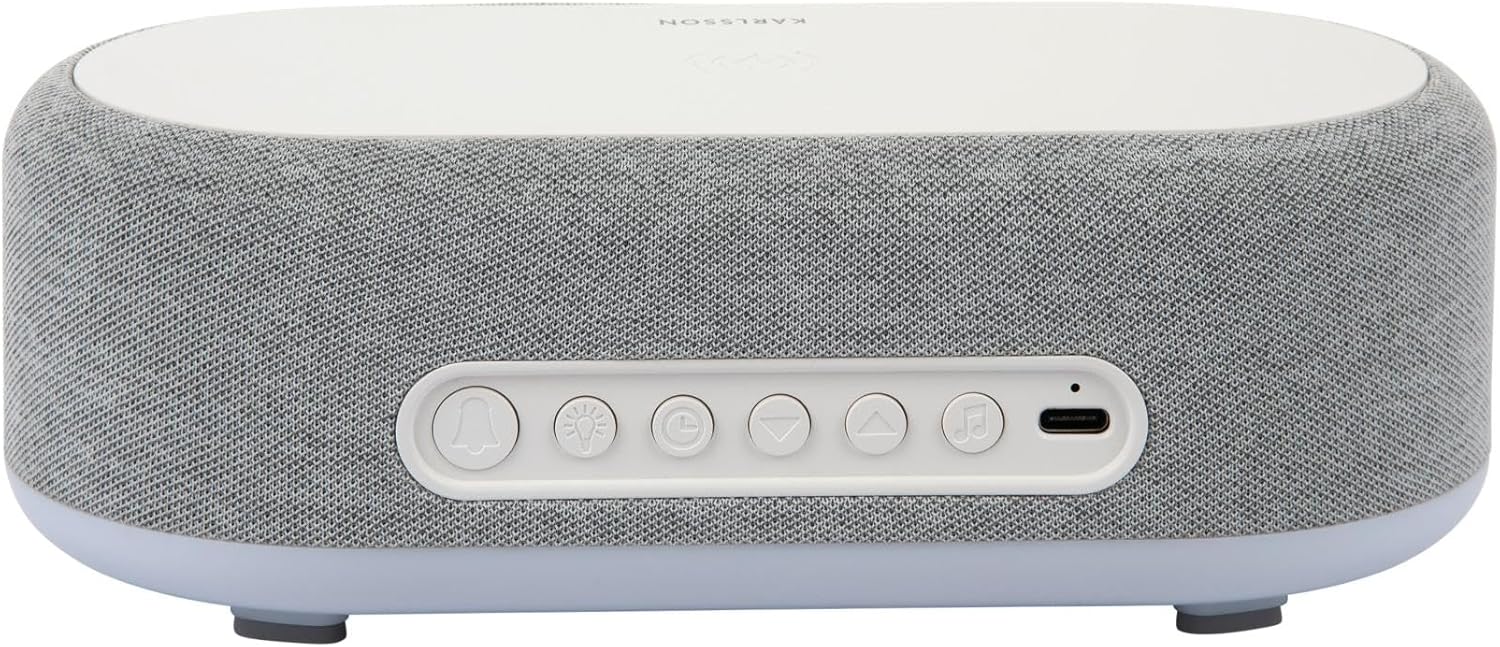
Figura 2.2: posterior view of the alarm clock, highlighting the control buttons and USB-C power input.
Control Buttons (from left to right on rear panel):
- Botó d'alarma 1: Press to activate/deactivate Alarm 1. Long press to set Alarm 1 time.
- Botó d'alarma 2: Press to activate/deactivate Alarm 2. Long press to set Alarm 2 time.
- Brightness/Snooze Button: Press to adjust display brightness. When alarm sounds, press to snooze.
- Botó de configuració de l'hora: Premeu llargament per entrar al mode de configuració de l'hora.
- Botó avall: Decrease values during setting, navigate menus.
- Botó amunt: Increase values during setting, navigate menus.
- Bluetooth/Play/Pause Button: Long press to enter Bluetooth pairing mode. Press to play/pause music.
- Entrada d'alimentació USB-C: Connecteu l'adaptador de corrent aquí.
Tauler superior:
- Coixinet de càrrega sense fil: Place compatible devices here for wireless charging.
3. Configuració
3.1 Connexió d'alimentació
- Connect the provided USB adapter to the USB-C Power Input port on the rear of the alarm clock.
- Plug the USB adapter into a standard wall outlet.
- La pantalla s'il·luminarà, indicant que el dispositiu està encès.
3.2 Configuració inicial de l'hora
- Premeu llargament el botó Botó de configuració de l'hora (clock icon) on the rear panel. The hour digits will start flashing.
- Utilitza el Up i Botons avall per ajustar l'hora.
- Premeu el botó Botó de configuració de l'hora de nou per confirmar l'hora i passar a la configuració dels minuts. Els dígits dels minuts parpellejaran.
- Utilitza el Up i Botons avall per ajustar el minut.
- Premeu el botó Botó de configuració de l'hora one more time to confirm the minute and exit time setting mode.
4. Instruccions de funcionament
4.1 Configuració d'alarmes
The device supports two independent alarms (Alarm 1 and Alarm 2).
- To set Alarm 1: Premeu llargament el botó Botó d'alarma 1 (bell icon with '1'). The hour digits for Alarm 1 will flash.
- Utilitza el Up i Botons avall per ajustar l'hora de l'alarma.
- Premeu el botó Botó d'alarma 1 de nou per confirmar l'hora i passar a la configuració dels minuts.
- Utilitza el Up i Botons avall per ajustar els minuts de l'alarma.
- Premeu el botó Botó d'alarma 1 one more time to confirm and exit alarm setting. The alarm icon will appear on the display.
- To set Alarm 2: Seguiu els mateixos passos utilitzant el Botó d'alarma 2 (bell icon with '2').
4.2 Activating/Deactivating Alarms
- Premeu el botó corresponent Botó d'alarma 1 or Botó d'alarma 2 briefly to toggle the alarm on or off. The alarm icon on the display will indicate its status.
4.3 Funció de repetició
- Quan soni una alarma, premeu el botó Brightness/Snooze Button (light bulb icon) to activate snooze. The alarm will temporarily stop and sound again after approximately 9 minutes.
- To turn off the alarm completely, press any other button on the rear panel.
4.4 Funcionament de l'altaveu Bluetooth
- Maridatge: Premeu llargament el botó Bluetooth/Play/Pause Button (music note icon) until the display shows "BT" and starts flashing, indicating pairing mode.
- On your mobile device, enable Bluetooth and search for "Karlsson Vogue". Select it to connect.
- Once connected, the "BT" indicator will stop flashing. You can now play audio through the alarm clock's speaker.
- Reproducció: Premeu el botó Bluetooth/Play/Pause Button briefly to play or pause music.
- Volume control is managed via your connected mobile device.
4.5 Wireless Induction Charging
The top surface of the alarm clock features a wireless charging pad compatible with Qi-enabled devices.
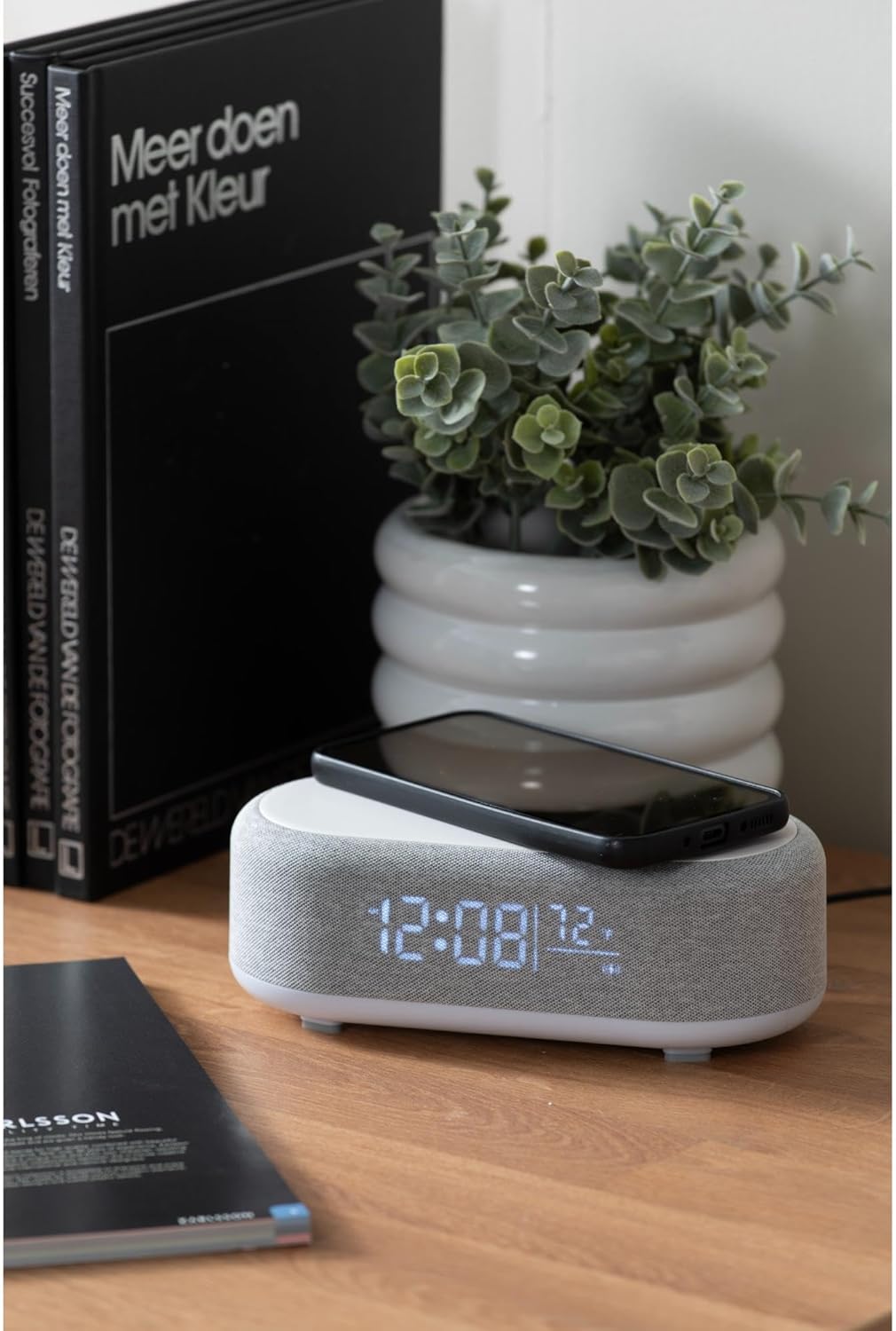
Figure 4.1: A smartphone placed on the wireless charging pad of the alarm clock.
- Place your Qi-compatible smartphone or other device directly onto the center of the top charging pad.
- Ensure the device is properly aligned. A charging indicator (usually on your phone screen) will confirm charging has begun.
- Traieu el dispositiu un cop estigui completament carregat.
4.6 Ajust de la brillantor de la pantalla
- Premeu el botó Brightness/Snooze Button (light bulb icon) repeatedly to cycle through different brightness levels for the display.
5. Manteniment
5.1 Neteja
- Before cleaning, disconnect the power adapter.
- Wipe the surface of the alarm clock with a soft, dry, or slightly damp tela.
- No utilitzeu netejadors abrasius, dissolvents ni productes químics forts, ja que poden danyar la superfície.
5.2 Emmagatzematge
- Si guardeu el dispositiu durant un període prolongat, desconnecteu-lo de l'alimentació.
- Emmagatzemar en un lloc fresc i sec, lluny de la llum solar directa i de temperatures extremes.
6. Solució De Problemes
| Problema | Causa possible | Solució |
|---|---|---|
| El dispositiu no s'encén. | No hi ha connexió a la xarxa elèctrica o l'adaptador és defectuós. | Ensure the USB-C cable is securely connected and the adapter is plugged into a working outlet. Try a different outlet. |
| El Bluetooth no es connecta. | Device not in pairing mode; already connected to another device; mobile device Bluetooth off. | Long press the Bluetooth button to enter pairing mode. Ensure no other device is connected. Turn off and on Bluetooth on your mobile device. |
| La càrrega sense fil no funciona. | Phone not Qi-compatible; phone not aligned; phone case too thick. | Ensure your device supports Qi wireless charging. Re-position the device on the center of the pad. Remove thick phone cases. |
| L'alarma no sona. | Alarm deactivated; volume too low (for Bluetooth alarm). | Check if the alarm icon is displayed. Ensure the alarm time is set correctly. If using Bluetooth audio for alarm, ensure phone volume is adequate. |
7. Especificacions
| Característica | Detall |
|---|---|
| Marca | Karlsson |
| Número de model | KA6033GY |
| Color | Gris |
| Material | Plàstic (ABS) |
| Dimensions (L x A x A) | 19.8 x 9.8 x 7 cm (7.8 x 3.86 x 2.76 polzades) |
| Pes | 0.46 kg (1.01 lliures) |
| Entrada de potència | USB (Adapter included) |
| Càrrega sense fils | Induction (Qi-compatible) |
| Connectivitat | Bluetooth |
8. Garantia i Suport
For warranty information and customer support, please refer to the documentation provided with your purchase or contact your retailer. You may also visit the official Karlsson weblloc per obtenir més ajuda.
Weblloc: Karlsson Official Store


