1. Introducció
The 1Mii Safefly Min+ is a versatile Bluetooth 5.3 audio adapter designed to function as both a transmitter (TX) and a receiver (RX). In TX mode, it enables non-Bluetooth audio sources like airplane entertainment systems, TVs, and computers to wirelessly stream audio to Bluetooth headphones or speakers. In RX mode, it allows your smartphone or tablet to connect to wired headphones, car stereos, or home stereo systems via Bluetooth. This device supports various audio codecs including SBC, AAC, aptX, aptX-Low Latency, aptX-HD, and aptX-Adaptive, ensuring a high-quality audio experience.
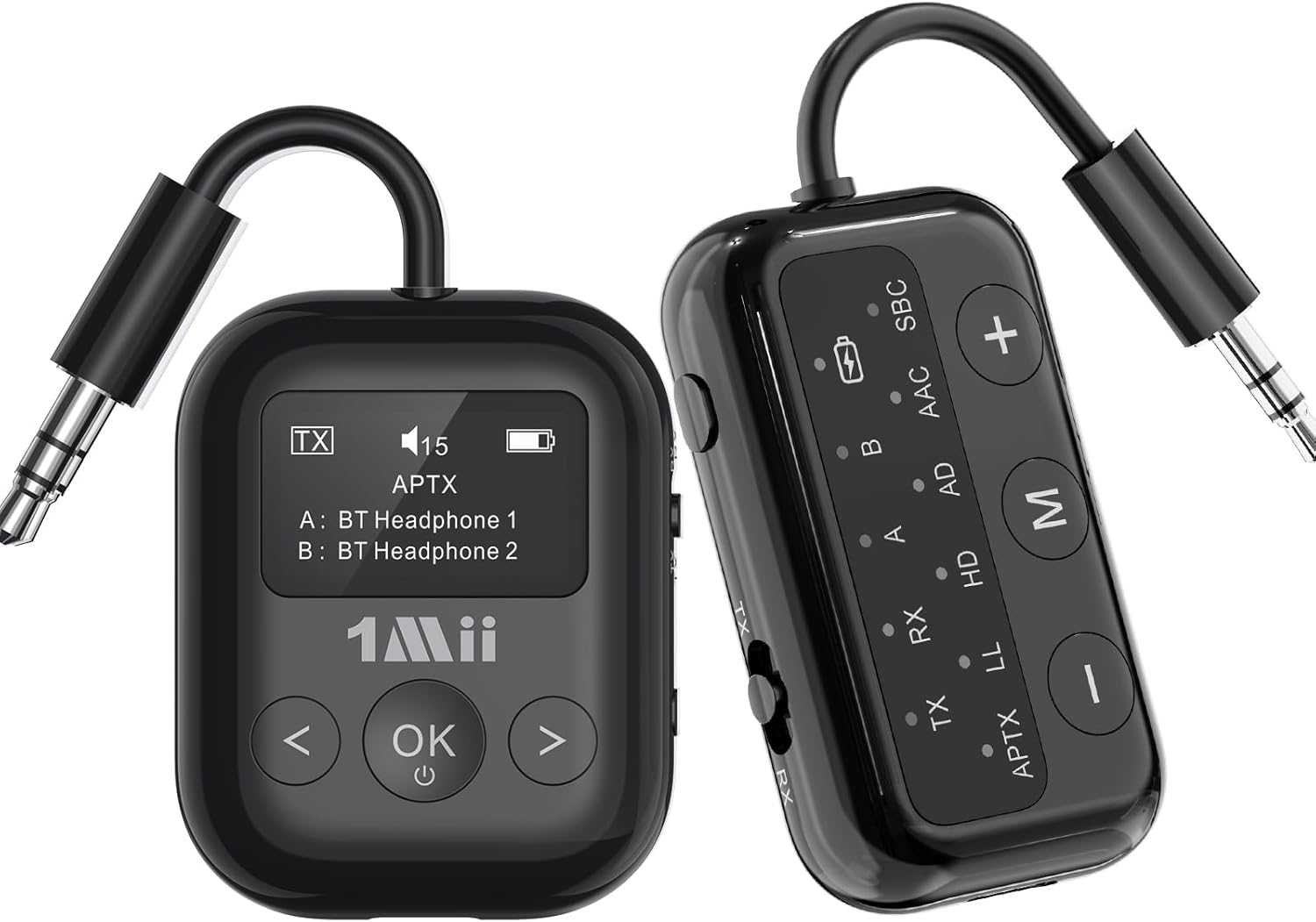
Image 1.1: The 1Mii Safefly Min+ Bluetooth Transmitter and Receiver, showcasing its compact design and dual functionality.
2. Característiques clau
- Tecnologia Bluetooth 5.3: Utilizes the latest Bluetooth standard for stable connections and efficient power consumption.
- Multiple Audio Codec Support: Supports SBC, AAC, aptX, aptX-Low Latency (aptX-LL), aptX-HD, and aptX-Adaptive for broad compatibility and superior sound quality.
- Funcionalitat 2 en 1: Seamlessly switches between Transmitter (TX) and Receiver (RX) modes.
- aptX Baixa latència: Minimizes audio delay for synchronized audio and video, ideal for gaming and watching movies.
- Connexió dual: In TX mode, connect to two Bluetooth headphones simultaneously for shared listening.
- Intuitive Indicator Panel: Clear display of connection mode, audio codec, paired devices, and battery level.
- Micròfon integrat: Enables hands-free calling in RX mode when connected to a car stereo or wired headphones.
- Disseny portàtil: Lightweight and compact, making it convenient for travel, including a two-prong airplane adapter.
- Botons de control fàcils: Accessible buttons for volume adjustment, mode switching, and connection management.
3. Contingut del paquet
Si us plau, comproveu el contingut del paquet en desembalar-lo per assegurar-vos que hi hagi tots els elements:
- 1Mii Safefly Min+ Bluetooth Transmitter and Receiver
- Cable de càrrega USB-C
- 3.5mm Audio Female Plug Adapter
- Dual 3.5mm Male to Female Airplane Adapter
- Audio Plug Protector
- Manual d'usuari
4. Diagrama del producte
Familiarize yourself with the various components and controls of your 1Mii Safefly Min+ device:

Image 4.1: Detailed product diagram illustrating the flexible audio cable, 3.5mm audio connection, Bluetooth codec indicators, battery indicator, device A/B indicators, RX/TX mode indicators, volume/track buttons, multi-function button, microphone, and Type-C charging port.
- Flexible Audio Cable: Integrated 3.5mm audio jack for connecting to audio sources/devices.
- Pair/Reset Button: Used for initiating pairing mode or resetting connections.
- TX/OFF/RX Switch: Slides to select Transmitter mode, power off, or Receiver mode.
- Indicador de bateria: Mostra el nivell actual de la bateria.
- Bluetooth Codec Indicators: Lights indicate the active audio codec (SBC, AAC, aptX, LL, HD, AD).
- Device A/B Indicators: Show which devices are currently connected in TX mode.
- Botó Pujar volum / Pista següent (+): Augmenta el volum o salta a la pista següent.
- Botó per baixar el volum / pista anterior (-): Disminueix el volum o torna a la pista anterior.
- Multi-function Button (M): Used for various functions like play/pause, answer/end calls, and mode switching.
- Micròfon: Built-in for voice input in RX mode.
- Port de càrrega tipus C: Per carregar el dispositiu.
5. Configuració i funcionament
5.1. Càrrega del dispositiu
Before first use, fully charge the Safefly Min+. Connect the provided USB-C charging cable to the device's Type-C port and the other end to a USB power adapter (not included) or a computer's USB port. The battery indicator lights will show charging status and turn off when fully charged.
5.2. Engegada/Apagada i Selecció de Mode
Slide the TX/OFF/RX switch to the desired mode:
- TX: Transmitter Mode (for streaming audio from non-Bluetooth devices).
- DESACTIVAT: Powers off the device.
- RX: Receiver Mode (for receiving audio from Bluetooth devices).
5.3. Configuració del mode transmissor (TX)
In TX mode, the Safefly Min+ transmits audio from a non-Bluetooth source to your Bluetooth headphones or speakers.
- Connecteu-vos a la font d'àudio: Plug the 3.5mm audio cable of the Safefly Min+ into the audio output jack of your device (e.g., airplane entertainment system, TV, computer, gym equipment). Use the dual-prong airplane adapter if needed for airplane audio jacks.
- Introduïu el mode de vinculació: Slide the switch to TX. The device will automatically enter pairing mode, indicated by flashing lights on the indicator panel.
- Emparellar amb auriculars/altaveus Bluetooth: Put your Bluetooth headphones or speakers into their pairing mode. Place them close to the Safefly Min+. The devices will automatically connect. Once connected, the 'A' indicator light will become solid.
- Dual Connection (TX Mode): To connect a second pair of Bluetooth headphones, press the 'Pair/Reset' button on the side of the Safefly Min+. The device will re-enter pairing mode. Put your second pair of headphones into pairing mode. Once connected, the 'B' indicator light will become solid.

Image 5.1: Safefly Min+ in TX mode, connected to an airplane's audio jack using the dual-prong adapter, transmitting audio to wireless earbuds.

Image 5.2: Safefly Min+ in TX mode, connected to a television, wirelessly transmitting audio to two pairs of Bluetooth headphones.

Image 5.3: Enjoying high-quality audio streaming in flight using the Safefly Min+ with aptX Low Latency, connected to wireless earbuds and headphones.

Image 5.4: The Safefly Min+ in TX mode, demonstrating its ability to easily pair with two Bluetooth headphones simultaneously for shared audio experience.
5.4. Configuració del mode receptor (RX)
In RX mode, the Safefly Min+ receives audio from your Bluetooth-enabled smartphone or tablet and outputs it to wired headphones, car stereos, or home stereo systems.
- Connecta al dispositiu d'àudio: Plug the 3.5mm audio cable of the Safefly Min+ into the audio input jack of your wired headphones, car stereo, or home speaker system.
- Introduïu el mode de vinculació: Slide the switch to RX. The device will automatically enter pairing mode, indicated by flashing lights.
- Pair with Smartphone/Tablet: Al vostre telèfon intel·ligent o tauleta, activeu el Bluetooth i cerqueu
Documents relacionats - Safefly Min+

Guia ràpida dels 1Mii SafeFly Min: connexió d'auriculars Bluetooth
Una guia ràpida per utilitzar el transmissor Bluetooth 1Mii SafeFly Min per connectar auriculars a avions, televisors, ordinadors i altres dispositius. Inclou instruccions per emparellar dos auriculars, reiniciar el dispositiu i resoldre problemes comuns.
Manual d'usuari del transmissor i receptor Bluetooth 1Mii ML300 2 en 1
Manual d'usuari complet per a l'1Mii ML300, un transmissor i receptor Bluetooth 2 en 1. Inclou instruccions de configuració per als modes TX i RX, guies d'emparellament i avisos importants.
Guia de l'usuari del transmissor i receptor Bluetooth 5.0 1Mii B03
Guia d'usuari completa per al transmissor i receptor Bluetooth 5.0 de llarg abast 1Mii B03. Apreneu a connectar el televisor o l'estèreo de casa per a àudio sense fil amb compatibilitat amb aptX de baixa latència.
Manual d'usuari del transmissor receptor 1Mii B03 Bluetooth 5.3
Manual d'usuari del transmissor i receptor Bluetooth 5.3 1Mii B03, que detalla les seves característiques, funcionament i resolució de problemes per a la transmissió d'àudio estèreo domèstic amb aptX Low Latency i compatibilitat amb HD.
Guia de l'usuari del transmissor/receptor Bluetooth 1Mii ML300
Aquesta guia proporciona instruccions sobre com utilitzar el transmissor i receptor Bluetooth 1Mii ML300, incloent-hi l'emparellament de dispositius, el canvi de còdecs d'àudio i la resolució de problemes comuns.
1Mii B03/B03Pro Bluetooth Transmitter Receiver Quick User Guide
This guide provides instructions for setting up and using the 1Mii B03/B03Pro, a 2-in-1 wireless Bluetooth transmitter and receiver. Learn about connections, operation, features, and troubleshooting for high-quality audio.

Image 5.5: Safefly Min+ in RX mode, demonstrating connections to a wired speaker for outdoor use and a car stereo for in-car audio streaming.