Introducció
The Gembird SPK-BT-LED-07 Bluetooth LED Speaker is a versatile portable audio device designed for high-quality sound and dynamic visual effects. It integrates Bluetooth 5.3 connectivity, multiple playback options, and vibrant RGB LED lighting to enhance your listening experience. This manual provides essential information for the safe and efficient use of your speaker.
Característiques del producte
- Transmissió de música perfecta: Bluetooth version 5.3 allows wireless audio streaming from smartphones or tablets up to 10 meters away.
- Opcions de reproducció versàtils: Supports music playback directly from Micro SD cards, USB flash drives, FM radio, and AUX input.
- Integrated Light and Sound: Features multi-color RGB LED lighting effects with 5 distinct color modes, paired with a powerful 5-watt speaker.
- Llarga vida útil de la bateria: Provides up to 4 hours of music playback on a single charge. Fast charging via USB Type-C port, with a full charge in approximately 3 hours.
- Compacte i portàtil: Measures 103 × 103 × 203 mm and weighs 0.58 kg, making it easy to transport for on-the-go entertainment.
- Funció mans lliures: Built-in microphone for convenient hands-free calling.
Configuració
1. Unboxing i Inspecció Inicial
Carefully remove the speaker and all accessories from the packaging. Inspect the device for any signs of damage. The package should include the Gembird Bluetooth LED Speaker and a USB Type-C charging cable.
2. Carregant l’altaveu
Before first use, fully charge the speaker. Connect the provided USB Type-C cable to the speaker's charging port and the other end to a compatible USB power adapter (not included) or a computer's USB port. The charging indicator light will typically show red while charging and turn off or change color when fully charged. A full charge takes approximately 3 hours.
3. Encès / apagat
To power on the speaker, press and hold the Power button (usually marked with a power symbol) for a few seconds until you hear an audible prompt or see the LED lights activate. To power off, press and hold the Power button again until the speaker shuts down.
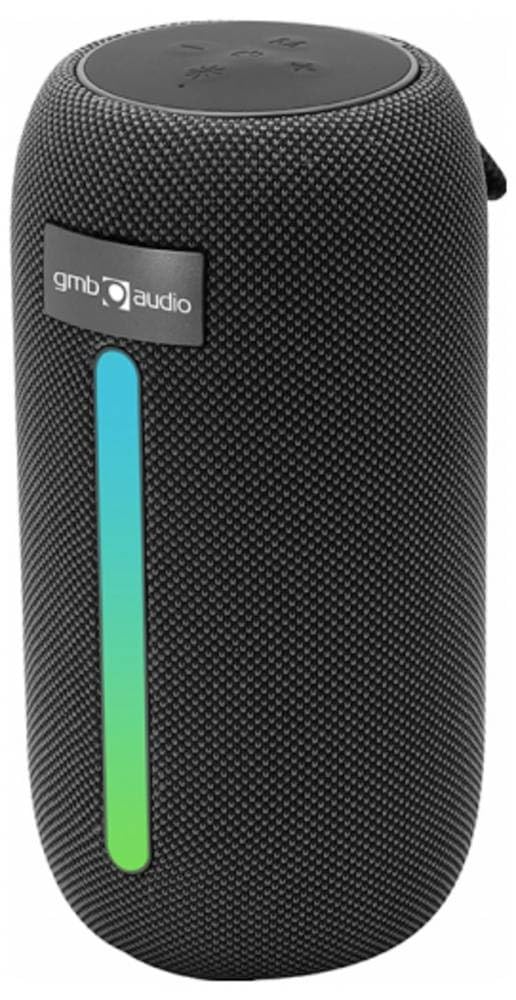
Image: The Gembird SPK-BT-LED-07 Bluetooth LED Speaker, showcasing its compact design and integrated RGB lighting.
Instruccions de funcionament
1. Emparellament Bluetooth
- Ensure the speaker is powered on and in Bluetooth pairing mode (indicated by a flashing LED light, often blue). If not, press the Mode button to switch to Bluetooth mode.
- Al vostre telèfon intel·ligent o tauleta, activeu el Bluetooth i cerqueu els dispositius disponibles.
- Select "Gembird SPK-BT-LED-07" (or similar name) from the list of devices.
- Once paired, the speaker will confirm with an audible prompt, and the LED light will stop flashing. You can now stream audio wirelessly.
2. Mode de ràdio FM
- Premeu el botó Mode repetidament fins que entreu al mode de ràdio FM.
- Press the Play/Pause button to automatically scan and save available FM stations.
- Use the Next/Previous track buttons to navigate between saved stations.
3. Reproducció USB/MicroSD
- Insert a USB flash drive or a Micro SD card (up to 32GB) containing MP3 audio files into the respective port on the speaker.
- The speaker should automatically switch to USB or MicroSD mode and begin playing music. If not, press the Mode button to select the correct input.
- Use the Play/Pause and Next/Previous track buttons to control playback.
4. Entrada AUX
- Connect one end of a 3.5mm audio cable (not included) to the AUX port on the speaker and the other end to the audio output of your device (e.g., laptop, MP3 player).
- Press the Mode button to switch to AUX input mode.
- Audio will now play through the speaker from your connected device. Control playback from your device.
5. Trucades mans lliures
- When the speaker is connected to your phone via Bluetooth, incoming calls will be routed to the speaker.
- Premeu el botó Reprodueix/Pausa per respondre a una trucada entrant.
- Premeu de nou el botó Reprodueix/Pausa per finalitzar la trucada.
6. Modes de llum LED
The speaker features 5 different RGB LED light modes. Press the dedicated Light Mode button (if available, or a long press on the Mode button) to cycle through the available lighting effects and select your preferred visual ambiance.
Manteniment
1. Neteja
To clean the speaker, ensure it is powered off and disconnected from any power source. Use a soft, dry, lint-free cloth to wipe the exterior surfaces. Do not use abrasive cleaners, solvents, or chemical sprays, as these can damage the finish or internal components. Avoid getting moisture into any openings.
2. Emmagatzematge
When not in use for extended periods, store the speaker in a cool, dry place away from direct sunlight, extreme temperatures, and high humidity. It is recommended to charge the battery at least once every three months to maintain battery health.
Resolució de problemes
| Problema | Causa possible | Solució |
|---|---|---|
| L'altaveu no s'encén. | Bateria baixa. | Carregueu l'altaveu completament. |
| No es pot emparellar per Bluetooth. | L'altaveu no està en mode d'emparellament; el Bluetooth del dispositiu està desactivat; massa lluny de l'altaveu. | Ensure speaker is in Bluetooth pairing mode. Turn on Bluetooth on your device. Move device closer to speaker (within 10m). Forget previous pairings and try again. |
| No hi ha so de l'altaveu. | Volum massa baix; mode d'entrada incorrecte; dispositiu no reprodueix. | Increase speaker and device volume. Ensure correct input mode (Bluetooth, AUX, USB, MicroSD, FM). Check if the source device is playing audio. |
| La recepció de ràdio FM és deficient. | Senyal feble. | Mou l'altaveu a un lloc amb millor recepció de senyal. |
| USB/MicroSD not playing. | Sense suport file format; targeta/unitat no inserida correctament; corrupta files. | Assegureu-vos files are MP3 format. Reinsert the USB drive/MicroSD card. Try with different files or storage devices. |
Especificacions
| Característica | Detall |
|---|---|
| Número de model | SPK-BT-LED-07 |
| Marca | Gembird |
| Color | Negre |
| Tecnologia de connectivitat | Bluetooth v5.3 |
| Interval màxim | 100 Meters (Bluetooth range up to 10 meters) |
| Potència de sortida dels altaveus | 5 watts |
| Tipus d'altaveu | Subwoofer |
| Impedància | 32 ohms |
| Font d'alimentació | Alimentat per bateria (1500 mAh) |
| Durada de la bateria | Fins a 4 hores |
| Temps de càrrega | Approx. 3 hours via USB Type-C |
| Dimensions del producte (P x A x A) | 11 x 11 x 22 cm |
| Pes de l'article | 750 grams |
| Mètode de control | Toca |
| Resistent a l'aigua | No |
| Mitjans suportats | Micro SD (up to 32GB), USB Flash Drive (up to 32GB), FM Radio, AUX |
| Components inclosos | Bluetooth LED Speaker, USB Type-C Charging Cable |
Garantia i Suport
For warranty information and technical support, please refer to the documentation provided with your purchase or visit the official Gembird weblloc web. Conserveu el comprovant de compra per a reclamacions de garantia.


