1. Introducció
Thank you for choosing the NBCP Wireless PS4 Controller. This elite gamepad is designed for an enhanced gaming experience across multiple platforms, including PS4, PS4 Slim, PS4 Pro, and PC. It features advanced functionalities such as customizable macro keys, turbo mode, dual vibration, Hall effect triggers, a responsive touchpad, 6-axis gyro, USB-C connectivity, and an audio jack. This manual provides detailed instructions on setup, operation, maintenance, and troubleshooting to help you get the most out of your controller.
2. Contingut del paquet
- 1 x NBCP Wireless PS4 Controller
- 1 x cable de càrrega USB-C
- 1 x Manual d'usuari
3. Producte acabatview
Familiarize yourself with the various components of your NBCP Wireless PS4 Controller:
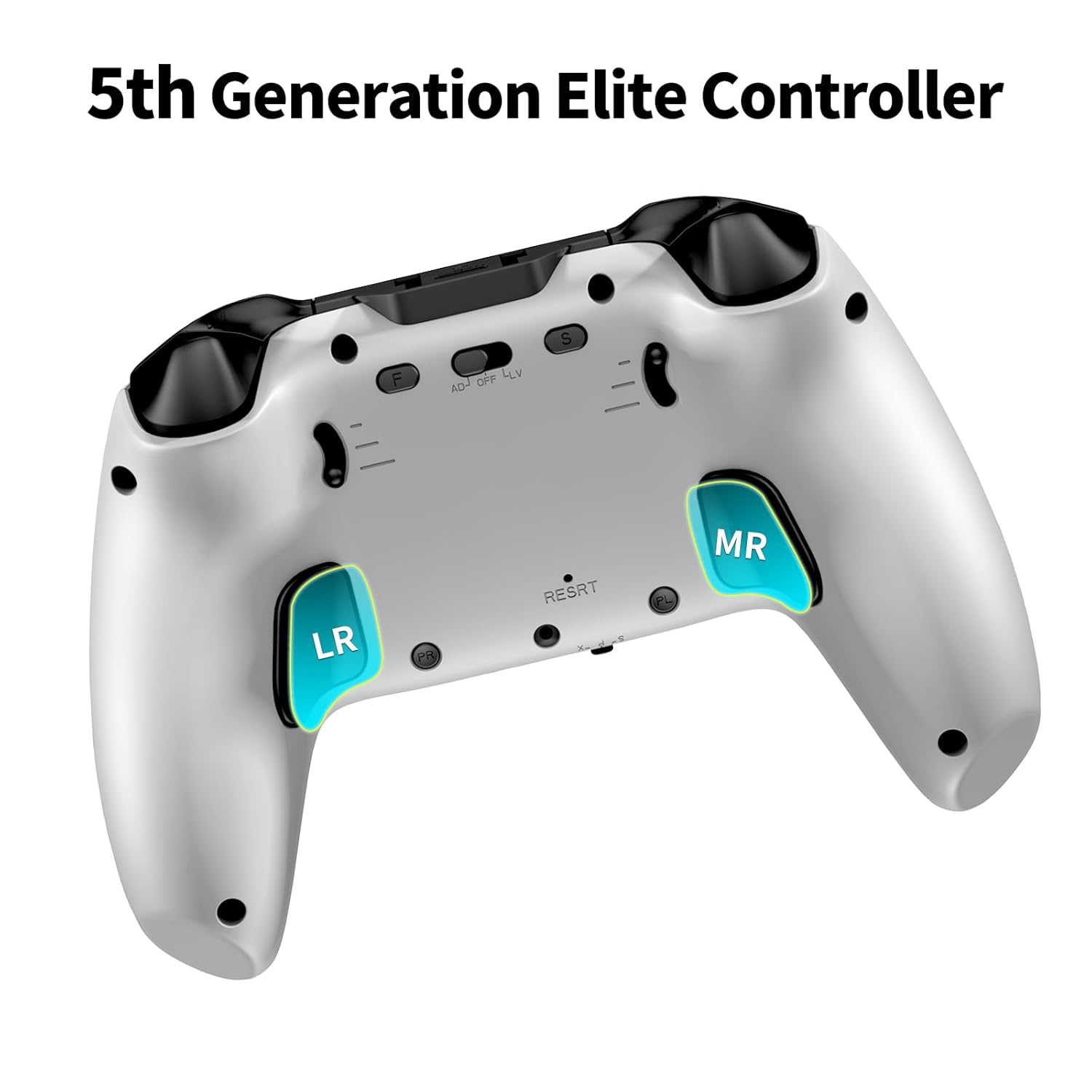
Figura 3.1: Frontal view of the NBCP Wireless PS4 Controller.
- Manets analògics: Two high-precision joysticks for movement and camera control.
- Coixinet direccional (D-Pad): Per a una entrada direccional precisa.
- Botons d'acció: Standard PlayStation layout (Triangle, Circle, Cross, Square).
- Touchpad: Multi-touch sensitive surface for interactive gameplay.
- Botó COMPARTIR: Per compartir moments de joc.
- Botó OPCIONS: Per als menús i opcions del joc.
- Botó PS: For accessing the PlayStation system menu or turning the controller on/off.
- Botons L1/R1: Botons a l'espatlla.
- Disparadors L2/R2: Hall effect linear triggers for precise input.
- Macro Back Buttons (LR/MR): Programmable buttons on the rear for custom commands.
- Port USB-C: Per a connexió amb cable i càrrega.
- Conector d'àudio de 3.5 mm: Per connectar auriculars o cascos.
- Barra de llum: Integrated glowing light bar for status indication and immersion.

Figura 3.2: posterior view showing the programmable macro buttons (LR/MR).
4. Configuració
4.1. Compatibilitat
The NBCP Wireless PS4 Controller is compatible with PlayStation 4 (PS4, PS4 Slim, PS4 Pro) and PC (Windows 7/8/10/11).

Figure 4.1: Controller compatibility across various platforms.
4.2. Connexió amb cable (PC)
To connect the controller to your PC via a wired connection:
- Connecteu un extrem del cable USB-C proporcionat al port USB-C del controlador.
- Connect the other end of the USB-C cable to an available USB port on your PC.
- The controller will be automatically recognized by your PC. Drivers may install automatically.
4.3. Wireless Connection (PS4/PC Bluetooth)
To connect the controller wirelessly:
- Assegureu-vos que el controlador estigui prou carregat.
- Per a PS4: Turn on your PS4 console. With the controller off, press and hold the PS button and SHARE button simultaneously until the light bar flashes rapidly. On your PS4, go to Settings > Devices > Bluetooth Devices and select the controller from the list to pair.
- Per a PC (Bluetooth): Ensure your PC has Bluetooth enabled. With the controller off, press and hold the PS button and SHARE button simultaneously until the light bar flashes rapidly. On your PC, go to Bluetooth & other devices settings, click "Add Bluetooth or other device," select "Bluetooth," and choose the controller from the list to pair.
5. Instruccions de funcionament
5.1. Customizable Macro Keys
The controller features fully programmable macro keys (LR and MR) on the back, allowing you to map up to 17 custom commands for enhanced gaming efficiency.
Passos de programació:
- Press and hold the 'SET' button (usually a small button near the macro keys) until the light bar changes color or flashes, indicating macro programming mode.
- Press the macro button (LR or MR) you wish to program.
- Input the sequence of buttons you want to assign (e.g., R1, R2, Square, Triangle).
- Press the 'SET' button again to save the macro. The light bar will return to its normal state.
Figure 5.1: Macro programming key settings for LR and MR buttons.
5.2. Mode Turbo
Activate Turbo mode for rapid-fire functionality, ideal for games requiring quick, repeated button presses. There are 3 adjustable Turbo speeds: 5/s, 12/s, and 20/s.
Activació:
- Press the 'TURBO' button (often labeled 'T' or with a rocket icon) and the desired action button simultaneously to enable Turbo for that button.
- To adjust Turbo speed, press the 'TURBO' button and the Right Analog Stick UP/DOWN.
- To disable Turbo for a specific button, repeat the activation step. To disable all Turbo functions, press and hold the 'TURBO' button for 3 seconds.

Figure 5.2: Auto & Manual Turbo settings with adjustable speeds.
5.3. Hall Effect Triggers
The Hall effect triggers (L2/R2) provide precise and consistent input without stick drift, offering two linear triggering modes: Short and Long.
Adjusting Trigger Modes:
- Locate the physical switches near the L2/R2 triggers (if present, refer to product diagrams).
- Toggle the switch to select between 'Short' (quicker response, ideal for shooters) and 'Long' (full range of motion, ideal for racing games).
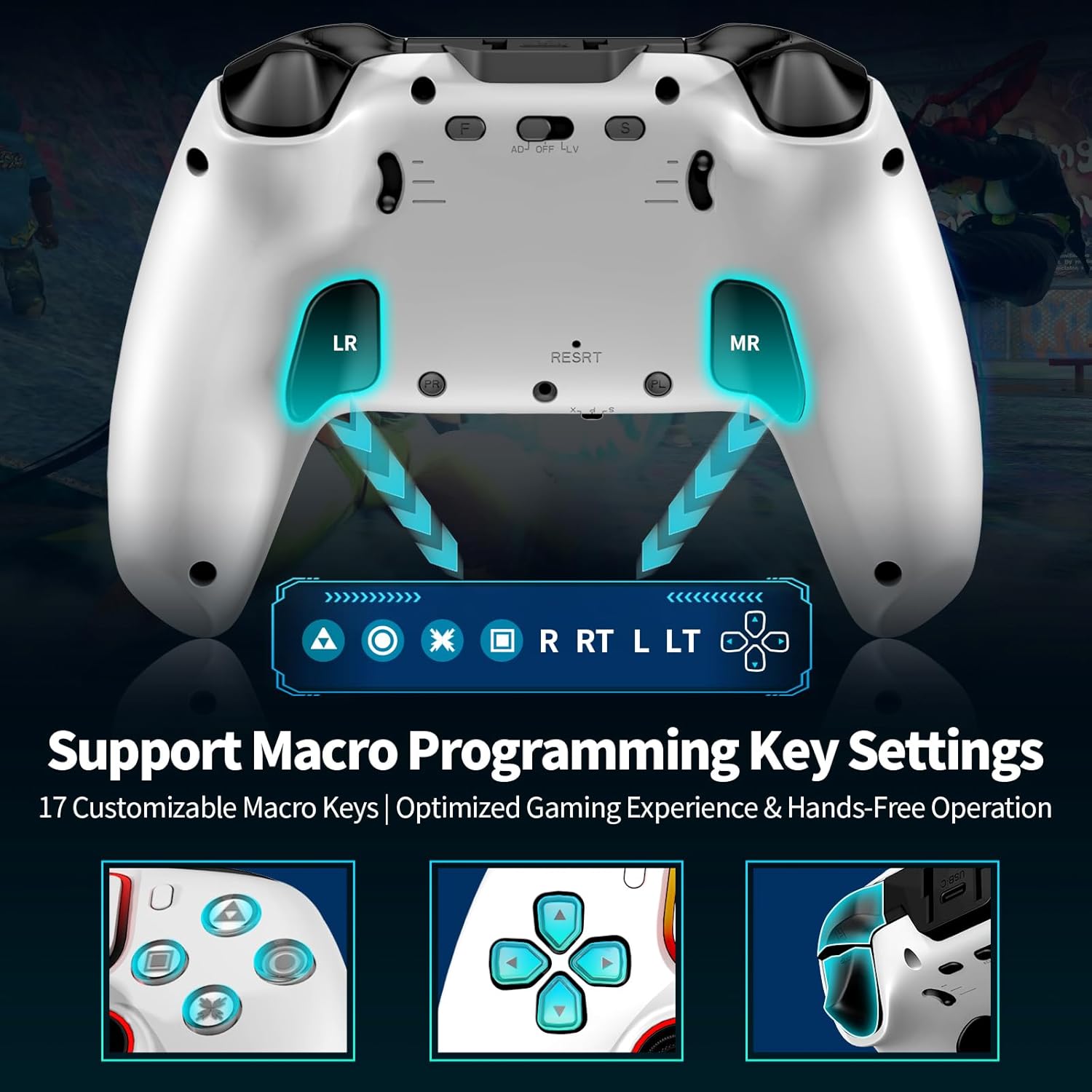
Figure 5.3: Hall effect triggers with two linear triggering modes.
5.4. Touchpad, Lightbar & Audio Support
- Touchpad: The integrated multi-touchpad functions as an additional input method in compatible games.
- Barra de llum: The glowing lightbar indicates controller status (e.g., player assignment, charging) and provides immersive visual feedback during gameplay.
- Jack d'àudio: Plug any standard 3.5mm headset into the audio jack for in-game audio and voice chat.

Figure 5.4: RGB running lights and ambient lighting on the controller.
5.5. 6-Axis Gyro Sensor & Dual Vibration
- Sensor giroscòpic de 6 eixos: The built-in gyroscope provides motion control capabilities, enhancing immersion and control in games that support it.
- Vibració dual: Dual motors provide excellent vibration feedback, increasing the sense of realism and excitement during gameplay. Vibration intensity can often be adjusted in game settings or through specific controller functions.

Figure 5.5: Illustration of 6-axis gyro sensor and dual-motor shock features.
5.6. Left Stick and Directional Buttons Swap Function
This controller supports swapping the functions of the Left Analog Stick and the Directional Buttons (D-Pad).
To Swap: While the controller is successfully connected, simultaneously press the Up button on the D-Pad and the Left Analog Stick (L3) for about 2 seconds. The light ring will flash and the controller will vibrate as confirmation.
To Revert: Repeat the same operation.

Figure 5.6: Visual guide for swapping Left Stick and Directional Buttons.
6. Calibració
Regular calibration ensures optimal performance and accuracy of your controller's inputs.

Figure 6.1: Visual guide for controller calibration procedures.
6.1. Joystick Calibration
If you experience stick drift or inaccurate joystick movement:
- With the controller off, hold the 'F' button (Function/Macro button) and the Triangle button simultaneously for 2 seconds until the light ring flashes slowly.
- Rotate both joysticks fully 1-2 times in a circular motion and then return them to the center position.
- Press the Triangle button again to save the calibration.
6.2. Calibratge del giroscopi
To calibrate the 6-axis gyroscope for accurate motion control:
- With the controller off, hold the 'F' button and the Square button simultaneously for 2 seconds until the light ring flashes.
- Place the controller horizontally on a flat, stable surface.
- Press the Square button again to save the calibration.
6.3. Trigger Calibration
To ensure optimal response from the L2/R2 triggers:
- With the controller connected (wired or wireless), hold the 'F' button and the Circle button simultaneously for 2 seconds until the light ring flashes.
- Press both L2 and R2 triggers fully 1-2 times.
- Press the Circle button again to save the calibration.
7. Manteniment
Proper care will extend the life of your controller:
- Neteja: Feu servir un drap suau i sec per netejar el controlador. Per a la brutícia persistent, netegeu lleugerament.ampNetegeu el drap amb aigua o una solució de neteja suau. Eviteu productes químics agressius.
- Emmagatzematge: Guardeu el controlador en un lloc fresc i sec, allunyat de la llum solar directa i de temperatures extremes.
- Càrrega: Use only the provided USB-C cable or a certified equivalent for charging. Avoid overcharging by disconnecting once fully charged.
- Manipulació: Avoid dropping the controller or exposing it to excessive force, which can damage internal components.
8. Solució De Problemes
If you encounter issues with your NBCP Wireless PS4 Controller, try the following solutions:
| Problema | Possible solució |
|---|---|
| El controlador no s'encén. | Ensure the controller is charged. Connect it via USB-C cable to a power source or console. |
| No es pot connectar sense fil. | Ensure Bluetooth is enabled on your device. Try re-pairing the controller (PS button + SHARE button). Ensure no other Bluetooth devices are interfering. |
| Retard d'entrada o botons que no responen. | Ensure the controller is fully charged. Move closer to the console/PC to reduce interference. Try a wired connection. Perform joystick/button calibration. |
| Stick drift or inaccurate joystick movement. | Perform Joystick Calibration as described in Section 6.1. |
| La vibració no funciona. | Check in-game settings to ensure vibration is enabled. Some PC games may not support vibration via Bluetooth. |
| El connector d'àudio no funciona. | Ensure your headset is properly plugged in. Check audio settings on your console/PC to ensure output is directed to the controller. |
| El controlador es desconnecta sovint. | Ensure the controller is charged. Reduce distance to the console/PC. Check for firmware updates (if available from NBCP). |
8.1. Restabliment del controlador
If the controller becomes unresponsive, you can perform a hard reset. Locate the small reset button (often a pinhole) on the back of the controller. Use a paperclip or a similar thin object to press and hold the reset button for 3-5 seconds. This will power cycle the controller.
9. Especificacions
| Característica | Detall |
|---|---|
| Número de model | 736B |
| Compatibilitat | PS4, PS4 Slim, PS4 Pro, PC (Windows 7/8/10/11) |
| Connectivitat | Bluetooth Wireless, USB-C Wired |
| Capacitat de la bateria | 1200mAh (Up to 8 hours gameplay) |
| Característiques especials | Macro Back Buttons, Turbo Mode, Dual Vibration, Hall Effect Triggers, Touchpad, 6-Axis Gyro, Audio Jack |
| Dimensions | 6.69 x 4.65 x 3.19 polzades |
| Pes | 13.7 unces |
10. Vídeo oficial del producte
Watch the official product video for a visual guide on the NBCP Wireless PS4 Controller's features and operation.
Vídeo 10.1: Acabatview of the PS4 Wireless Controller by DOYO-US.
11. Garantia i assistència
For warranty information and technical support, please refer to the warranty card included with your product or visit the official NBCP website. You may also contact the seller directly through the platform where you purchased the product for assistance.


