Introducció
This manual provides detailed instructions for the safe and effective operation, setup, and maintenance of your Dasqua 8400-0020 Digital Levelling Box. Please read this manual thoroughly before using the device to ensure proper handling and to prevent damage or injury.
Instruccions de seguretat
Precaucions generals de seguretat:
- Always handle the device with care to avoid dropping or impact, which can affect its accuracy.
- Keep the device away from strong magnetic fields, except for its integrated magnet, to prevent interference with internal components.
- No exposeu el dispositiu a temperatures extremes, humitat o llum solar directa.
- Netegeu el dispositiu amb un drap suau i sec. No utilitzeu productes de neteja abrasius ni dissolvents.
- This device is not waterproof. Avoid contact with liquids.
- Mantenir fora de l'abast dels nens.
Producte acabatview
The Dasqua 8400-0020 is a compact digital levelling box designed for precise angle measurements. It features a clear digital display, intuitive controls, and a magnetic base for secure attachment to ferrous surfaces.
Components i controls
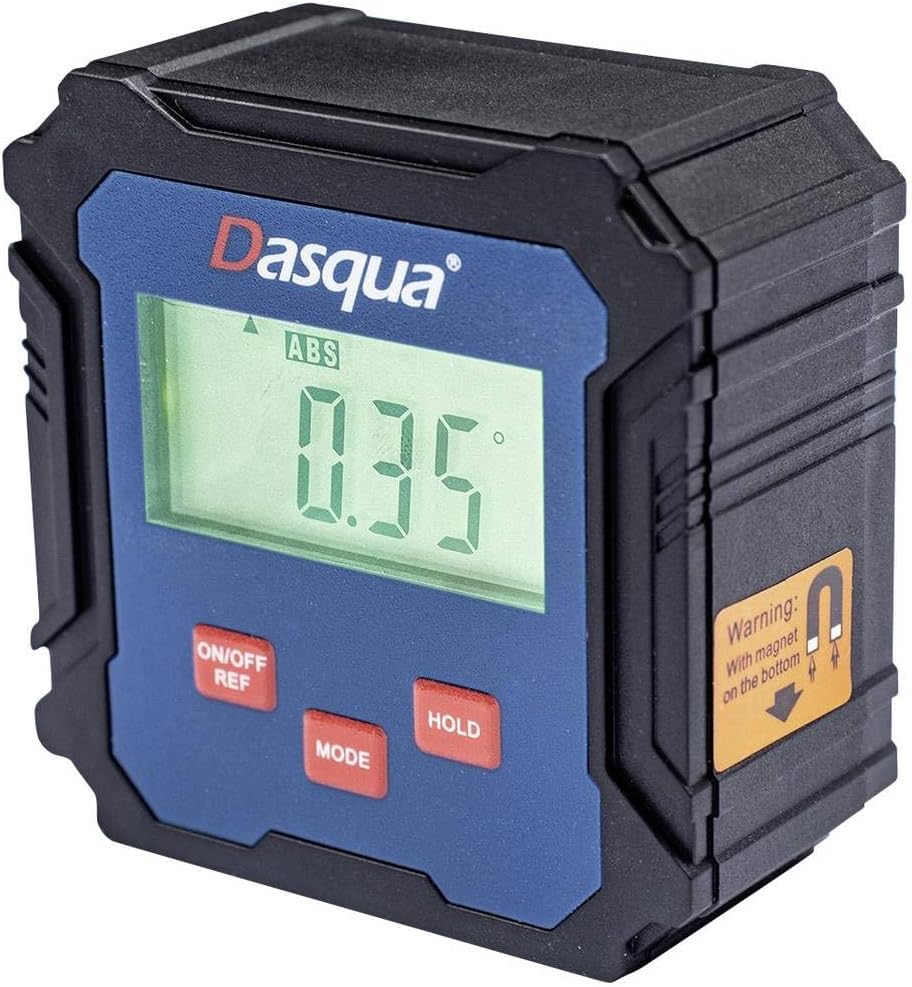
Figure 1: Dasqua 8400-0020 Digital Levelling Box. This image shows the front face of the device, highlighting the digital display, control buttons, and a warning label for the magnetic base.
- 1. Pantalla digital: Shows angle readings in degrees, absolute (ABS) or relative (REF) mode, and battery indicator.
- 2. ON/OFF REF Button: Powers the unit on or off. Also used to set a relative zero point (REF).
- 3. MODE Button: Switches between absolute (ABS) and relative (REF) measurement modes.
- 4. HOLD Button: Congela la lectura actual a la pantalla.
- 5. Magnetic Base: Located on the bottom of the unit, allows for secure attachment to metal surfaces for hands-free operation.
Configuració
Before first use, ensure the device has sufficient power. The Dasqua 8400-0020 typically uses standard AAA batteries. Open the battery compartment, insert batteries with correct polarity, and close the compartment securely.
Instal·lació de la bateria:
- Locate the battery compartment cover on the back or side of the unit.
- Obriu la tapa.
- Insert [Number] AAA batteries (not included) observing the correct polarity (+/-).
- Close the battery compartment cover firmly.
Note: The exact battery type and quantity should be confirmed from the product packaging or device itself.
Instruccions de funcionament
1. Encendre/apagar:
Premeu el botó ON/OFF REF button to turn the device on. Press and hold the ON/OFF REF botó durant uns segons per apagar-lo.
2. Absolute Measurement (ABS Mode):
When the device is powered on, it typically defaults to Absolute (ABS) mode. In this mode, the display shows the angle relative to a true horizontal (0°) or vertical (90°) plane. The "ABS" indicator will be visible on the display.
3. Relative Measurement (REF Mode):
To measure an angle relative to a specific surface (e.g., to find the difference between two angles), use the Relative (REF) mode:
- Place the device on the first surface you wish to set as your reference.
- Premeu el botó ON/OFF REF button briefly. The display will show "0.00°" and the "REF" indicator will appear, indicating that this position is now your zero reference.
- Move the device to the second surface. The display will now show the angle difference between the first and second surfaces.
- To exit REF mode and return to ABS mode, press the MODE botó.
4. Funció de retenció:
Premeu el botó MANTENIM button to freeze the current reading on the display. This is useful when taking measurements in hard-to-see areas. Press the MANTENIM button again to release the reading and resume live measurement.
5. Calibration (Self-Calibration):
For optimal accuracy, it is recommended to perform a self-calibration periodically or if you suspect the readings are inaccurate. Refer to the device's specific instructions for calibration, which usually involves placing the unit on a flat, level surface and following a sequence of button presses.
Note: Consult the manufacturer's full instructions for detailed calibration procedures if available.
Manteniment
Neteja:
Wipe the device with a soft, dry, lint-free cloth. Do not use liquid cleaners, aerosols, or solvents. Ensure no dust or debris accumulates around the display or buttons.
Emmagatzematge:
When not in use, store the digital levelling box in a dry, cool place, away from direct sunlight and extreme temperatures. If storing for an extended period, remove the batteries to prevent leakage and potential damage to the device.
Resolució de problemes
| Problema | Causa possible | Solució |
|---|---|---|
| El dispositiu no s'encén. | Low or dead batteries. Incorrect battery polarity. | Canvieu les piles per unes de noves. Assegureu-vos que les piles estiguin inserides amb la polaritat correcta. |
| Lectures inexactes. | Device not calibrated. Device exposed to strong magnetic fields (other than its base magnet). Physical damage. | Perform self-calibration. Move device away from other magnetic sources. Inspect for damage; if damaged, contact support. |
| La pantalla està tènue o parpelleja. | Potència de bateria baixa. | Substituïu les piles. |
| Els botons no responen. | Device frozen. Low battery. | Remove and reinsert batteries to reset. Replace batteries. |
Especificacions
| Característica | Detall |
|---|---|
| Número de model | 8400-0020 |
| Marca | Dasqua |
| Interval de mesura | 90° x 4 (360°) |
| Resolució | 0.1° |
| Dimensions del producte | 13.3 x 12.5 x 5.5 cm |
| Pes | 140 g |
| Característiques | Digital display, Magnetic base, ABS/REF mode, Hold function |
Garantia i Suport
For warranty information and technical support, please contact Dasqua customer service or refer to the official Dasqua weblloc web. Conserveu el rebut de compra com a comprovant de compra per a qualsevol reclamació de garantia.
Manufacturer: Dasqua


