1. Introducció
This manual provides essential information for the safe and efficient operation of your Hisense 40E41QT 40-inch Full HD Smart TV. Please read it thoroughly before using the product and retain it for future reference.
The Hisense 40E41QT is a 40-inch Full HD LED Smart TV with a 1920x1080 resolution and a 60Hz LED panel. It features a slim design, VIDAA U8 Smart OS with integrated Wi-Fi, and a remote control providing direct access to various streaming services. It also includes a DVB-T2/S2 HEVC 10 digital terrestrial tuner and Game Mode for an enhanced viewexperiència.
2. Què hi ha a la caixa
En desempaquetar, assegureu-vos que hi hagi tots els elements següents:
- Hisense 40E41QT Television
- Cable d'alimentació
- Control remot
- Manual d'usuari

Image: The Hisense 40E41QT 40-inch Full HD Smart TV with its stand, showcasing the display and branding.
3. Guia de configuració
3.1 Instal·lació física
Carefully remove the TV from its packaging. You can either place it on a flat surface using the provided stand or mount it on a wall (wall mount sold separately). Ensure proper ventilation around the TV.
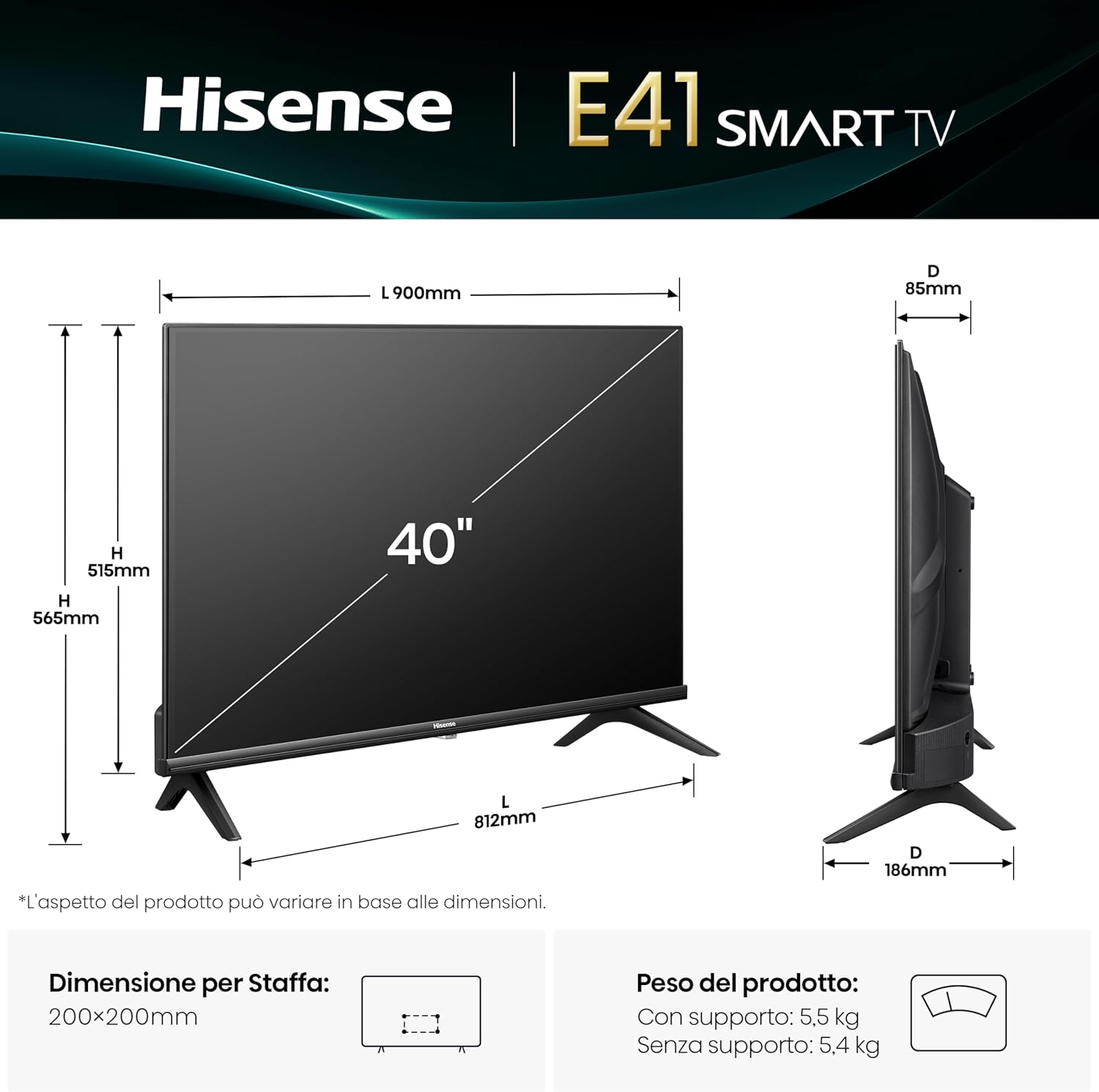
Image: Technical drawing showing the dimensions of the Hisense 40E41QT TV (900mm width, 565mm height with stand, 186mm depth with stand) and its weight (5.5 kg with stand, 5.4 kg without stand). VESA mount compatibility is 200x200mm.
3.2 Connexió de perifèrics
Connect your devices to the appropriate ports on the back of the TV. Refer to the diagram below for port identification.

Imatge: Primer pla view of the Hisense 40E41QT TV's rear connection panel, detailing ports such as USB (x2), Digital Audio Out, Headphone, ANT (x2), HDMI 2.1 (eARC), HDMI 2, and Ethernet for internet router connection.
- Cable de corrent: Connecteu el cable d'alimentació al televisor i després a una presa de corrent.
- Antena/cable: Connect your antenna or cable TV source to the ANT (x2) input.
- Dispositius HDMI: Use HDMI 1 (eARC) or HDMI 2 for devices like Blu-ray players, game consoles, or set-top boxes.
- Dispositius USB: Two USB ports are available for flash drives or other compatible USB devices.
- Ethernet: Per a una connexió a Internet estable, connecteu un cable Ethernet del vostre encaminador al port Ethernet del televisor.
- Sortida d'àudio digital: Connecteu-lo a un sistema de so extern mitjançant un cable òptic.
- Auriculars: Connecteu els auriculars per a una escolta privada.
3.3 Engegada inicial i connexió de xarxa
After connecting all necessary cables, plug the TV into a power source. Press the power button on the remote control or the TV itself. Follow the on-screen instructions to complete the initial setup, including language selection, channel scanning, and connecting to your Wi-Fi network.
4. Funcionament del televisor
4.1 Funcions de control remot
The remote control provides access to all TV functions. Familiarize yourself with the button layout for easy navigation.

Image: The Hisense TV remote control, highlighting dedicated buttons for popular streaming services like Disney+, YouTube, Prime Video, YouTube Kids, Apple TV+, Netflix, and others, allowing for one-click access.
- Botó d'encesa: Encén o apaga el televisor.
- Botons de navegació (amunt/avall/esquerra/dreta/d'acord): S'utilitza per navegar pels menús i seleccionar opcions.
- Pujar/baixar el volum: Ajusta el nivell de volum.
- Canal amunt/avall: Canvia els canals de televisió.
- Botó d'inici: Accesses the VIDAA Smart OS home screen.
- Botons de drecera d'aplicacions: Direct access to popular streaming applications (e.g., Netflix, Prime Video, YouTube).
4.2 Smart TV Features (VIDAA U8)
Your Hisense TV runs on the VIDAA U8 Smart OS, offering a wide range of applications and features.

Image: The Hisense VIDAA Smart OS home screen, displaying various streaming app icons such as Netflix, Disney+, Prime Video, YouTube, and others, indicating a user-friendly interface.
- App Store: Baixeu i instal·leu aplicacions addicionals.
- Serveis de streaming: Access pre-installed apps like Netflix, Prime Video, Disney+, and YouTube.
- Airplay2: Reprodueix contingut en streaming directament des dels teus dispositius Apple.
- Funciona amb Alexa: Integrate with your Alexa-enabled devices for voice control.
4.3 Configuració d'imatge i so
Adjust picture and sound settings to your preference via the TV's menu. The TV features:
- Natural Colour Enhancer: Optimizes color reproduction for a more vibrant image.
- Reducció de soroll: Reduces visual noise for clearer images.
- Dolby Audio & DTS HD: Provides enhanced audio quality.
- Mode de joc: Reduces input lag for a smoother gaming experience.

Image: A split image demonstrating the effect of Natural Colour Enhancer, showing a duller image on the left and a vibrant, enhanced image on the right, highlighting improved color saturation.

Image: A split image illustrating the Noise Reduction feature, with a grainy image on the left and a smoother, clearer image on the right, demonstrating the reduction of visual noise.

Image: A visual representation of Dolby Audio and DTS HD sound technologies, showing a drum being played with vibrant sound waves emanating, indicating immersive audio experience.

Image: A dynamic image depicting a motorcycle racer, illustrating the Game Mode feature which optimizes the TV for gaming by reducing input lag.
5. Manteniment
Proper maintenance ensures the longevity of your TV.
- Neteja de la pantalla: Netegeu suaument la pantalla amb un drap suau, sec i sense borrissol. Per a marques difícils, netegeu lleugerament.ampNetegeu el drap amb aigua o un netejador de pantalles especialitzat (no ruixeu directament sobre la pantalla).
- Neteja de l'armari: Feu servir un drap suau i sec per netejar el moble del televisor. Eviteu utilitzar productes de neteja abrasius o dissolvents.
- Ventilació: Assegureu-vos que les obertures de ventilació de la part posterior del televisor no estiguin bloquejades per evitar el sobreescalfament.
- Apagar: Always unplug the TV from the power outlet before cleaning or when it will not be used for an extended period.
6. Solució De Problemes
Si teniu problemes amb el televisor, consulteu els problemes i solucions més comuns següents:
| Problema | Causa possible | Solució |
|---|---|---|
| Sense poder | Cable d'alimentació desconnectat; no hi ha alimentació a la presa de corrent. | Comproveu la connexió del cable d'alimentació; proveu la presa de corrent amb un altre dispositiu. |
| No hi ha imatge, però hi ha so | Incorrect input source; faulty cable. | Press the "Source" button on the remote to select the correct input; check HDMI/AV cables. |
| No hi ha so, però hi ha imatge | Volum silenciat o massa baix; problema amb el sistema d'àudio extern. | Unmute or increase volume; check connections to external audio devices. |
| El comandament a distància no funciona | Piles gastades; obstrucció; comandament a distància no emparellat. | Replace batteries; remove obstructions; re-pair remote if necessary (refer to remote manual). |
| No es pot connectar a la Wi-Fi | Contrasenya incorrecta; problema amb el router; televisor massa lluny del router. | Verifiqueu la contrasenya del Wi-Fi; reinicieu l'encaminador; acosteu el televisor a l'encaminador o utilitzeu Ethernet. |
Si el problema persisteix després de provar aquestes solucions, poseu-vos en contacte amb l'atenció al client.
7. Especificacions
Key technical specifications for the Hisense 40E41QT TV:
- Número de model: 40E41QT
- Mida de la pantalla: 40 polzades
- Tecnologia de visualització: LED
- Resolució: 1920x1080 (Full HD)
- Freqüència d'actualització: 60 Hz
- Relació d'aspecte: 16:9
- Connectivitat: Ethernet, HDMI (x2, one with eARC), USB (x2), Wi-Fi
- Característiques especials: Parental Controls, Frameless Design, Game Mode
- Tecnologia d'àudio: Dolby Audio, DTS HD
- Plataforma de televisió intel·ligent: VIDA U8
- Sintonitzador: DVB-T2/S2 HEVC 10
- Dimensions del producte (amb suport): 90 cm (A) x 56.5 cm (Alt) x 18.6 cm (F)
- Product Weight (with stand): 7.35 kg
- Compatibilitat de muntatge VESA: 200x200mm
- Classe d'eficiència energètica: F (SDR: 39 kWh/1000h, HDR: 50 kWh/1000h)
- País d'origen: Xina
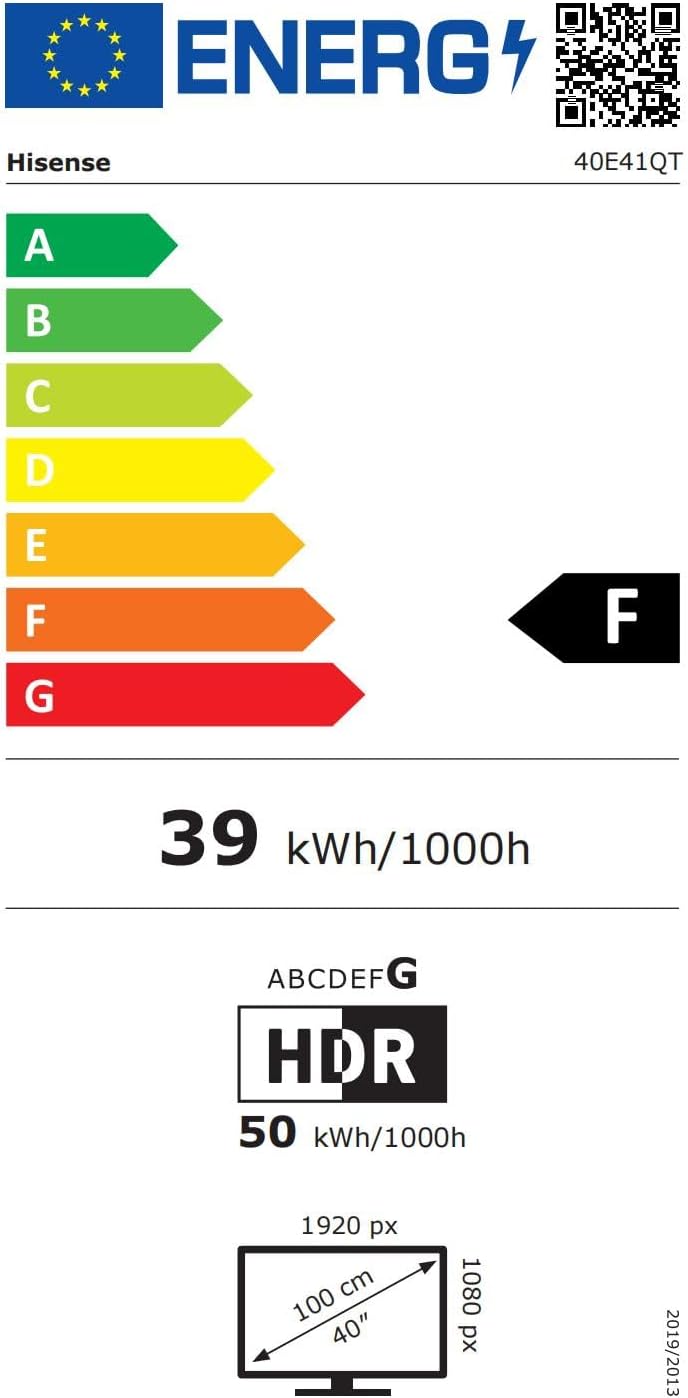
Image: The EU Energy Label for the Hisense 40E41QT TV, showing an energy efficiency class of F, with energy consumption of 39 kWh/1000h for SDR and 50 kWh/1000h for HDR.

Image: A detailed product data sheet for the Hisense 40E41QT, listing various technical parameters and compliance information.
For more detailed information, refer to the official EPREL database: https://eprel.ec.europa.eu/qr/2235691
8. Garantia i Suport
Your Hisense 40E41QT TV comes with a standard warranty. Please refer to the warranty card included in the packaging for specific terms and conditions.
- Període de garantia: Typically 2 years from the date of purchase.
- Política de devolucions: If you wish to return a product within 30 days of receipt because you have changed your mind, please consult the retailer's help page. For defective or damaged products, consult the retailer's help page on returns.
- Atenció al client: For technical assistance or warranty claims, please contact Hisense customer support. Contact details can usually be found on the Hisense official weblloc web o a la documentació inclosa.