Introducció
This manual provides detailed instructions for the setup, operation, and maintenance of your MASTER & DYNAMIC MH40 Over-Ear Wireless Headphones Gen II. Please read this manual thoroughly to ensure optimal performance and longevity of your device.

Image: MASTER & DYNAMIC MH40 Wireless Over-Ear Headphones banner, showcasing the product name and design.
Producte acabatview
The MH40 Wireless Over-Ear Headphones Gen II are designed for superior audio quality and comfort. Key features include:
- Custom Titanium Drivers: Enhanced, precise sound with deep bass and clear treble.
- Durada de la bateria ampliada: Fins a 30 hores de joc amb una sola càrrega.
- Capacitat de càrrega ràpida: 6 hours of listening after just 15 minutes of charging.
- Bluetooth 5.2: Reliable wireless connectivity up to 30 meters (100 ft).
- Optional USB-C Audio: Digital audio support up to 24-bit/96kHz via USB-C to USB-C cable.
- Matriu de micròfon dual: Features proprietary wind noise reduction technology for clear calls.
- Materials premium: Constructed with lightweight anodized aluminum, coated canvas, and soft lambskin-leather for durability and comfort.
- Removable Magnetic Ear Pads: Offers superior noise isolation and ease of maintenance.

Imatge: Frontal view of the MH40 Gen II headphones in Silver Metal / Tan Leather.

Imatge: Primer pla view of the MH40 earcups and headband, highlighting the material and design.

Image: MH40 headphones shown in a folded position, demonstrating their portability.
Configuració
1. Càrrega dels auriculars
Before initial use, fully charge your MH40 Gen II headphones. Connect the provided USB-C charging cable to the headphone's charging port and to a power source (e.g., computer USB port or USB wall adapter).
- Una càrrega completa proporciona fins a 30 hores d'escolta.
- For quick charging, 15 minutes of charge time yields approximately 6 hours of listening.

Image: MH40 headphones illustrating the "Boundless Battery" feature, emphasizing long battery life.

Image: Close-up of the power buttons on the MH40 headphones, showing the LED indicator.
2. Emparellament Bluetooth
- Assegureu-vos que els auriculars estiguin carregats i apagats.
- Premeu i manteniu premut el botó d'engegada fins que l'indicador lluminós parpellegi, cosa que indica el mode d'emparellament.
- Al dispositiu (telèfon intel·ligent, tauleta, ordinador), navega fins a la configuració de Bluetooth.
- Select "MH40 Gen II" from the list of available devices.
- Once connected, the indicator light on the headphones will change to a steady color or turn off, depending on the model.
The MH40 Gen II uses Bluetooth 5.2 for a stable connection up to 30 meters (100 ft).
Instruccions de funcionament
Controls
The MH40 Gen II headphones feature intuitive controls for managing audio playback and calls. Specific control functions may vary slightly but generally include:
- Botó d'encesa: On/Off, Pairing mode.
- Controls de volum: Ajusta el nivell de sortida d'àudio.
- Botó multifunció: Play/Pause, Skip tracks, Answer/End calls.
- Botó de silenci: Located on the right side for quick microphone muting during calls.
For detailed control mapping, refer to the companion mobile application (if available) or the quick start guide included with your product.

Imatge: Primer pla view of the controls on the MH40 headphones, showing buttons and ports.
Fer i rebre trucades
The dual microphone array with wind noise reduction ensures clear communication.
- Respondre/Finalitzar la trucada: Press the multi-function button.
- Rebutja la trucada: Premeu i manteniu premut el botó multifunció.
- Silenciar el micròfon: Use the dedicated mute button during a call.
Connexió per cable
For digital audio up to 24-bit/96kHz, connect the headphones to your device using a USB-C to USB-C cable. This bypasses Bluetooth and can be useful for high-fidelity audio or when battery is low.
Manteniment
Proper care will extend the life and maintain the performance of your MH40 Gen II headphones.
- Neteja: Use a soft, dry cloth to clean the exterior surfaces. For leather parts, use a specialized leather cleaner if necessary. Avoid harsh chemicals or abrasive materials.
- Coixinets per a les orelles: The magnetic ear pads are removable for easy cleaning or replacement. Gently detach them and clean as needed. Ensure they are securely reattached.
- Emmagatzematge: When not in use, store the headphones in a cool, dry place, away from direct sunlight and extreme temperatures. Use the provided carrying pouch to protect them from dust and scratches.
- Eviteu la humitat: No exposeu els auriculars a l'aigua ni a una humitat excessiva.

Image: MH40 headphones with one ear pad removed, demonstrating the magnetic attachment for easy maintenance.
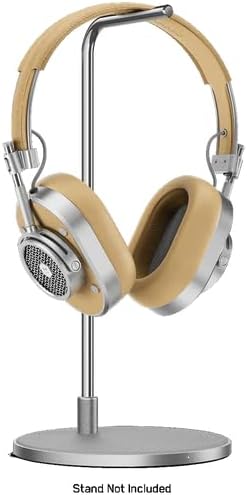
Image: MH40 headphones displayed on a stand, illustrating proper storage.
Resolució de problemes
If you encounter issues with your MH40 Gen II headphones, refer to the following common solutions:
| Problema | Solució |
|---|---|
| Els auriculars no s'engeguen. | Assegureu-vos que els auriculars estiguin completament carregats. Connecteu-los a una font d'alimentació i comproveu l'indicador de càrrega. |
| No es pot emparellar per Bluetooth. |
|
| No hi ha so o hi ha mala qualitat de so. |
|
| El micròfon no funciona durant les trucades. |
|
Especificacions
| Característica | Detall |
|---|---|
| Nom del model | MH40 |
| Tecnologia de connectivitat | Sense fil (Bluetooth), amb cable (USB-C) |
| Tecnologia de comunicació sense fils | Bluetooth 5.2 |
| Interval Bluetooth | 30 metres (100 peus) |
| Components inclosos | Headphones, USB-C Charging Cable, USB-C to USB-C Audio Cable (specific cables may vary by package) |
| Material | Aluminum, Leather, Canvas |
| Mètode de control | Aplicació, controls supraauriculars |
| Durada de la bateria | Fins a 30 hores |
| Forma de l'auricular | Sobre l'orella |
| Control de soroll | Aïllament acústic |
| Pes de l'article | 2.38 lliures |
| Fabricant | MASTER & DYNAMIC |
| UPC | 850060736537 |
Garantia i Suport
MASTER & DYNAMIC products are engineered to last and are covered by a limited warranty. For specific warranty terms and conditions, please refer to the warranty card included with your product or visit the official MASTER & DYNAMIC weblloc.
For technical support, product inquiries, or warranty claims, please contact MASTER & DYNAMIC customer service through their official channels. You can often find support information on the manufacturer's website or by referring to the contact details provided in your product packaging.
Fabricant: MASTER & DYNAMIC
Per obtenir més ajuda, visiteu el MASTER & DYNAMIC Store on Amazon.


