1. Introducció
This manual provides detailed instructions for the installation, operation, and maintenance of your Walfront Wireless WiFi Video Doorbell Camera. This device is designed to enhance home security by providing real-time video monitoring and remote communication capabilities for your front door.
2. Contingut del paquet
Verifiqueu que tots els elements que s'enumeren a continuació siguin presents al vostre paquet:
- 1 x Doorbell Unit
- 1 x Chime Unit
- 1 x Cable de dades (per carregar)
- 1 x Manual d'usuari
- 1 x Adhesiu
- 1 x Accessory Pack (mounting screws, anchors)

Image 2.1: Walfront Wireless WiFi Video Doorbell and Chime Unit. The doorbell unit features a camera lens and a call button, while the chime unit has a speaker grille.
3. Característiques del producte
- HD Visibility: The doorbell camera is equipped with a high-definition camera that provides clear video of the area outside your door.
- Comandament a distància: Monitor your entrance in real-time and engage in two-way intercom communication via a mobile phone application.
- Intelligent Reminding: Supports mobile phone application message push notifications, alerting you to doorbell presses or motion detection events.
- Construcció duradora: Constructed from ABS material for durability and extended service life.
- Aplicació àmplia: Suitable for various environments including homes, apartments, villas, studios, and offices.

Image 3.1: Illustration of the IR Night Vision capability, showing a scene split between daytime color and nighttime black and white view.

Image 3.2: Depiction of the two-way audio function, showing a delivery person communicating with a homeowner remotely.
4. Configuració i instal·lació
4.1 Charging the Doorbell Unit
Before initial use, fully charge the doorbell unit using the provided data cable. Connect the cable to the doorbell's charging port and a standard USB power adapter (not included).
4.2 Mobile Application Setup
- Download the designated mobile application (e.g., TUYA Smart) from your device's app store.
- Registreu un compte i inicieu sessió.
- Follow the in-app instructions to add the doorbell device. This typically involves powering on the doorbell and connecting it to your home's WiFi network.

Image 4.1: The doorbell installed near a door, with a separate image showing the mobile application interface displaying a live feed.
4.3 Instal·lació física
- Select a suitable mounting location near your front door, ensuring clear visibility and strong WiFi signal.
- Use the provided accessory pack (screws and anchors) to securely mount the doorbell unit.
- Place the chime unit indoors within range of the doorbell unit.
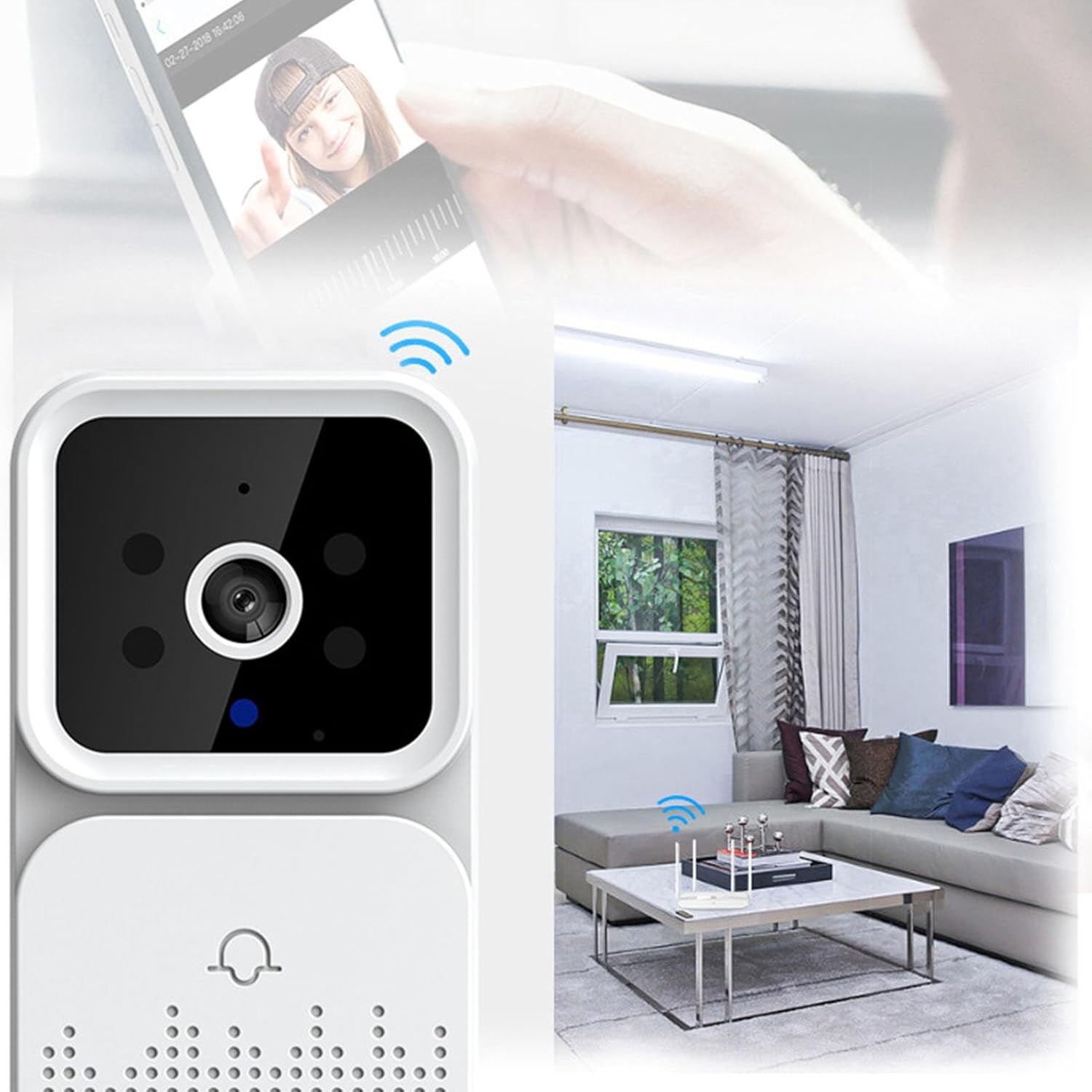
Image 4.2: Diagram illustrating the wireless connection between the doorbell, home WiFi router, and mobile device.
5. Instruccions de funcionament
5.1 Recepció de notificacions
When a visitor presses the doorbell button or motion is detected, the chime unit will sound, and a notification will be sent to your linked mobile application.

Image 5.1: Illustration of the mobile application's message push function, showing notifications received on various mobile devices.
5.2 Comunicació d'àudio bidireccional
Upon receiving a notification, open the mobile application to view the live video feed. You can then use the microphone and speaker icons within the app to communicate with the visitor at your door.

Image 5.2: The doorbell unit next to a smartphone displaying a live view of a delivery person, demonstrating remote interaction.
5.3 Visió nocturna
The doorbell camera automatically switches to infrared (IR) night vision mode in low-light conditions, providing visibility even in darkness.
6. Manteniment
- Neteja: Gently wipe the camera lens and doorbell surface with a soft, dry cloth. Avoid abrasive cleaners or solvents.
- Durada de la bateria: Monitor the battery level via the mobile application and recharge the doorbell unit as needed.
- Actualitzacions de firmware: Reviseu regularment l'aplicació mòbil per veure si hi ha actualitzacions de firmware disponibles per garantir un rendiment i una seguretat òptims.
7. Solució De Problemes
- Sense energia: Ensure the doorbell unit is fully charged. Check the charging cable and power source.
- Sense connexió Wi-Fi: Verify that your home WiFi network is active and the doorbell is within range. Restart your router and the doorbell unit. Re-attempt the WiFi setup process in the app.
- Sense notificacions: Check your mobile application's notification settings and ensure they are enabled. Verify that the app has necessary permissions on your smartphone.
- Poca qualitat de vídeo: Ensure the camera lens is clean and free from obstructions. Check your WiFi signal strength; a weak signal can affect video streaming quality.
- El timbre no sona: Ensure the chime unit is powered on and properly paired with the doorbell unit. Refer to the app for pairing instructions if necessary.
8. Especificacions tècniques
| Marca | Walfront |
| Nom del model | WALFRONT76zxpvg1oq |
| Número de model de l'article | WALFRONT76zxpvg1oq |
| ASIN | B0F31G5NDR |
| Material | ABS |
| Tipus de bateria | Lithium Battery (Included) |
| Capacitat de la bateria | 1000 mAh |
| Tecnologia de connectivitat | Ethernet (likely refers to network protocol, not physical port) |
| Protocol de connectivitat | Ethernet (likely refers to network protocol, not physical port) |
| Font d'alimentació | AC/DC (for charging/powering) |
| Tipus de controlador | Android (refers to app compatibility) |
| Usos recomanats | Interior/Exterior |
| Pes de l'article | 5.2 unces |
| Dimensions del paquet | 4.72 x 3.94 x 1.97 polzades |
9. Informació sobre garantia i assistència
For warranty details and technical support, please refer to the contact information provided with your purchase documentation or visit the official Walfront weblloc web. Conserveu el rebut de compra com a comprovant de compra per a reclamacions de garantia.
