Introducció
Gràcies per la compraasing the SEMIER SM-136 Cassette Player & Digital Converter. This versatile device allows you to play and record audio cassettes, play music from an SD card, and convert your cherished cassette tapes into digital MP3 files, either directly to an SD card or to your computer using the included software. Please read this manual carefully to ensure proper operation and to maximize your enjoyment of this product.
Què hi ha a la caixa
- Cassette Recorder Converter x 1
- Targeta SD de 16 GB x 1
- USB Reader x 1
- Software CD-ROM x 1
- Manual d'usuari x 1
- Type-C Charging and Data Cable x 1

Imatge: Tots els articles inclosos al paquet del producte.
Configuració
Alimentació del dispositiu
The SEMIER SM-136 can be powered by two methods:
- Cable USB-C: Connect the included USB-C cable to the device's USB-C port and the other end to a USB power adapter (not included) or a computer's USB port.
- Piles AA: Open the battery compartment on the back of the device and insert four (4) AA batteries (not included), ensuring correct polarity.
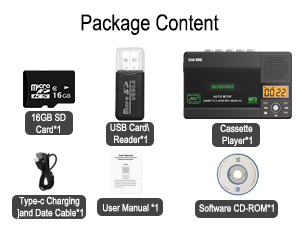
Image: Illustration of inserting AA batteries into the device.
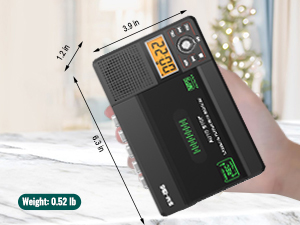
Image: Connecting the USB-C power cable to the device.
Inserting a Cassette Tape
Gently open the cassette compartment door. Insert your cassette tape with the open edge facing upwards and the tape side facing the device. Close the door firmly until it clicks.

Image: Proper insertion of a cassette tape into the player.
Inserció d'una targeta SD
Locate the SD card slot on the side of the device. Insert the included 16GB SD card (or another compatible SD card, up to 32GB) into the slot until it clicks into place. Ensure the card is inserted in the correct orientation.

Image: Proper insertion of an SD card into the device's dedicated slot.
Instruccions de funcionament
Playing Cassette Tapes
- Ensure a cassette tape is inserted.
- Slide the "TAPE/OFF/Micro SD" switch to the "TAPE" position.
- Premeu el botó JUGAR botó (►) per començar la reproducció.
- Ajusteu el volum amb el botó VOL perilla.
- Per aturar la reproducció, premeu el botó STOP botó (■).
- Utilitza el FWD (►►) i REW (◄◄) buttons for fast-forward and rewind.
Playing Music from SD Card
- Ensure an SD card with MP3 files'insereix s.
- Slide the "TAPE/OFF/Micro SD" switch to the "Micro SD" position. The LCD display will show "SD" and the current track time.
- Premeu el botó REPRODUCCIÓ/PAUSA botó (►⏺) per iniciar o pausar la reproducció.
- Utilitza el PREV (◄◄) i SEGÜENT (►►) botons per navegar entre pistes.
- Premeu el botó REP botó per repetir la pista actual o totes les pistes.
- Premeu el botó DEL button to delete the current track.
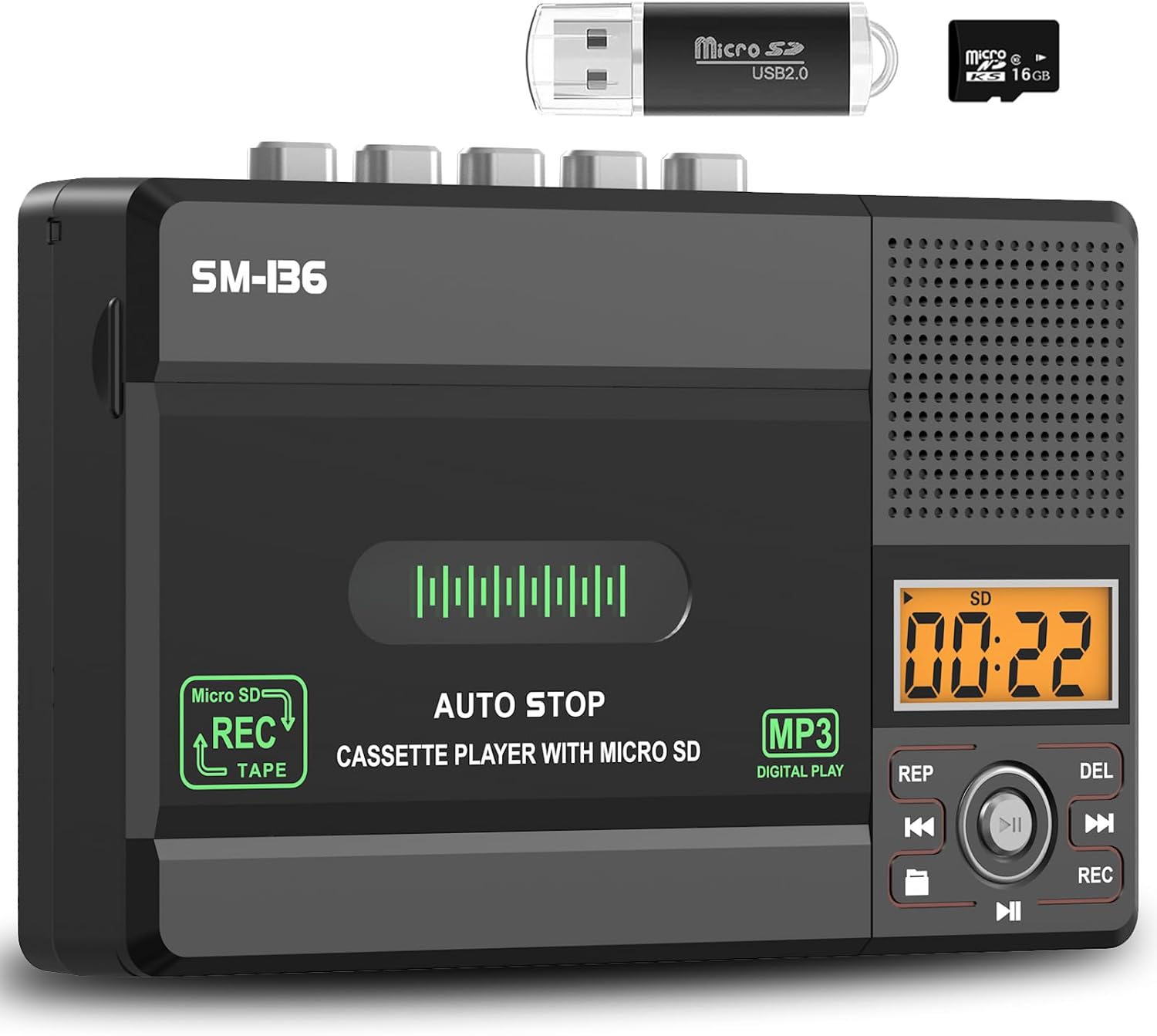
Imatge: Més deview of the device's control panel and LCD screen.
Recording to Cassette Tape (from built-in microphone)
- Insert a blank or recordable cassette tape.
- Slide the "TAPE/OFF/Micro SD" switch to the "TAPE" position.
- Premeu el botó REC button (red button) to begin recording from the built-in microphone.
- Per aturar la gravació, premeu el botó STOP botó (■).

Image: Demonstrates recording audio to a cassette tape using the built-in microphone.
Converting Cassette to MP3 (to SD Card)
This method allows direct conversion without a computer.
- Insert the cassette tape you wish to convert.
- Insert the 16GB SD card (or another compatible SD card) into the SD card slot.
- Slide the "TAPE/OFF/Micro SD" switch to the "TAPE" position.
- Premeu el botó JUGAR botó (►) on the cassette player.
- While the tape is playing, press and hold the REC button (red button) on the digital control panel until the LCD display shows "REC". This will start recording the cassette audio directly to the SD card as an MP3 file.
- Per aturar la gravació, premeu el botó REC de nou o premeu el botó STOP botó (■) on the cassette player.
- The converted MP3 files will be saved on the SD card. You can then play them back on the device by switching to "Micro SD" mode or transfer them to a computer using the included USB reader.

Image: Visual steps for direct cassette to SD card MP3 conversion.
Converting Cassette to MP3 (to Computer via Audacity)
This method requires a computer and the included Audacity software.
- Install Audacity: Insert the included Software CD-ROM into your computer's CD drive and follow the installation instructions for Audacity. Alternatively, you can download the latest version of Audacity from its official weblloc.
- Connectar el dispositiu: Connect the SEMIER SM-136 to your computer using the included USB-C data cable.
- Prepare Audacity: Open Audacity. Ensure the correct input device (usually "USB Audio CODEC" or similar) is selected in Audacity's audio settings.
- Comença a gravar: Insert the cassette tape you wish to convert into the player. Press the JUGAR botó (►) on the cassette player. Then, click the Registre button in Audacity to begin capturing the audio.
- Monitor and Stop: Monitor the audio levels in Audacity. Once the tape has finished playing, click the Atureu-vos button in Audacity and the STOP botó (■) on the cassette player.
- Export MP3: In Audacity, you can edit the recorded audio (e.g., trim silence, remove noise). Once satisfied, go to File > Export > Export as MP3 to save your digital audio file.

Image: Illustrates connecting the device to a computer and using Audacity for digital conversion.
Manteniment
- Neteja: Feu servir un drap suau i sec per netejar l'exterior del dispositiu. No utilitzeu netejadors líquids ni materials abrasius.
- Neteja del capçal de cinta: Periodically clean the tape heads and pinch rollers with a cotton swab lightly dampEnriquit amb alcohol isopropílic per garantir una qualitat de so òptima i evitar danys a la cinta.
- Emmagatzematge: Guardeu el dispositiu en un lloc fresc i sec, allunyat de la llum solar directa i de temperatures extremes.
- Extracció de la bateria: If the device will not be used for an extended period, remove the AA batteries to prevent leakage.
Resolució de problemes
| Problema | Causa possible | Solució |
|---|---|---|
| El dispositiu no s'encén. | No power source; batteries dead or incorrectly inserted; USB-C cable not connected properly. | Check battery polarity and charge; ensure USB-C cable is securely connected to a working power source. |
| No sound during cassette playback. | Volume too low; "TAPE/OFF/Micro SD" switch in wrong position; tape head dirty. | Increase volume; ensure switch is on "TAPE"; clean tape head. |
| Poor sound quality during playback/recording. | Dirty tape heads; worn-out tape; low battery power. | Clean tape heads; try a different tape; replace batteries or use USB-C power. |
| SD card not recognized or "No SD" message. | SD card incorrectly inserted; unsupported SD card format/size; faulty SD card. | Reinsert SD card; ensure it's formatted to FAT32 and is 32GB or less; try a different SD card. |
| No es pot gravar a la targeta SD. | SD card full; SD card write-protected; incorrect recording procedure. | Suprimeix files from SD card; check SD card's physical write-protect switch; follow "Converting Cassette to MP3 (to SD Card)" steps carefully. |
| Audacity not detecting device for conversion. | USB-C cable issue; incorrect audio input selected in Audacity; driver issue. | Try a different USB port/cable; ensure "USB Audio CODEC" is selected in Audacity; restart computer and device. |
Especificacions
- Model: SM-136
- Funcions: Cassette Player, Cassette Recorder (via Mic), SD Card MP3 Player, Cassette to MP3 Converter (to SD Card / PC)
- Font d'alimentació: DC 5V (USB-C) or 4 x AA Batteries
- Sortida de l'altaveu: 2W
- Auriculars Jack: 3.5mm estèreo
- Suport de la targeta SD: Fins a 32 GB, format FAT32
- Dimensions: 6.3 x 3.9 x 1.2 polzades (16 x 9.9 x 3 cm)
- Pes: 0.52 lliures (0.24 kg)

Image: Detailed dimensions and weight of the product.
Garantia i Suport
SEMIER products are designed for reliability and performance. This product comes with a standard manufacturer's warranty. For detailed warranty information, technical support, or customer service inquiries, please refer to the contact information provided on the product packaging or visit the official SEMIER website. Our dedicated customer support team is available to assist you with any questions or concerns.
També podeu visitar el SEMIER Store on Amazon per obtenir més informació i recursos de suport.


