1. Introducció
Thank you for choosing the SJOYBRING QLED Double Din Car Stereo (Model W018). This manual provides essential information for the proper installation, operation, and maintenance of your new car stereo system, including its integrated dash cam and backup camera. Please read this manual thoroughly before use to ensure optimal performance and safety.
2. Informació de seguretat
- Instal·lació professional recomanada: Due to the complexity of car audio systems and vehicle electrical wiring, professional installation is highly recommended. Incorrect installation can lead to damage to the unit, vehicle, or personal injury.
- Font d'alimentació: Ensure the unit is connected to a 12V DC power supply with a negative ground.
- Eviteu les distraccions: No utilitzeu la unitat o view vídeos mentre condueixes. Prioritza sempre la conducció segura.
- Temperatura: Eviteu exposar la unitat a temperatures extremes o a la llum solar directa durant períodes prolongats.
- Humitat: Keep the unit away from water and moisture to prevent electrical hazards.
3. Contingut del paquet
Verifiqueu que tots els elements siguin presents al paquet:
- SJOYBRING Car Stereo Unit
- Càmera de seguretat
- Dash Cam
- Control remot
- ISO Stereo Harness
- Suports i cargols de muntatge
- Manual d'usuari

Image: Contents of the SJOYBRING car stereo package, including the main stereo unit, dash cam, backup camera, remote control, wiring harness, mounting brackets, and user manual.
4. Producte acabatview
The SJOYBRING QLED Double Din Car Stereo features a 7-inch QLED touchscreen, offering a vibrant display and intuitive control. It integrates advanced connectivity options and safety features for an enhanced in-car experience.
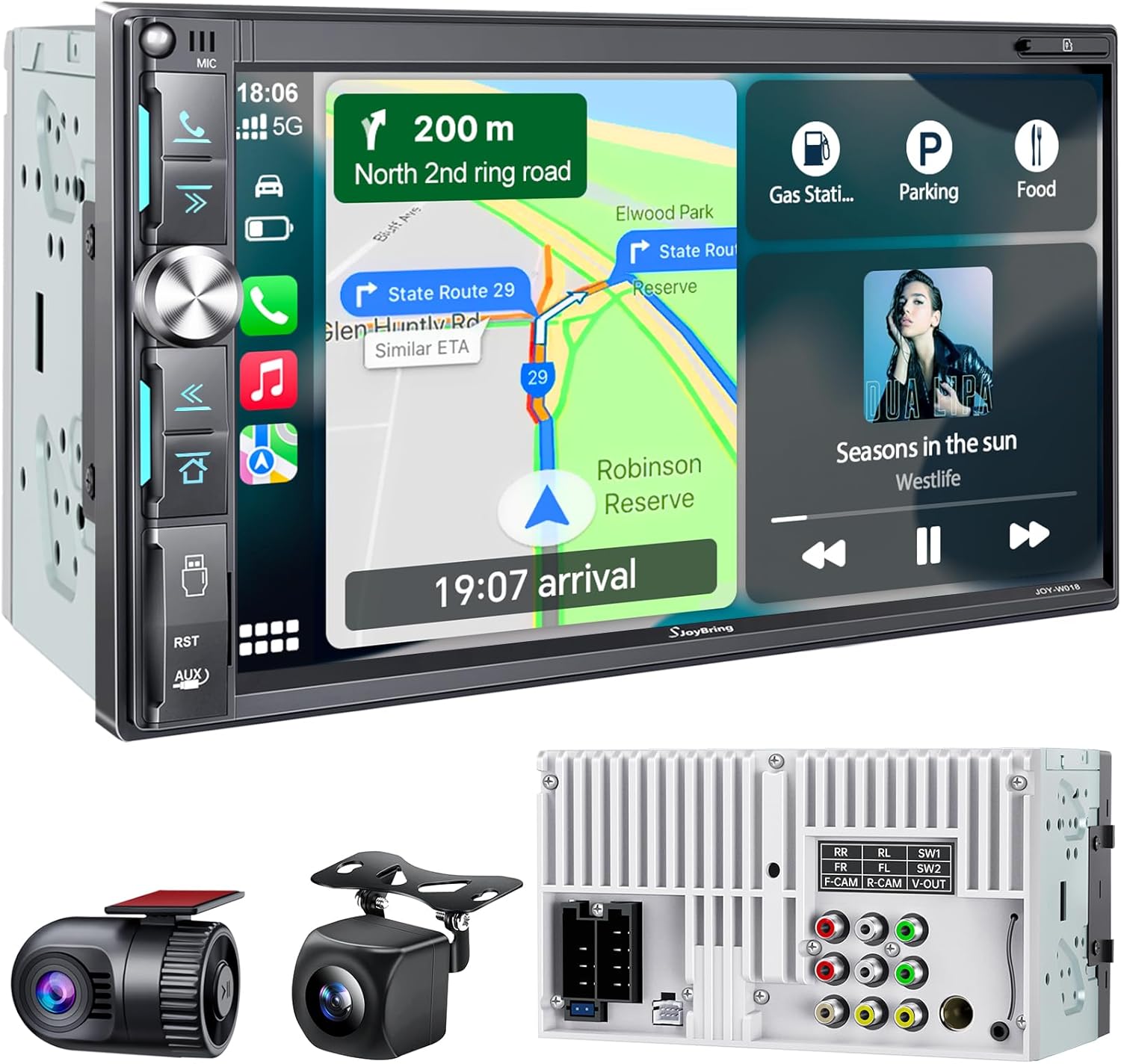
Imatge: Frontal view of the SJOYBRING car stereo unit, showcasing the 7-inch QLED display and physical controls, alongside the included dash cam and backup camera.
Característiques principals:
- 7-inch QLED Touchscreen (1024x600P resolution)
- Apple CarPlay sense fil i Android Auto
- Bluetooth 5.3 per a trucades de mans lliures i transmissió d'àudio
- MirrorLink support
- Integrated Dash Cam (1280x720P, 170° wide-angle)
- Backup Camera (HD night vision, waterproof, 170° wide-angle)
- 4.2-Channel Audio Output with 2 Subwoofer Outputs
- FM/AM Radio Tuner
- Steering Wheel Control compatibility (requires separate interface module)
5. Instal·lació
Proper installation is crucial for the functionality and longevity of your car stereo. Refer to the following guidelines and diagrams.
5.1 Notes generals d'instal·lació
- Dashboard Opening: Ensure your vehicle's dashboard opening size is compatible with the double din stereo (Product Dimensions: 3.66 x 7 x 3.93 inches). An additional dash kit may be required for a proper fit in some car models.
- Accessoris addicionals: Some vehicles may require a separate wire harness adapter and a radio antenna adapter for complete installation.
- Dissipador de calor: The unit features an oversized heatsink for optimal cooling. Ensure adequate ventilation around the unit during installation.

Imatge: Part posterior view of the car stereo highlighting the large heatsink design for efficient cooling, compared to a smaller heatsink on another unit.
5.2 Main Unit Wiring Diagram
Connect the provided ISO stereo harness to the car stereo and then to your vehicle's wiring. Refer to the diagram for correct connections.

Image: Comprehensive wiring diagram for the car stereo, illustrating connections for power (12V constant, ignition switch, ground), speaker outputs (front/rear left/right), and control wires (brake detect, reverse, steering wheel control).
- Connexions d'alimentació: Yellow (12V+ Constant Power), Red (ACC +12V Ignition Switch), Black (Ground).
- Sortides dels altaveus: Connect to your vehicle's speakers (e.g., White/White-Black for Left Front, Grey/Grey-Black for Right Front).
- Control Wires: Brown (Brake Detect), Pink (Back Car Control for backup camera trigger), Green (Steering Wheel Control 1), Green/Black (Steering Wheel Control 2).
5.3 Instal·lació de la Dash Cam
Connect the dash cam to the designated 'F-CAM' video input on the rear of the stereo unit. Ensure power connections are made as per the diagram.

Image: Diagram illustrating the wiring for the dash cam, connecting its video output to the 'F-CAM' RCA input on the car stereo and its power wires (Yellow for Battery Positive, Red for ACC, Black for Ground).
5.4 Instal·lació de la càmera de marxa enrere
Mount the backup camera at the rear of your vehicle. Connect its video output to the 'R-CAM' input on the stereo. The pink reversing trigger wire from the stereo harness must be connected to the vehicle's reversing light +12V to enable automatic display when reversing.

Image: Diagram detailing the installation of the backup camera, showing its connection to the 'R-CAM' video input on the stereo and the crucial connection of the stereo's pink reversing trigger wire to the vehicle's +12V reversing light circuit.
6. Configuració
6.1 Encès inicial
After successful installation, turn on your vehicle's ignition. The stereo should power on automatically. Follow any on-screen prompts for initial setup, such as language selection.
6.2 Configuració del control del volant (SWC)
If your vehicle has steering wheel controls, you can configure them to operate the stereo. This feature typically requires a separate SWC interface module (not included). Once the module is installed and wired, access the 'Steering Wheel' settings in the stereo's menu. Follow the on-screen instructions to program each button.

Image: The steering wheel control configuration screen on the car stereo, showing options to program buttons like 'Pre', 'Next', 'Vol+', 'Vol-', 'Mute', 'Dial', 'Reject', and 'Mode'.
7. Instruccions de funcionament
Apple CarPlay i Android Auto sense fil 7.1
Connect your compatible iOS or Android smartphone wirelessly to access navigation, music, calls, and other apps directly on the stereo's screen. Ensure Bluetooth and Wi-Fi are enabled on your phone.
- Apple CarPlay: On your iPhone, go to Settings > General > CarPlay and select your car stereo.
- Android Auto: On your Android phone, open the Android Auto app and follow the pairing instructions.
- Control de veu: Use voice commands (Siri for CarPlay, Google Assistant for Android Auto) for hands-free operation.

Image: The car stereo display showing the user interface for Wireless Apple CarPlay and Android Auto, along with MirrorLink functionality, demonstrating seamless smartphone integration.
7.2 Bluetooth 5.3
The unit features Bluetooth 5.3 for stable and high-quality wireless connections.
- Maridatge: Go to the Bluetooth menu on the stereo and your phone. Select the stereo's name from your phone's Bluetooth device list to pair.
- Trucades mans lliures: Make and receive calls directly through the stereo.
- Transmissió d'àudio: Reprodueix música des del teu telèfon mitjançant Bluetooth.
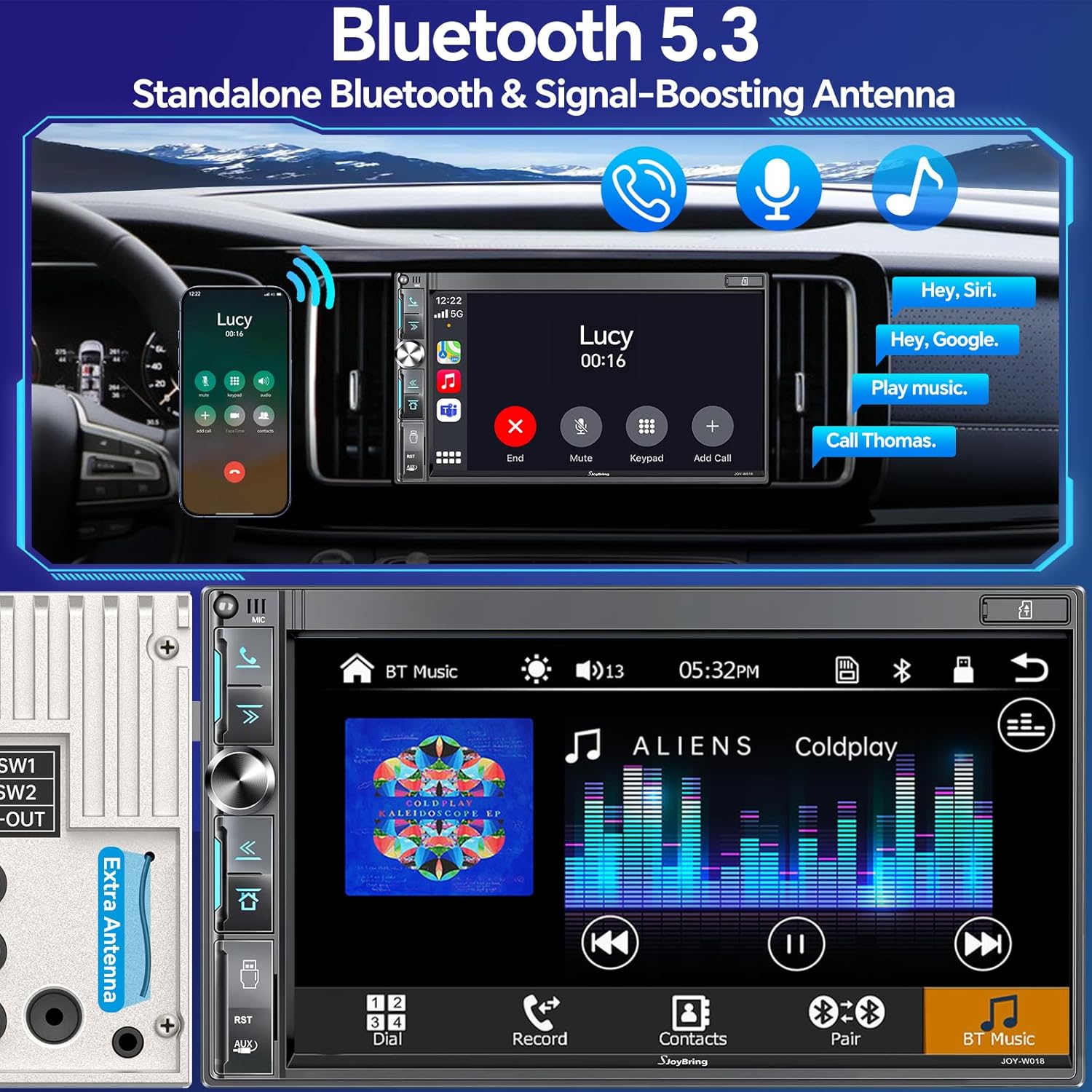
Image: The car stereo display showing the Bluetooth 5.3 interface, with options for phone calls, music playback, and voice assistant integration (Hey Siri, Hey Google).
7.3 MirrorLink
MirrorLink allows you to mirror your smartphone's screen onto the car stereo display. Connect your phone via USB and follow the on-screen instructions to activate MirrorLink.
7.4 Ràdio FM/AM
Access the radio function from the main menu. You can manually tune to stations or use the scan function to find available frequencies. Save your favorite stations for quick access.

Image: The car stereo's FM/AM radio interface, displaying frequency tuning, preset stations, and scan options.
7.5 Audio Settings (EQ, Subwoofer)
Customize your audio experience using the built-in equalizer and subwoofer controls. The unit supports 4.2-channel audio output.
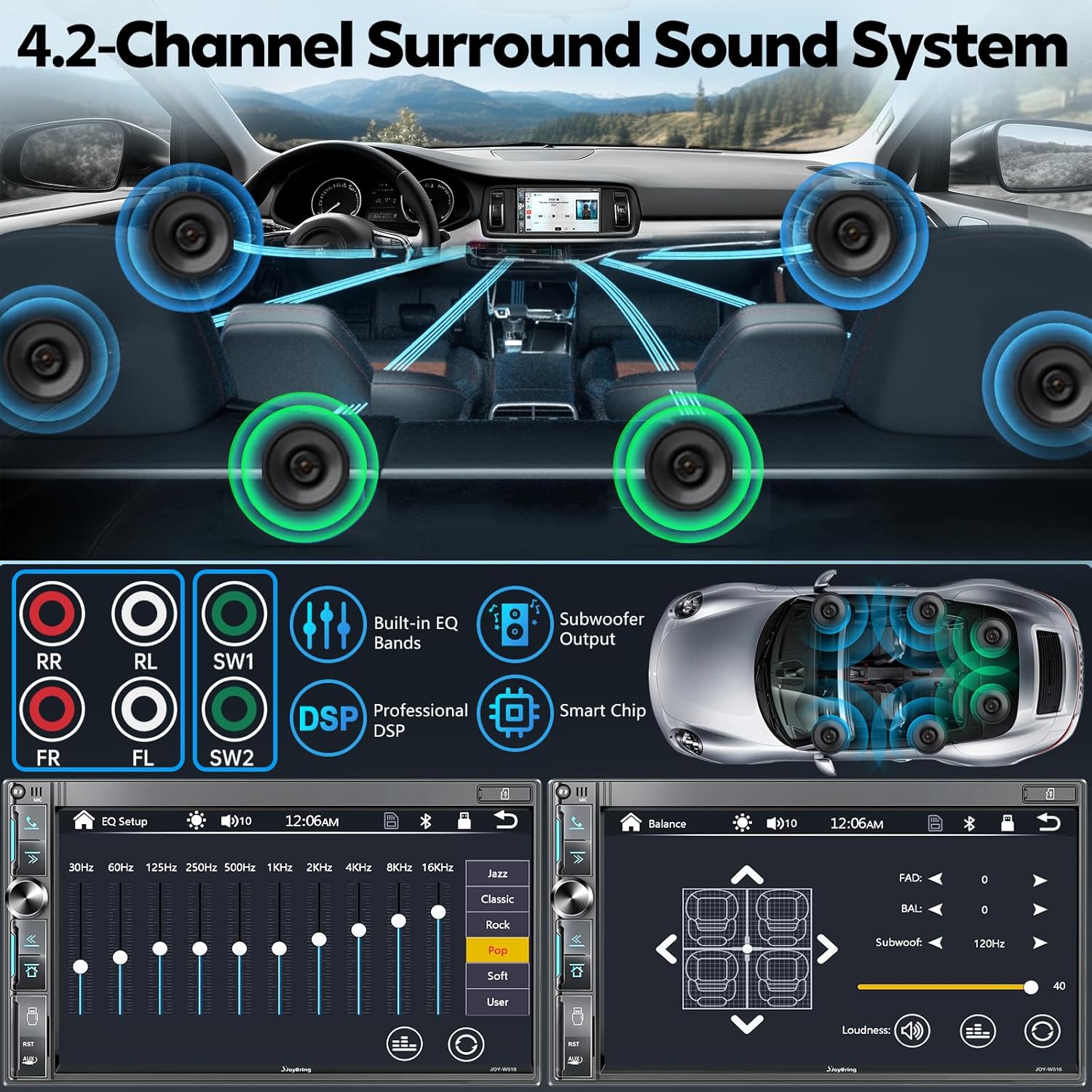
Image: The audio settings interface of the car stereo, showing the graphic equalizer with various presets (Jazz, Classic, Rock, Pop, Soft, User) and controls for subwoofer output and loudness.
7.6 Dash Cam Operation
The integrated dash cam records in 1280x720P Ultra HD with a 170° wide-angle lens. It supports loop recording (requires Class 10 or above MicroSD card, up to 64GB FAT32). Access dash cam footage and settings through the dedicated application on the stereo.
7.7 Backup Camera Operation
When the vehicle is shifted into reverse, the stereo automatically displays the feed from the HD backup camera. The camera features night vision and a waterproof design for clear visibility in various conditions.

Imatge: Més deview of the dash cam and backup camera functionalities, highlighting features like HD recording, loop recording, waterproof design, and night vision for both cameras.
7.8 QLED Touchscreen
The 7-inch QLED touchscreen provides a responsive and vivid display with 1024x600P resolution. Navigate through menus and applications with touch gestures.

Image: A visual comparison demonstrating the superior color reproduction and clarity of the QLED touchscreen (1024x600P) compared to a standard LCD screen, featuring a colorful parrot image.
8. Manteniment
- Neteja de pantalla: Feu servir un drap suau i sense borrissol per netejar suaument la pantalla tàctil. Per a taques difícils, fregueu lleugeramentampNetegeu el drap amb aigua o un netejador de pantalles. Eviteu materials abrasius o productes químics agressius.
- Atenció general: Mantingueu la unitat lliure de pols i deixalles. Assegureu-vos que totes les connexions estiguin ben fixades.
9. Solució De Problemes
Si teniu problemes, consulteu els següents problemes i solucions habituals:
| Problema | Causa possible | Solució |
|---|---|---|
| Sense poder | Incorrect wiring, blown fuse, loose connection. | Check power (Yellow, Red, Black) and ground connections. Inspect vehicle's fuse box and stereo's fuse. Ensure all wires are securely connected. |
| Sense so | Incorrect speaker wiring, volume too low, mute activated, incorrect audio source. | Verify speaker connections. Increase volume. Check if mute is active. Select the correct audio source (e.g., Radio, Bluetooth, CarPlay). |
| Problemes de connexió Bluetooth | Telèfon no detectable, emparellament incorrecte, interferències. | Ensure Bluetooth is enabled on both devices. Delete previous pairings and re-pair. Move closer to the unit. Restart both devices. |
| La càmera de marxa enrere no es mostra | Incorrect wiring, faulty camera, trigger wire not connected. | Check R-CAM video input. Ensure the pink reversing trigger wire is correctly connected to the vehicle's +12V reversing light. Verify camera power. |
| La pantalla tàctil no respon | System freeze, debris on screen. | Perform a soft reset (locate the reset button, usually a small pinhole). Clean the screen. |
10. Especificacions
Technical specifications for the SJOYBRING QLED Double Din Car Stereo (Model JOY-W018):
| Característica | Especificació |
|---|---|
| Número de model | JOY-W018 |
| Dimensions del producte | 3.66 x 7 x 3.93 polzades |
| Pes de l'article | 2 lliures |
| Tipus de visualització | 7-inch QLED Touchscreen |
| Resolució de visualització | 1024x600P (supports 1920x1080P video playback) |
| Tecnologia de connectivitat | Bluetooth 5.3, USB, Wi-Fi |
| Tipus de controlador | Android Auto, Apple CarPlay |
| Característiques especials | Android Auto, Apple CarPlay, Built-In Bluetooth, DSP, Screen Mirroring, Dash Cam, Backup Camera |
| Dispositius compatibles | Amplifier, Headphone, Smartphone, Speaker |
| Mode de sortida d'àudio | estèreo |
| Configuració del canal de so envoltant | 4.2 |
| Suport de codificació de vídeo | MPEG-4, RMVB, DivX, AVI, 1080P, MP3, WMA, JPEG |
| Gamma de ràdio FM | 87.5 ~ 107.9 MHz |
| AM Radio Range | 530 ~ 1710 KHz |
11. Garantia i Suport
SJOYBRING provides the following support for your product:
- Política de devolució de 90 dies: Es pot retornar en un termini de 90 dies des de la compra.
- 12-Month Replacement: Product replacement available within 12 months for manufacturing defects.
- Lifetime Consult and Support: Ongoing technical assistance for the product's lifespan.
For any issues or technical assistance, please contact the seller or SJOYBRING customer support. Our dedicated after-sales team is available 24/7.

Image: SJOYBRING customer support details, outlining quick reply times, return policy, replacement period, and lifetime consultation and support.


