1. Introducció
Welcome to the user manual for your new NIMO 15.6" FHD Laptop. This guide provides essential information to help you set up, operate, maintain, and troubleshoot your device. Designed for both adults and students, this laptop combines powerful performance with user-friendly features, including an Intel Core i3-1215U processor, 32GB RAM, 2TB SSD, a vibrant Full HD display, and a backlit keyboard with fingerprint security. Please read this manual thoroughly to ensure optimal performance and longevity of your laptop.

Figura 1.1: NIMO 15.6" FHD Laptop. This image shows the laptop open, highlighting its display and key features such as Full HD, IPS, 32GB RAM, 2TB SSD, Type-C PD Charger, Fingerprint reader, and Backlit keyboard.
2. Què hi ha a la caixa
Upon unboxing your NIMO 15.6" FHD Laptop, please verify that all the following items are included:
- 1 x Nimo N154 Laptop
- 1 x Carregador ràpid tipus C 65 W PD
- 1 x Manual d'usuari (aquest document)
- Windows 11 Home (pre-installed)
3. Configuració
3.1 Càrrega inicial
Before first use, it is recommended to fully charge your laptop.
- Connect the Type-C 65W PD Fast Charger to the Type-C charging port on your laptop.
- Connecteu el carregador a una presa de corrent.
- The charging LED indicator will illuminate. Allow the laptop to charge until the indicator shows a full charge.
3.2 Primer arrencada i configuració de Windows
Your NIMO laptop comes with Windows 11 Home pre-installed.
- Premeu el botó d'engegada que es troba al teclat per engegar el portàtil.
- Follow the on-screen instructions to complete the Windows 11 setup process. This typically includes selecting your region, language, connecting to a Wi-Fi network, and creating a user account.
- Once setup is complete, your laptop is ready for use.
4. Instruccions de funcionament
4.1 Pantalla
The NIMO laptop features a 15.6-inch Full HD (1920x1080) IPS display, offering vibrant colors and wide viewangles d'ajust.
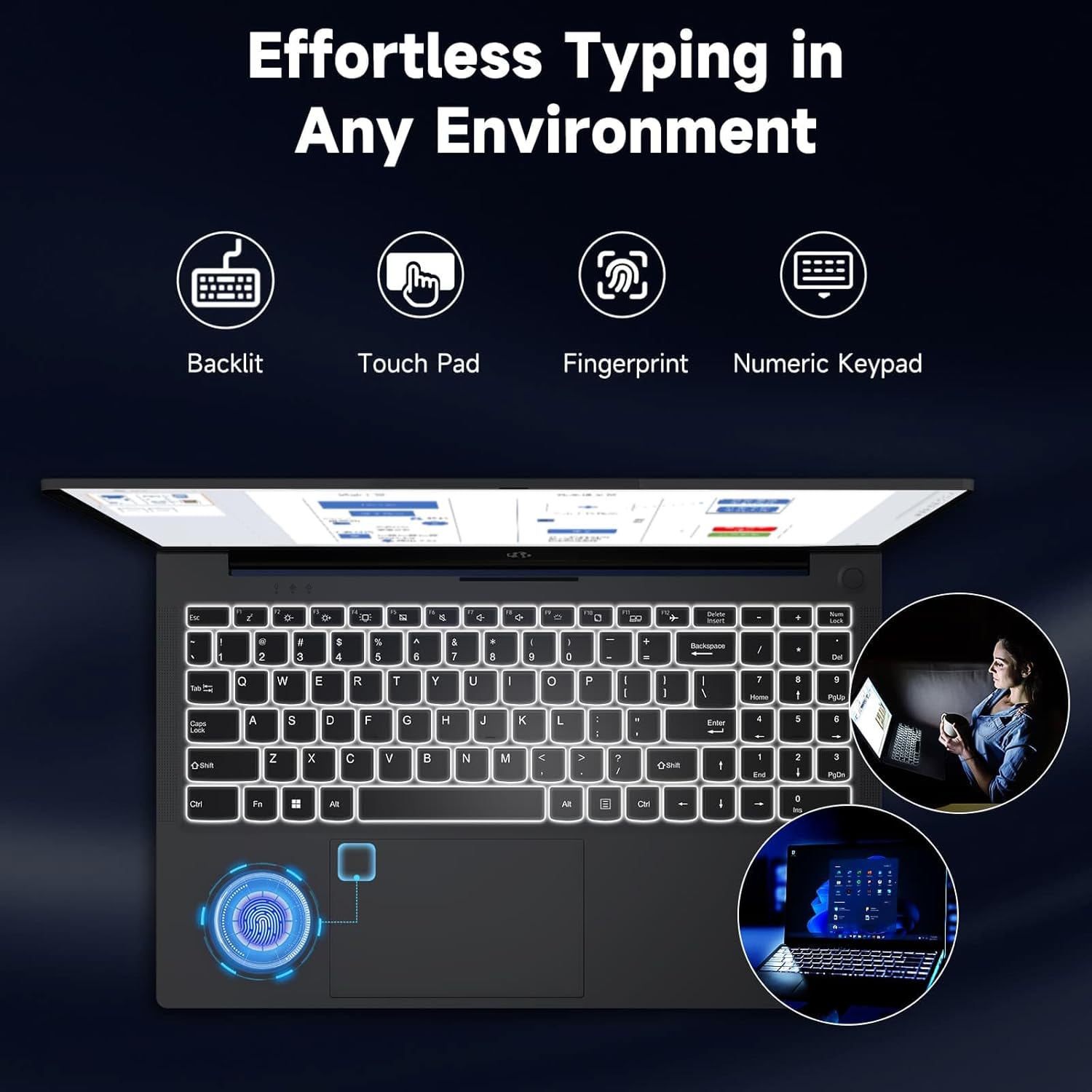
Figura 4.1: Vivid Full HD Display. This image highlights the laptop's 15.6-inch Full HD (1920x1080) IPS display, emphasizing its clarity and vibrant color reproduction.
4.2 Teclat i entrada
The laptop is equipped with a backlit keyboard, a responsive touchpad, and a dedicated numeric keypad for enhanced productivity.
- Teclat retroil·luminat: Adjust the keyboard backlight intensity using the function keys (Fn + Fx, refer to keyboard legends) for comfortable typing in low-light conditions.
- Touchpad: Use the multi-touch touchpad for navigation, scrolling, and gestures.
- Teclat numèric: The integrated numeric keypad on the right side provides quick data entry.

Figura 4.2: Effortless Typing in Any Environment. This image showcases the laptop's backlit keyboard, touchpad, fingerprint sensor, and numeric keypad, highlighting features that enhance typing comfort and efficiency.
4.3 Connectivitat
Your NIMO laptop offers a variety of ports for connecting external devices and peripherals.
- Ports USB 2.0: 1 port for standard USB devices.
- Ports USB 3.0: 2 ports per a la transferència de dades d'alta velocitat.
- Type-C Ports: Includes one for charging (PD Type-C) and one for multi-functionality (data, display output).
- Port HDMI: Connecteu-vos a monitors o projectors externs.
- Lector de targetes Micro SD: Per ampliar l'emmagatzematge o transferir files de targetes de memòria.
- Headphone Combo Jack: Per a la sortida d'àudio i l'entrada de micròfon.
- Ranura de bloqueig Kensington: Per a la seguretat física.

Figura 4.3: Multiple Ports for Greater Versatility. This image illustrates the various connectivity options available on the NIMO laptop, including USB, Type-C, HDMI, Micro SD, and audio ports.
4.4 Rendiment
The NIMO laptop is powered by an Intel Core i3-1215U processor, 32GB DDR4 RAM, and a 2TB SSD, ensuring smooth multitasking and fast data access.
- Processador: Intel Core i3-1215U (up to 4.4 GHz) provides efficient performance for daily tasks.
- RAM: 32GB DDR4 RAM allows for seamless switching between applications.
- Emmagatzematge: The 2TB SSD offers rapid boot times, quick application loading, and ampl'espai per al teu files.

Figura 4.4: 12th Gen Core i3-1215U Processor. This image details the specifications of the Intel Core i3-1215U processor, highlighting its core count, thread count, power consumption, and turbo boost frequency.
4.5 Càrrega
The laptop supports 65W PD fast-charging via its Type-C port, allowing for quick replenishment of the 65Wh battery.
- Use the provided 65W PD Type-C charger for optimal charging speed.
- The laptop can be charged from any compatible Type-C PD power source.
- Average battery life is approximately 5 hours, depending on usage.
4.6 Funcions de seguretat
Enhance your laptop's security with the integrated fingerprint reader and privacy-focused weblleva.
- Lector d'empremtes digitals: Set up your fingerprint for quick and secure login via Windows Hello. The sensor is typically integrated into the power button or touchpad area.
- Webcam with Privacy Switch: El 2MP webcam includes a physical privacy switch (Webcam Shield) to ensure your privacy when the camera is not in use.
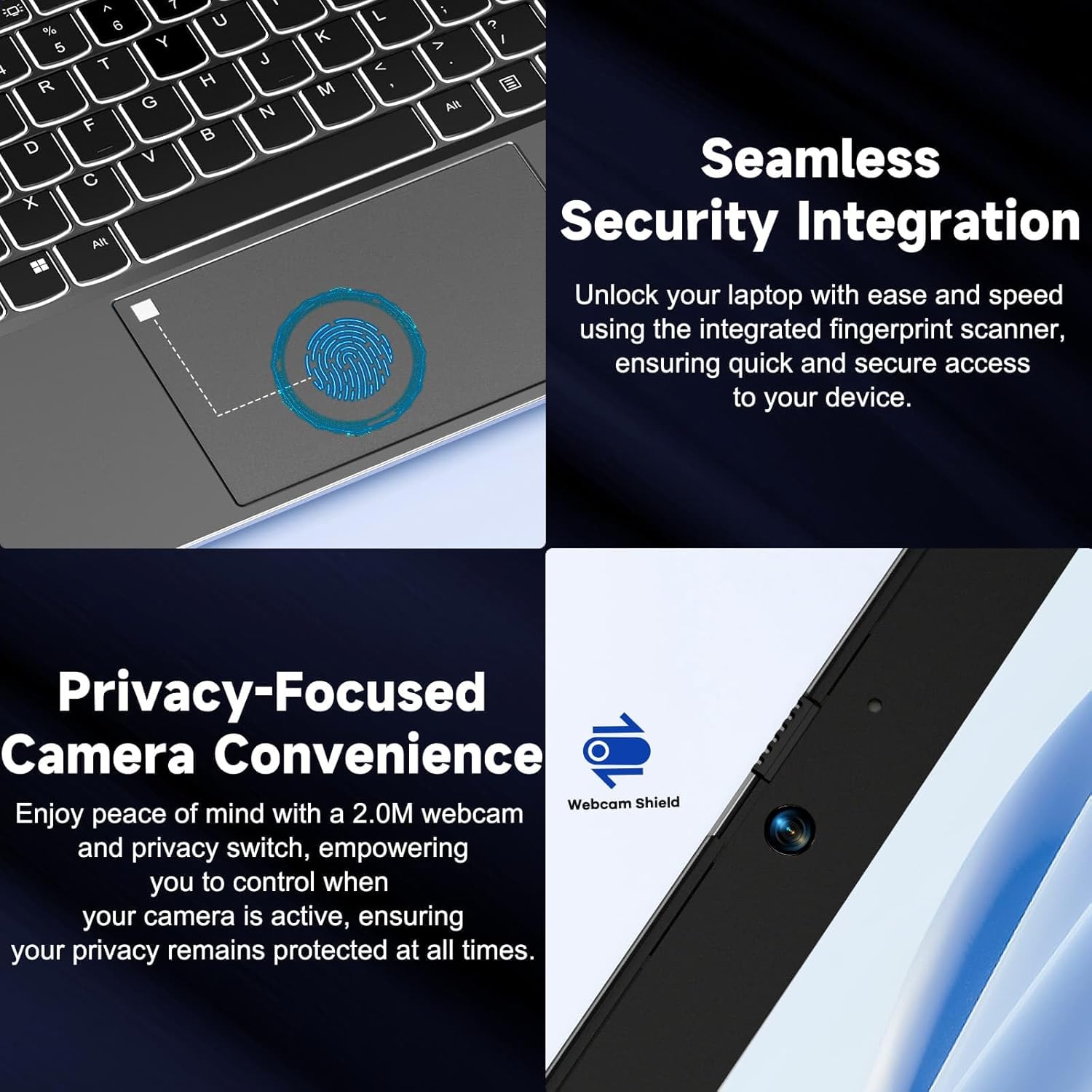
Figura 4.5: Seamless Security Integration. This image highlights the laptop's security features, including the integrated fingerprint scanner for secure access and the 2.0M webcam with a physical privacy switch (Webcam Shield).
5. Manteniment
Proper maintenance ensures the longevity and optimal performance of your NIMO laptop.
- Neteja: Feu servir un drap suau i sense borrissol per netejar la pantalla i l'exterior. Per a marques difícils, dampNetegeu lleugerament el drap amb aigua o un netejador de pantalles. Eviteu productes químics agressius.
- Cura de la bateria: To prolong battery life, avoid extreme temperatures. It is recommended to occasionally discharge the battery below 20% and then fully recharge it.
- Actualitzacions de programari: Comproveu i instal·leu regularment si hi ha actualitzacions de Windows i controladors per garantir l'estabilitat i la seguretat del sistema.
- Ventilació: Assegureu-vos que les obertures de ventilació del portàtil no estiguin bloquejades per evitar el sobreescalfament. Feu servir el portàtil sobre una superfície dura i plana.
- Emmagatzematge: Quan no l'utilitzeu durant períodes prolongats, guardeu el portàtil en un lloc fresc i sec.
6. Solució De Problemes
This section addresses common issues you might encounter with your NIMO laptop.
| Problema | Causa possible | Solució |
|---|---|---|
| El portàtil no s'encén. | Low battery; Power adapter issue; System crash. | Connect the charger and wait a few minutes. Ensure the power outlet is working. Perform a hard reset by holding the power button for 10-15 seconds. |
| La pantalla està en blanc o negra. | Display settings; External display connected; System sleep/hibernate. | Press any key or move the mouse. Press Fn + F7 (or relevant display toggle key) to cycle display modes. Disconnect external monitors. |
| Problemes de connexió Wi-Fi. | Wi-Fi desactivat; Problema amb l'encaminador; Problema amb el controlador. | Ensure Wi-Fi is enabled in Windows settings. Restart your router. Update Wi-Fi drivers from the NIMO support weblloc. |
| El portàtil va lent. | Too many programs open; Low storage space; Malware. | Tanqueu les aplicacions innecessàries. Allibereu espai al disc. Executeu una anàlisi completa del sistema amb un programari antivirus. |
If you encounter issues not listed here or require further assistance, please refer to the Warranty and Support section for contact information.
7. Especificacions
Detailed technical specifications for the NIMO 15.6" FHD Laptop (Model NIMO N154G):
| Característica | Detall |
|---|---|
| Marca | NIMO |
| Nom del model | NIMO N154G |
| Mida de la pantalla | 15.6 polzades |
| Resolució de pantalla | 1920 x 1080 píxels (Full HD) |
| Processador | Intel Core i3-1215U (up to 4.4 GHz) |
| RAM | 32 GB DDR4 |
| Disc dur | SSD de 2 TB (estat sòlid) |
| Coprocessador gràfic | Gràfics integrats |
| Sistema operatiu | Windows 11 Home |
| Tipus sense fil | 802.11a/b/g/n/ac |
| Ports USB 2.0 | 1 |
| Ports USB 3.0 | 2 |
| Ports tipus C | 2 (1 for PD charging, 1 multi-function) |
| Port HDMI | Sí |
| Ranura Micro SD | Sí |
| Headphone Combo Jack | Sí |
| Ranura de bloqueig de Kensington | Sí |
| Durada mitjana de la bateria | 5 hores |
| Tipus de bateria | 1 bateria de polímer de liti (inclosa) |
| Pes de l'article | 5 lliures |
| Dimensions del producte (LxWxH) | 14.07 x 8.98 x 0.76 polzades |
| Color | Gris |
| posterior WebResolució de la càmera | 2 MP |
| Característiques especials | Backlit Keyboard, Fingerprint Reader, High Definition Audio, Memory Card Slot, Numeric Keypad |
8. Garantia i Suport
NIMO is committed to providing reliable products and excellent customer service.
- 2-Year Laptop Protection: Your NIMO laptop is backed by a 2-year warranty covering manufacturing defects.
- 90-Day Laptop Returns: Enjoy a 90-day return policy for your laptop purchase.
- 24/7 Laptop Experts: Access instant help from our dedicated laptop experts for any queries or issues you may encounter.
- Plans de protecció: Additional protection plans are available for purchase, including 2-Year and 4-Year options, and a monthly "Complete Protect" plan. For details, please visit the NIMO store on Amazon or contact customer service.
For further assistance, please visit the official NIMO support weblloc o poseu-vos en contacte amb el seu equip d'atenció al client.


