Introducció
This manual provides detailed instructions for the installation, operation, and maintenance of your Extel Digital Connect Wired Video Intercom with Fingerprint Access, Model 720335. Please read this manual thoroughly before installation and use to ensure proper function and safety.
Informació de seguretat
- Ensure all electrical connections are made by a qualified professional and comply with local electrical codes.
- Desconnecteu l'alimentació abans de realitzar qualsevol instal·lació o manteniment.
- Do not expose the outdoor station to direct water spray or immerse it in water.
- Use only the power adapter and cables supplied or recommended by Extel.
- Keep the device away from sources of high heat or direct sunlight.
Contingut del paquet
Verifiqueu que tots els components siguin presents al paquet:
- Monitor interior
- Outdoor Station with Fingerprint Reader
- Suports i cargols de muntatge
- Adaptador d'alimentació
- Cables de connexió
- Manual d'usuari (aquest document)
Producte acabatview
The Extel Digital Connect system consists of an indoor monitor, an outdoor station, and a mobile application for remote access and control.
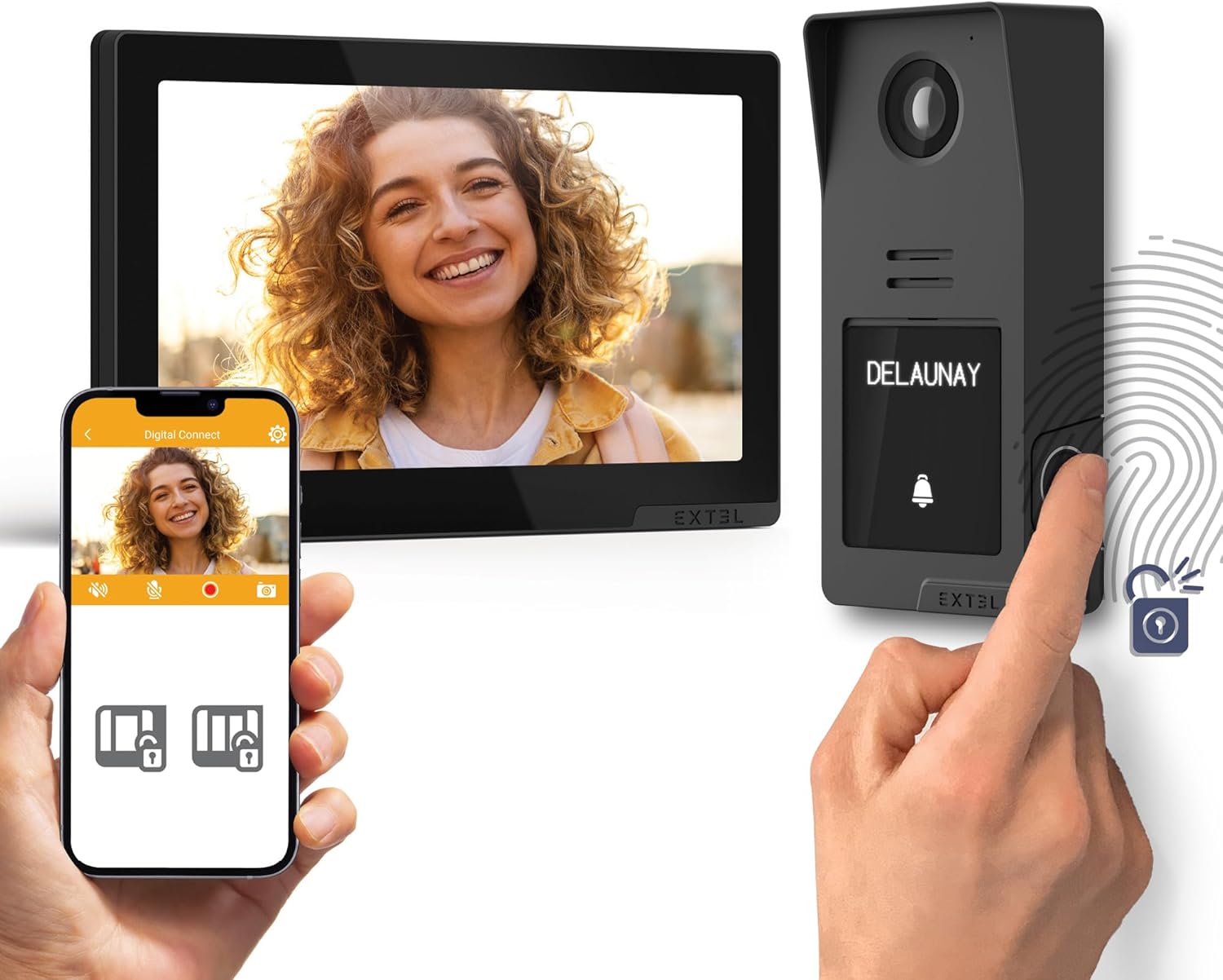
Acabatview of the Extel Digital Connect video intercom system, showing the indoor monitor, outdoor station, and smartphone application interface.

The outdoor station of the Extel Digital Connect video intercom, illustrating the QR code for mobile application setup.

Diagram showing the modular design of the outdoor station, with optional color covers.
Configuració
1. Instal·lació
The system requires wired connections between the indoor monitor and the outdoor station. Ensure proper cable selection based on distance:
- For distances up to 25m: Use 2 x 0.75mm² cables.
- For distances up to 100m: Use 2 x 1.5mm² cables.

Wiring diagram for the Extel Digital Connect video intercom, showing connections for the indoor monitor, outdoor station, and optional accessories, along with Wi-Fi connectivity.
2. Engegada inicial
After all wired connections are securely made, connect the power adapter to the indoor monitor and plug it into a power outlet. The monitor should power on automatically.
3. Connexió de xarxa (Wi-Fi)
The indoor monitor supports 2.4GHz and 5GHz Wi-Fi networks. Follow the on-screen prompts on the indoor monitor to connect to your home Wi-Fi network. This is essential for smartphone app functionality.
4. Instal·lació i emparellament de l'aplicació
- Download the 'Digital Connect' application from your smartphone's app store (iOS or Android).
- Obre l'aplicació i crea un compte o inicia la sessió.
- Follow the in-app instructions to add your Extel Digital Connect device. This typically involves scanning a QR code displayed on the indoor monitor or the outdoor station.

The Extel Digital Connect video intercom system, demonstrating the indoor monitor and outdoor station, with a smartphone displaying the connected mobile application.
5. Registre d'empremtes dactilars
To enable fingerprint access, you must register fingerprints through the indoor monitor or the mobile application. Refer to the on-screen menu for the 'Fingerprint Management' section. Follow the instructions to scan and save authorized fingerprints.

A hand interacting with the fingerprint sensor on the outdoor station for access control.
Instruccions de funcionament
Contestar trucades
- From Indoor Monitor: When a visitor presses the call button on the outdoor station, the indoor monitor will ring and display the visitor's video. Press the 'Answer' button on the monitor to communicate.
- Des de l'aplicació mòbil: If connected to Wi-Fi, your smartphone will receive a notification when a visitor calls. Tap the notification to view the video feed and communicate remotely.
Opening Gates/Doors
- From Indoor Monitor: During a call, press the 'Unlock' button on the monitor to open a connected gate or door.
- Des de l'aplicació mòbil: During a remote call, use the 'Unlock' function within the app.
- Via Fingerprint: Authorized users can place their registered finger on the outdoor station's fingerprint reader to unlock the connected access point.
Seguiment
Tu pots view the live feed from the outdoor station at any time:
- From Indoor Monitor: Select the 'Monitor' function on the indoor unit.
- Des de l'aplicació mòbil: Open the 'Digital Connect' app and select the live view option for your intercom.
Comunicació d'àudio bidireccional
The system supports two-way audio, allowing you to speak with visitors at the outdoor station from both the indoor monitor and the mobile application.
Manteniment
- Neteja: Use a soft, dry cloth to clean the indoor monitor and outdoor station. Do not use abrasive cleaners or solvents.
- Actualitzacions de programari: Periodically check for firmware updates through the mobile application or the indoor monitor's settings menu to ensure optimal performance and security.
- Sensor d’empremta digital: Keep the fingerprint sensor clean and dry for accurate readings.
Resolució de problemes
| Problema | Causa possible | Solució |
|---|---|---|
| No power to indoor monitor | Power adapter unplugged or faulty; no power at outlet. | Check power connections; test outlet with another device; replace adapter if faulty. |
| No video from outdoor station | Wiring issue; outdoor station faulty. | Verify all wired connections are secure; contact support if issue persists. |
| No es pot connectar a la Wi-Fi | Contrasenya incorrecta; senyal feble; problema amb el router. | Re-enter Wi-Fi password; move monitor closer to router; restart router. |
| No es reconeix l'empremta digital | Finger not registered; sensor dirty; finger wet/damaged. | Ensure finger is registered; clean sensor; try a different registered finger. |
| Mobile app not receiving calls | No internet connection; app notifications disabled; app not paired. | Check Wi-Fi/mobile data; enable app notifications; re-pair device if necessary. |
Especificacions
- Marca: EXTEL
- Model: 720335
- Pes de l'article: 950 g
- Connectivitat: Wired (2-wire), Wi-Fi (2.4GHz / 5GHz)
- Característiques principals: Video Intercom, Fingerprint Access, Smartphone Connectivity, Remote Control
- Distància de cablejat: Up to 25m (2 x 0.75mm²), Up to 100m (2 x 1.5mm²)
Garantia i Suport
For warranty information and technical support, please refer to the documentation provided with your purchase or visit the official Extel weblloc web. Conserveu el comprovant de compra per a reclamacions de garantia.


