1. Introducció
This manual provides detailed instructions for the installation, operation, and maintenance of your Joying JY-UTD80N4-B Android 13 Double Din Car Stereo. This unit integrates advanced features such as Android 13 operating system, Apple CarPlay, Android Auto, GPS navigation, Bluetooth connectivity, and a high-resolution 8-inch display. Please read this manual thoroughly before using the product to ensure proper function and safety.

Imatge 1.1: Frontal view of the Joying JY-UTD80N4-B Android 13 Double Din Car Stereo.
2. Configuració i instal·lació
2.1. Què hi ha a la caixa
Verifiqueu que tots els components siguin presents abans de començar la instal·lació:
- 8" radio (1 unit)
- Double Din Cage (1 unit)
- Left & Right Bracket (1 set)
- Reinforced Shims (1 set)
- Plastic Trim Out (1 unit)
- Manual d'instal·lació (1 unitat)
- WiFi Antenna (1 unit)
- GPS Antenna (1 unit)
- 4G Antenna (2 units)
- External Mic (1 unit)
- Cable USB (2 unitats)
- AR Cable (1 unit)
- Screen Ribbon Cable (1 unit)
- ISO Cable (1 unit)
- Manual d'usuari (1 unitat)

Image 2.1: All included components for the Joying JY-UTD80N4-B car stereo.
2.2. Notes generals d'instal·lació
Installation may require an installation frame kit with an inner size of 178 x 102mm, a special ISO harness, an amplifier adapter, or a CANbus decoder, depending on your vehicle's specific requirements. This unit does not support factory car GPS antennas, backup rear cameras, Bluetooth, USB, or microphones. Only JOYING accessories are supported for DVR, OBDII scanner, reverse camera, TPMS, and steering wheel controllers, which are sold separately.
2.3. Installation Structure
The fixing position of the left and right brackets can be extended or telescoped to achieve the best fixing position according to your car's center console, adapting to a wider range of vehicles. If your car is a Hyundai or Kia brand, please contact support for a different bracket.

Image 2.2: Illustration of the upgraded and adjustable installation structure.
2.4. Connexions del panell posterior
Familiarize yourself with the various ports and connections on the rear panel of the head unit for proper wiring.

Image 2.3: Rear panel connections and overall dimensions of the head unit.
3. Instruccions de funcionament
3.1. Fast Boot Feature
Once the car key is inserted, the unit will start up and enter the user interface in approximately 2 seconds. The initial boot-up may take 30-40 seconds.
3.2. Built-in CarPlay & Android Auto
Connect your mobile phone to the car radio via a USB cable or Bluetooth to access phone applications on the larger screen. This allows for navigation, phone calls, and music playback.

Image 3.1: Display of Apple CarPlay and Android Auto interfaces.
3.3. Navegació GPS
The unit features precise GPS engines and includes a GPS antenna for accurate positioning and faster real-time navigation. Offline maps are supported in areas where data download is available, allowing for navigation without an internet connection. Mobile phone map data can also be synchronized via CarPlay or Android Auto.
3.4. Built-in 4G Module
Insert a SIM card into the unit for internet access. This feature supports FDD-LTE: B2/B4/B5/B7/B12/B13/B14/B17/B25/B26/B38/B66/B71 and TDD-LTE: B41. Note that this module does not support making phone calls or sending SMS messages.
3.5. High-Quality Audio Features
The unit is equipped with a TDA7851 DSP chip, a 48-band graphic equalizer, and a maximum output power of 4x50W for enhanced sound quality. It supports aftermarket amplifiers with 4 audio outputs, 1 SUB output, Fiber Optical output, SPDIF Coaxial output, and a Center Channel output.

Imatge 3.2: acabatview of high-quality sound features and aftermarket ampsuport vitalitzador.
3.6. Split-screen Multitasking
The unit supports split-screen functionality, allowing two applications to run simultaneously on the display. To use this feature, tap the recent apps icon, find the desired app, click the split-screen button, and then select a second app from the recent apps list.

Image 3.3: Step-by-step guide for using split-screen multitasking.
3.7. Control del volant
The unit supports steering wheel controls for easy switching of songs, radio channels, and volume adjustment, contributing to a safer driving experience. Vehicles with a CAN system may require an additional CANbus cable to enable this feature.

Image 3.4: Illustration of steering wheel control integration.
3.8. Personalized Settings
Customize your user experience with various settings, including changing the car boot logo, selecting from customizable wallpapers, and adjusting the button colors and screen brightness.

Imatge 3.5: Ex.amples of personalized settings such as boot logo, wallpapers, and button colors.
3.9. Pom de volum
The unit features a physical volume knob for intuitive audio control. Rotate to adjust volume, and press to mute/unmute.

Imatge 3.6: Detallada view of the volume knob and its functions.
3.10. Sortida HDMI
The HDMI output provides a full digital image and sound-sending interface, capable of sending uncompressed audio and video signals. Audio and video can be output synchronously without manual adjustment. This allows for projection screen display for passengers or on-screen display with 1080P clarity and zero delay. The HDMI cable is not included.
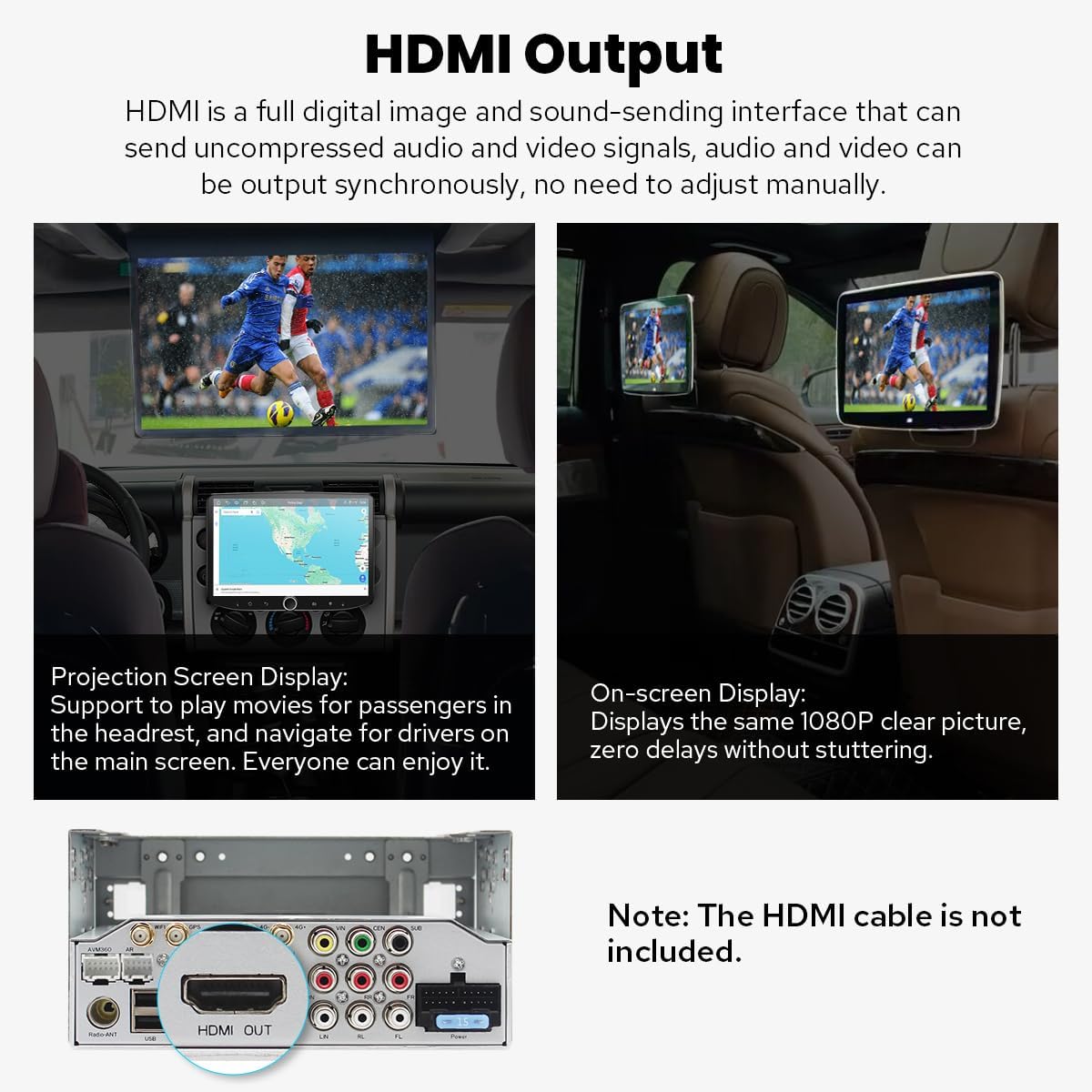
Image 3.7: Demonstration of HDMI output for projection and on-screen displays.
3.11. Altres característiques
The unit includes additional features such as Picture-in-Picture mode, three USB ports, a Micro SD Card Slot, and a 4G SIM Card Slot.

Image 3.8: Icons representing various features of the car stereo.
4. Manteniment
4.1. Sistema de refrigeració
The unit features a dual heat sink design for superior heat dissipation, improved temperature control, and enhanced performance stability. You can set a warning value for volume or CPU temperature. When the CPU temperature or radio's volume rises and exceeds the warning value, the fan will automatically activate for cooling to prevent overheating.

Image 4.1: Illustration of the upgraded dual heat sink cooling system.
4.2. Atenció general
To maintain the unit's performance and appearance, regularly clean the screen with a soft, dry cloth. Avoid using abrasive cleaners or solvents. Ensure all connections are secure and free from debris.
5. Solució De Problemes
If you encounter issues with your Joying car stereo, consider the following general troubleshooting steps:
- Sense energia: Check all power connections and fuses. Ensure the car's ignition is on.
- Sense so: Verify speaker connections, volume levels, and audio output settings. Check if the unit is muted.
- Problemes amb el senyal GPS: Assegureu-vos que l'antena GPS estigui instal·lada correctament i que tingui una vista clara view del cel.
- Problemes de connectivitat Bluetooth: Assegureu-vos que el Bluetooth estigui activat tant a l'estèreo com al dispositiu. Proveu de desvincular i tornar a vincular els dispositius.
- Pantalla tàctil que no respon: Perform a soft reset by pressing the reset button (if available) or turning off the car's ignition and restarting.
For persistent issues or complex problems, refer to the detailed troubleshooting section in the included Installation Manual or contact Joying customer support.
6. Especificacions
| Característica | Detall |
|---|---|
| Número de model | JY-UTD80N4-B |
| Sistema operatiu | Android 13 |
| Mida de la pantalla | 8 polzades |
| Resolució de visualització | 1280 x 800P |
| Memòria (RAM) | 4 GB |
| Emmagatzematge (ROM) | 64 GB |
| Connectivitat | Bluetooth, Ethernet, HDMI, USB, Wi-Fi, 4G Module |
| Característiques especials | Android Auto, Apple CarPlay, Built-In Bluetooth, Built-In Wi-Fi, Equalizer, Fast Boot, GPS Navigation, AM/FM Radio, Hands-free Call, Picture-in-Picture |
| Mode de sortida d'àudio | Stereo, Optical Fiber, Coaxial Digital |
| Tipus de muntatge | Dashboard Mount (Double Din) |
| Pes de l'article | 2.65 lliures |
| Dimensions del paquet | 12.2 x 7.87 x 5.91 polzades |
6.1. WiFi Signal
The unit features an independent WiFi antenna to ensure stable signal quality and provide fast, smooth internet access. It supports 802.11a/b/g/n/AC standards and operates on 2.4GHz/5GHz spectral bands.

Image 6.1: Details of the upgraded WiFi signal and antenna.
7. Accessoris opcionals
The following accessories are not included in the package but can be ordered separately to enhance your experience:
- OBD2 Scanner: Connects via Bluetooth to retrieve real-time data and trouble codes from your vehicle computer.
- AR Front Camera: Records the front road automatically while driving.
- AR Rear Camera: Switches to the reverse display automatically when reversing the car.

Image 7.1: Optional accessories including OBD2, AR Front Camera, and AR Rear Camera.
8. Garantia
The Joying JY-UTD80N4-B Android 13 Double Din Car Stereo comes with a 2 any de garantia from the date of purchase. Please retain your proof of purchase for warranty claims. The warranty covers manufacturing defects and malfunctions under normal use. It does not cover damage caused by improper installation, misuse, accidents, or unauthorized modifications.
9. Suport
For further assistance, technical support, or warranty inquiries, please contact Joying customer service. Refer to the contact information provided in your product packaging or visit the official Joying weblloc de recursos de suport.


