1. Introducció
This manual provides essential information for setting up, operating, maintaining, and troubleshooting your Blackview MP200 Mini PC. The Blackview MP200 is a compact desktop computer designed for various applications, including office work, home theater, and light gaming, featuring an Intel Core i5-11400H processor, 16GB RAM, and a 512GB SSD.
Si us plau, llegiu aquest manual detingudament abans d'utilitzar el dispositiu per garantir-ne el funcionament correcte i maximitzar-ne la vida útil.

El Negreview MP200 Mini PC, showcasing its compact design and front-facing ports.
2. Contingut del paquet
En obrir el paquet, comproveu que tots els elements hi siguin presents i que estiguin en bon estat:
- Negreview Mini PC MP200
- Adaptador d'alimentació
- Cable HDMI
- Manual d'usuari
- VESA Mount (optional, may vary by package)
3. Disseny i ports del dispositiu
Familiarize yourself with the various ports and components of your Blackview MP200 Mini PC.
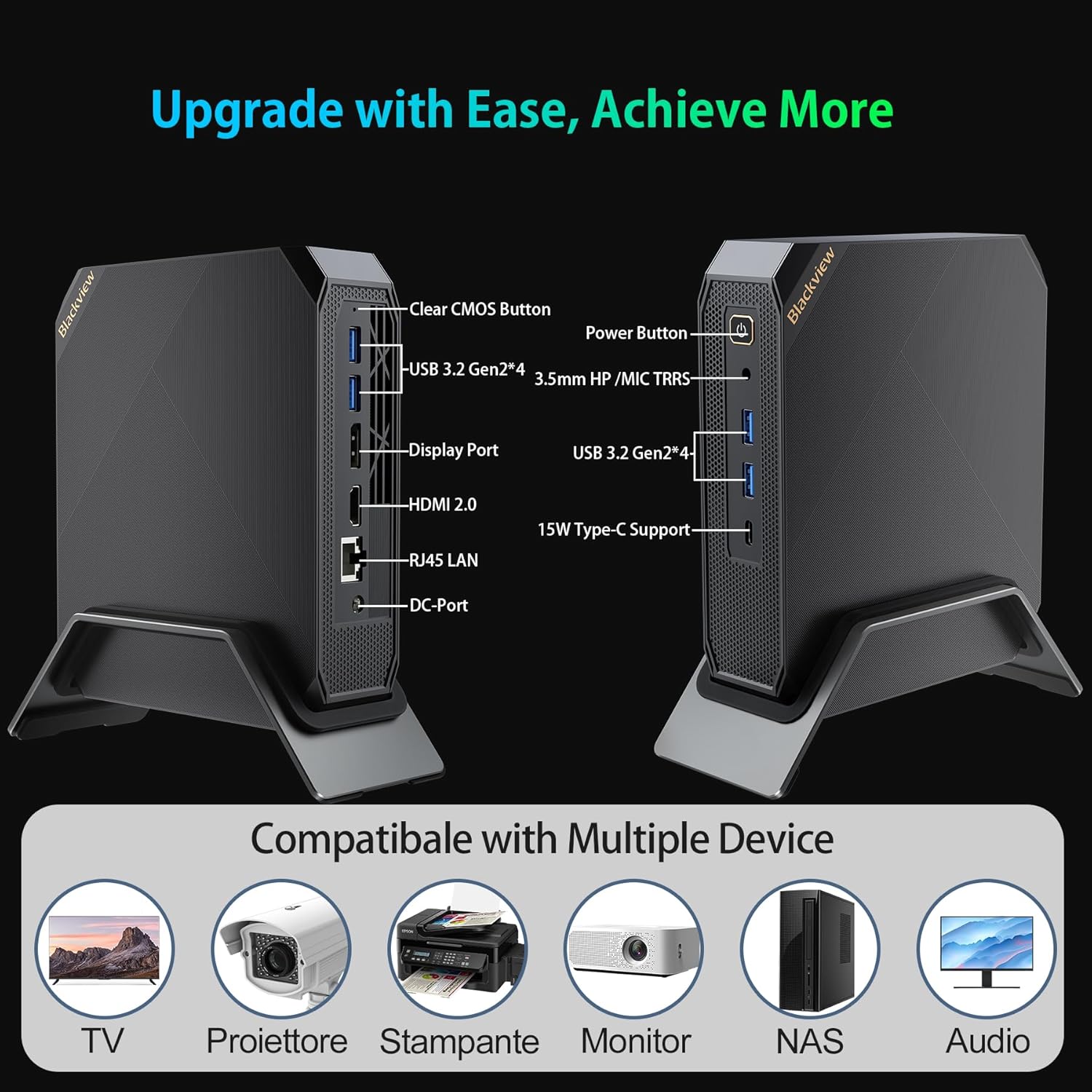
Detallada view del Negreview MP200 Mini PC's various ports, including USB, HDMI, DisplayPort, Ethernet, and power input.
Panell frontal:
- Botó d'encesa: Premeu per encendre/apagar el dispositiu.
- USB 3.2 Gen2 Ports (x2): Per connectar dispositius USB d'alta velocitat.
- USB Type-C Port (15W Support): For data transfer and power delivery to compatible devices.
- Jack combinat d'àudio de 3.5 mm: For headphones or microphone.
Panell posterior:
- Port DC-IN: Connecteu l'adaptador de corrent aquí.
- Port HDMI 2.0b: Connect to a display for up to 4K@60Hz resolution.
- DisplayPort: Connect to a display for up to 8K@60Hz resolution.
- Port LAN RJ45: For wired Gigabit Ethernet connection.
- USB 3.2 Gen2 Ports (x2): Per connectar dispositius USB d'alta velocitat.
- Botó d'esborrar CMOS: Used to reset BIOS settings (refer to troubleshooting for use).
4. Instruccions de configuració
4.1 Connexió inicial
- Connecta la pantalla: Use the provided HDMI cable or a DisplayPort cable to connect your monitor(s) to the corresponding ports on the Mini PC.
- Connecteu els perifèrics: Connecteu el teclat i el ratolí USB als ports USB disponibles.
- Connectar l'alimentació: Connect the power adapter to the DC-IN port on the Mini PC, then plug the adapter into a power outlet.
4.2 Encès
Press the Power Button on the front panel of the Mini PC. The power indicator light will illuminate, and the system will begin to boot.
4.3 Configuració del Windows 11 Pro
Upon first boot, you will be guided through the Windows 11 Pro initial setup process. Follow the on-screen instructions to configure your language, region, network, and user account settings.
4.4 Connexió de xarxa
- Wi-Fi: During Windows setup or via the Windows Settings, select your Wi-Fi network and enter the password. The MP200 supports Wi-Fi 6 for fast wireless connectivity.
- Ethernet: For a wired connection, connect an Ethernet cable from your router or modem to the RJ45 LAN port on the Mini PC.
5. Instruccions de funcionament
5.1 Funcionament bàsic
- Encès: Premeu el botó d'encesa.
- Apagar: Feu clic al botó Inici del Windows i, a continuació, seleccioneu Energia > Apagar.
- Reinicia: Feu clic al botó Inici del Windows i, a continuació, seleccioneu Energia > Reiniciar.
- Dormir: Feu clic al botó Inici del Windows i, a continuació, seleccioneu Energia > Suspensió.
5.2 Configuració de triple pantalla
El Negreview MP200 supports connecting up to three displays simultaneously for an extended desktop experience. Use a combination of the HDMI, DisplayPort, and USB Type-C ports.
- Connecteu el monitor principal al port HDMI.
- Connect a second monitor to the DisplayPort.
- Connect a third compatible monitor to the USB Type-C port.
- In Windows, right-click on the desktop and select 'Display settings' to configure display arrangement, resolution, and orientation.
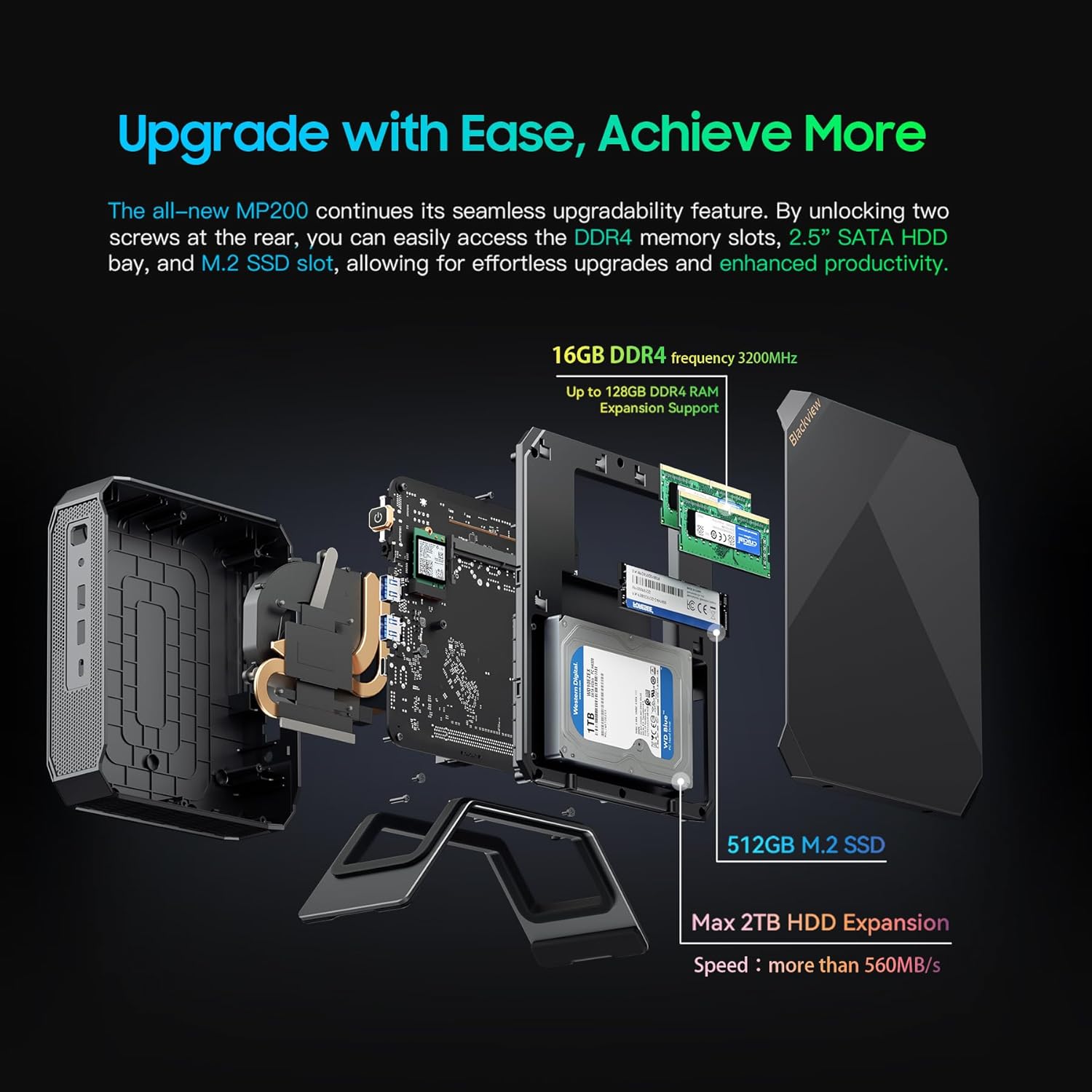
A visual representation of the Blackview MP200 Mini PC supporting a triple monitor setup for enhanced productivity or entertainment.
5.3 Expansió d'emmagatzematge
El Negreview MP200 includes a 512GB M.2 NVMe SSD and supports additional storage expansion via a 2.5-inch SATA bay (up to 2TB SSD/HDD).
- Apagueu el mini PC i desconnecteu tots els cables.
- Locate the screws on the bottom or side panel that secure the chassis. Remove these screws.
- Obriu amb cura el xassís per accedir als components interns.
- Install your 2.5-inch SATA SSD/HDD into the designated bay and connect the SATA data and power cables.
- Secure the drive with screws if necessary.
- Close the chassis and re-secure the screws.
- Power on the PC. The new drive may need to be initialized and formatted in Windows Disk Management before use.

Un va explotar view del Negreview MP200 Mini PC, demonstrating the M.2 NVMe SSD and the 2.5-inch SATA bay for storage expansion.
5.4 RAM Upgrade
The MP200 comes with 16GB LPDDR4 RAM. It may support further RAM upgrades depending on the specific configuration and available slots. Consult the product specifications for maximum supported RAM.
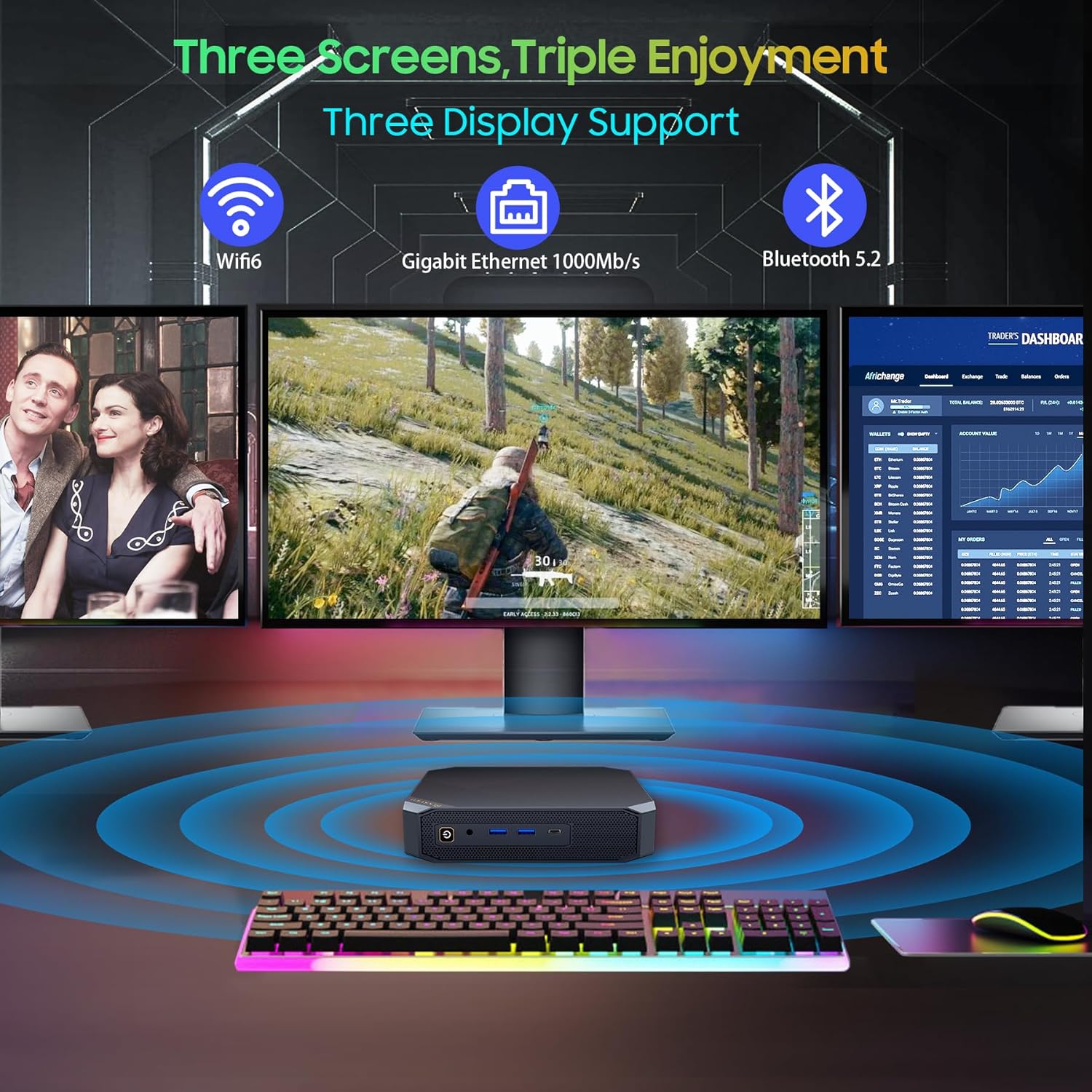
Close-up of the Blackview MP200 Mini PC's internal layout, indicating the DDR4 RAM slots for memory upgrades.
6. Manteniment
6.1 Neteja
- Regularly clean the exterior of the Mini PC with a soft, dry cloth.
- Use compressed air to clear dust from the ventilation grilles and ports to ensure proper airflow and prevent overheating. Do this with the device powered off.
- Eviteu utilitzar netejadors líquids directament sobre el dispositiu.
6.2 Actualitzacions de programari
Keep your Windows operating system and device drivers updated to ensure optimal performance and security.
- Actualitzacions de Windows: Go to Settings > Windows Update and check for available updates.
- Actualitzacions de controladors: Visit the Blackview oficial website for the latest drivers for your MP200 Mini PC.
6.3 Gestió tèrmica
The MP200 features an advanced cooling system with copper heat pipes and a precision-engineered fan. To maintain optimal thermal performance:
- Ensure the Mini PC is placed in a well-ventilated area.
- No bloquegeu les obertures d’aire.
- Avoid operating the device in excessively hot environments.
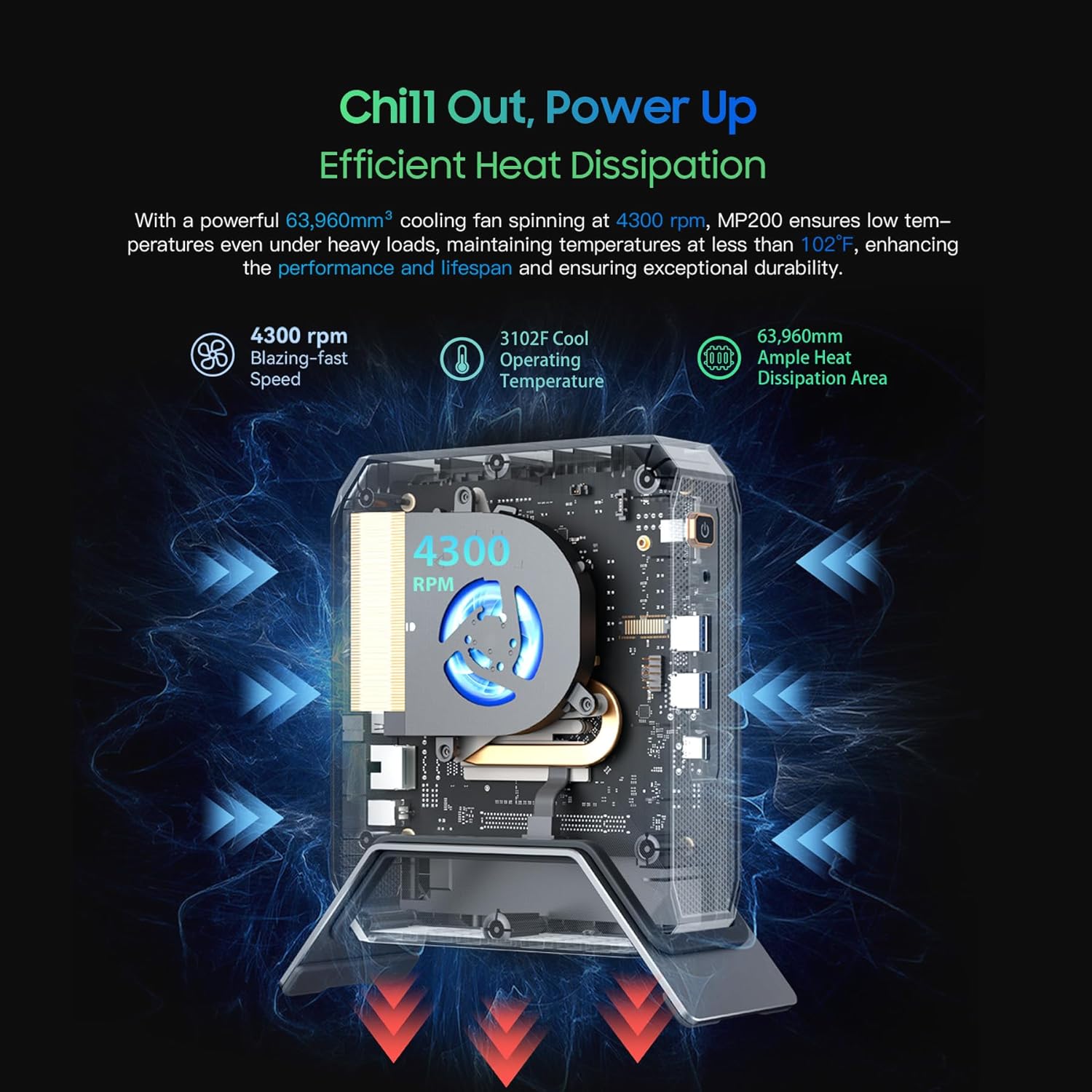
Diagram illustrating the efficient heat dissipation system of the Blackview MP200 Mini PC, featuring a cooling fan and heat pipes.
7. Solució De Problemes
Si teniu problemes amb el vostre Blackview MP200 Mini PC, refer to the following common problems and solutions:
7.1 Sense poder
- Assegureu-vos que l'adaptador de corrent estigui connectat correctament tant al Mini PC com a una presa de corrent que funcioni.
- Verifiqueu que la presa de corrent funciona connectant-hi un altre dispositiu.
- Comproveu si l'adaptador de corrent presenta algun dany visible.
7.2 Sense sortida de pantalla
- Confirmeu que el monitor estigui encès i que s'hagi seleccionat la font d'entrada correcta.
- Check that the HDMI, DisplayPort, or USB-C cable is securely connected to both the Mini PC and the monitor.
- Try using a different cable or monitor to isolate the issue.
7.3 Problemes de connectivitat de xarxa
- Wi-Fi: Ensure Wi-Fi is enabled in Windows settings. Restart your router/modem. Verify the Wi-Fi password.
- Ethernet: Comproveu si el cable Ethernet està connectat correctament. Verifiqueu que el vostre encaminador/mòdem funciona correctament.
7.4 Rendiment lent
- Tanca les aplicacions innecessàries que s'executen en segon pla.
- Comproveu i instal·leu les actualitzacions de Windows o els controladors pendents.
- Assegureu-vos que hi hagi prou espai lliure a la unitat principal.
- Monitor CPU and RAM usage in Task Manager to identify resource-intensive processes.
7.5 CMOS clars
If you experience persistent boot issues or incorrect BIOS settings, you can try clearing the CMOS. With the device powered off and disconnected from power, press and hold the 'Clear CMOS' button on the rear panel for 5-10 seconds. This will reset BIOS settings to their factory defaults.
8. Especificacions
Especificacions tècniques detallades del Blackview MP200 Mini PC:
| Característica | Especificació |
|---|---|
| Model | Negreview MP200 |
| Processador | Intel Core i5-11400H (6 nuclis, 12 fils de treball, fins a 4.5 GHz) |
| Gràfics | Gràfics Intel UHD (integrats) |
| RAM | 16 GB LPDDR4 (3200 MHz) |
| Emmagatzematge | SSD NVMe M.2 de 512 GB |
| Ampliació d'emmagatzematge | 1x 2.5-inch SATA Bay (up to 2TB SSD/HDD) |
| Sistema operatiu | Windows 11 Pro |
| Sortida de vídeo | 1x HDMI 2.0b (4K@60Hz), 1x DisplayPort (8K@60Hz), 1x USB Type-C (4K@60Hz) |
| Ports USB | 4x USB 3.2 Gen2 |
| Xarxa | Intel AX201 WiFi 6 (802.11ax), Gigabit Ethernet (RJ45) |
| Bluetooth | Bluetooth 5.2 |
| Àudio | Jack combinat d'àudio de 3.5 mm |
| Dimensions | 7.2 × 5.9 × 3.0 inches (approx.) |
| Pes | 1.49 lliures (aprox.) |
9. Garantia i Suport
Your Blackview MP200 Mini PC comes with a 3-year warranty, ensuring peace of mind regarding manufacturing defects and hardware failures under normal use.
9.1 Cobertura de la garantia
The 3-year warranty covers defects in materials and workmanship from the date of purchase. It does not cover damage caused by misuse, accidents, unauthorized modifications, or natural disasters.
9.2 Atenció al client
For technical assistance, warranty claims, or any questions regarding your Blackview MP200 Mini PC, please contact Blackview customer support through their official weblloc web o la informació de contacte proporcionada amb la documentació de compra.


