1. Introducció
Thank you for choosing the Lumary Smart RGBWW LED Disk Light. This manual provides essential information for the safe and efficient installation, setup, and operation of your new smart lighting system. Please read these instructions thoroughly before beginning installation and retain them for future reference.
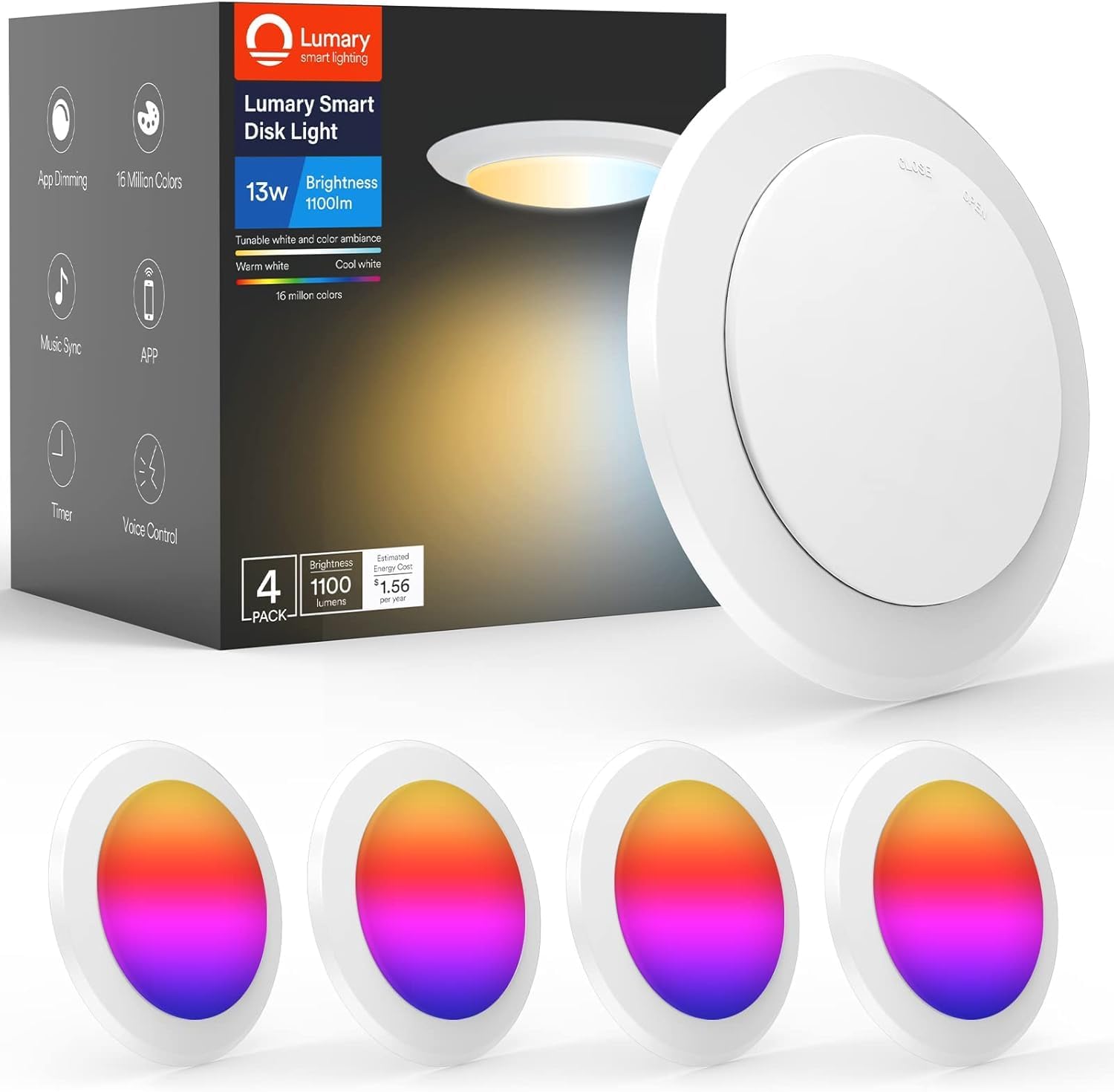
Image: Lumary Smart Disk Light product packaging and individual lights, illustrating the product and its components.
2. Informació de seguretat
- Seguretat elèctrica: Installation should be performed by a qualified electrician or a person with sufficient knowledge of electrical wiring. Always turn off power at the circuit breaker before installation or maintenance.
- Voltage: Assegureu-vos que la font d'alimentació voltage matches the light's requirements (120 Volts).
- Només per a ús interior: Aquest producte està dissenyat per a ús en interiors. No l'exposeu a la humitat ni a la intempèrie.
- Interruptors de regulació: This flush LED light is NOT compatible with traditional dimmer switches. Dimming is controlled via the Lumary APP or voice assistants.
- Calor: Do not cover the light fixture with insulating material that may prevent proper heat dissipation.
3. Contingut del paquet
Verifiqueu que tots els components siguin presents abans de començar la instal·lació:
- Lumary Smart RGBWW LED Disk Light(s) (Model US-DS6B-4)
- 2 Spring Connectors
- 2 cargols
- 3 femelles de filferro
- Tapa de cablejat
4. Especificacions
| Característica | Especificació |
|---|---|
| Nom del model | Flush Mount Surface LED Disk Lights |
| Número de model | US-DS6B-4 |
| Wattage | 13 watts |
| Brillantor | 1100 lúmens |
| Temperatura de color | 2700K (Blanc càlid) - 6500K (Blanc fred) |
| Opcions de color | 16 milions de colors RGB |
| Voltage | 120 Volts |
| Connectivitat | Wi-Fi de 2.4 GHz |
| Mètodes de control | Lumary APP, Amazon Alexa, Google Assistant, Siri |
| Tipus d'instal·lació | Flush Mount (3.5" or 4" J-Box) / Recessed Can (5" or 6" Can) |
| Dimensions | 6"L x 7"W x 8"H (Product); 1.29" Thickness (Model B) |
| Material | Metall |
| Eficiència | 85 lúmens per watt |
| CRI | Ra>90 |

Image: Diagram illustrating the dimensions (7.5" diameter, 1.29" thickness) and key specifications of the Lumary Smart Disk Light, including wattage, brightness, voltage, beam angle, Wi-Fi, and CRI.
5. Instal·lació
The Lumary Smart Disk Light offers two primary installation methods: Ceiling/Surface Mount for J-boxes and Recessed Can Installation. Always ensure power is OFF at the circuit breaker before proceeding.

Image: A diagram illustrating two installation methods: Ceiling/Surface Mount for 3.5" or 4" J-boxes and Recessed Can Installation for 5" or 6" housings, with wiring instructions.
Method 1: Ceiling/Surface Mount (3.5" or 4" J-Box)
- Apagueu l'alimentació: Ensure the power to the circuit is off at the breaker.
- Connecteu els cables: Connect the wires from the fixture to the J-Box wiring using the provided wire nuts. Match Line (black), Neutral (white), and Ground (green/bare copper) wires.
- Adjunta l'aparell: Attach the disk light to the J-Box using the provided screws.
Method 2: Recessed Can Installation (5" or 6" Housing)
- Apagueu l'alimentació: Ensure the power to the circuit is off at the breaker.
- Connecteu els cables: Connect the wires of the fixture to the provided TP24 connector.
- Llum segura: Fix the spring connectors in place and gently push the light into the recessed can until it is flush with the ceiling.
Nota: Model B disk lights are recommended if the J-box space is narrow due to their ultra-thin design (1.29" thickness).

Image: A diagram comparing the J-box fit for Model A and Model B Lumary smart disk lights, highlighting Model B's slimmer profile for narrow spaces.
6. Setup: Lumary App & Voice Control
To unlock the full smart features of your Lumary LED Disk Light, connect it to the Lumary APP and integrate with voice assistants.
6.1 Lumary APP Setup
- Descarregar l'aplicació: Download the 'Lumary' APP from your smartphone's app store (iOS or Android).
- Registra't/Iniciar sessió: Obre l'aplicació i registra un compte nou o inicia la sessió amb un d'existent.
- Afegeix un dispositiu: Ensure your phone's Wi-Fi is on and the light is powered on. In the Lumary APP, tap 'Add Device' or the '+' icon. The app will search for nearby devices.
- Connecta't a Wi-Fi: Select your 2.4 GHz Wi-Fi network and enter the password. (Note: Only 2.4 GHz Wi-Fi is supported).
- Mode de sincronització: If the light is not discovered, turn the power off-on-off-on again to put the light into pairing mode (it will breathe/blink).
- Gaudeix: Once connected, you can rename your light and begin controlling it via the app.

Image: A four-step visual guide demonstrating how to download the Lumary APP, add a device, connect to 2.4GHz Wi-Fi, and complete the setup process.
6.2 Voice Control Integration (Alexa, Google Assistant, Siri)
After connecting your lights to the Lumary APP, you can link them to your preferred voice assistant.
- Obriu l'aplicació Assistent de veu: Open the Amazon Alexa, Google Home, or Apple Home app on your smartphone.
- Enable Skill/Service: Cerca and enable the 'Lumary' skill or service.
- Enllaça el compte: Follow the on-screen instructions to link your Lumary account with your voice assistant account.
- Descobriu els dispositius: Once linked, ask your voice assistant to discover new devices (e.g., "Alexa, discover my devices").
- Control: You can now control your lights using voice commands (e.g., "Alexa, turn on the living room lights," "Hey Google, set kitchen lights to blue," "Hey Siri, dim the bedroom lights to 50%").

Image: An illustration demonstrating the Lumary Smart Disk Light's compatibility with voice control platforms like Alexa, Google Assistant, and Siri, showing a user interacting with a smart speaker.
7. Instruccions de funcionament
Utilize the Lumary APP or voice commands to control your smart disk lights.
7.1 Ajust de la brillantor i la temperatura del color
- Brillantor: Adjust the light intensity from 1% to 100% via the Lumary APP or voice commands.
- Temperatura de color: Change the white light from warm white (2700K) to cool white (6500K) to suit your preference or time of day.

Image: A visual representation of Lumary Smart Lights set to various color temperatures, from warm 2700K to cool 6500K, with a slider indicating adjustable brightness.
7.2 RGB Color Changing
- Access 16 million RGB colors through the Lumary APP to create custom ambiances for any occasion.
- Explore preset scene modes or create your own DIY scenes.

Image: A smartphone screen showing the Lumary app's color wheel interface, allowing users to select from a wide range of RGB colors for their smart lights.
7.3 Sincronització de música
- The Lumary APP allows your smart LED recessed lighting to synchronize with music beats, creating dynamic lighting effects.

Image: A father and daughter dancing in a living room, with colorful musical notes emanating from a smartphone, illustrating the music sync feature of Lumary Smart Lights.
7.4 Control de grup
- Create groups of Lumary LED lights within the APP for unified control across different rooms (e.g., porch, kitchen, living room, bedroom).

Image: A four-step visual guide demonstrating how to select a device, click the edit icon, choose 'Create Group', and select devices for group control within the Lumary app.
7.5 Automated Schedules & Memory Function
- Horaris: Set schedules for your smart lights to automatically turn on and off at specific times, simplifying daily routines.
- Funció de memòria: The disk light recalls your last settings (color, brightness) when powered off and on, ensuring your preferred lighting every time.

Image: A smartphone screen displaying the 'Biorhythm' feature in the Lumary app, which allows users to set automated lighting schedules that adjust color temperature (2700K-6500K) throughout the day, mimicking natural light cycles.
8. Remote Control (Sold Separately)
An optional Bluetooth (BT) remote control is available for convenient operation. This remote is sold separately.
8.1 Pairing the BT Remote
- Ensure the light is connected to the Lumary APP.
- Turn off the light using the wall switch, then turn it back on.
- Within a few seconds, press and hold the 'A', 'B', 'C', or 'D' button on the remote until the light flashes, indicating successful pairing.
8.2 Unpairing the BT Remote
- Press two keys on the remote simultaneously for 5 seconds.
- Re-pairing requires another reboot of the light using the wall switch.

Image: A visual guide demonstrating the steps to pair and unpair the Lumary Bluetooth remote control with the smart lights, including restarting lights via the wall switch and pressing specific remote buttons.
9. Manteniment
- Neteja: Ensure the power is off before cleaning. Use a soft, dry cloth to wipe the surface of the light. Do not use harsh chemicals or abrasive cleaners.
- Inspecció: Periodically check the wiring and connections for any signs of damage or loosening.
- Sense peces reparables per l'usuari: Els components LED estan integrats i no els pot substituir l'usuari. No intenteu desmuntar el dispositiu.
10. Solució De Problemes
Consulteu la taula següent per veure els problemes habituals i les seves solucions.
| Pregunta | Respon |
|---|---|
| Can't connect to the app? |
|
| Why is the light flickering? |
|
| Why did the remote controller fail to pair? |
|
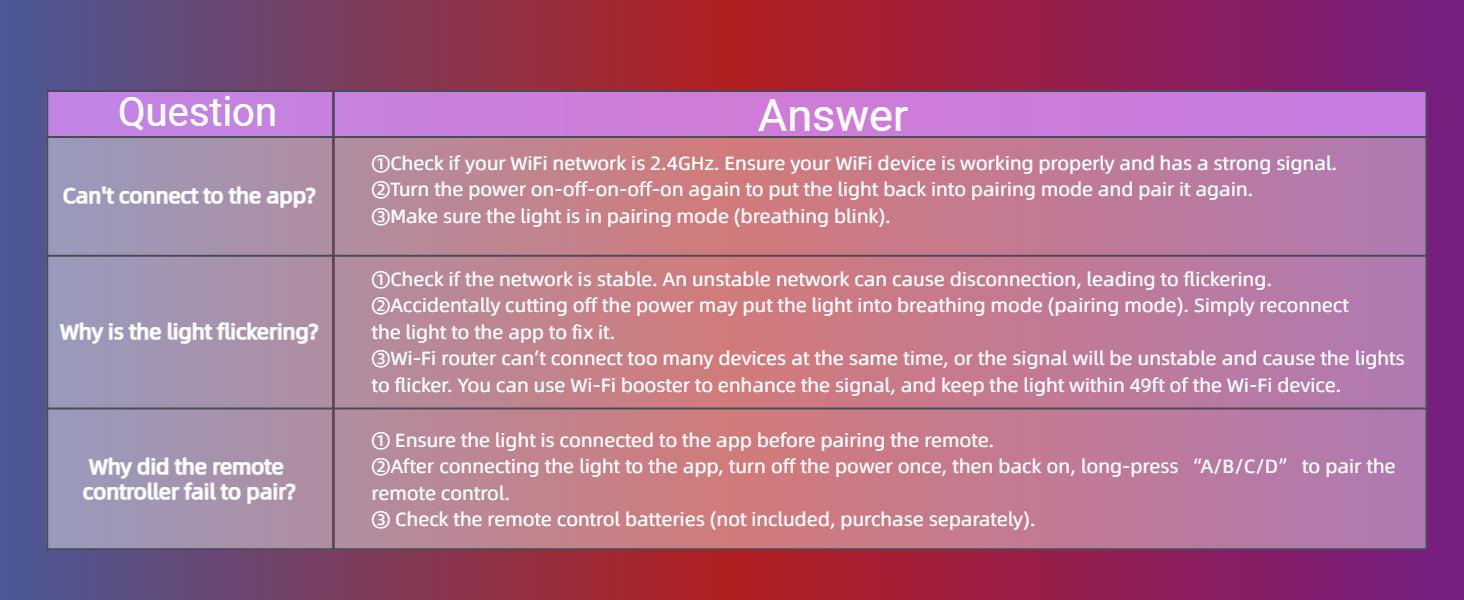
Image: A table summarizing common questions and answers regarding connectivity, flickering, and remote control pairing issues for Lumary Smart Lights.
11. Garantia i Suport
This Lumary product comes with a Garantia limitada. For specific warranty terms and conditions, please refer to the documentation included with your purchase or visit the official Lumary weblloc.
For technical support or further assistance, please contact Lumary customer service through the Lumary APP or their official website. Ensure you have your product model number (US-DS6B-4) and purchase information ready.


